
hamburger-menu icon
भाषा का चयन करें

VSA 131 Vehicle Plate Certification – Fillable PDF

  1. भाषा अंग्रेज़ी
  2. देश अमेरीका
  3. गतिविधि वाहन पंजीकरण
  4. विभाग Virginia Department of Motor Vehicles
फार्म को भरो
VSA 131 Vehicle Plate Certification – Fillable PDF

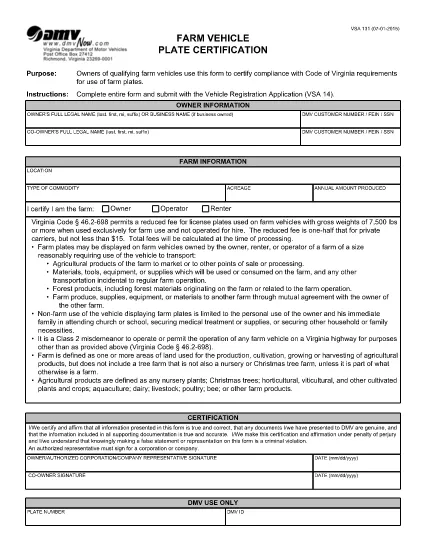
The VSA 131 Vehicle Plate Certification is the official form used by the Virginia Department of Motor Vehicles (Virginia DMV) to certify vehicle plates for a variety of registration purposes. This fillable PDF can be completed online, saved, and printed without the need for any additional software.

Our Formize PDF Filler loads the VSA 131 directly in your browser, letting you enter data, add signatures, and validate entries in real time. Once you’re finished, you can download the completed form, print it, or submit it electronically where accepted.

What Is the VSA 131 Form?

The VSA 131 is required when you need to certify a vehicle's license plate for:

  • New vehicle registrations
  • Plate transfers
  • Specialty or personalized plates
  • Vehicle title updates that affect plate information

How to Complete VSA 131 Online

Follow the simple steps below to fill out the form quickly and accurately using Formize:

  • Click the "Fill out this form" button on the page.
  • Wait for the Formize PDF Filler app to load (usually a few seconds).
  • Enter all required information exactly as it appears on your registration documents.
  • Use the built‑in signature field to sign electronically.
  • Review the completed form, then download, print, or submit as instructed.

Common Mistakes to Avoid

  • Leaving required fields blank: The DMV will reject the form if any mandatory field is empty.
  • Incorrect VIN or plate numbers: Double‑check the numbers against your vehicle title.
  • Using the wrong signature format: The Formize app provides a proper e‑signature field; do not paste scanned signatures.
  • Submitting an outdated version: Always use the latest VSA 131 PDF (link provided below).

Where to Submit the Completed Form

After you have saved the completed VSA 131, you can:

  • Mail it to your local Virginia DMV office.
  • Bring the printed copy to a DMV customer service center.
  • Upload it through the Virginia DMV’s online portal if you have an account.

Need more help? Visit the Virginia DMV website for detailed filing instructions and office locations.

सामान्य प्रश्न
  • What is the purpose of the VSA 131 form?

    The VSA 131 certifies a vehicle’s license plate for registration, transfer, or title updates with the Virginia DMV.

  • Can I fill out VSA 131 on a mobile device?

    Yes. The Formize PDF Filler works on smartphones and tablets as long as you have a modern browser.

  • Do I need to print the form after completing it online?

    The Virginia DMV typically requires a printed copy with a physical signature, so printing is recommended.

  • Is there a fee to use the Formize PDF Filler?

    No. Formize provides free access to fillable PDFs; any DMV filing fees are paid directly to the DMV.

  • What should I do if I make a mistake after submitting?

    Contact your local Virginia DMV office immediately. You may need to submit a corrected VSA 131 with a new signature.

  • How often is the VSA 131 form updated?

    The Virginia DMV updates its forms as needed. The link on this page always points to the latest version.

कैसे करें

VSA 131 को मुफ़्त में, ऑनलाइन 4 आसान स्टेप्स में कैसे भरें:

  1. 1
    Open the Fillable Form
    Click the "Fill out this form" button on the page. The Formize PDF Filler will open in a new tab.
  2. 2
    Load the Formize PDF Filler
    Wait a few seconds while the app loads the VSA 131 PDF. No download or installation is required.
  3. 3
    Enter Your Information
    Complete every required field, add your electronic signature, and double‑check all entries for accuracy.
  4. 4
    Save or Print
    When finished, click "Download" to save the completed PDF, or print directly from the browser to submit to the DMV.
पीडीएफ फिलर एप तैयार करें
के बारे में

वाहन पंजीकरण प्रपत्र

VSA 131 डीएमवी फॉर्मों में से एक है, जिसे मोटर वाहन विभाग फॉर्म के रूप में भी जाना जाता है, जो मोटर वाहनों से संबंधित विभिन्न लेनदेन और प्रक्रियाओं में उपयोग किए जाने वाले दस्तावेज हैं। DMV एक सरकारी एजेंसी है जो ड्राइवर लाइसेंसिंग, वाहन पंजीकरण और मोटर वाहन कानूनों को लागू करने के लिए जिम्मेदार है। उपलब्ध विशिष्ट DMV फॉर्म क्षेत्राधिकार के अनुसार भिन्न हो सकते हैं, लेकिन यहां कुछ सामान्य उदाहरण दिए गए हैं:

ड्राइवर लाइसेंस फॉर्म: इन फॉर्म का उपयोग ड्राइवर के लाइसेंस के लिए आवेदन करने या परिवर्तन या नवीनीकरण का अनुरोध करने के लिए किया जाता है। उन्हें आम तौर पर व्यक्तिगत जानकारी, पहचान के प्रमाण की आवश्यकता होती है, और इसमें चिकित्सा जानकारी या ड्राइविंग इतिहास के अनुभाग शामिल हो सकते हैं।

वाहन पंजीकरण फॉर्म: इन फॉर्मों का उपयोग डीएमवी के साथ मोटर वाहन को पंजीकृत करने के लिए किया जाता है। उन्हें वाहन की जानकारी, स्वामित्व विवरण और बीमा के प्रमाण की आवश्यकता होती है।

टाइटल ट्रांसफर फॉर्म: वाहन खरीदते या बेचते समय, इन फॉर्मों का उपयोग एक पक्ष से दूसरे पक्ष को स्वामित्व हस्तांतरित करने के लिए किया जाता है। उन्हें खरीदार, विक्रेता, वाहन विवरण के बारे में जानकारी की आवश्यकता होती है और इसमें बिक्री का बिल भी शामिल हो सकता है।

वाहन दायित्व प्रपत्र जारी करना: किसी वाहन के स्वामित्व को बेचते या स्थानांतरित करते समय, ये प्रपत्र डीएमवी को सूचित करते हैं कि विक्रेता अब वाहन के लिए जिम्मेदार नहीं है। यह विक्रेता को बिक्री के बाद वाहन से जुड़ी दुर्घटनाओं या घटनाओं के लिए दायित्व से बचाने में मदद करता है।

लाइसेंस प्लेट और पंजीकरण नवीनीकरण फॉर्म: इन फॉर्मों का उपयोग वाहन पंजीकरण को नवीनीकृत करने या नए लाइसेंस प्लेटों का अनुरोध करने के लिए किया जाता है। उन्हें आम तौर पर पंजीकृत मालिक, वर्तमान पंजीकरण विवरण और लागू शुल्क के भुगतान के बारे में जानकारी की आवश्यकता होती है।

ड्राइविंग रिकॉर्ड अनुरोध फॉर्म: ये फॉर्म व्यक्तियों को डीएमवी से अपने ड्राइविंग रिकॉर्ड का अनुरोध करने की अनुमति देते हैं, जो ड्राइविंग उल्लंघन, लाइसेंस स्थिति और अन्य प्रासंगिक विवरणों के बारे में जानकारी प्रदान करते हैं।

विशेषता या वैयक्तिकृत लाइसेंस प्लेट फॉर्म: इन फॉर्मों का उपयोग वैयक्तिकृत या विशिष्ट लाइसेंस प्लेटों के लिए आवेदन करने के लिए किया जाता है, जो व्यक्तियों को विशिष्ट पात्रों या डिज़ाइन के साथ अपनी लाइसेंस प्लेट को अनुकूलित करने की अनुमति देते हैं।

ये उन अनेक प्रपत्रों के कुछ उदाहरण हैं जो DMV के माध्यम से उपलब्ध हो सकते हैं। विशिष्ट फॉर्म और आवश्यकताएं क्षेत्राधिकार के अनुसार अलग-अलग हो सकती हैं, इसलिए अपनी विशेष जरूरतों के लिए सही फॉर्म प्राप्त करने के लिए स्थानीय डीएमवी वेबसाइट से परामर्श करना या डीएमवी कार्यालय में जाना महत्वपूर्ण है।

विशेषताएं

पीडीएफ भराव

पीडीएफ फॉर्म ऑनलाइन भरने का सबसे आसान तरीका

  • जल्दी से VSA 131 भरें
    VSA 131 को जल्दी से ऑनलाइन भरने का कोई तरीका खोज रहे हैं? हमारे ऑनलाइन नि:शुल्क पीडीएफ फॉर्म फिलर के साथ, आप एक मिनट से भी कम समय में इस पीडीएफ दस्तावेज़ को संपादित करने और भरने का तरीका जानेंगे।
  • ऑनलाइन पीडीएफ संपादक का उपयोग करना आसान है
    पीडीएफ फाइलों को प्रिंट करने से तंग आ गए हैं ताकि आप उन्हें फिर से स्कैन करने और उन्हें वापस भेजने से पहले संपादित कर सकें? PDF दस्तावेज़ों को निःशुल्क ऑनलाइन संपादित करें। समय और कागज बचाने के लिए हमारे ऑनलाइन पीडीएफ संपादक का प्रयोग करें।
  • महान उपकरण, सभी प्लेटफार्म
    आश्चर्य है कि मैक पर VSA 131 कैसे भरें, या शायद पीडीएफ फिलर का मुफ्त में उपयोग कैसे करें? हमारे ऑनलाइन पीडीएफ टूल सभी प्लेटफॉर्म पर काम करते हैं।
  • सुरक्षित फ़ाइल भंडारण
    पूर्ण की गई "VSA 131" फ़ाइलें Amazon क्लाउड होस्टिंग द्वारा प्रबंधित एक सुरक्षित डेटाबेस में संग्रहीत की जाती हैं। आप कभी भी अपनी फाइलों को हमारे सिस्टम से हटा सकते हैं। किसी भी स्थिति में, ये फ़ाइलें 24 घंटे के बाद स्वतः हटा दी जाती हैं।
  • {कीवर्ड} से चैट करें
    Chatize पर "VSA 131" के साथ चैट करें, जो एक निःशुल्क पीडीएफ रीडर सहायक है। प्रश्न पूछें और "VSA 131" से उत्तर प्राप्त करें। बस ऊपर दस्तावेज़ के साथ चैट करें बटन पर क्लिक करें।

फ़िलिंग सत्र मिटाएँ

चयनित फ़िलिंग सत्र को मिटाएँ? इस स्थिति में, फ़ॉर्म को पूरा करने में आपकी प्रगति खो जाएगी।

संपादन सत्र हटाएँ

चयनित संपादन सत्र हटाएँ? इस स्थिति में, फ़ॉर्म बनाने और संपादित करने में आपकी प्रगति नष्ट हो जाएगी।