
Izaberi jezik

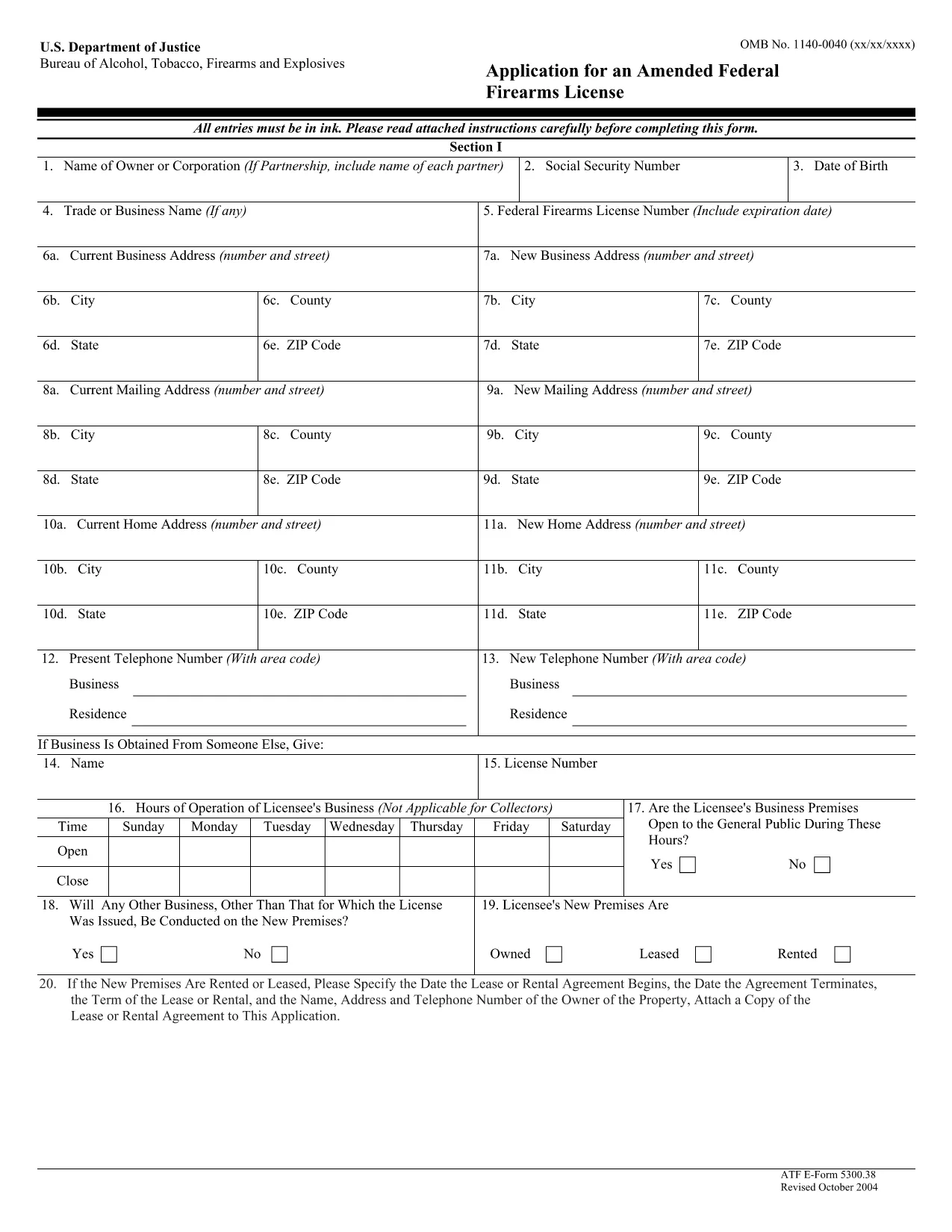
ATF Form 5300.38 – Amended Federal Firearms License Application

  1. Jezik Engleski
  2. Zemlja SAD
  3. Odjel Zaliha alkohola, duhana, vatrenog oružja i eksploziva
  4. Sektor Vatreno oružje
ATF Form 5300.38 – Amended Federal Firearms License Application

The ATF Form 5300.38 is the official application used to request an amendment to an existing Federal Firearms License (FFL). Whether you need to add a new class of firearms, change your business address, or update other license details, this form is required by the Bureau of Alcohol, Tobacco, Firearms and Explosives (ATF).

Formize.com offers a 100% fillable, searchable PDF version of the ATF Form 5300.38. You can either download the PDF to complete it offline or use our integrated online PDF filler to fill it out instantly in your browser—no extra software needed.

What is ATF Form 5300.38?

This form is titled “Application for an Amended Federal Firearms License” and is governed by 18 U.S.C. Chapter 44. It is used by existing FFL holders to request any change to their license that does not require a completely new application.

How to Fill Out the Form Online

Follow the simple steps below to complete the form securely with Formize’s PDF Filler:

  • Click the “Fill out this form” button on this page.
  • Wait a few seconds while the Formize PDF Filler loads the fillable ATF Form 5300.38.
  • Enter your information directly into each field. The filler validates dates, phone numbers, and required fields in real time.
  • Review the completed form, sign electronically if required, and click “Download” or “Print”.
  • Mail the signed form to the ATF Federal Firearms Licensing Center as instructed.

Common Mistakes to Avoid

Even a small error can delay processing. Keep these tips in mind:

  • Incorrect ATF Number: Double‑check your current FFL number.
  • Missing Signatures: All required signatures must be original or an accepted electronic signature.
  • Out‑of‑Date Addresses: Use the exact mailing address listed on your current license.
  • Incomplete Attachments: If you’re adding a new class, include the appropriate supplemental pages.

Where to Submit Your Application

After completing the form, mail it to:

Chief, Federal Firearms Licensing Center
2600 Century Parkway NE
Atlanta, GA 30345
United States

Use certified mail or a reputable courier to ensure delivery tracking.

Download the Official PDF

If you prefer to fill out the form offline, click the download button below to get the official ATF Form 5300.38 PDF directly from the government source.

Download ATF Form 5300.38 PDF

PITANJA
  • Is the ATF Form 5300.38 available as a fillable PDF?

    Yes. Formize provides a fully fillable PDF version that you can complete online or download for offline use.

  • Do I need a digital signature for this form?

    The ATF accepts electronic signatures for most sections, but the final signature line often requires a wet ink signature. Check the instructions on the form.

  • How long does it take for the ATF to process an amendment?

    Processing times vary, but most amended license requests are reviewed within 4‑6 weeks after receipt.

  • Can I submit the form electronically?

    The ATF still requires a hard‑copy submission by mail. You can, however, fill out the form electronically and print it for mailing.

  • What should I do if I make a mistake after printing?

    Cross out the error with a single line, initial the change, and complete the rest of the form. For major errors, it’s best to start a new copy.

  • Is there a fee for filing an amendment?

    Generally, there is no additional fee for amending an existing FFL unless the amendment adds a new class of firearms, which may incur a fee.

  • Where can I find the official ATF instructions for Form 5300.38?

    The official instruction sheet is included as the first page of the PDF linked above or can be accessed on the ATF website.

  • Do I need to attach any supporting documents?

    Depending on the amendment, you may need to attach a copy of your current license, a new business location map, or other relevant documentation.

KAKO DA

Kako ispuniti ATF Form 5300.38 besplatno, online u 5 jednostavnih koraka:

  1. 1
    Click the Fill‑out Button
    Press the “Fill out this form” button on this page to launch the Formize PDF Filler.
  2. 2
    Wait for the Filler to Load
    The fillable ATF Form 5300.38 will appear in your browser within a few seconds.
  3. 3
    Enter Your Information
    Complete each field. The tool validates entries and highlights required sections.
  4. 4
    Review and Sign
    Check the completed form for accuracy, add an electronic signature if allowed, and save.
  5. 5
    Download or Print
    Download the finished PDF or print it to mail to the ATF Federal Firearms Licensing Center.
Aplikacija Formize PDF Filler
OKO

Obrasci za opljačkanje alkohola, duhana, vatrenog oružja i eksploziva (ATF).

ATF Form 5300.38 jedan je od službenih obrazaca koje koristi ATF, savezna agencija za provođenje zakona unutar Ministarstva pravosuđa Sjedinjenih Država. ATF je odgovoran za provođenje federalnih zakona i propisa koji se odnose na alkohol, duhan, vatreno oružje i eksplozive. Ovi se obrasci koriste u razne svrhe, uključujući registraciju, licenciranje i regulaciju tvrtki i pojedinaca uključenih u ove djelatnosti. Evo nekoliko primjera ATF oblika:

ATF obrazac 4473: Ovaj se obrazac koristi za postupak provjere prošlosti kada osoba kupi vatreno oružje od trgovca vatrenim oružjem s federalnom dozvolom. Prikuplja podatke o kupčevom identitetu, pozadini i podobnosti za posjedovanje vatrenog oružja.

ATF obrazac 1: Ovaj se obrazac koristi za podnošenje zahtjeva za izradu i registraciju vatrenog oružja. Obično se koristi za pojedince koji žele proizvesti vatreno oružje za osobnu upotrebu ili pretvoriti postojeće vatreno oružje u drugu konfiguraciju.

ATF obrazac 4: Ovaj se obrazac koristi za prijenos i registraciju vatrenog oružja od jedne osobe ili subjekta do druge. Obično se koristi u procesu kupnje vatrenog oružja od privatne strane ili prijenosa vatrenog oružja zakladi ili korporaciji.

ATF obrazac 6: Ovaj se obrazac koristi za uvoz vatrenog oružja, streljiva i određenih drugih predmeta koje regulira ATF. Potreban je pojedincima ili tvrtkama koji žele uvesti takve artikle u Sjedinjene Države.

ATF obrazac 7: Ovaj se obrazac koristi za podnošenje zahtjeva i obnovu savezne dozvole za vatreno oružje (FFL). Potreban je za pojedince ili tvrtke koje se bave proizvodnjom, trgovinom ili uvozom vatrenog oružja.

ATF obrazac 5320.20: Ovaj se obrazac koristi za prijavu i odobrenje prijevoza vatrenog oružja ili razorne naprave preko državnih granica.

ATF obrazac 5400.13: Ovaj se obrazac koristi za registraciju i izvješćivanje eksplozivnih materijala i naprava.

Ovo je samo nekoliko primjera ATF obrazaca koji se koriste u razne svrhe povezane s regulacijom i provedbom saveznih zakona koji reguliraju alkohol, duhan, vatreno oružje i eksplozive. Specifični potrebni obrasci ovise o određenoj aktivnosti ili transakciji koja se provodi i propisima koji se primjenjuju. Važno je konzultirati službenu web stranicu Ureda za alkohol, duhan, vatreno oružje i eksplozive (www.atf.gov) ili potražiti stručne upute za točne i ažurne informacije u vezi s određenim ATF obrascima relevantnim za vašu situaciju.

ZNAČAJKE

PDF punilo

Najlakši način da ispunite ATF Form 5300.38 online

  • Brzo ispunite ATF Form 5300.38
    Tražite način da brzo ispunite ATF Form 5300.38 online? Uz naš online besplatni PDF obrazac za popunjavanje, znat ćete kako urediti i ispuniti ovaj pdf dokument za manje od minute.
  • Jednostavan za korištenje mrežni PDF uređivač
    Dosta vam je ispisivanja PDF datoteka kako biste ih mogli uređivati ​​prije ponovnog skeniranja i slanja natrag? Uređujte PDF dokumente besplatno na mreži. Upotrijebite naš online uređivač pdf-ova kako biste uštedjeli vrijeme i papir.
  • Sjajni alati, sve platforme
    Pitate se kako ispuniti ATF Form 5300.38 na Macu ili možda kako koristiti PDF filer besplatno? Naši online PDF alati rade na svim platformama.
  • Sigurno skladištenje datoteka
    Dovršene datoteke "ATF Form 5300.38" pohranjuju se u zaštićenu bazu podataka kojom upravlja Amazon Cloud hosting. Svoje datoteke možete izbrisati iz našeg sustava bilo kada. U svakom slučaju, te se datoteke automatski brišu nakon 24 sata.
  • Chat s ATF Form 5300.38
    Razgovarajte s "ATF Form 5300.38" na Chatize koji je besplatni pomoćnik za čitanje PDF-ova. Postavljajte pitanja i dobivajte odgovore od "ATF Form 5300.38". Samo kliknite gornji gumb Chat with Document.

Izbriši sesiju punjenja

Izbrisati odabranu sesiju punjenja? U tom će slučaju vaš napredak u ispunjavanju obrasca biti izgubljen.

Izbriši sesiju uređivanja

Izbrisati odabranu sesiju uređivanja? U tom će slučaju vaš napredak u stvaranju i uređivanju obrasca biti izgubljen.