
Izaberi jezik

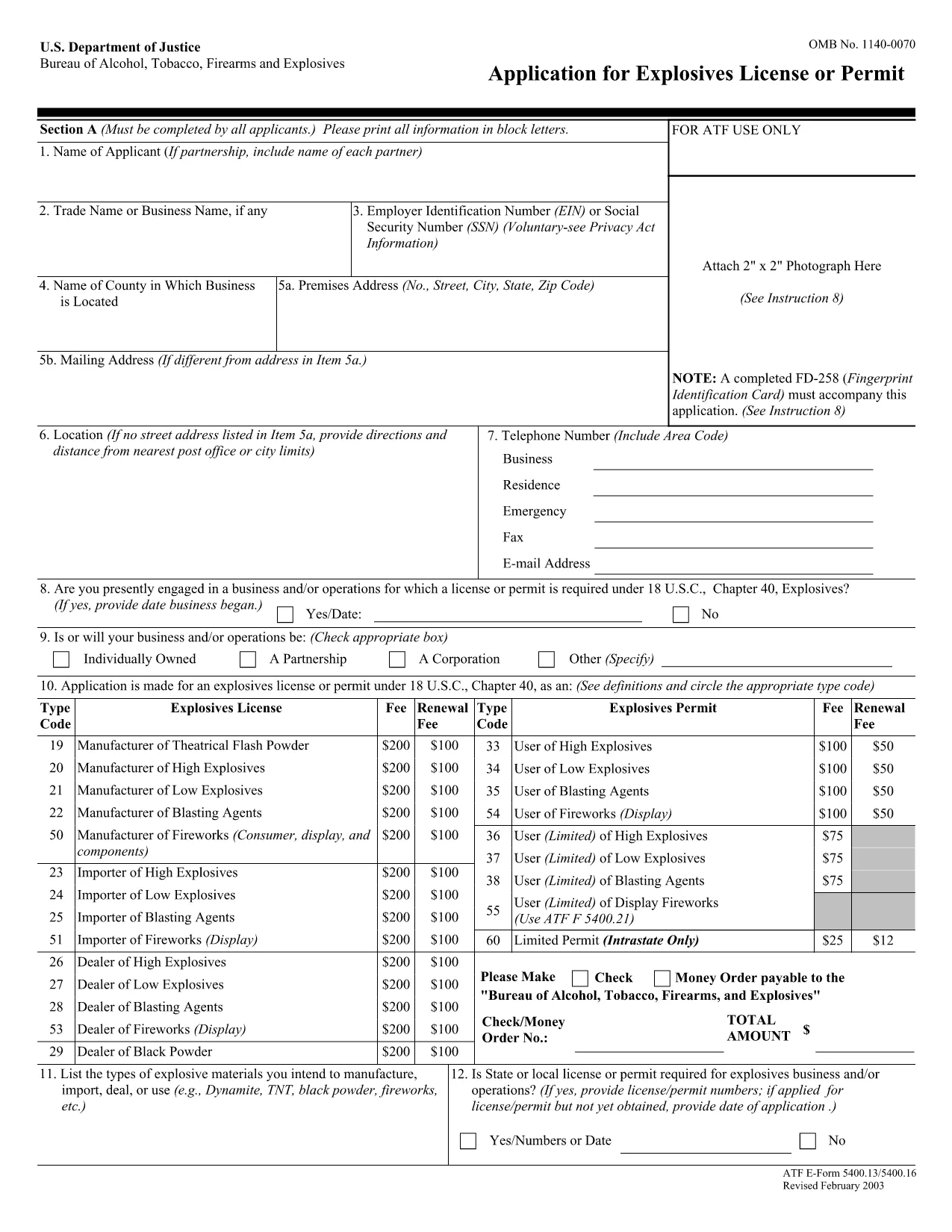
ATF Form 5400.13/5400.16 – Responsible Person Questionnaire

  1. Jezik Engleski
  2. Zemlja SAD
  3. Odjel Zaliha alkohola, duhana, vatrenog oružja i eksploziva
  4. Sektor Eksplozivi
ATF Form 5400.13/5400.16 – Responsible Person Questionnaire

The ATF Form 5400.13 (Responsible Person Questionnaire) and its companion Form 5400.16 are required for anyone applying for an explosives license or permit. These forms collect detailed information about each responsible person associated with the business, ensuring compliance with the Bureau of Alcohol, Tobacco, Firearms and Explosives (ATF) regulations.

What Is ATF Form 5400.13/5400.16?

Form 5400.13 gathers personal, business, and background data for each responsible person, while Form 5400.16 provides additional certification and signature fields. Together, they form the core of the ATF’s Responsible Person Questionnaire, a mandatory part of every explosives license or permit application.

How to Complete the Form Online with Formize

  • Step 1: Click the "Fill out this form" button on this page.
  • Step 2: Wait a few seconds while the Formize PDF Filler app loads the fillable PDF.
  • Step 3: Enter the requested information in each field. The interface saves your progress automatically.
  • Step 4: When all sections are complete, download the finished PDF or submit it directly to the ATF portal.

Common Mistakes & Tips for a Successful Submission

Don’t leave any required fields blank. The ATF will reject applications with missing data. Use the "Add another responsible person" button if you have more than one individual to report.

Use legal names only. Include maiden names, previous married names, and any aliases exactly as they appear on official documents.

Double‑check dates. Ensure birth dates, licensing dates, and expiration dates follow the MM/DD/YYYY format.

Where to Send the Completed Form

After you download the completed PDF, mail or fax it to the ATF National Services Center, Federal Explosives Licensing Center, P.O. Box 6200‑18, Portland, OR 97228‑6200. Refer to the ATF instructions for any additional submission requirements.

Need a printable version? Use the download link below to get the original PDF.

PITANJA
  • Who must complete ATF Form 5400.13/5400.16?

    Every individual who will act as a responsible person for an explosives business – owners, partners, officers, and key employees – must complete the questionnaire.

  • Can I submit a paper copy instead of the fillable PDF?

    Yes, a printed version is accepted, but using the fillable PDF reduces errors and speeds up processing.

  • What if I have more than three responsible persons?

    Use the "Add another responsible person" button in the online filler, or attach additional sheets if you print the form.

  • How long is the form valid after I submit it?

    The information is valid for the duration of the license or permit. Any changes (e.g., new responsible person) must be reported to the ATF promptly.

  • Do I need a digital signature?

    A typed name in the signature field is acceptable for the online version. For paper submissions, sign with a pen.

  • Is there a filing fee associated with this questionnaire?

    The questionnaire itself has no fee, but it is part of the overall explosives license application, which may have associated fees.

  • What should I do if I make a mistake after saving?

    Open the saved PDF in the Formize filler again, correct the error, and re‑download the updated file.

  • Where can I find the official ATF instructions?

    The ATF publishes detailed guidance on its website under the Explosives Licensing section; a link is included on the form’s cover page.

KAKO DA

Kako ispuniti ATF Form 5400.13 besplatno, online u 4 jednostavnih koraka:

  1. 1
    Click the Fill‑out Button
    Press the "Fill out this form" button on the page to launch the Formize PDF Filler.
  2. 2
    Wait for the Filler to Load
    A few seconds later the fillable PDF appears in the browser. No download or extra software is needed.
  3. 3
    Enter All Required Information
    Complete each field for every responsible person. The app auto‑saves as you type.
  4. 4
    Download or Submit
    When finished, click "Download PDF" to save a copy or follow ATF instructions to submit the form.
Aplikacija Formize PDF Filler
OKO

Obrasci za opljačkanje alkohola, duhana, vatrenog oružja i eksploziva (ATF).

ATF Form 5400.13 jedan je od službenih obrazaca koje koristi ATF, savezna agencija za provođenje zakona unutar Ministarstva pravosuđa Sjedinjenih Država. ATF je odgovoran za provođenje federalnih zakona i propisa koji se odnose na alkohol, duhan, vatreno oružje i eksplozive. Ovi se obrasci koriste u razne svrhe, uključujući registraciju, licenciranje i regulaciju tvrtki i pojedinaca uključenih u ove djelatnosti. Evo nekoliko primjera ATF oblika:

ATF obrazac 4473: Ovaj se obrazac koristi za postupak provjere prošlosti kada osoba kupi vatreno oružje od trgovca vatrenim oružjem s federalnom dozvolom. Prikuplja podatke o kupčevom identitetu, pozadini i podobnosti za posjedovanje vatrenog oružja.

ATF obrazac 1: Ovaj se obrazac koristi za podnošenje zahtjeva za izradu i registraciju vatrenog oružja. Obično se koristi za pojedince koji žele proizvesti vatreno oružje za osobnu upotrebu ili pretvoriti postojeće vatreno oružje u drugu konfiguraciju.

ATF obrazac 4: Ovaj se obrazac koristi za prijenos i registraciju vatrenog oružja od jedne osobe ili subjekta do druge. Obično se koristi u procesu kupnje vatrenog oružja od privatne strane ili prijenosa vatrenog oružja zakladi ili korporaciji.

ATF obrazac 6: Ovaj se obrazac koristi za uvoz vatrenog oružja, streljiva i određenih drugih predmeta koje regulira ATF. Potreban je pojedincima ili tvrtkama koji žele uvesti takve artikle u Sjedinjene Države.

ATF obrazac 7: Ovaj se obrazac koristi za podnošenje zahtjeva i obnovu savezne dozvole za vatreno oružje (FFL). Potreban je za pojedince ili tvrtke koje se bave proizvodnjom, trgovinom ili uvozom vatrenog oružja.

ATF obrazac 5320.20: Ovaj se obrazac koristi za prijavu i odobrenje prijevoza vatrenog oružja ili razorne naprave preko državnih granica.

ATF obrazac 5400.13: Ovaj se obrazac koristi za registraciju i izvješćivanje eksplozivnih materijala i naprava.

Ovo je samo nekoliko primjera ATF obrazaca koji se koriste u razne svrhe povezane s regulacijom i provedbom saveznih zakona koji reguliraju alkohol, duhan, vatreno oružje i eksplozive. Specifični potrebni obrasci ovise o određenoj aktivnosti ili transakciji koja se provodi i propisima koji se primjenjuju. Važno je konzultirati službenu web stranicu Ureda za alkohol, duhan, vatreno oružje i eksplozive (www.atf.gov) ili potražiti stručne upute za točne i ažurne informacije u vezi s određenim ATF obrascima relevantnim za vašu situaciju.

ZNAČAJKE

PDF punilo

Najlakši način da ispunite ATF Form 5400.13 online

  • Brzo ispunite ATF Form 5400.13
    Tražite način da brzo ispunite ATF Form 5400.13 online? Uz naš online besplatni PDF obrazac za popunjavanje, znat ćete kako urediti i ispuniti ovaj pdf dokument za manje od minute.
  • Jednostavan za korištenje mrežni PDF uređivač
    Dosta vam je ispisivanja PDF datoteka kako biste ih mogli uređivati ​​prije ponovnog skeniranja i slanja natrag? Uređujte PDF dokumente besplatno na mreži. Upotrijebite naš online uređivač pdf-ova kako biste uštedjeli vrijeme i papir.
  • Sjajni alati, sve platforme
    Pitate se kako ispuniti ATF Form 5400.13 na Macu ili možda kako koristiti PDF filer besplatno? Naši online PDF alati rade na svim platformama.
  • Sigurno skladištenje datoteka
    Dovršene datoteke "ATF Form 5400.13" pohranjuju se u zaštićenu bazu podataka kojom upravlja Amazon Cloud hosting. Svoje datoteke možete izbrisati iz našeg sustava bilo kada. U svakom slučaju, te se datoteke automatski brišu nakon 24 sata.
  • Chat s ATF Form 5400.13
    Razgovarajte s "ATF Form 5400.13" na Chatize koji je besplatni pomoćnik za čitanje PDF-ova. Postavljajte pitanja i dobivajte odgovore od "ATF Form 5400.13". Samo kliknite gornji gumb Chat with Document.

Izbriši sesiju punjenja

Izbrisati odabranu sesiju punjenja? U tom će slučaju vaš napredak u ispunjavanju obrasca biti izgubljen.

Izbriši sesiju uređivanja

Izbrisati odabranu sesiju uređivanja? U tom će slučaju vaš napredak u stvaranju i uređivanju obrasca biti izgubljen.