
Izaberi jezik

Australian Age Pension Application Form (Fillable PDF)

  1. Jezik Engleski
  2. Zemlja Australija
  3. Odjel Centrelink
  4. Aktivnost Retirement Benefits
Australian Age Pension Application Form (Fillable PDF)

Applying for the Centrelink Age Pension can feel overwhelming, but with the right form and clear instructions you can submit your claim confidently. This page gives you a direct link to the fillable PDF, a quick walkthrough of each section, and answers to the most common questions.

Why You Need the Age Pension Application Form

The Age Pension is a government‑provided income support for Australians aged 67 or older who meet residency and means‑test requirements. To start receiving payments you must complete the official application form, attach supporting documents, and submit it through myGov or a Centrelink service centre.

How to Fill Out the Form with Formize PDF Filler

Instead of downloading the PDF and editing it in a separate program, simply click the “Fill out this form” button on this page. The Formize PDF Filler app will load in your browser, letting you type, select dates, and add checkmarks directly on the form. When you’re done, you can save a copy and submit it online.

Key Documents & Information Required

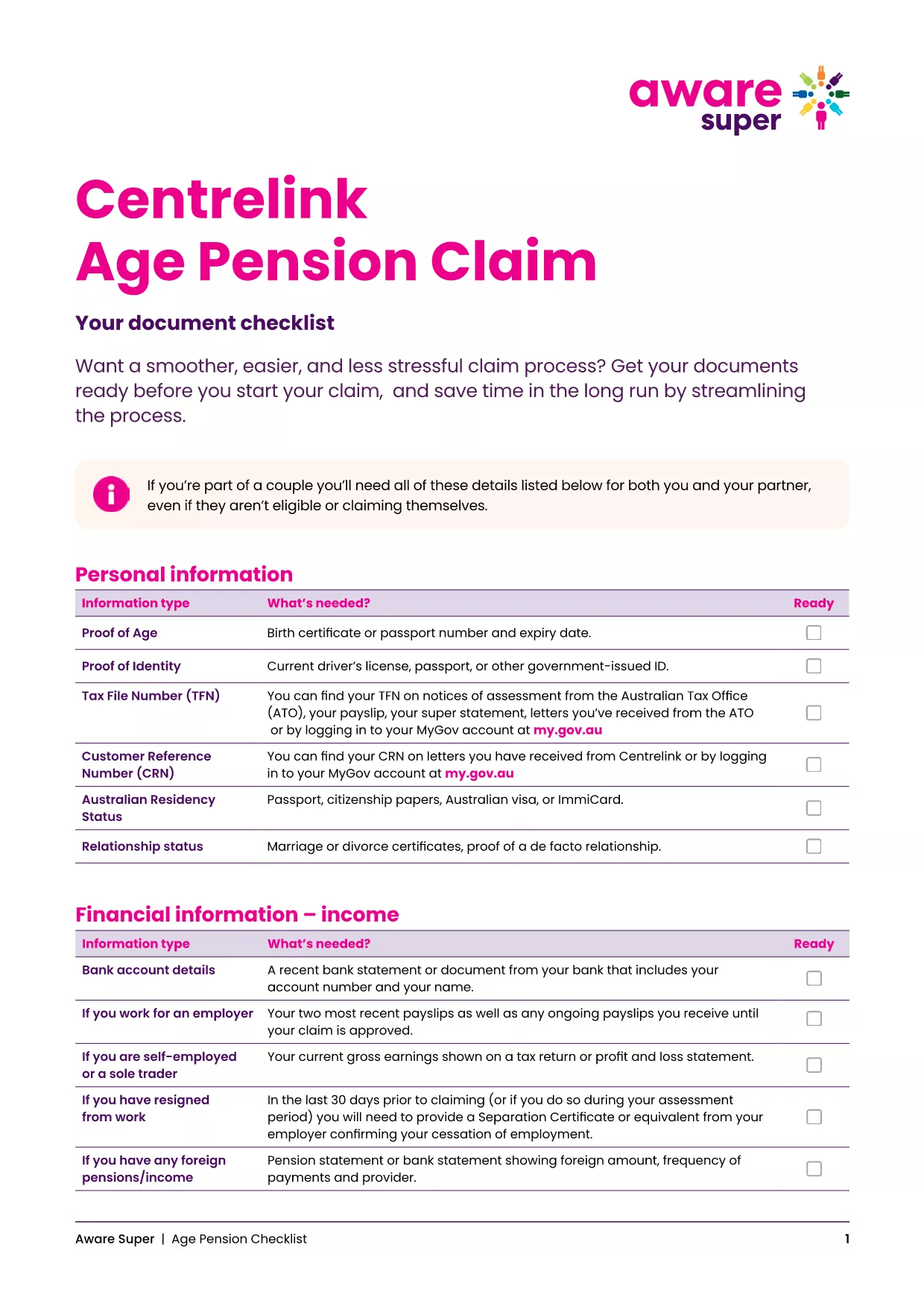
  • Proof of identity (passport, driver’s licence, or birth certificate)
  • Centrelink Reference Number (CRN)
  • Bank account details for pension payments
  • Details of assets, superannuation, and income
  • Proof of Australian residency (e.g., rental agreement or utility bill)

Common Mistakes to Avoid

  • Leaving fields blank: Even if a question does not apply, enter “N/A”.
  • Mismatched personal details: Ensure the name, date of birth and address match your Centrelink records.
  • Incorrect bank account: Payments are only made to accounts in the applicant’s name.
  • Out‑of‑date asset values: Use current market values for property, vehicles and investments.

Download & Print the Checklist PDF

For a printable, step‑by‑step checklist that helps you gather all required paperwork before you start the online claim, download the Age Pension Checklist PDF. Use it alongside the fillable application to keep everything organised.

PITANJA
  • When can I start my Age Pension application?

    You can lodge an application up to 13 weeks before you turn 67. It’s best to gather all documents early to avoid delays.

  • Do I need to fill out a separate form for my partner?

    Yes. Even if your partner is not claiming the pension, you must provide their details and any assets they own.

  • Can I edit the PDF after I’ve saved it?

    Absolutely. The Formize PDF Filler lets you reopen the saved file, make changes, and re‑save before submitting.

  • What if I don’t have a myGov account?

    Create a myGov account at my.gov.au, then link it to your Centrelink profile using your CRN.

  • How long does the Age Pension claim take to process?

    Typical processing time is 2‑4 weeks after all required documents are received. You’ll be notified via email or SMS.

  • Is the PDF form truly fillable on mobile devices?

    Yes. Formize PDF Filler works on all modern browsers, including mobile Safari and Chrome.

  • What happens if I make a mistake on the form?

    Centrelink may contact you for clarification, which can delay payment. Double‑check each section before submitting.

  • Do I need to provide proof of home ownership?

    You must disclose any property you own, even if it’s rented out, and provide a recent valuation or mortgage statement.

  • Can I claim the Age Pension if I have superannuation?

    Yes, but your superannuation balances are counted towards the assets test. Include the current balance in the form.

  • Where can I get help if I’m stuck?

    Visit your nearest Centrelink service centre or call the Seniors Helpline on 132 300.

KAKO DA

Kako ispuniti age pension application australia besplatno, online u 5 jednostavnih koraka:

  1. 1
    Open the Fillable Form
    Click the “Fill out this form” button on this page. The Formize PDF Filler will open in a new tab.
  2. 2
    Enter Your Personal Details
    Type your name, date of birth, CRN and contact information into the highlighted fields.
  3. 3
    Add Supporting Information
    Upload or type details about your assets, income, and residency status as prompted.
  4. 4
    Review and Save
    Use the “Review” button to check for empty fields, then click “Save” to download a copy for your records.
  5. 5
    Submit Your Claim
    Log into myGov, link your Centrelink account, and upload the completed PDF. Submit and wait for confirmation.
Aplikacija Formize PDF Filler
OKO

age pension application australia predložak

S tradicionalnim skupom značajki za pregled i ispunjavanje PDF dokumenta, u kombinaciji s prednostima web aplikacije i responzivnog izgleda, možete ispuniti age pension application australia u nekoliko minuta.

ZNAČAJKE

PDF punilo

Najlakši način da ispunite age pension application australia online

  • Brzo ispunite age pension application australia
    Tražite način da brzo ispunite age pension application australia online? Uz naš online besplatni PDF obrazac za popunjavanje, znat ćete kako urediti i ispuniti ovaj pdf dokument za manje od minute.
  • Jednostavan za korištenje mrežni PDF uređivač
    Dosta vam je ispisivanja PDF datoteka kako biste ih mogli uređivati ​​prije ponovnog skeniranja i slanja natrag? Uređujte PDF dokumente besplatno na mreži. Upotrijebite naš online uređivač pdf-ova kako biste uštedjeli vrijeme i papir.
  • Sjajni alati, sve platforme
    Pitate se kako ispuniti age pension application australia na Macu ili možda kako koristiti PDF filer besplatno? Naši online PDF alati rade na svim platformama.
  • Sigurno skladištenje datoteka
    Dovršene datoteke "age pension application australia" pohranjuju se u zaštićenu bazu podataka kojom upravlja Amazon Cloud hosting. Svoje datoteke možete izbrisati iz našeg sustava bilo kada. U svakom slučaju, te se datoteke automatski brišu nakon 24 sata.
  • Chat s age pension application australia
    Razgovarajte s "age pension application australia" na Chatize koji je besplatni pomoćnik za čitanje PDF-ova. Postavljajte pitanja i dobivajte odgovore od "age pension application australia". Samo kliknite gornji gumb Chat with Document.

Izbriši sesiju punjenja

Izbrisati odabranu sesiju punjenja? U tom će slučaju vaš napredak u ispunjavanju obrasca biti izgubljen.

Izbriši sesiju uređivanja

Izbrisati odabranu sesiju uređivanja? U tom će slučaju vaš napredak u stvaranju i uređivanju obrasca biti izgubljen.