
Izaberi jezik

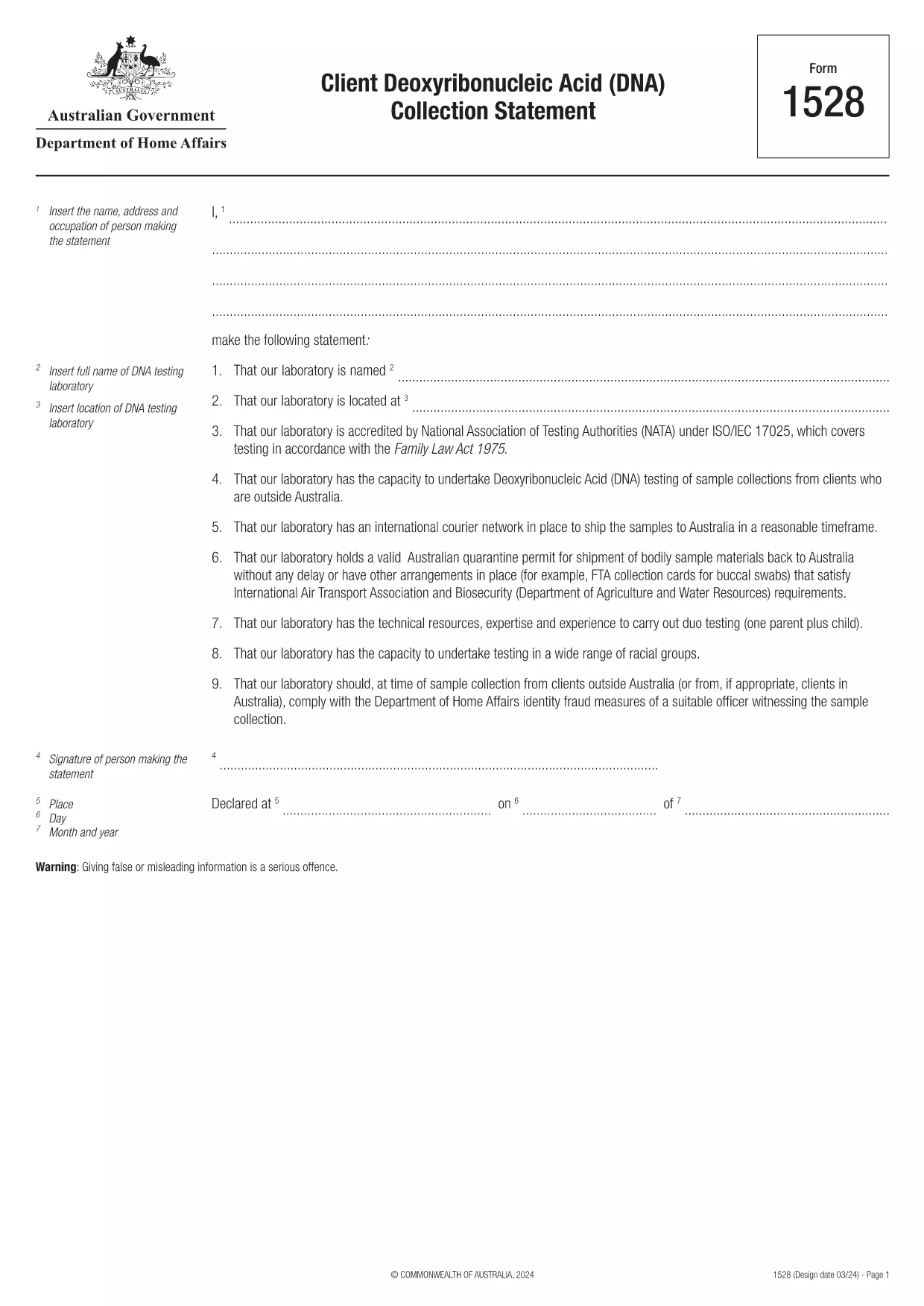
Form 1528 – Client DNA Collection Statement (Fillable PDF)

  1. Zemlja Australija
  2. Jezik Engleski
  3. Aktivnost Karakter ili identitet
Form 1528 – Client DNA Collection Statement (Fillable PDF)

Form 1528 is the official Client Deoxyribonucleic Acid (DNA) Collection Statement required by the Australian Department of Home Affairs. The form captures the name, address and occupation of the person making the statement, as well as details of the DNA testing laboratory.

What Is Form 1528?

This form is used when an individual must provide a DNA sample for immigration, visa, or forensic purposes. It must be completed by the person providing the sample and signed by an authorised DNA testing laboratory.

How to Fill Out Form 1528 with Formize

Instead of printing, scanning, or editing the PDF manually, simply click the “Fill out this form” button on this page. The Formize PDF Filler app will load the fillable version, letting you enter data, add signatures, and save the completed document in seconds.

Common Mistakes & Tips

  • Leave no blank fields – the Department rejects forms with empty required sections.
  • Use the exact laboratory name and address as it appears on the lab’s official letterhead.
  • Check date formats – use DD/MM/YYYY throughout.
  • Sign electronically only after all information is verified; a digital signature is accepted.

Where to Submit the Completed Form

After you download the completed PDF, you can upload it through your online visa portal, email it to the requesting officer, or deliver a printed copy to the nearest Australian Visa Application Centre.

Need More Help?

For detailed guidance, review the instructions on the Department of Home Affairs website or contact your DNA testing laboratory for clarification on laboratory‑specific fields.

PITANJA
  • Is an electronic signature accepted on Form 1528?

    Yes. The Department of Home Affairs accepts a clear electronic signature created with the Formize PDF Filler.

  • Can I print the form after filling it online?

    Absolutely. After completing the form, you can download the PDF and print a hard copy if you prefer a physical submission.

  • What if I make a mistake after saving the form?

    Open the saved PDF again in Formize, edit the incorrect fields, and re‑save. The fillable PDF allows unlimited edits before final submission.

  • Do I need to attach any supporting documents?

    Typically, the DNA laboratory will provide a separate certification letter. Attach that letter alongside the completed Form 1528 when you submit your application.

  • How long does it take to process Form 1528?

    Processing time varies by case, but the Department generally reviews the statement within 5‑10 business days after receipt.

  • Is there a fee for using Formize’s PDF filler?

    Formize offers a free basic fillable version for Form 1528. Advanced features such as bulk signing require a paid plan, but are not needed for a single submission.

  • Can I fill out Form 1528 on a mobile device?

    Yes. The Formize PDF Filler works on smartphones and tablets, allowing you to complete the form anywhere.

  • What format should I use when uploading the completed form?

    Upload the final document as a PDF file. Ensure the file size does not exceed the portal’s limit (usually 5 MB).

KAKO DA

Kako ispuniti Form 1528 besplatno, online u 5 jednostavnih koraka:

  1. 1
    Open the Fillable Form
    Click the “Fill out this form” button on the page. The Formize PDF Filler app will launch in a new tab with the fillable version of Form 1528.
  2. 2
    Enter Your Information
    Type the required details – personal data, laboratory name, and address – directly into the highlighted fields.
  3. 3
    Add Electronic Signatures
    Use the signature tool to sign the statement and, if required, the laboratory representative’s signature.
  4. 4
    Review & Validate
    Double‑check every field for accuracy, especially dates and laboratory information.
  5. 5
    Download or Submit
    When you’re satisfied, click “Save & Download” to get the completed PDF, or use the built‑in “Submit” button to send it directly to the Home Affairs portal.
Aplikacija Formize PDF Filler
OKO

Obrasci karaktera ili identiteta

Form 1528 je jedan od dokumenata ili obrazaca koji se odnose na utvrđivanje ili provjeru identiteta pojedinca. Ovi obrasci obično zahtijevaju osobne podatke i dokumentaciju za potvrdu identiteta osobe. Evo nekoliko primjera obrazaca koji se obično povezuju s provjerom identiteta:

Obrasci za potvrdu identiteta: Ove obrasce koriste organizacije, kao što su poslodavci, vladine agencije ili financijske institucije, za provjeru identiteta pojedinaca. Obično traže osobne podatke, kao što su ime, adresa, datum rođenja i broj socijalnog osiguranja, a mogu zahtijevati i prateću dokumentaciju poput službene osobne iskaznice, putovnice ili rodnog lista.

Obrasci za dokaz adrese: Ovi se obrasci koriste za provjeru adrese stanovanja pojedinca. Od osobe mogu zahtijevati da dostavi račun za režije, bankovni izvod, ugovor o najmu ili druge dokumente koji dokazuju njihovu trenutnu adresu.

Obrasci za autorizaciju provjere pozadine: Kada organizacija provodi provjeru pozadine pojedinca, često od osobe zahtijeva da ispuni obrazac kojim odobrava provjeru. Ovi obrasci mogu tražiti osobne podatke, uključujući ime, datum rođenja i broj socijalnog osiguranja, koji pomažu u utvrđivanju identiteta osobe.

Obrasci izjave pod prisegom o krađi identiteta: U slučajevima krađe identiteta, žrtve će možda trebati ispuniti obrazac izjave pod prisegom o krađi identiteta. Ovaj obrazac pomaže pojedincima prijaviti lažnu upotrebu njihovog identiteta i pruža pravnu evidenciju incidenta.

Važno je napomenuti da se specifični oblici i zahtjevi za utvrđivanje ili provjeru identiteta mogu razlikovati ovisno o kontekstu, kao što je svrha, nadležnost ili uključena organizacija. Za najtočnije i najsvježije informacije uvijek pogledajte posebne obrasce koje nudi organizacija ili institucija koja zahtijeva potvrdu identiteta.

ZNAČAJKE

PDF punilo

Najlakši način da ispunite Form 1528 online

  • Brzo ispunite Form 1528
    Tražite način da brzo ispunite Form 1528 online? Uz naš online besplatni PDF obrazac za popunjavanje, znat ćete kako urediti i ispuniti ovaj pdf dokument za manje od minute.
  • Jednostavan za korištenje mrežni PDF uređivač
    Dosta vam je ispisivanja PDF datoteka kako biste ih mogli uređivati ​​prije ponovnog skeniranja i slanja natrag? Uređujte PDF dokumente besplatno na mreži. Upotrijebite naš online uređivač pdf-ova kako biste uštedjeli vrijeme i papir.
  • Sjajni alati, sve platforme
    Pitate se kako ispuniti Form 1528 na Macu ili možda kako koristiti PDF filer besplatno? Naši online PDF alati rade na svim platformama.
  • Sigurno skladištenje datoteka
    Dovršene datoteke "Form 1528" pohranjuju se u zaštićenu bazu podataka kojom upravlja Amazon Cloud hosting. Svoje datoteke možete izbrisati iz našeg sustava bilo kada. U svakom slučaju, te se datoteke automatski brišu nakon 24 sata.
  • Chat s Form 1528
    Razgovarajte s "Form 1528" na Chatize koji je besplatni pomoćnik za čitanje PDF-ova. Postavljajte pitanja i dobivajte odgovore od "Form 1528". Samo kliknite gornji gumb Chat with Document.

Izbriši sesiju punjenja

Izbrisati odabranu sesiju punjenja? U tom će slučaju vaš napredak u ispunjavanju obrasca biti izgubljen.

Izbriši sesiju uređivanja

Izbrisati odabranu sesiju uređivanja? U tom će slučaju vaš napredak u stvaranju i uređivanju obrasca biti izgubljen.