Izaberi jezik

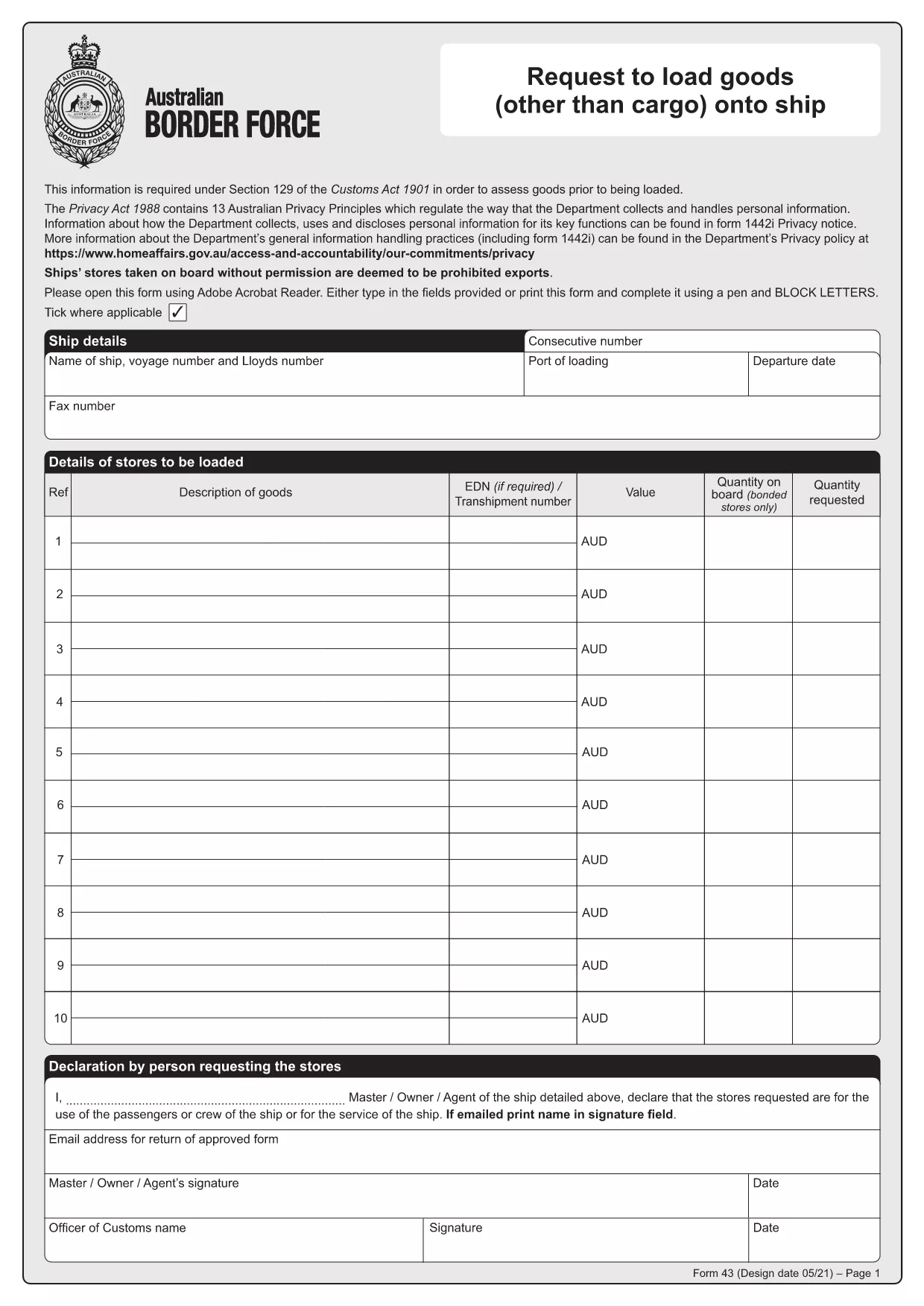
Form 43 – Request to Load Goods onto Ship (Fillable PDF)

  1. Zemlja Australija
  2. Jezik Engleski
  3. Aktivnost Import/Export
  4. Odjel Customs
Form 43 – Request to Load Goods onto Ship (Fillable PDF)

Form 43 is the Australian Border Force (ABF) customs form used when ship stores or other goods are taken on board a vessel without prior permission. It records essential details about the ship, the supplier, the goods, and the customs officer’s approval.

Whether you are a ship captain, a logistics officer, or a supplier, having a quick, fillable version of Form 43 saves time and reduces errors. With Formize’s online PDF filler, you can complete the form directly in your browser – no extra software required.

  • Instant download: Get the official PDF in seconds.
  • Online filling: Click “Fill out this form” and the Formize PDF Filler loads automatically.
  • Secure storage: Save a copy to your device or cloud storage after you submit.

Below you’ll find step‑by‑step instructions, common pitfalls, and answers to the most frequently asked questions about Form 43.

PITANJA
  • What is the purpose of Form 43?

    Form 43 records the request to load ship stores or other goods onto a vessel without prior customs permission, ensuring the goods are documented and approved.

  • Can I edit the PDF on my phone?

    Yes. The Formize PDF Filler works on all modern browsers, including mobile Safari and Chrome, so you can complete the form on a smartphone or tablet.

  • Do I need a PDF editor to fill Form 43?

    No. The online filler lets you fill, sign, and save the form without installing any PDF editor.

  • Is the downloaded PDF an official version?

    Absolutely. The file is the official Form 43 PDF provided by the Australian Border Force, unchanged and ready for submission.

  • What common mistakes should I avoid?

    Make sure all dates are in DD/MM/YYYY format, double‑check the ship’s registration number, and ensure the customs officer’s signature field is left blank for them to sign later.

  • How long is Form 43 valid after submission?

    The form remains valid for the duration of the voyage it covers. Keep a saved copy for your records in case customs request it later.

  • Can I submit Form 43 electronically to customs?

    Customs usually requires a printed copy with the officer’s signature, but you can email a PDF copy for preliminary review if your port authority allows it.

KAKO DA

Kako ispuniti Form 43 PDF besplatno, online u 4 jednostavnih koraka:

  1. 1
    Step 1 – Click the Fill Button
    On this page, click the bright “Fill out this form” button. The Formize PDF Filler app will open in a new tab.
  2. 2
    Step 2 – Wait for the Filler to Load
    The online filler loads the official Form 43 PDF automatically. This usually takes only a few seconds.
  3. 3
    Step 3 – Enter the Required Information
    Type directly into each field: ship details, supplier name, description of goods, dates, and customs officer approval. All fields are searchable and auto‑save.
  4. 4
    Step 4 – Save or Print Your Completed Form
    When you finish, click “Save” to download a filled PDF to your device, or click “Print” to produce a hard copy for submission to customs.
Aplikacija Formize PDF Filler
OKO

Form 43 PDF predložak

S tradicionalnim skupom značajki za pregled i ispunjavanje PDF dokumenta, u kombinaciji s prednostima web aplikacije i responzivnog izgleda, možete ispuniti Form 43 PDF u nekoliko minuta.

ZNAČAJKE

PDF punilo

Najlakši način da ispunite Form 43 PDF online

  • Brzo ispunite Form 43 PDF
    Tražite način da brzo ispunite Form 43 PDF online? Uz naš online besplatni PDF obrazac za popunjavanje, znat ćete kako urediti i ispuniti ovaj pdf dokument za manje od minute.
  • Jednostavan za korištenje mrežni PDF uređivač
    Dosta vam je ispisivanja PDF datoteka kako biste ih mogli uređivati ​​prije ponovnog skeniranja i slanja natrag? Uređujte PDF dokumente besplatno na mreži. Upotrijebite naš online uređivač pdf-ova kako biste uštedjeli vrijeme i papir.
  • Sjajni alati, sve platforme
    Pitate se kako ispuniti Form 43 PDF na Macu ili možda kako koristiti PDF filer besplatno? Naši online PDF alati rade na svim platformama.
  • Sigurno skladištenje datoteka
    Dovršene datoteke "Form 43 PDF" pohranjuju se u zaštićenu bazu podataka kojom upravlja Amazon Cloud hosting. Svoje datoteke možete izbrisati iz našeg sustava bilo kada. U svakom slučaju, te se datoteke automatski brišu nakon 24 sata.
  • Chat s Form 43 PDF
    Razgovarajte s "Form 43 PDF" na Chatize koji je besplatni pomoćnik za čitanje PDF-ova. Postavljajte pitanja i dobivajte odgovore od "Form 43 PDF". Samo kliknite gornji gumb Chat with Document.

Izbriši sesiju punjenja

Izbrisati odabranu sesiju punjenja? U tom će slučaju vaš napredak u ispunjavanju obrasca biti izgubljen.

Izbriši sesiju uređivanja

Izbrisati odabranu sesiju uređivanja? U tom će slučaju vaš napredak u stvaranju i uređivanju obrasca biti izgubljen.