
Izaberi jezik

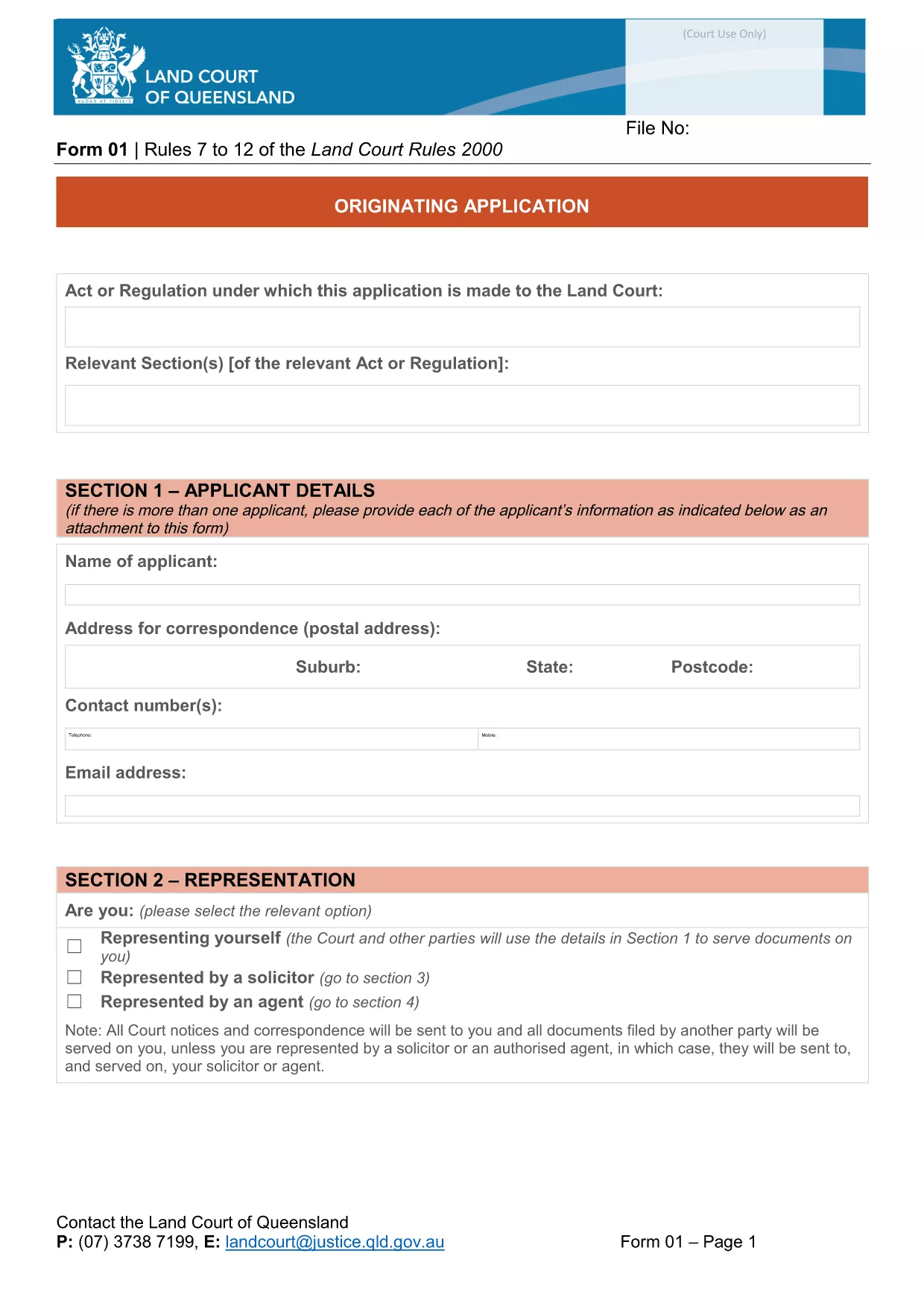
Originating Application Form Part 1 (Fillable PDF)

  1. Jezik Engleski
  2. Zemlja Australija
  3. Aktivnost Legal Forms
  4. Odjel Ministarstvo pravosuđa
Originating Application Form Part 1 (Fillable PDF)

The Originating Application Form Part 1 is the first step in initiating a matter before the Queensland Land Court. Traditionally this PDF had to be printed, filled by hand, and scanned back in – a time‑consuming process that often led to errors.

With Formize’s free Fillable PDF feature, the same form is now completely editable online. The document is not locked, meaning you can type directly into every field, add dates, and even attach supporting files without ever opening a separate PDF editor.

Why Choose a Fillable PDF?

  • Instant validation – required fields are highlighted.
  • Save time – no printing, scanning, or faxing.
  • Reduce mistakes – auto‑formatting for dates, numbers, and checkboxes.
  • Secure storage – your completed form is saved in the cloud until you download it.

How to Complete the Form Online

Simply click the "Fill out this form" button on this page. The Formize PDF Filler app will load in seconds, presenting the exact layout of the official Queensland Courts form.

Enter your details, attach any required documents, and use the navigation tabs to move between sections. When you’re finished, click Save & Download to get a completed PDF ready for submission.

Common Mistakes & Tips

  • Leaving required fields blank: The filler highlights missing information in red.
  • Incorrect date format: Use the calendar picker to avoid format errors.
  • Uploading oversized files: Keep attachments under 5 MB for faster upload.
  • Not saving frequently: The app auto‑saves every 30 seconds, but a manual save gives peace of mind.

Download vs. Online Fill – What’s Best?

If you prefer to keep a local copy, you can still download the original PDF from the link below and fill it with any PDF editor. However, the online filler guarantees that the form stays unlocked and fully editable, which many other PDF viewers lock after the first edit.

Legal Use & Submission Guidelines

Once completed, the form must be signed (electronic signatures are accepted by the Queensland Land Court) and lodged according to the court’s filing instructions. Keep a copy for your records and submit the original as directed.

Ready to start? Click the button below and let Formize handle the rest.

PITANJA
  • Do I need to download the PDF before I can fill it?

    No. Click the "Fill out this form" button and the Formize online filler will let you edit the document directly in your browser.

  • Is the form compatible with Adobe Acrobat?

    Yes. After you finish online, you can download the PDF and open it in Adobe Acrobat or any other PDF viewer.

  • Can I save my progress and return later?

    The Formize filler auto‑saves every 30 seconds. You can also manually click "Save" to download a draft and continue later.

  • Are electronic signatures accepted?

    The Queensland Land Court accepts electronic signatures on this form. Use the built‑in signature field in the filler or attach a scanned signature image.

  • What if I upload the wrong document?

    Simply delete the attachment in the filler and re‑upload the correct file. The app supports most common formats (PDF, JPG, PNG).

  • Is there a size limit for attachments?

    Each attachment must be under 5 MB to ensure quick upload and processing.

  • Do I need an account to use Formize?

    No account is required for this form. The filler works anonymously and does not store any personal data after you download the completed PDF.

  • Can I print the form after filling it online?

    Absolutely. Once you download the completed PDF, you can print it on any standard printer.

KAKO DA

Kako ispuniti fillable PDF besplatno, online u 4 jednostavnih koraka:

  1. 1
    Open the Fillable Form
    Click the "Fill out this form" button on the page. The Formize PDF Filler loads instantly in your browser.
  2. 2
    Enter Your Information
    Type directly into each field, use the date picker for dates, and attach supporting documents where required.
  3. 3
    Validate & Save
    The filler highlights any missing required fields. Click "Save & Download" when all sections are complete.
  4. 4
    Download the Completed PDF
    A fully completed, unlocked PDF will be saved to your device. You can now print, sign electronically, or lodge it with the court.
Aplikacija Formize PDF Filler
OKO

Obrasci Ministarstva pravosuđa (DOJ).

fillable PDF jedan je od službenih obrazaca koje koristi Ministarstvo pravosuđa Sjedinjenih Država i njegovi različiti odjeli, agencije i komponente. DOJ je federalni izvršni odjel odgovoran za provođenje saveznih zakona, obranu interesa Sjedinjenih Država u pravnim stvarima i provođenje pravde.

Evo nekoliko primjera obrazaca Ministarstva pravosuđa:

Zahtjev za saveznu pomoć (SF-424): Ovaj obrazac koriste organizacije koje se prijavljuju za savezne potpore ili financijsku pomoć kojom upravlja DOJ ili njegove komponente. Prikuplja podatke o organizaciji, predloženom projektu i proračunu.

Obrazac za pritužbu u vezi s građanskim pravima: Ovaj se obrazac koristi za podnošenje pritužbe Odjelu za građanska prava DOJ-a u vezi s navodnim kršenjima zakona o građanskim pravima, kao što je diskriminacija na temelju rase, spola, invaliditeta ili nacionalnog podrijetla.

Obrazac zahtjeva za obavještavanje žrtve: Ovaj obrazac koriste žrtve zločina za traženje obavijesti o statusu i postupku saveznog kaznenog slučaja, kao dio napora DOJ-a da pruži informacije i podršku žrtvama zločina.

Imigracijski obrasci: Izvršni ured DOJ-a za reviziju imigracije (EOIR) upravlja imigracijskim sudovima i imigracijskim postupcima. U imigracijskim sudskim postupcima koriste se različiti obrasci, kao što je obrazac EOIR-42B za zahtjeve za oslobađanje od udaljenja ili obrazac EOIR-28 za žalbe.

ATF obrasci: Ured za alkohol, duhan, vatreno oružje i eksplozive (ATF), sastavni dio DOJ-a, ima vlastiti skup obrazaca za različite svrhe, kao što je spomenuto u prethodnom odgovoru.

Obrasci Uprave za suzbijanje droga (DEA): DEA, još jedna komponenta DOJ-a, koristi vlastite obrasce za pitanja koja se odnose na kontrolirane tvari, uključujući zahtjeve za registraciju, izvješćivanje i vođenje evidencije.

Ovi primjeri ističu nekoliko kategorija obrazaca DOJ-a, ali specifični obrasci koje koristi Ministarstvo pravosuđa mogu varirati ovisno o odjelu, agenciji ili komponenti koja je uključena i prirodi usluga ili postupka. Preporučljivo je konzultirati službenu web stranicu određenog odjela ili agencije unutar DOJ-a ili zatražiti pravni savjet kako biste dobili točne i ažurne informacije u vezi s određenim obrascima DOJ-a relevantnim za vašu situaciju.

ZNAČAJKE

PDF punilo

Najlakši način da ispunite fillable PDF online

  • Brzo ispunite fillable PDF
    Tražite način da brzo ispunite fillable PDF online? Uz naš online besplatni PDF obrazac za popunjavanje, znat ćete kako urediti i ispuniti ovaj pdf dokument za manje od minute.
  • Jednostavan za korištenje mrežni PDF uređivač
    Dosta vam je ispisivanja PDF datoteka kako biste ih mogli uređivati ​​prije ponovnog skeniranja i slanja natrag? Uređujte PDF dokumente besplatno na mreži. Upotrijebite naš online uređivač pdf-ova kako biste uštedjeli vrijeme i papir.
  • Sjajni alati, sve platforme
    Pitate se kako ispuniti fillable PDF na Macu ili možda kako koristiti PDF filer besplatno? Naši online PDF alati rade na svim platformama.
  • Sigurno skladištenje datoteka
    Dovršene datoteke "fillable PDF" pohranjuju se u zaštićenu bazu podataka kojom upravlja Amazon Cloud hosting. Svoje datoteke možete izbrisati iz našeg sustava bilo kada. U svakom slučaju, te se datoteke automatski brišu nakon 24 sata.
  • Chat s fillable PDF
    Razgovarajte s "fillable PDF" na Chatize koji je besplatni pomoćnik za čitanje PDF-ova. Postavljajte pitanja i dobivajte odgovore od "fillable PDF". Samo kliknite gornji gumb Chat with Document.

Izbriši sesiju punjenja

Izbrisati odabranu sesiju punjenja? U tom će slučaju vaš napredak u ispunjavanju obrasca biti izgubljen.

Izbriši sesiju uređivanja

Izbrisati odabranu sesiju uređivanja? U tom će slučaju vaš napredak u stvaranju i uređivanju obrasca biti izgubljen.