
Izaberi jezik

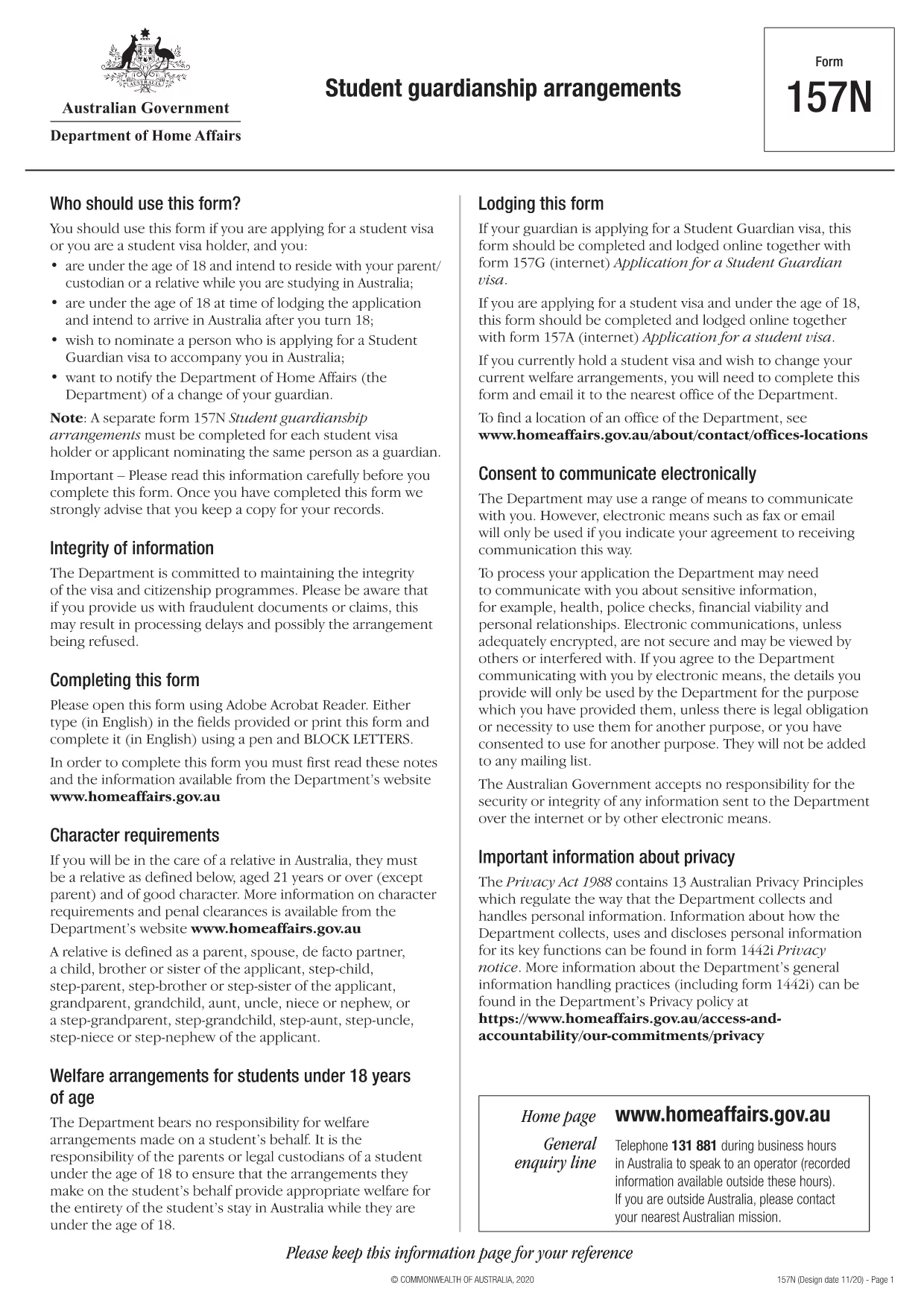
Form 157N – Student Guardian Arrangement (Fillable PDF)

  1. Jezik Engleski
  2. Zemlja Australija
  3. Aktivnost Studija
Form 157N – Student Guardian Arrangement (Fillable PDF)

Form 157N is the official Australian document used to nominate a guardian for a student visa holder. Whether you are a parent, legal guardian, or an approved welfare provider, this form must be completed for every student who requires a guardian while studying in Australia.

What is Form 157N?

The Student Guardianship Arrangements – Form 157N captures details about the student, the proposed guardian, and the nature of the guardianship agreement. It is required by the Department of Home Affairs for visa subclasses 500, 590, and related student visas.

When and Who Must Complete Form 157N

  • Any new student visa applicant who needs a guardian in Australia.
  • Current visa holders who change their guardian or wish to add a second guardian.
  • Educational institutions acting on behalf of a student to nominate a welfare provider.

How to Fill Out Form 157N with Formize

Instead of downloading the PDF and editing it manually, use our Formize PDF Filler – a fast, secure, and fully fillable online solution.

Common Mistakes to Avoid

  • Leaving any mandatory field blank (marked with an asterisk *).
  • Submitting an outdated passport number for the guardian.
  • Providing an Australian address that does not belong to the guardian.
  • Failing to sign and date the form in the correct places.

Where to Submit the Completed Form

After you have filled the form online, download the completed PDF and attach it to your visa application through ImmiAccount, or email it to your education provider if they handle the submission.

Need help? Review our step‑by‑step guide below or check the FAQs for quick answers.

PITANJA
  • Do I need to fill out a separate Form 157N for each student?

    Yes. Every student visa holder who nominates a guardian must have an individual Form 157N, even if the same guardian is named for multiple students.

  • Can I use the same PDF for a change of guardian?

    For a change of guardian you must complete a new Form 157N (sometimes referenced as Form 157N‑N). Submit the new form together with supporting evidence of the change.

  • Is an electronic signature accepted?

    The Department of Home Affairs accepts electronic signatures made within an approved PDF filler such as Formize. Ensure the signature field is marked as signed before downloading.

  • What happens if I forget to sign the form?

    An unsigned Form 157N will be rejected, causing delays in visa processing. The Formize validator will alert you to any missing signatures.

  • Do I need to provide proof of the guardian’s relationship to the student?

    Yes. Attach supporting documents (e.g., birth certificate, adoption papers, or legal guardianship order) alongside the completed Form 157N.

  • Can I save my progress and finish later?

    Formize allows you to save a draft locally. Click **Save Draft** before closing the browser, then reopen the saved file to continue.

  • Is there a fee to use Formize’s PDF filler?

    No. Formize provides free online filling for government forms like Form 157N. There are no hidden charges.

  • What if I submit the wrong guardian’s details?

    You must submit a corrected Form 157N as soon as the error is discovered. The Department will treat the new submission as the official record.

KAKO DA

Kako ispuniti Form 157N besplatno, online u 5 jednostavnih koraka:

  1. 1
    Open the Fillable Form
    Click the **Fill out this form** button on this page. The Formize PDF Filler app will load the Form 157N directly in your browser.
  2. 2
    Enter Your Details
    Complete each field—student information, guardian details, and signatures—using your keyboard. All fields are interactive and save automatically.
  3. 3
    Review and Validate
    Use the built‑in validation to check for missing or incorrectly formatted data. Correct any highlighted errors before proceeding.
  4. 4
    Download the Completed PDF
    When you’re satisfied, click **Download PDF**. The file will be saved with all your entries intact, ready for upload to ImmiAccount.
  5. 5
    Submit with Your Visa Application
    Attach the downloaded PDF to your student visa application or provide it to your education provider as instructed.
Aplikacija Formize PDF Filler
OKO

Obrasci studija

Form 157N je jedan od dokumenata koji se koriste u kontekstu obrazovnih ili akademskih studija. Ove obrasce obično koriste studenti, obrazovne ustanove ili istraživačke organizacije za prikupljanje i upravljanje podacima koji se odnose na studije, istraživačke projekte ili akademske procese. Konkretni oblici koji se koriste mogu varirati ovisno o prirodi studije ili istraživanja koje se provodi. Evo nekoliko primjera obrazaca za učenje:

Obrasci za prijavu: Ove obrasce koriste studenti prilikom prijave za upis na obrazovne ustanove ili određene studijske programe. Prikupljaju osobne podatke, akademsku pozadinu i druge detalje potrebne za proces upisa.

Obrasci za registraciju tečaja: Studenti često moraju ispuniti obrasce za registraciju tečaja kako bi upisali određene tečajeve ili predmete. Ovi obrasci omogućuju studentima odabir željenih kolegija za nadolazeći semestar ili akademsku godinu.

Obrasci prijedloga istraživanja: Prilikom pokretanja istraživačkog projekta od istraživača se može zahtijevati da predaju obrazac prijedloga istraživanja. Ovaj obrazac opisuje ciljeve, metodologiju, vremenski okvir i resurse potrebne za predloženu studiju.

Obrasci informiranog pristanka: U istraživanju koje uključuje ljudske subjekte, obrasci informiranog pristanka koriste se kako bi se osiguralo da su sudionici u potpunosti informirani o svrsi, rizicima, koristima i postupcima studije. Sudionici daju svoj pristanak potpisivanjem ovih obrazaca prije sudjelovanja u istraživanju.

Obrasci ankete ili upitnika: Istraživači često koriste obrasce ankete ili upitnika za prikupljanje podataka od sudionika istraživanja. Ovi obrasci sadrže niz pitanja osmišljenih za prikupljanje specifičnih informacija povezanih s istraživačkom studijom.

Obrasci izvješća o napretku studija: U određenim obrazovnim programima ili istraživačkim projektima od studenata ili istraživača može se zahtijevati podnošenje redovitih izvješća o napretku. Ovi obrasci prate napredak, postignuća, izazove i sljedeće korake studija ili istraživanja.

Obrasci za tezu ili disertaciju: Studenti koji stječu napredne stupnjeve možda će morati ispuniti različite obrasce koji se odnose na njihovu tezu ili disertaciju. Ovi obrasci uključuju, između ostalog, obrasce za prijedloge, obrasce za odobrenje odbora i obrasce za konačnu prijavu.

Obrasci za prijavu za studij u inozemstvu: Studenti koji se prijavljuju za programe studiranja u inozemstvu često moraju ispuniti posebne obrasce za prijavu koji prikupljaju informacije o namjeravanom odredištu studiranja, akademskim ciljevima, znanju jezika i drugim relevantnim detaljima.

Ovo je samo nekoliko primjera oblika učenja koji se obično koriste u obrazovnim ili istraživačkim okruženjima. Specifični oblici i zahtjevi mogu se razlikovati ovisno o ustanovi, programu ili istraživačkom projektu. Važno je konzultirati se s obrazovnom ustanovom ili istraživačkom organizacijom za točne i ažurne informacije o potrebnim oblicima učenja za određeni akademski ili istraživački pothvat.

ZNAČAJKE

PDF punilo

Najlakši način da ispunite Form 157N online

  • Brzo ispunite Form 157N
    Tražite način da brzo ispunite Form 157N online? Uz naš online besplatni PDF obrazac za popunjavanje, znat ćete kako urediti i ispuniti ovaj pdf dokument za manje od minute.
  • Jednostavan za korištenje mrežni PDF uređivač
    Dosta vam je ispisivanja PDF datoteka kako biste ih mogli uređivati ​​prije ponovnog skeniranja i slanja natrag? Uređujte PDF dokumente besplatno na mreži. Upotrijebite naš online uređivač pdf-ova kako biste uštedjeli vrijeme i papir.
  • Sjajni alati, sve platforme
    Pitate se kako ispuniti Form 157N na Macu ili možda kako koristiti PDF filer besplatno? Naši online PDF alati rade na svim platformama.
  • Sigurno skladištenje datoteka
    Dovršene datoteke "Form 157N" pohranjuju se u zaštićenu bazu podataka kojom upravlja Amazon Cloud hosting. Svoje datoteke možete izbrisati iz našeg sustava bilo kada. U svakom slučaju, te se datoteke automatski brišu nakon 24 sata.
  • Chat s Form 157N
    Razgovarajte s "Form 157N" na Chatize koji je besplatni pomoćnik za čitanje PDF-ova. Postavljajte pitanja i dobivajte odgovore od "Form 157N". Samo kliknite gornji gumb Chat with Document.

Izbriši sesiju punjenja

Izbrisati odabranu sesiju punjenja? U tom će slučaju vaš napredak u ispunjavanju obrasca biti izgubljen.

Izbriši sesiju uređivanja

Izbrisati odabranu sesiju uređivanja? U tom će slučaju vaš napredak u stvaranju i uređivanju obrasca biti izgubljen.