
Izaberi jezik

Application Form No – Fillable PDF for NSW Transport

  1. Jezik Engleski
  2. Zemlja Australija
  3. Odjel Transport for NSW
  4. Aktivnost Registracija vozila
Application Form No – Fillable PDF for NSW Transport

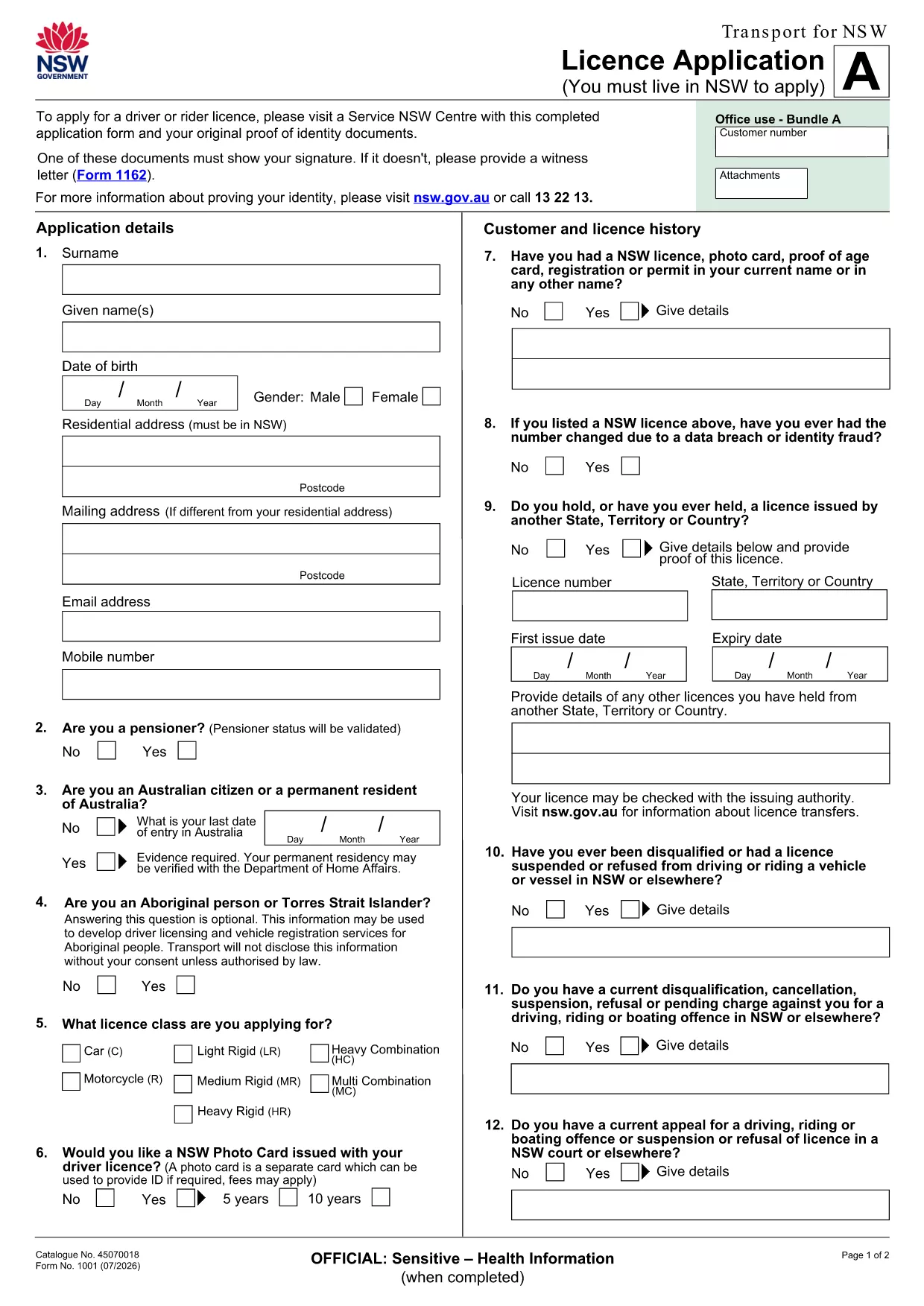
If you’re looking for the official Application Form No used by Transport for NSW, you’ve come to the right place. This page provides a direct link to the fillable PDF, step‑by‑step online instructions, and tips to ensure your submission is error‑free.

What is the Application Form No?

The Application Form No is the standard licence application used by the New South Wales transport authority. It collects personal details, licence preferences, and supporting documentation required for a new or renewed driver licence.

How to Fill the Form Online with Formize

Instead of downloading the PDF to a desktop editor, simply click the "Fill out this form" button on this page. The Formize PDF Filler app will load in your browser, letting you type directly into the fields, save progress, and export a completed PDF.

Key Sections and Required Information

  • Personal Details: Full name, address, date of birth, and contact numbers.
  • Licence Choice: Select the appropriate licence class and any endorsements.
  • Identity Verification: Upload a scanned ID or provide a reference number.
  • Signature: Use the digital signature tool in Formize to sign securely.

Common Mistakes to Avoid

  • Leaving required fields blank – the filler will highlight missing data before you submit.
  • Using non‑standard fonts or special characters in names – stick to plain text.
  • Uploading files that exceed the size limit (5 MB per file).
  • Forgetting to sign the form digitally; an unsigned form is rejected.

Download the Fillable PDF

The original, printable version of the form is available for download if you need a hard copy. Download the PDF

Ready to start? Click the button below, fill the form online, and submit it directly to Transport for NSW.

PITANJA
  • Do I need Adobe Acrobat to fill this form?

    No. The Formize PDF Filler works in any modern browser, so you can complete the form without installing any software.

  • Can I print the filled form after completing it online?

    Yes. After you finish, click the "Download" button to save a PDF that you can print or email.

  • What if I make a mistake while filling the form?

    Use the "Undo" button or simply edit the field again. The filler saves changes in real time.

  • Is my personal data secure?

    Formize uses SSL encryption for all data transmitted between your browser and our servers. Your information is not stored longer than needed for the submission.

  • Do I still need to sign the form with a pen?

    A digital signature accepted by Transport for NSW is sufficient. Print‑and‑sign is only required if you choose to submit a hard copy.

  • Can I save the form and finish it later?

    Yes. Click "Save" to download a partially completed PDF, then reopen it later in Formize to continue.

  • What file formats are accepted for supporting documents?

    PDF, JPG, and PNG files up to 5 MB each are accepted.

KAKO DA

Kako ispuniti application form no besplatno, online u 5 jednostavnih koraka:

  1. 1
    Open the Form
    Click the "Fill out this form" button on this page. The Formize PDF Filler will open in a new browser tab.
  2. 2
    Enter Your Information
    Type directly into each highlighted field. Use the tab key to move quickly between sections.
  3. 3
    Add Supporting Documents
    Upload scanned copies of your ID or proof of address using the upload icons inside the form.
  4. 4
    Sign Digitally
    Select the signature field and draw or type your signature using the built‑in tool.
  5. 5
    Save and Submit
    Click "Save" to download a copy for your records, then press "Submit" to send the completed form to Transport for NSW.
Aplikacija Formize PDF Filler
OKO

Obrasci za registraciju vozila

Ako posjedujete ili unajmljujete motorno vozilo, prikolicu ili čamac, morate ispuniti određene obveze kako bi vaše vozilo bilo legalno registrirano i sigurno.

application form no je jedan od obrazaca za registraciju vozila koji su dokumenti koji se koriste za registraciju motornog vozila kod nadležnog državnog ili pokrajinskog tijela. Ovi su obrasci obično potrebni kada osoba kupi novo ili rabljeno vozilo ili kada se s vozilom preseli u novu državu ili pokrajinu.

Točni zahtjevi i obrasci potrebni za registraciju vozila mogu se razlikovati ovisno o lokaciji, ali općenito, postupak uključuje pružanje informacija o vozilu, vlasniku i svim založnim pravima na vozilu.

Nakon podnošenja obrazaca za registraciju i pristojbi, državno ili pokrajinsko tijelo će vlasniku vozila izdati potvrdu o registraciji ili registarsku pločicu. Ova registracija omogućuje legalnu vožnju vozila na javnim cestama i autocestama.

ZNAČAJKE

PDF punilo

Najlakši način da ispunite application form no online

  • Brzo ispunite application form no
    Tražite način da brzo ispunite application form no online? Uz naš online besplatni PDF obrazac za popunjavanje, znat ćete kako urediti i ispuniti ovaj pdf dokument za manje od minute.
  • Jednostavan za korištenje mrežni PDF uređivač
    Dosta vam je ispisivanja PDF datoteka kako biste ih mogli uređivati ​​prije ponovnog skeniranja i slanja natrag? Uređujte PDF dokumente besplatno na mreži. Upotrijebite naš online uređivač pdf-ova kako biste uštedjeli vrijeme i papir.
  • Sjajni alati, sve platforme
    Pitate se kako ispuniti application form no na Macu ili možda kako koristiti PDF filer besplatno? Naši online PDF alati rade na svim platformama.
  • Sigurno skladištenje datoteka
    Dovršene datoteke "application form no" pohranjuju se u zaštićenu bazu podataka kojom upravlja Amazon Cloud hosting. Svoje datoteke možete izbrisati iz našeg sustava bilo kada. U svakom slučaju, te se datoteke automatski brišu nakon 24 sata.
  • Chat s application form no
    Razgovarajte s "application form no" na Chatize koji je besplatni pomoćnik za čitanje PDF-ova. Postavljajte pitanja i dobivajte odgovore od "application form no". Samo kliknite gornji gumb Chat with Document.

Izbriši sesiju punjenja

Izbrisati odabranu sesiju punjenja? U tom će slučaju vaš napredak u ispunjavanju obrasca biti izgubljen.

Izbriši sesiju uređivanja

Izbrisati odabranu sesiju uređivanja? U tom će slučaju vaš napredak u stvaranju i uređivanju obrasca biti izgubljen.