
Izaberi jezik

Application Form of Registration – Fillable PDF

  1. Jezik Engleski
  2. Zemlja Australija
  3. Odjel Transport for NSW
  4. Aktivnost Registracija vozila
Application Form of Registration – Fillable PDF

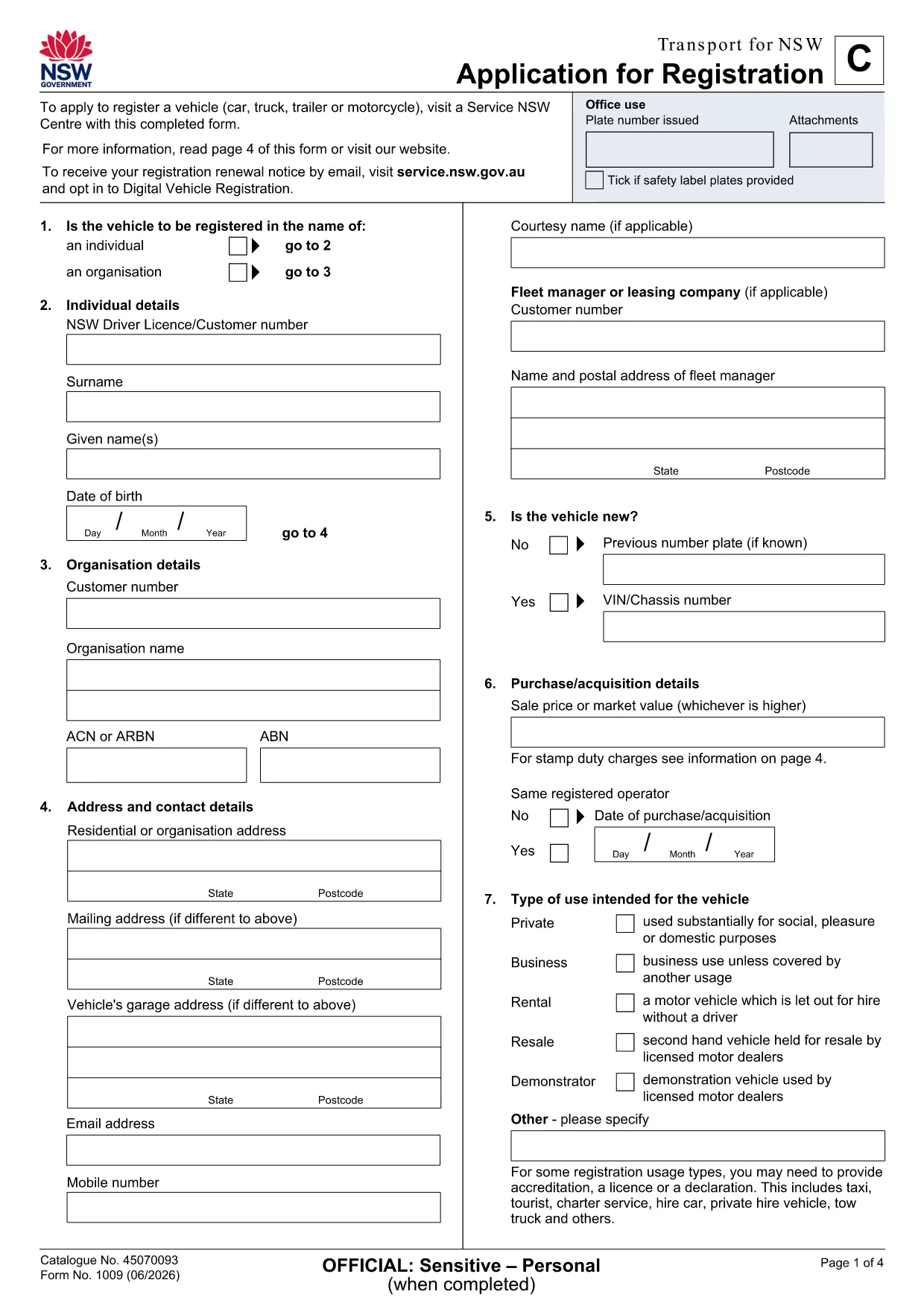
Looking for a quick, hassle‑free way to submit your application form of registration in New South Wales? The fillable PDF provided by Transport for NSW lets you enter data directly on your screen, save a draft, and print a clean copy for submission.

Our Formize PDF Filler loads the form instantly in your browser—no extra software needed. Just click the button, fill the fields, and download the completed document.

How to Fill the Application Form of Registration Online

  1. Click the Fill out this form button on the page.
  2. Wait a few seconds while the Formize PDF Filler app loads the registration PDF.
  3. Enter your personal details, vehicle information, and any supporting data in the highlighted fields.
  4. Use the built‑in validation to catch missing or incorrectly formatted entries.
  5. When you’re done, click Save & Download to get a completed PDF ready for printing or email.

Key Sections & Required Information

  • Applicant Details – full name, address, contact number, and driver licence number.
  • Vehicle Information – make, model, VIN, and registration number.
  • Supporting Documents – proof of identity, insurance, and any exemption letters.
  • Declaration & Signature – electronic signature box that complies with NSW regulations.

Common Mistakes to Avoid When Completing the Form

  • Leaving mandatory fields blank – the filler will highlight them in red.
  • Using non‑standard fonts or special characters in names – stick to alphanumeric characters.
  • Uploading outdated supporting documents – ensure PDFs are current and legible.
  • Forgetting to sign the electronic declaration – an unsigned form will be rejected.

Download & Print the PDF in One Click

After saving, you can instantly download the filled PDF, print it on plain A4 paper, and attach any required attachments before delivering it to your local Transport for NSW office.

Need a hard copy? The Formize app also offers a Print button that sends the document directly to your printer with the correct margins.

PITANJA
  • Do I need Adobe Acrobat to fill this form?

    No. The Formize PDF Filler works in any modern browser, so you can complete the form without installing additional software.

  • Can I save a draft and finish later?

    Yes. Use the **Save Draft** button in the filler to download a partially completed PDF, then reopen it later to finish.

  • Is the electronic signature legally accepted?

    Transport for NSW accepts the electronic signature generated by Formize, as it complies with NSW electronic signing standards.

  • What file format will I receive after completion?

    You will receive a standard PDF file that can be printed, emailed, or stored on your device.

  • What should I do if I encounter an error while filling the form?

    Refresh the page and reopen the form. If the problem persists, check your internet connection or try a different browser.

  • Are there any fees for using the fillable PDF?

    The PDF download and online filling are free. Any processing fees are determined by Transport for NSW, not by Formize.

KAKO DA

Kako ispuniti application form of registration besplatno, online u 4 jednostavnih koraka:

  1. 1
    Open the Fillable Form
    Click the **Fill out this form** button on the page. The Formize PDF Filler app will open the registration PDF directly in your browser.
  2. 2
    Enter Your Information
    Type your details into each highlighted field. The app validates entries in real time, so you’ll know immediately if something is missing.
  3. 3
    Save and Download
    When all required sections are complete, press **Save & Download**. The completed PDF is saved to your device, ready to print or email.
  4. 4
    Print or Submit Electronically
    Print the saved PDF on A4 paper and attach any supporting documents, or email the file to the address indicated on the form.
Aplikacija Formize PDF Filler
OKO

Obrasci za registraciju vozila

application form of registration jedan je od obrazaca za registraciju vozila koji su dokumenti koji se koriste za registraciju motornog vozila kod relevantnog državnog tijela, obično Odjela za motorna vozila (DMV) ili ekvivalentne agencije. Ovi obrasci su potrebni kada osoba kupi novo ili rabljeno vozilo, prenese vlasništvo nad vozilom ili se preseli u novu jurisdikciju s vozilom.

Specifični obrasci za registraciju vozila mogu se razlikovati ovisno o jurisdikciji, ali općenito zahtijevaju sljedeće podatke:

Informacije o vozilu: Ovo uključuje detalje o vozilu, kao što su marka, model, godina, identifikacijski broj vozila (VIN) i očitanje brojača kilometara.

Podaci o vlasniku: obrazac će zahtijevati podatke o vlasniku vozila, uključujući njegovo ime, adresu, podatke za kontakt i broj vozačke dozvole.

Dokaz o vlasništvu: Ovisno o okolnostima, može biti potreban dokaz o vlasništvu, kao što je vlasnički list, račun o prodaji ili potvrda proizvođača o podrijetlu (za nova vozila).

Informacije o osiguranju: Obično je potreban dokaz o važećem osiguranju vozila. To može uključivati ​​davanje broja police osiguranja, datuma pokrića i podataka o osiguravajućem društvu.

Plaćanje naknada: Registracija vozila uključuje plaćanje raznih naknada, kao što su naknade za registraciju, porezi i eventualno drugi troškovi specifični za jurisdikciju.

Uz ove osnovne zahtjeve, neke jurisdikcije mogu imati dodatne zahtjeve za obrasce ili dokumentaciju. Na primjer, rezultati ispitivanja emisija, sigurnosne inspekcije ili dokaz o prebivalištu mogu biti potrebni u određenim područjima.

Nakon što se ispune i predaju obrasci za registraciju vozila, državno tijelo će izdati potvrdu o registraciji, registarske pločice i registracijske naljepnice. Ovi dokumenti pokazuju da je vozilo legalno registrirano i ovlašteno za promet na javnim cestama.

Važno je napomenuti da se zahtjevi za registraciju vozila mogu značajno razlikovati ovisno o jurisdikciji. Stoga se preporučuje konzultirati lokalni DMV ili ekvivalentnu agenciju za specifične obrasce i postupke koji se primjenjuju na vašu lokaciju.

ZNAČAJKE

PDF punilo

Najlakši način da ispunite application form of registration online

  • Brzo ispunite application form of registration
    Tražite način da brzo ispunite application form of registration online? Uz naš online besplatni PDF obrazac za popunjavanje, znat ćete kako urediti i ispuniti ovaj pdf dokument za manje od minute.
  • Jednostavan za korištenje mrežni PDF uređivač
    Dosta vam je ispisivanja PDF datoteka kako biste ih mogli uređivati ​​prije ponovnog skeniranja i slanja natrag? Uređujte PDF dokumente besplatno na mreži. Upotrijebite naš online uređivač pdf-ova kako biste uštedjeli vrijeme i papir.
  • Sjajni alati, sve platforme
    Pitate se kako ispuniti application form of registration na Macu ili možda kako koristiti PDF filer besplatno? Naši online PDF alati rade na svim platformama.
  • Sigurno skladištenje datoteka
    Dovršene datoteke "application form of registration" pohranjuju se u zaštićenu bazu podataka kojom upravlja Amazon Cloud hosting. Svoje datoteke možete izbrisati iz našeg sustava bilo kada. U svakom slučaju, te se datoteke automatski brišu nakon 24 sata.
  • Chat s application form of registration
    Razgovarajte s "application form of registration" na Chatize koji je besplatni pomoćnik za čitanje PDF-ova. Postavljajte pitanja i dobivajte odgovore od "application form of registration". Samo kliknite gornji gumb Chat with Document.

Izbriši sesiju punjenja

Izbrisati odabranu sesiju punjenja? U tom će slučaju vaš napredak u ispunjavanju obrasca biti izgubljen.

Izbriši sesiju uređivanja

Izbrisati odabranu sesiju uređivanja? U tom će slučaju vaš napredak u stvaranju i uređivanju obrasca biti izgubljen.