Izaberi jezik

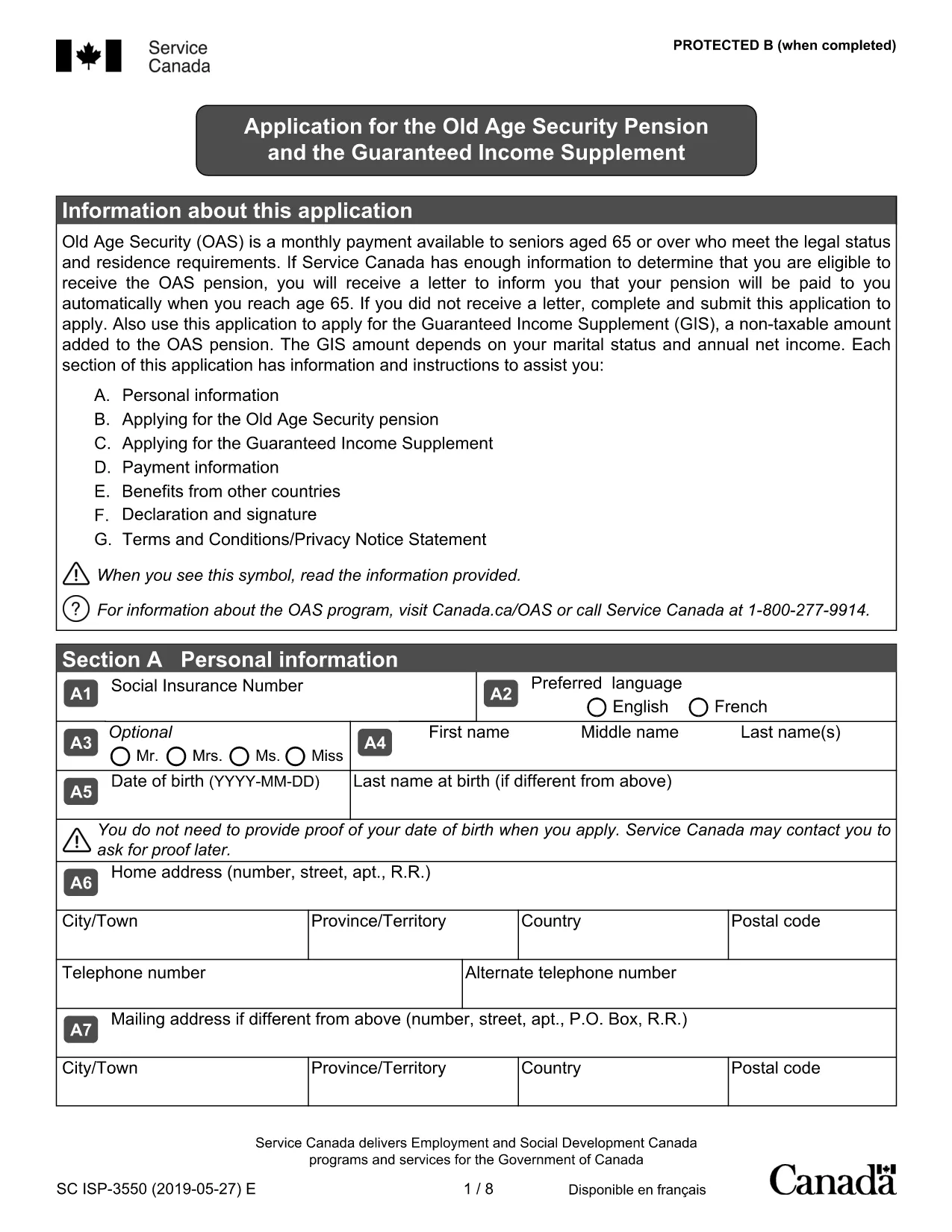
Old Age Pension Application Form (Fillable PDF)

  1. Zemlja Kanada
  2. Jezik Engleski
  3. Aktivnost Pensions
  4. Odjel Service Canada
Old Age Pension Application Form (Fillable PDF)

Applying for the Old Age Pension (Old Age Security) can feel overwhelming, but with our fillable PDF you can complete the entire application online, save time, and reduce errors. The form is fully compatible with the Formize PDF Filler – just click the button, fill the fields, and submit.

Why Choose a Fillable PDF for Your Old Age Pension

  • Instant editing: No need to print, write, scan, or fax.
  • Auto‑save: Your progress is saved automatically, so you can return later.
  • Guided validation: The filler highlights required fields and alerts you to missing information.
  • Secure submission: Export a clean PDF that meets Service Canada’s requirements.

How to Complete the Old Age Pension Application

Follow the simple steps below to fill out the application correctly. Each step corresponds to a section of the PDF.

  1. Open the form: Click the Fill out this form button on this page. The Formize PDF Filler will load the document.
  2. Enter personal details: Provide your full name, date of birth, Social Insurance Number (SIN), and current address.
  3. Residency information: Indicate your citizenship status and the number of years you have lived in Canada.
  4. Financial information: List any income, savings, or property you own. This helps Service Canada assess eligibility.
  5. Partner details (if applicable): Even if your partner is not applying, their information is required for the means test.
  6. Review & submit: Use the built‑in review tool, then download the completed PDF and send it to Service Canada.

Common Mistakes to Avoid

  • Leaving required fields blank – the filler will flag them before you can submit.
  • Using an outdated address – ensure the mailing address matches your myGov profile.
  • Incorrect SIN format – double‑check the nine‑digit number.
  • Omitting partner information – this can delay processing.
  • Submitting an unsigned form – the PDF filler adds an electronic signature option.

Eligibility Checklist

Before you start, make sure you meet the basic criteria:

  • Age 65 or older
  • Canadian citizen or legal resident
  • Minimum 10 years of residence in Canada after age 18
  • Income and assets within the program’s limits

Download & Fill the Form

Ready to begin? Click the button below, let Formize load the PDF, and complete your Old Age Pension application in minutes.

Fill out this form

PITANJA
  • Do I need to print the Old Age Pension form?

    No. The fillable PDF can be completed entirely online using the Formize PDF Filler, then saved as a digital file for submission.

  • What documents do I need to have handy?

    You’ll need your Social Insurance Number (SIN), proof of residency (e.g., driver’s licence), recent bank statements, and details of any assets or income.

  • Can I save my progress and finish later?

    Yes. The Formize filler automatically saves your entries in the browser, so you can close the window and return at any time.

  • Is an electronic signature accepted?

    Service Canada accepts a digitally signed PDF. The Formize filler includes an e‑signature field that meets their requirements.

  • How long does the application process take?

    After submission, Service Canada typically processes an OAS application within 4‑6 weeks, provided all information is complete.

  • What if I make a mistake after I submit?

    Contact Service Canada immediately. You can submit a corrected PDF or provide additional information through your myGov account.

  • Is there a fee to use the fillable PDF?

    No. The PDF and the Formize filler are completely free to use.

KAKO DA

Kako ispuniti old age pension application besplatno, online u 5 jednostavnih koraka:

  1. 1
    Open the Fillable Form
    Click the “Fill out this form” button on the page. The Formize PDF Filler loads the Old Age Pension application automatically.
  2. 2
    Enter Your Information
    Type your personal, residency, and financial details into the highlighted fields. Required fields are marked with an asterisk.
  3. 3
    Validate & Review
    The filler checks for missing or incorrectly formatted data. Fix any alerts, then use the built‑in preview to ensure everything looks correct.
  4. 4
    Save or Export
    When you’re satisfied, click “Save” to store a copy in your browser or “Export” to download a clean PDF ready for submission.
  5. 5
    Submit to Service Canada
    Mail or upload the completed PDF to Service Canada according to their instructions. Keep a copy for your records.
Aplikacija Formize PDF Filler
OKO

old age pension application predložak

S tradicionalnim skupom značajki za pregled i ispunjavanje PDF dokumenta, u kombinaciji s prednostima web aplikacije i responzivnog izgleda, možete ispuniti old age pension application u nekoliko minuta.

ZNAČAJKE

PDF punilo

Najlakši način da ispunite old age pension application online

  • Brzo ispunite old age pension application
    Tražite način da brzo ispunite old age pension application online? Uz naš online besplatni PDF obrazac za popunjavanje, znat ćete kako urediti i ispuniti ovaj pdf dokument za manje od minute.
  • Jednostavan za korištenje mrežni PDF uređivač
    Dosta vam je ispisivanja PDF datoteka kako biste ih mogli uređivati ​​prije ponovnog skeniranja i slanja natrag? Uređujte PDF dokumente besplatno na mreži. Upotrijebite naš online uređivač pdf-ova kako biste uštedjeli vrijeme i papir.
  • Sjajni alati, sve platforme
    Pitate se kako ispuniti old age pension application na Macu ili možda kako koristiti PDF filer besplatno? Naši online PDF alati rade na svim platformama.
  • Sigurno skladištenje datoteka
    Dovršene datoteke "old age pension application" pohranjuju se u zaštićenu bazu podataka kojom upravlja Amazon Cloud hosting. Svoje datoteke možete izbrisati iz našeg sustava bilo kada. U svakom slučaju, te se datoteke automatski brišu nakon 24 sata.
  • Chat s old age pension application
    Razgovarajte s "old age pension application" na Chatize koji je besplatni pomoćnik za čitanje PDF-ova. Postavljajte pitanja i dobivajte odgovore od "old age pension application". Samo kliknite gornji gumb Chat with Document.

Izbriši sesiju punjenja

Izbrisati odabranu sesiju punjenja? U tom će slučaju vaš napredak u ispunjavanju obrasca biti izgubljen.

Izbriši sesiju uređivanja

Izbrisati odabranu sesiju uređivanja? U tom će slučaju vaš napredak u stvaranju i uređivanju obrasca biti izgubljen.