
Izaberi jezik

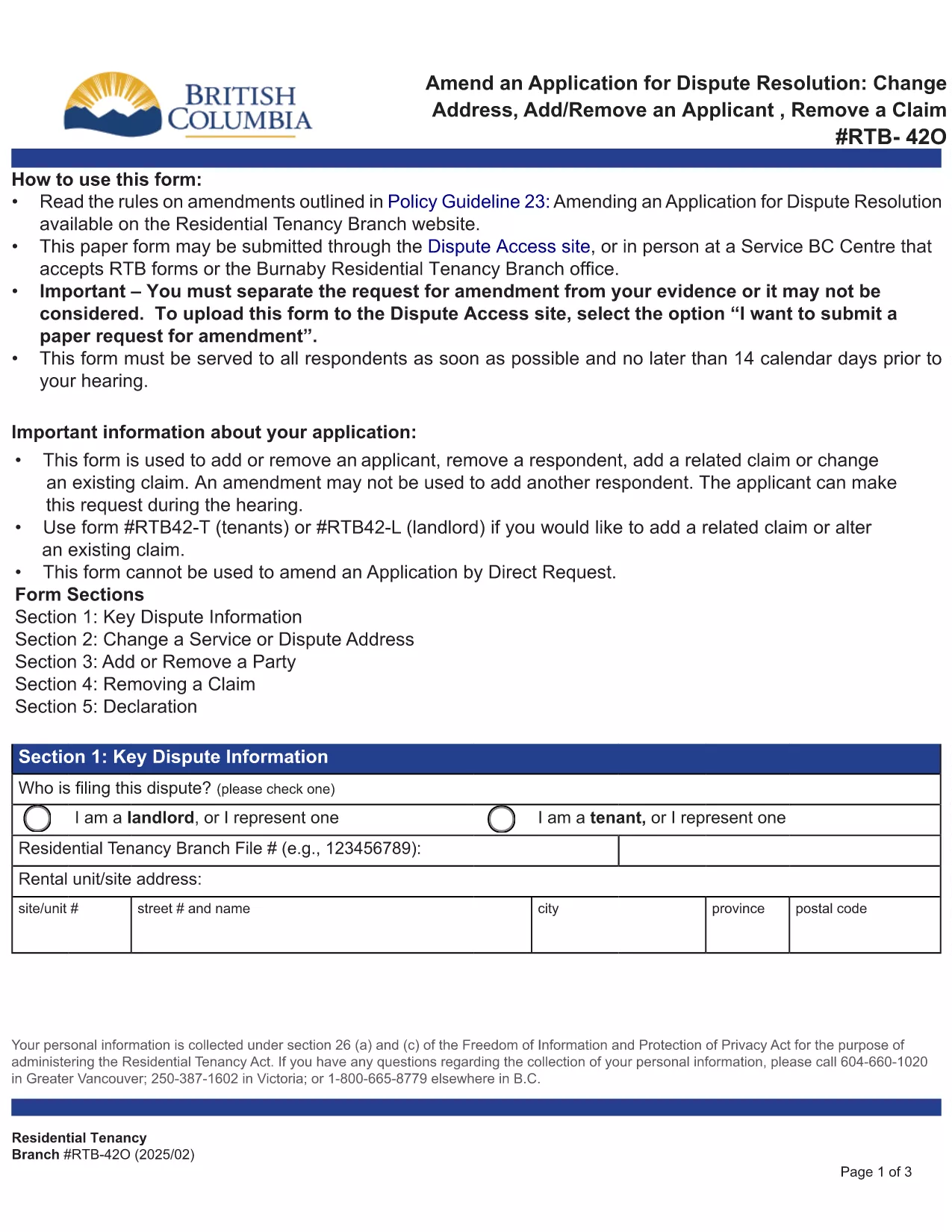
RTB‑42O – Amend an Application for Dispute Resolution (Fillable PDF)

  1. Jezik Engleski
  2. Zemlja Kanada
  3. Aktivnost Stanarstvo
  4. država Britanska Kolumbija
RTB‑42O – Amend an Application for Dispute Resolution (Fillable PDF)

What is the RTB‑42O Form?

The RTB‑42O is the official Residential Tenancy Branch (RTB) form used in British Columbia to request an amendment to an existing dispute‑resolution application. It allows tenants or landlords to change claims, add parties, or correct information after the original filing.

When and Who Should Use RTB‑42O?

  • Tenants or landlords who need to add, delete, or modify a claim.
  • Parties who must change an address, add a co‑tenant, or correct a mistake.
  • Anyone who has already submitted an RTB‑59 or RTB‑42T application and needs to update it before the hearing.

How to Complete the RTB‑42O Online

Instead of downloading and editing the PDF manually, simply click the "Fill out this form" button below. The Formize PDF Filler app will load the fillable version instantly.

  1. Click Fill out this form on the page.
  2. Wait a few seconds while the Formize PDF Filler loads.
  3. Enter your information in each highlighted field. Required fields are marked with an asterisk (*).
  4. Review the entered data for accuracy.
  5. Click Save & Download to get a completed PDF you can email to the RTB.

Common Mistakes to Avoid

  • Leaving required fields blank – the form will not submit.
  • Using an old case number; always copy the number from your original application.
  • Submitting the form after the RTB deadline – check the Rules of Procedure for timing.

Submit and Save Your Completed Form

After you have filled the form, download the PDF, attach it to an email addressed to rtb@gov.bc.ca, and include your original application reference number. Keep a copy for your records.

PITANJA
  • What is the purpose of the RTB‑42O form?

    The RTB‑42O allows tenants or landlords to amend an existing dispute‑resolution application – adding or removing claims, parties, or correcting details.

  • Can I fill out RTB‑42O on a mobile device?

    Yes. The Formize PDF Filler works on smartphones, tablets and desktop browsers, providing a responsive fillable experience.

  • Do I need to pay a fee to submit an amendment?

    No additional fee is required to submit an RTB‑42O amendment, but the original application fee (usually $100) still applies.

  • How long do I have to submit an amendment after filing the original application?

    Amendments must be filed before the hearing date or within the time limits set out in RTB Rule 4.0.1. Check the latest Rules of Procedure for exact deadlines.

  • What happens if I make a mistake on the RTB‑42O?

    If required fields are left blank or information is incorrect, the RTB will return the form for correction. Use the fillable version to avoid common errors.

  • Do I need a lawyer to complete the RTB‑42O?

    No. The form is designed for self‑representation. However, you may seek legal advice if the amendment is complex.

KAKO DA

Kako ispuniti RTB-42O besplatno, online u 5 jednostavnih koraka:

  1. 1
    Open the Fillable Form
    Click the “Fill out this form” button on the page. The Formize PDF Filler loads the RTB‑42O automatically.
  2. 2
    Enter Your Details
    Fill every highlighted field, especially those marked with *. Use the original application number for reference.
  3. 3
    Review & Validate
    Check all entries for accuracy. The filler will highlight any missing required information.
  4. 4
    Download the Completed PDF
    When you’re satisfied, click “Save & Download”. The PDF is ready to email to the Residential Tenancy Branch.
  5. 5
    Submit to the RTB
    Attach the completed PDF to an email addressed to rt​b@gov.bc.ca, include your original case number, and keep a copy for your records.
Aplikacija Formize PDF Filler
OKO

Obrasci za stanodavce i/ili stanare za predlaganje radnji u vezi s ugovorima o najmu.

RTB-42O je vrsta ugovora o stambenom najmu koju koristi većina privatnih stanodavaca i stambenih udruga.

Postoji niz pitanja u vezi s kojima stanodavci ili stanari moraju slijediti određena pravila navedena u propisima. U nekim slučajevima može biti potrebno da ispune obrazac, koji se naziva "propisani obrazac", koji predlaže radnju koja može utjecati na drugu stranu u ugovoru o najmu.

Obrasci se nazivaju propisanim obrascima jer je tekst u njima pažljivo sastavljen kako bi se osiguralo da osoba koja ispunjava obrazac i osoba kojoj se uručuje mogu razumjeti što se predlaže i što mogu učiniti kao odgovor. Neuspjeh posluživanja ispravnog obrasca može poništiti radnju koja je predložena.

Ne smijete mijenjati tekst u ovim obrascima osim ako obrazac ne kaže da to smijete učiniti. Ako promijenite tekst, obrazac može biti nevažeći. Također se morate pridržavati svih otkaznih rokova navedenih u obrascu.

ZNAČAJKE

PDF punilo

Najlakši način da ispunite RTB-42O online

  • Brzo ispunite RTB-42O
    Tražite način da brzo ispunite RTB-42O online? Uz naš online besplatni PDF obrazac za popunjavanje, znat ćete kako urediti i ispuniti ovaj pdf dokument za manje od minute.
  • Jednostavan za korištenje mrežni PDF uređivač
    Dosta vam je ispisivanja PDF datoteka kako biste ih mogli uređivati ​​prije ponovnog skeniranja i slanja natrag? Uređujte PDF dokumente besplatno na mreži. Upotrijebite naš online uređivač pdf-ova kako biste uštedjeli vrijeme i papir.
  • Sjajni alati, sve platforme
    Pitate se kako ispuniti RTB-42O na Macu ili možda kako koristiti PDF filer besplatno? Naši online PDF alati rade na svim platformama.
  • Sigurno skladištenje datoteka
    Dovršene datoteke "RTB-42O" pohranjuju se u zaštićenu bazu podataka kojom upravlja Amazon Cloud hosting. Svoje datoteke možete izbrisati iz našeg sustava bilo kada. U svakom slučaju, te se datoteke automatski brišu nakon 24 sata.
  • Chat s RTB-42O
    Razgovarajte s "RTB-42O" na Chatize koji je besplatni pomoćnik za čitanje PDF-ova. Postavljajte pitanja i dobivajte odgovore od "RTB-42O". Samo kliknite gornji gumb Chat with Document.

Izbriši sesiju punjenja

Izbrisati odabranu sesiju punjenja? U tom će slučaju vaš napredak u ispunjavanju obrasca biti izgubljen.

Izbriši sesiju uređivanja

Izbrisati odabranu sesiju uređivanja? U tom će slučaju vaš napredak u stvaranju i uređivanju obrasca biti izgubljen.