
Izaberi jezik

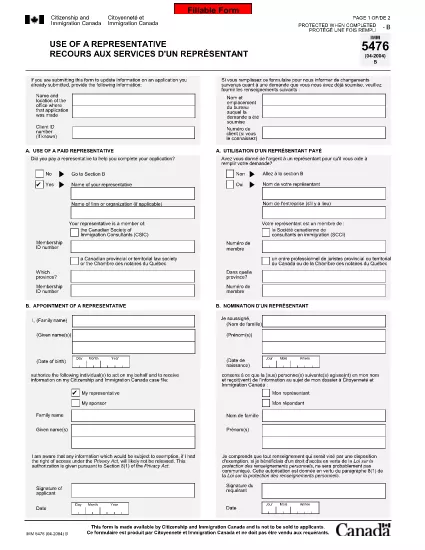
IMM 5476 – Use of a Representative (Canada)

  1. Zemlja Kanada
  2. Jezik Engleski francuski
  3. Aktivnost vize
IMM 5476 – Use of a Representative (Canada)

The IMM 5476 – Use of a Representative form allows you to officially appoint an immigration consultant, lawyer, or another authorized person to act on your behalf with Immigration, Refugees and Citizenship Canada (IRCC) and the Canada Border Services Agency (CBSA). This form is required for most permanent‑resident, temporary‑resident, and citizenship applications.

What Is the IMM 5476 Form?

IMM 5476 is a government‑issued PDF that records the details of your chosen representative, their contact information, and the scope of authority you are granting. It is available in both English and French and must be signed by both you (the applicant) and your representative.

How to Fill Out IMM 5476 Online

Instead of downloading the PDF and editing it manually, simply click the "Fill out this form" button on the page. Our Formize PDF Filler app will load the fillable version instantly, letting you complete the form directly in your browser.

Common Mistakes to Avoid

  • Incorrect Representative Details: Double‑check the name, address, and CRA‑issued client number of your representative.
  • Missing Signatures: Both the applicant and the representative must sign; unsigned forms are rejected.
  • Wrong Language Version: Use the official English or French version that matches the rest of your application package.
  • Out‑of‑Date Form: Always use the latest version – the link below always points to the current PDF.

When to Submit the Form

Attach IMM 5476 to the same package as your main application (e.g., Express Entry, Study Permit, Visitor Visa). If you change representatives later, submit a new, signed IMM 5476 with your updated request.

Need More Help?

While Formize does not provide live support, you can find detailed guidance on the IRCC website or consult a licensed immigration professional.

PITANJA
  • Do I need a lawyer to fill out IMM 5476?

    No. You can appoint any authorized representative, such as a licensed immigration consultant, lawyer, or family member, as long as they have a valid client number.

  • Can I change my representative after submitting the form?

    Yes. Submit a new, signed IMM 5476 with the updated representative’s details and include a brief letter explaining the change.

  • Is a digital signature accepted?

    IRCC accepts electronic signatures generated within a fillable PDF application like Formize, provided the signature field is clearly marked.

  • What happens if I forget to sign the form?

    An unsigned IMM 5476 will be considered incomplete and may delay processing of your entire application.

  • Do I need to submit both English and French versions?

    Submit only the language version that matches the rest of your application package. IRCC does not require both versions.

  • Is there a fee to use the Formize PDF Filler?

    No. Formize provides free access to fillable PDFs for government forms like IMM 5476.

  • Can I print the form after filling it online?

    Yes. Once you finish, click "Download PDF" and print a hard copy if your submission requires a physical signature.

  • Where can I find the latest version of IMM 5476?

    The link on this page always points to the most recent version published by Immigration, Refugees and Citizenship Canada.

KAKO DA

Kako ispuniti IMM 5476 besplatno, online u 5 jednostavnih koraka:

  1. 1
    Open the Fillable Form
    Click the "Fill out this form" button on the page. The Formize PDF Filler app will load the IMM 5476 form directly in your browser.
  2. 2
    Enter Applicant Information
    Fill in your full name, client ID, and contact details in the Applicant section. All fields are required.
  3. 3
    Enter Representative Details
    Provide the representative’s name, firm, address, phone, and email. Make sure the CRA client number matches the one on record.
  4. 4
    Add Signatures
    Use the built‑in signature fields to sign electronically. Both you and your representative must sign before saving.
  5. 5
    Download or Submit
    After completing the form, click "Download PDF" to save a copy for your records, then attach it to your immigration application package.
Aplikacija Formize PDF Filler
OKO

Obrasci za vize

IMM 5476 je jedan od Visa obrazaca koji su dokumenti koji se koriste za podnošenje zahtjeva za vizu za ulazak u stranu zemlju. Viza je dokument koji stranom državljaninu omogućuje ulazak, boravak i ponekad rad u stranoj zemlji na određeno vrijeme. Točni obrasci i zahtjevi za dobivanje vize razlikuju se ovisno o zemlji i vrsti vize.

Obrasci za vizu obično zahtijevaju osobne podatke kao što su ime, datum rođenja i podaci o putovnici, kao i informacije o svrsi i duljini putovanja, namjeravanom odredištu i je li podnositelju zahtjeva prethodno odbijena viza ili je deportiran iz zemlje. Obrasci također mogu zahtijevati popratne dokumente kao što su putovnica, fotografije i dokaz o financijskoj potpori.

U Sjedinjenim Državama najčešći obrasci za vize su DS-160 i DS-260. Obrazac DS-160 koristi se za podnošenje zahtjeva za neuseljeničku vizu, dok se obrazac DS-260 koristi za podnošenje zahtjeva za useljeničku vizu. Ovi obrasci zahtijevaju detaljne informacije o osobnoj i putnoj povijesti podnositelja zahtjeva, kao i prateću dokumentaciju poput putovnice, plana putovanja i financijskih podataka.

Druge zemlje mogu imati različite obrasce i zahtjeve za vizu, ali osnovni postupak obično uključuje ispunjavanje zahtjeva za vizu, pružanje popratne dokumentacije i prisustvovanje intervjuu s konzularnim službenikom u veleposlanstvu ili konzulatu SAD-a. Važno je napomenuti da proces podnošenja zahtjeva za vizu može biti složen i dugotrajan, te se preporučuje da se pojedinci koji traže vizu posavjetuju s imigracijskim odvjetnikom ili drugim kvalificiranim stručnjakom kako bi bili sigurni da su ispunjeni svi potrebni obrasci i zahtjevi.

ZNAČAJKE

PDF punilo

Najlakši način da ispunite IMM 5476 online

  • Brzo ispunite IMM 5476
    Tražite način da brzo ispunite IMM 5476 online? Uz naš online besplatni PDF obrazac za popunjavanje, znat ćete kako urediti i ispuniti ovaj pdf dokument za manje od minute.
  • Jednostavan za korištenje mrežni PDF uređivač
    Dosta vam je ispisivanja PDF datoteka kako biste ih mogli uređivati ​​prije ponovnog skeniranja i slanja natrag? Uređujte PDF dokumente besplatno na mreži. Upotrijebite naš online uređivač pdf-ova kako biste uštedjeli vrijeme i papir.
  • Sjajni alati, sve platforme
    Pitate se kako ispuniti IMM 5476 na Macu ili možda kako koristiti PDF filer besplatno? Naši online PDF alati rade na svim platformama.
  • Sigurno skladištenje datoteka
    Dovršene datoteke "IMM 5476" pohranjuju se u zaštićenu bazu podataka kojom upravlja Amazon Cloud hosting. Svoje datoteke možete izbrisati iz našeg sustava bilo kada. U svakom slučaju, te se datoteke automatski brišu nakon 24 sata.
  • Chat s IMM 5476
    Razgovarajte s "IMM 5476" na Chatize koji je besplatni pomoćnik za čitanje PDF-ova. Postavljajte pitanja i dobivajte odgovore od "IMM 5476". Samo kliknite gornji gumb Chat with Document.

Izbriši sesiju punjenja

Izbrisati odabranu sesiju punjenja? U tom će slučaju vaš napredak u ispunjavanju obrasca biti izgubljen.

Izbriši sesiju uređivanja

Izbrisati odabranu sesiju uređivanja? U tom će slučaju vaš napredak u stvaranju i uređivanju obrasca biti izgubljen.