
Izaberi jezik

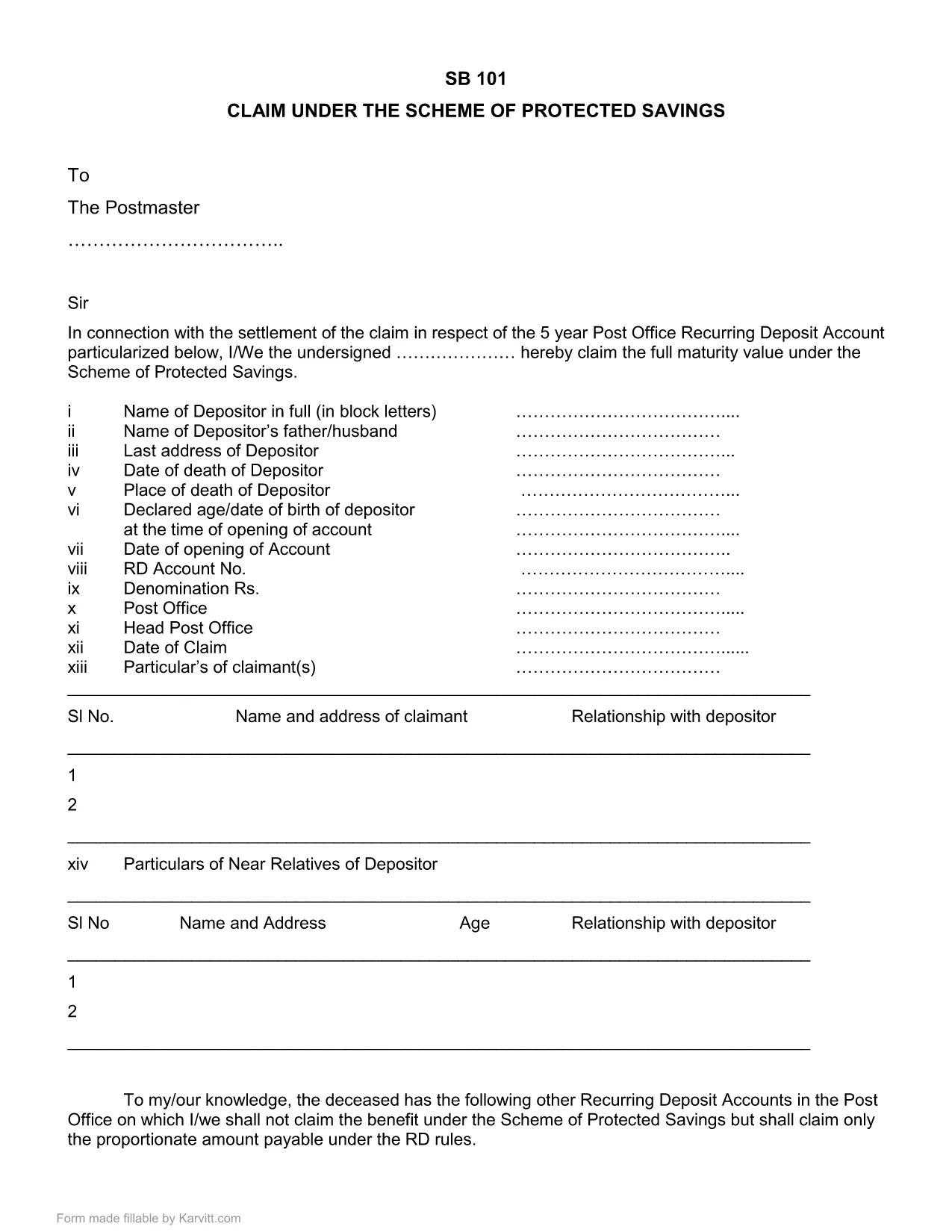
SB-101 India Fillable PDF – Claim Protected Savings

  1. Jezik Engleski
  2. Zemlja Indija
  3. Odjel Odjel za pošte
SB-101 India Fillable PDF – Claim Protected Savings

The SB-101 form is the official Post Office document used in India to claim benefits under the Scheme of Protected Savings. Whether you are a first‑time claimant or need to submit a renewal, a fillable PDF version saves you time and reduces errors.

What is Form SB-101?

SB-101 is issued by the Indian Post Office and is required to:

  • Validate your protected savings account.
  • Apply for interest benefits and withdrawals.
  • Update personal details linked to your savings scheme.

The form is recognized nationwide and must be completed in the exact format prescribed by the Post Office.

How to Fill SB-101 Online with Formize

Instead of downloading, printing, and scanning, use the Formize PDF Filler for a seamless experience:

  1. Click the "Fill out this form" button on this page.
  2. The Formize PDF Filler loads directly in your browser – no extra software needed.
  3. Enter your information in each highlighted field. The interface guides you through mandatory sections.
  4. When you finish, review the summary screen for any missing or incorrect entries.
  5. Save the completed form to your device or submit it electronically to your nearest Post Office.

Common Mistakes to Avoid When Completing SB-101

  • Incorrect Account Number: Double‑check the 12‑digit number printed on your passbook.
  • Missing Signature: The form is invalid without a clear, legible signature.
  • Outdated Address: Ensure the address matches the one on record with the Post Office.
  • Skipping Optional Fields: Even optional fields can help speed up verification if filled correctly.

Download & Save the Official SB-101 PDF

If you prefer a traditional approach, you can still download the official fillable PDF version below. The file retains the original layout and can be opened with any modern PDF reader.

Download SB-101 Fillable PDF (India)

Remember, using the Formize PDF Filler ensures your data is captured accurately and saves you a trip to the printer.

PITANJA
  • What is the purpose of SB-101?

    SB-101 is used to claim benefits, update personal details, and manage withdrawals under the Scheme of Protected Savings offered by the Indian Post Office.

  • Can I fill SB-101 on a mobile device?

    Yes. The Formize PDF Filler works on all modern browsers, including mobile phones and tablets.

  • Do I need Adobe Acrobat to use the fillable PDF?

    No. While the PDF can be opened with Adobe Reader, the Formize online filler lets you complete the form without any additional software.

  • Is the downloaded PDF version still valid?

    Absolutely. The PDF retains the official layout and is accepted by all Post Office branches, provided it is fully completed and signed.

  • What should I do if I make a mistake?

    Use the Formize filler's reset option to clear fields, or download a fresh copy of the PDF and start over.

  • How long does it take to process SB-101 after submission?

    Processing time varies by branch, but most offices complete verification within 7‑10 business days.

KAKO DA

Kako ispuniti SB-101 India besplatno, online u 5 jednostavnih koraka:

  1. 1
    Click the Fill Out Button
    Press the "Fill out this form" button on the page to launch the Formize PDF Filler.
  2. 2
    Load the Formize PDF Filler
    The web‑based filler loads instantly in your browser—no downloads required.
  3. 3
    Enter Your Details
    Complete each highlighted field with accurate information. The filler highlights required sections.
  4. 4
    Review & Validate
    Check the summary view for any missing or incorrect entries before finalizing.
  5. 5
    Save or Submit
    Download the finished PDF to your device or submit it electronically to your local Post Office.
Aplikacija Formize PDF Filler
OKO

Obrasci za prijavu odjela za poštu

SB-101 India jedan je od službenih obrazaca Indijskog odjela za poštu koji nudi različite obrasce za prijavu za različite usluge. Neki uobičajeni obrasci za prijavu uključuju:

Poštansko životno osiguranje: Ovaj se obrazac koristi za podnošenje zahtjeva za poštanske police životnog osiguranja koje nudi Department of Posts.

Štedni bankovni račun: Ovaj se obrazac koristi za otvaranje štednog računa u poštanskom uredu.

Novčana uputnica: Ovaj se obrazac koristi za slanje novčanih uputnica putem pošte.

Preporučena pošta: Ovaj se obrazac koristi za slanje preporučenih pisama i paketa putem pošte.

Brza pošta: Ovaj se obrazac koristi za slanje paketa i dokumenata putem usluge brze pošte.

Program mjesečnog dohotka pošte: Ovaj se obrazac koristi za otvaranje računa za shemu mjesečnog dohotka u poštanskom uredu.

ZNAČAJKE

PDF punilo

Najlakši način da ispunite SB-101 India online

  • Brzo ispunite SB-101 India
    Tražite način da brzo ispunite SB-101 India online? Uz naš online besplatni PDF obrazac za popunjavanje, znat ćete kako urediti i ispuniti ovaj pdf dokument za manje od minute.
  • Jednostavan za korištenje mrežni PDF uređivač
    Dosta vam je ispisivanja PDF datoteka kako biste ih mogli uređivati ​​prije ponovnog skeniranja i slanja natrag? Uređujte PDF dokumente besplatno na mreži. Upotrijebite naš online uređivač pdf-ova kako biste uštedjeli vrijeme i papir.
  • Sjajni alati, sve platforme
    Pitate se kako ispuniti SB-101 India na Macu ili možda kako koristiti PDF filer besplatno? Naši online PDF alati rade na svim platformama.
  • Sigurno skladištenje datoteka
    Dovršene datoteke "SB-101 India" pohranjuju se u zaštićenu bazu podataka kojom upravlja Amazon Cloud hosting. Svoje datoteke možete izbrisati iz našeg sustava bilo kada. U svakom slučaju, te se datoteke automatski brišu nakon 24 sata.
  • Chat s SB-101 India
    Razgovarajte s "SB-101 India" na Chatize koji je besplatni pomoćnik za čitanje PDF-ova. Postavljajte pitanja i dobivajte odgovore od "SB-101 India". Samo kliknite gornji gumb Chat with Document.

Izbriši sesiju punjenja

Izbrisati odabranu sesiju punjenja? U tom će slučaju vaš napredak u ispunjavanju obrasca biti izgubljen.

Izbriši sesiju uređivanja

Izbrisati odabranu sesiju uređivanja? U tom će slučaju vaš napredak u stvaranju i uređivanju obrasca biti izgubljen.