
Izaberi jezik

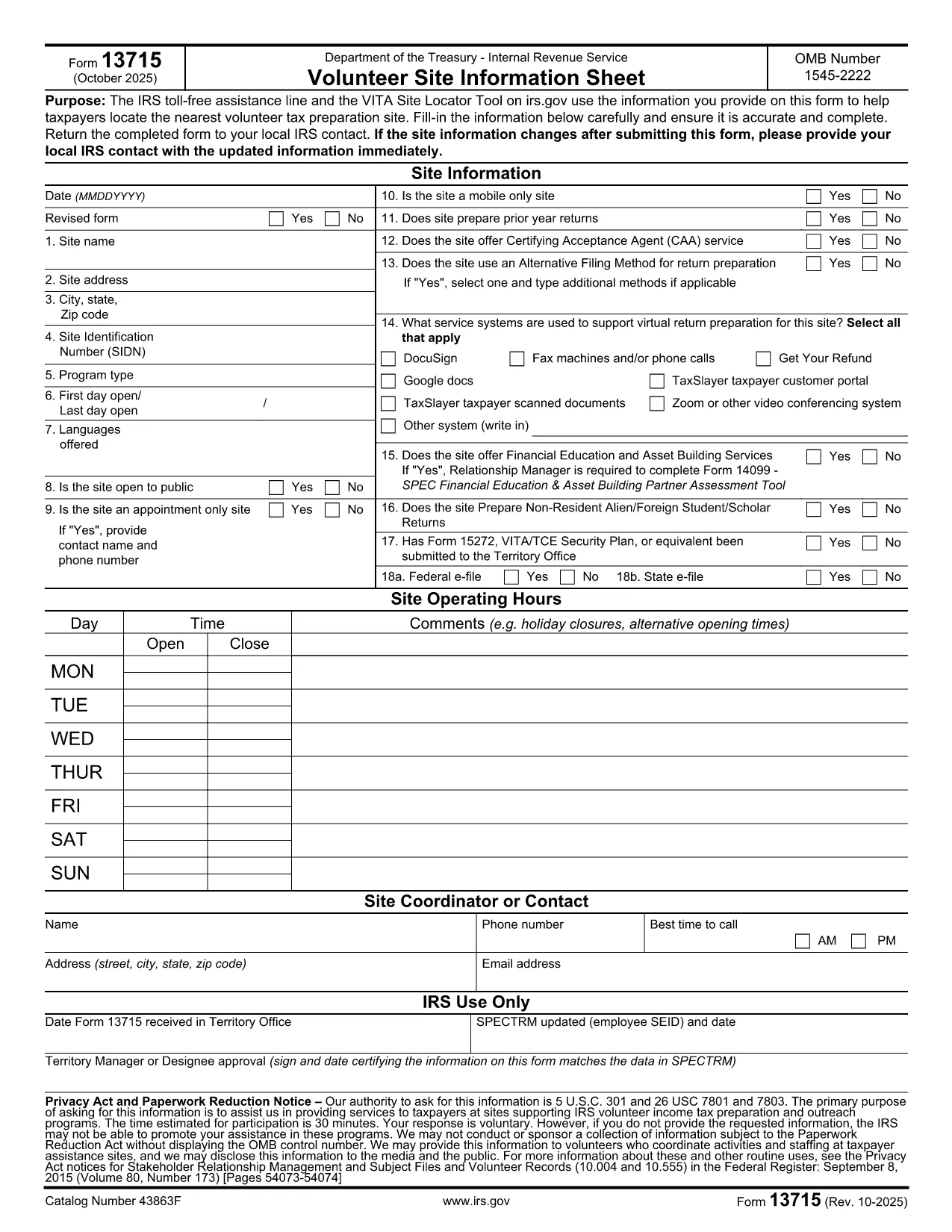
Form 13715 – Volunteer Site Information Sheet (Fillable PDF)

  1. Zemlja SAD
  2. Jezik Engleski
  3. Aktivnost Porezi
  4. Odjel Porezna uprava
Form 13715 – Volunteer Site Information Sheet (Fillable PDF)

The IRS Form 13715, also known as the Volunteer Site Information Sheet, is required for any organization that wants to be listed in the VITA (Volunteer Income Tax Assistance) Site Locator tool. This form collects essential contact and service details so taxpayers can easily find the nearest volunteer tax‑preparation site.

What Is Form 13715 and Who Needs It?

Form 13715 is issued by the Internal Revenue Service (IRS) and must be completed by:

  • Non‑profit organizations that host VITA or TCE (Tax Counseling for the Elderly) sites.
  • Community centers, libraries, churches, or any entity that provides free tax‑preparation services.

The information you provide helps the IRS toll‑free assistance line and the online site locator match taxpayers with the closest volunteer site.

How to Complete the Form Using Formize

Instead of downloading the PDF and opening it in a separate editor, simply click the "Fill out this form" button on this page. The Formize PDF Filler app will load instantly, allowing you to:

  1. Enter all required details directly in your browser.
  2. Save your progress automatically.
  3. Download a completed, IRS‑ready PDF with one click.

Common Mistakes & Tips

  • Missing phone number or email: The IRS requires at least one reliable contact method.
  • Incorrect zip code: Double‑check the ZIP to ensure the site appears in the correct geographic search.
  • Out‑of‑date service hours: Update hours each year to avoid confusion for taxpayers.

Review each field carefully before saving the final PDF.

Where to Submit the Completed Form

After you finish, print the filled‑in PDF and mail it to your local IRS VITA coordinator (address is provided on the form). Some regions also accept a scanned copy via email—check the instructions on the last page of the form.

FAQs About Form 13715

Below are quick answers to the most common questions (full FAQ list is also available further down the page).

PITANJA
  • Do I need to print the form after filling it online?

    Yes. The IRS requires a hard‑copy signature on Form 13715 before it can be processed. Print the completed PDF, sign, and mail it.

  • Can I save a draft and finish later?

    Absolutely. Formize automatically saves your progress in the browser’s local storage. Return to the page later and continue where you left off.

  • Is there a fee to use Formize’s PDF filler?

    No. The fillable PDF tool is completely free for all IRS forms, including Form 13715.

  • What if I enter the wrong ZIP code?

    The site will not appear in the VITA locator for the intended area, and taxpayers may be directed elsewhere. Double‑check the ZIP before downloading.

  • How often should I update Form 13715?

    Update the form annually or whenever your contact information, service hours, or locations change.

  • Can I submit the form electronically?

    The IRS still requires a signed hard copy, but many regional VITA coordinators accept a scanned copy via email after the original is mailed.

  • Where can I find help if I have questions?

    Contact the IRS VITA hotline at 1‑800‑222‑2222 or reach out to your local IRS volunteer coordinator for assistance.

  • Is Form 13715 the same as Form 13614?

    No. Form 13715 collects site information for VITA locations, while Form 13614 is the IRS Individual Taxpayer Interview and used by volunteers to prepare returns.

KAKO DA

Kako ispuniti Form 13715 besplatno, online u 5 jednostavnih koraka:

  1. 1
    Click the Fill‑out Button
    Press the "Fill out this form" button on this page. The Formize PDF Filler loads directly in your browser—no download required.
  2. 2
    Enter Your Information
    Complete each field: organization name, contact details, service hours, and any special instructions. The form auto‑saves as you type.
  3. 3
    Review & Validate
    Use the built‑in validation to check for missing or incorrectly formatted entries. Correct any highlighted errors.
  4. 4
    Download the Completed PDF
    When all fields are filled, click the "Download PDF" button. You’ll receive an IRS‑ready, fillable PDF ready for printing or electronic submission.
  5. 5
    Submit to Your Local IRS Coordinator
    Print the PDF and mail it to the address listed on the last page, or follow any region‑specific email instructions.
Aplikacija Formize PDF Filler
OKO

Porezni obrasci

Form 13715 je jedan od poreznih obrazaca koji su dokumenti koji se koriste za prijavu informacija o prihodima pojedinca ili tvrtke, odbicima i poreznim obvezama relevantnim poreznim vlastima. Ovi su obrasci nužni za usklađivanje s poreznim zakonima i ispunjavanje poreznih obveza. Porezni obrasci razlikuju se ovisno o zemlji i posebnim poreznim zahtjevima. Evo nekih uobičajenih vrsta poreznih obrazaca:

Individualni porezni obrasci: Ove obrasce koriste pojedinačni porezni obveznici za prijavu osobnog dohotka i traženje odbitaka, kredita i izuzeća. Primjeri uključuju obrazac 1040 u Sjedinjenim Američkim Državama ili obrazac povrata poreza za samoprocjenu u Ujedinjenom Kraljevstvu.

Poslovni porezni obrasci: Poslovni porezni obrasci koriste se od strane tvrtki, partnerstava ili samozaposlenih pojedinaca za prijavu poslovnih prihoda, troškova i drugih podataka povezanih s porezom. Primjeri uključuju obrazac iz Priloga C (Dobit ili gubitak od poslovanja) u Sjedinjenim Državama ili obrazac CT600 (Povrat poreza tvrtke) u Ujedinjenom Kraljevstvu.

Obrasci za porez na plaće: Ove obrasce koriste poslodavci za prijavu plaća, nadnica i poreza zadržanih na plaćama svojih zaposlenika. Primjeri uključuju obrazac W-2 u Sjedinjenim Državama ili obrazac P60 u Ujedinjenom Kraljevstvu.

Obrasci za porez na promet: tvrtke koriste obrasce za porez na promet za prijavu i uplatu poreza na promet prikupljenog na oporezivu robu ili usluge. Posebni obrasci poreza na promet razlikuju se ovisno o jurisdikciji.

Obrasci za porez na dodanu vrijednost (PDV): PDV obrasci koriste se u zemljama koje nameću porez na dodanu vrijednost za prijavu i uplatu PDV-a prikupljenog od prodaje i traženje PDV kredita za kupnje. Primjeri uključuju obrasce za povrat PDV-a koji se koriste u mnogim zemljama.

Procijenjeni porezni obrasci: Procijenjeni porezni obrasci koriste se za prijavu i plaćanje procijenjenih poreza na prihod koji ne podliježe zadržavanju, kao što je prihod od samozapošljavanja ili prihod od ulaganja.

Ovo je samo nekoliko primjera od brojnih poreznih oblika koji mogu postojati. Konkretni potrebni obrasci ovise o poreznim zakonima i propisima u vašoj zemlji ili jurisdikciji. Važno je konzultirati se sa smjernicama porezne uprave ili potražiti stručni savjet kako biste utvrdili koji su obrasci primjenjivi u vašoj situaciji.

ZNAČAJKE

PDF punilo

Najlakši način da ispunite Form 13715 online

  • Brzo ispunite Form 13715
    Tražite način da brzo ispunite Form 13715 online? Uz naš online besplatni PDF obrazac za popunjavanje, znat ćete kako urediti i ispuniti ovaj pdf dokument za manje od minute.
  • Jednostavan za korištenje mrežni PDF uređivač
    Dosta vam je ispisivanja PDF datoteka kako biste ih mogli uređivati ​​prije ponovnog skeniranja i slanja natrag? Uređujte PDF dokumente besplatno na mreži. Upotrijebite naš online uređivač pdf-ova kako biste uštedjeli vrijeme i papir.
  • Sjajni alati, sve platforme
    Pitate se kako ispuniti Form 13715 na Macu ili možda kako koristiti PDF filer besplatno? Naši online PDF alati rade na svim platformama.
  • Sigurno skladištenje datoteka
    Dovršene datoteke "Form 13715" pohranjuju se u zaštićenu bazu podataka kojom upravlja Amazon Cloud hosting. Svoje datoteke možete izbrisati iz našeg sustava bilo kada. U svakom slučaju, te se datoteke automatski brišu nakon 24 sata.
  • Chat s Form 13715
    Razgovarajte s "Form 13715" na Chatize koji je besplatni pomoćnik za čitanje PDF-ova. Postavljajte pitanja i dobivajte odgovore od "Form 13715". Samo kliknite gornji gumb Chat with Document.

Izbriši sesiju punjenja

Izbrisati odabranu sesiju punjenja? U tom će slučaju vaš napredak u ispunjavanju obrasca biti izgubljen.

Izbriši sesiju uređivanja

Izbrisati odabranu sesiju uređivanja? U tom će slučaju vaš napredak u stvaranju i uređivanju obrasca biti izgubljen.