
Izaberi jezik

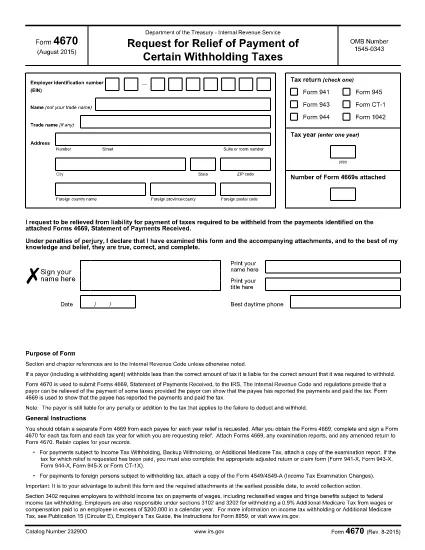
Fillable IRS Form 4670 – Employee Statement for Paid Family & Medical Leave Credit

  1. Zemlja SAD
  2. Jezik Engleski
  3. Aktivnost Porezi
  4. Odjel Porezna uprava
Fillable IRS Form 4670 – Employee Statement for Paid Family & Medical Leave Credit

Form 4670, Employee’s Statement Regarding Eligibility for the Paid Family and Medical Leave Credit, is required when you claim the new credit on your federal tax return. Instead of printing, printing, and hand‑signing a paper copy, you can fill out the fillable PDF directly in your browser using the Formize PDF Filler app.

What Is IRS Form 4670?

This form is used by employees to certify that they meet the eligibility criteria for the Paid Family and Medical Leave (PFML) credit. The credit reduces the employer’s payroll tax liability and is claimed on Form 941 or the annual Form 944.

How to Complete Form 4670 Online

Follow the simple steps below to fill out the form without leaving the page:

  • Click the "Fill out this form" button below.
  • Wait a few seconds while the Formize PDF Filler app loads.
  • Enter your personal information, employer details, and answer the eligibility questions.
  • Use the built‑in e‑signature field to sign electronically.
  • When you’re done, download the completed PDF or print it for your records.

Common Mistakes & Tips

  • Incorrect SSN or EIN: Double‑check the numbers before submitting.
  • Leaving a required box blank: The PDF filler will highlight missing fields.
  • Using an outdated form version: Always use the latest PDF from the IRS (link provided below).
  • Signature errors: The e‑signature field must be completed; otherwise the form is considered incomplete.

Where to Submit the Completed Form

The employee’s signed Form 4670 is attached to the employer’s payroll‑tax filing (Form 941 or Form 944). Keep a copy for your records and provide the original to your employer.

Download the Official PDF

If you prefer a hard copy, you can download the official IRS PDF from the link below. The same file is used by the Formize filler, ensuring full compatibility.

Download IRS Form 4670 (PDF)

PITANJA
  • Do I need a PDF editor to fill out Form 4670?

    No. The Formize PDF Filler works directly in your browser, so you don’t need any additional software.

  • Is the electronic signature on Formize accepted by the IRS?

    Yes. The IRS allows electronic signatures on Form 4670 when the form is submitted as part of the employer’s payroll‑tax filing.

  • Can I save my progress and return later?

    The Formize filler lets you download a partially completed PDF, which you can reopen later in the same tool to finish.

  • What if I make a mistake after submitting?

    Correct the error on a new copy of the form, sign again, and provide the updated version to your employer. The IRS does not accept handwritten corrections on the electronic version.

  • Is there a cost to use the Formize PDF Filler?

    No. Filling out Form 4670 with Formize is completely free.

  • Do I need to attach Form 4670 to my personal tax return?

    No. The employee’s statement is attached to the employer’s payroll‑tax return (Form 941 or 944), not to your individual 1040.

  • Where can I find the latest version of Form 4670?

    The most recent version is always available on the official IRS website: IRS Form 4670 PDF.

KAKO DA

Kako ispuniti Form 4670 besplatno, online u 5 jednostavnih koraka:

  1. 1
    Click the Fill Out Button
    Locate the "Fill out this form" button on this page and click it to launch the Formize PDF Filler.
  2. 2
    Wait for the Filler to Load
    A short loading screen appears while the secure Formize app prepares the fillable PDF. This only takes a few seconds.
  3. 3
    Enter Your Information
    Complete each field—personal details, employer information, and eligibility questions—using your keyboard or mobile device.
  4. 4
    Add Your Electronic Signature
    Use the built‑in e‑signature box to sign the form. The signature is legally binding for IRS purposes.
  5. 5
    Save or Print the Completed Form
    When all fields are filled, click "Download" to save a copy or "Print" to produce a hard copy for your employer.
Aplikacija Formize PDF Filler
OKO

Savezni porezni obrasci

Form 4670 jedan je od saveznih poreznih obrazaca koji su dokumenti koji se koriste za prijavu i podnošenje saveznih poreza na dohodak Poreznoj upravi (IRS) u Sjedinjenim Državama. Ove obrasce koriste pojedinci, tvrtke i organizacije za prijavu svojih prihoda, odbitaka i drugih relevantnih informacija potrebnih za izračun saveznih poreznih obveza.

Najčešće korišten savezni porezni obrazac je obrazac 1040, koji koriste pojedinačni porezni obveznici za prijavu poreza na dohodak. Drugi često korišteni obrasci uključuju Obrazac 1065 za partnerstva, Obrazac 1120 za korporacije i Obrazac 990 za organizacije oslobođene plaćanja poreza.

Savezni porezni obrasci obično zahtijevaju od poreznih obveznika da prijave različite izvore prihoda, kao što su nadnice, plaće i napojnice, kao i prihod od ulaganja, iznajmljivanja nekretnina i drugih izvora. Obrasci također omogućuju poreznim obveznicima traženje odbitaka i kredita za razne troškove, kao što su dobrotvorni prilozi, kamate na hipotekarni kredit i troškovi zdravstvene zaštite.

Važno je podnijeti savezne porezne obrasce točno i na vrijeme, jer nepoštivanje toga može rezultirati kaznama i kamatama od Porezne uprave.

ZNAČAJKE

PDF punilo

Najlakši način da ispunite Form 4670 online

  • Brzo ispunite Form 4670
    Tražite način da brzo ispunite Form 4670 online? Uz naš online besplatni PDF obrazac za popunjavanje, znat ćete kako urediti i ispuniti ovaj pdf dokument za manje od minute.
  • Jednostavan za korištenje mrežni PDF uređivač
    Dosta vam je ispisivanja PDF datoteka kako biste ih mogli uređivati ​​prije ponovnog skeniranja i slanja natrag? Uređujte PDF dokumente besplatno na mreži. Upotrijebite naš online uređivač pdf-ova kako biste uštedjeli vrijeme i papir.
  • Sjajni alati, sve platforme
    Pitate se kako ispuniti Form 4670 na Macu ili možda kako koristiti PDF filer besplatno? Naši online PDF alati rade na svim platformama.
  • Sigurno skladištenje datoteka
    Dovršene datoteke "Form 4670" pohranjuju se u zaštićenu bazu podataka kojom upravlja Amazon Cloud hosting. Svoje datoteke možete izbrisati iz našeg sustava bilo kada. U svakom slučaju, te se datoteke automatski brišu nakon 24 sata.
  • Chat s Form 4670
    Razgovarajte s "Form 4670" na Chatize koji je besplatni pomoćnik za čitanje PDF-ova. Postavljajte pitanja i dobivajte odgovore od "Form 4670". Samo kliknite gornji gumb Chat with Document.

Izbriši sesiju punjenja

Izbrisati odabranu sesiju punjenja? U tom će slučaju vaš napredak u ispunjavanju obrasca biti izgubljen.

Izbriši sesiju uređivanja

Izbrisati odabranu sesiju uređivanja? U tom će slučaju vaš napredak u stvaranju i uređivanju obrasca biti izgubljen.