
Izaberi jezik

Form 5498‑ESA Fillable PDF – Coverdell Education Savings Account Reporting

  1. Zemlja SAD
  2. Jezik Engleski
  3. Aktivnost Porezi
  4. Odjel Porezna uprava
Form 5498‑ESA Fillable PDF – Coverdell Education Savings Account Reporting

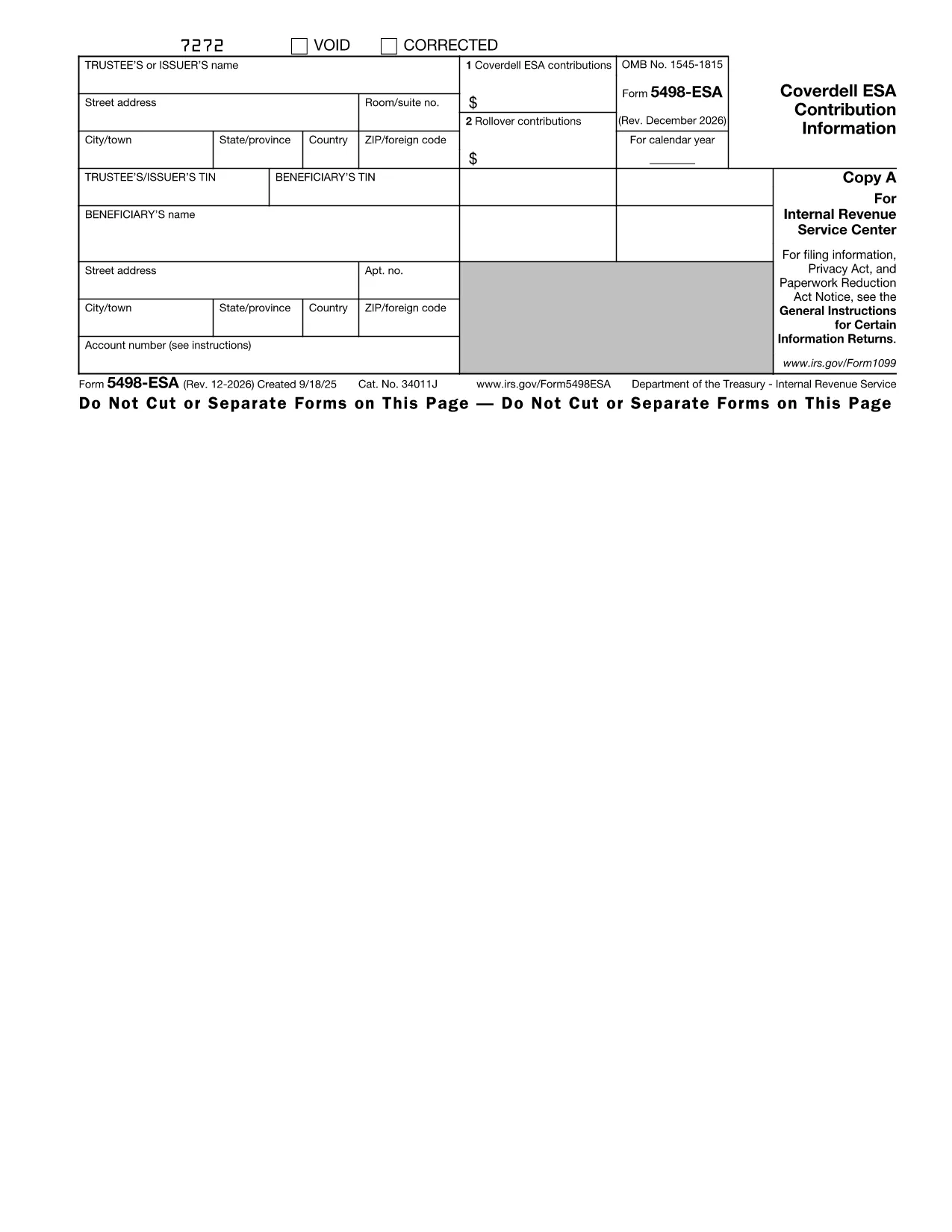
The IRS Form 5498‑ESA (Coverdell Education Savings Account Contribution Information) is the official document trustees or issuers use to report contributions, rollovers, and the year‑end fair market value of a Coverdell ESA. Accurate reporting helps the IRS track education‑savings contributions and ensures beneficiaries stay within the $2,000 annual limit.

What Is Form 5498‑ESA?

Form 5498‑ESA provides a yearly snapshot of all activity in a Coverdell ESA. It includes:

  • Trustee/issuer name, address, and TIN
  • Beneficiary name and TIN
  • Total contributions for the tax year (Box 1)
  • Rollover contributions, if any (Box 2)
  • Fair market value of the account on December 31

How to Fill Out Form 5498‑ESA Online

Instead of printing, downloading, and editing the PDF in a separate editor, simply click the "Fill out this form" button on this page. The Formize PDF Filler app will load instantly, letting you:

  1. Enter trustee and beneficiary details directly into fillable fields.
  2. Upload supporting documents if needed.
  3. Validate the data with built‑in checks that flag common mistakes.
  4. Save a completed copy or export it as a PDF for your records.

Key Deadlines and Common Errors

Deadline: Trustees must provide Copy B of Form 5498‑ESA to the beneficiary by May 31 of the year following the tax year.

Common mistakes to avoid:

  • Entering the wrong beneficiary Social Security number.
  • Reporting contributions that exceed the $2,000 limit.
  • Leaving Box 2 blank when a rollover actually occurred.
  • Failing to include the fair market value as of December 31.

Download the Fillable PDF

If you prefer to work offline, you can download the official fillable PDF directly from the IRS:

Download Form 5498‑ESA (PDF)

Why Use Formize PDF Filler?

Formize provides a secure, browser‑based environment that eliminates the need for separate PDF software. Your data never leaves the encrypted session unless you choose to save or export it. Plus, the built‑in validation helps you submit a clean, error‑free form the first time.

Ready to get started? Click the button below and let Formize guide you through every field.

upute

PITANJA
  • Who must file Form 5498‑ESA?

    The trustee or issuer of the Coverdell ESA files the form. A copy (Copy B) is provided to the beneficiary by May 31 of the following year.

  • Is Form 5498‑ESA deductible on my tax return?

    No. Contributions reported on Form 5498‑ESA are not deductible, but they are important for tracking contribution limits.

  • Can I file Form 5498‑ESA electronically?

    Yes. If you have 250 or more forms, electronic filing is required. For a single form, you can submit a paper copy or use an online filler like Formize.

  • What happens if I exceed the $2,000 contribution limit?

    Excess contributions plus earnings must be withdrawn by June 1 of the following year to avoid a 6% excise tax on the excess amount.

  • Do I need to attach any supporting documents?

    Generally, no supporting documents are attached to Form 5498‑ESA, but you should keep records of contributions and rollovers for your own files.

  • How do I correct an error on a filed Form 5498‑ESA?

    Submit a corrected Form 5498‑ESA with the label "Corrected" at the top of the form. The IRS provides instructions for filing amended information returns.

KAKO DA

Kako ispuniti Form 5498-ESA besplatno, online u 4 jednostavnih koraka:

  1. 1
    Click the Fill‑out Button
    On this page, click the "Fill out this form" button. The Formize PDF Filler will open in a new tab.
  2. 2
    Enter Required Information
    Type the trustee’s name, address, TIN, and the beneficiary’s details into the fillable fields. The form automatically moves you to the next section.
  3. 3
    Review and Validate
    Use the built‑in validation to check for missing or incorrect entries. Fix any highlighted errors before proceeding.
  4. 4
    Save or Export
    When all fields are complete, click "Save" to store a copy in your Formize account or "Export PDF" to download a finished PDF for your records.
Aplikacija Formize PDF Filler
OKO

Porezni obrasci

Form 5498-ESA je jedan od Poreznih obrazaca koji su dokumenti koji se koriste za prijavu informacija povezanih s porezima relevantnom poreznom tijelu. Postoje različite vrste poreznih obrazaca, uključujući savezne, državne i lokalne porezne obrasce, koji se mogu razlikovati ovisno o okolnostima i lokaciji poreznog obveznika.

ZNAČAJKE

PDF punilo

Najlakši način da ispunite Form 5498-ESA online

  • Brzo ispunite Form 5498-ESA
    Tražite način da brzo ispunite Form 5498-ESA online? Uz naš online besplatni PDF obrazac za popunjavanje, znat ćete kako urediti i ispuniti ovaj pdf dokument za manje od minute.
  • Jednostavan za korištenje mrežni PDF uređivač
    Dosta vam je ispisivanja PDF datoteka kako biste ih mogli uređivati ​​prije ponovnog skeniranja i slanja natrag? Uređujte PDF dokumente besplatno na mreži. Upotrijebite naš online uređivač pdf-ova kako biste uštedjeli vrijeme i papir.
  • Sjajni alati, sve platforme
    Pitate se kako ispuniti Form 5498-ESA na Macu ili možda kako koristiti PDF filer besplatno? Naši online PDF alati rade na svim platformama.
  • Sigurno skladištenje datoteka
    Dovršene datoteke "Form 5498-ESA" pohranjuju se u zaštićenu bazu podataka kojom upravlja Amazon Cloud hosting. Svoje datoteke možete izbrisati iz našeg sustava bilo kada. U svakom slučaju, te se datoteke automatski brišu nakon 24 sata.
  • Chat s Form 5498-ESA
    Razgovarajte s "Form 5498-ESA" na Chatize koji je besplatni pomoćnik za čitanje PDF-ova. Postavljajte pitanja i dobivajte odgovore od "Form 5498-ESA". Samo kliknite gornji gumb Chat with Document.

Izbriši sesiju punjenja

Izbrisati odabranu sesiju punjenja? U tom će slučaju vaš napredak u ispunjavanju obrasca biti izgubljen.

Izbriši sesiju uređivanja

Izbrisati odabranu sesiju uređivanja? U tom će slučaju vaš napredak u stvaranju i uređivanju obrasca biti izgubljen.