
Izaberi jezik

IRS Form 706 – Fillable Estate Tax Return PDF

  1. Zemlja SAD
  2. Jezik Engleski
  3. Aktivnost Porezi
  4. Odjel Porezna uprava
IRS Form 706 – Fillable Estate Tax Return PDF

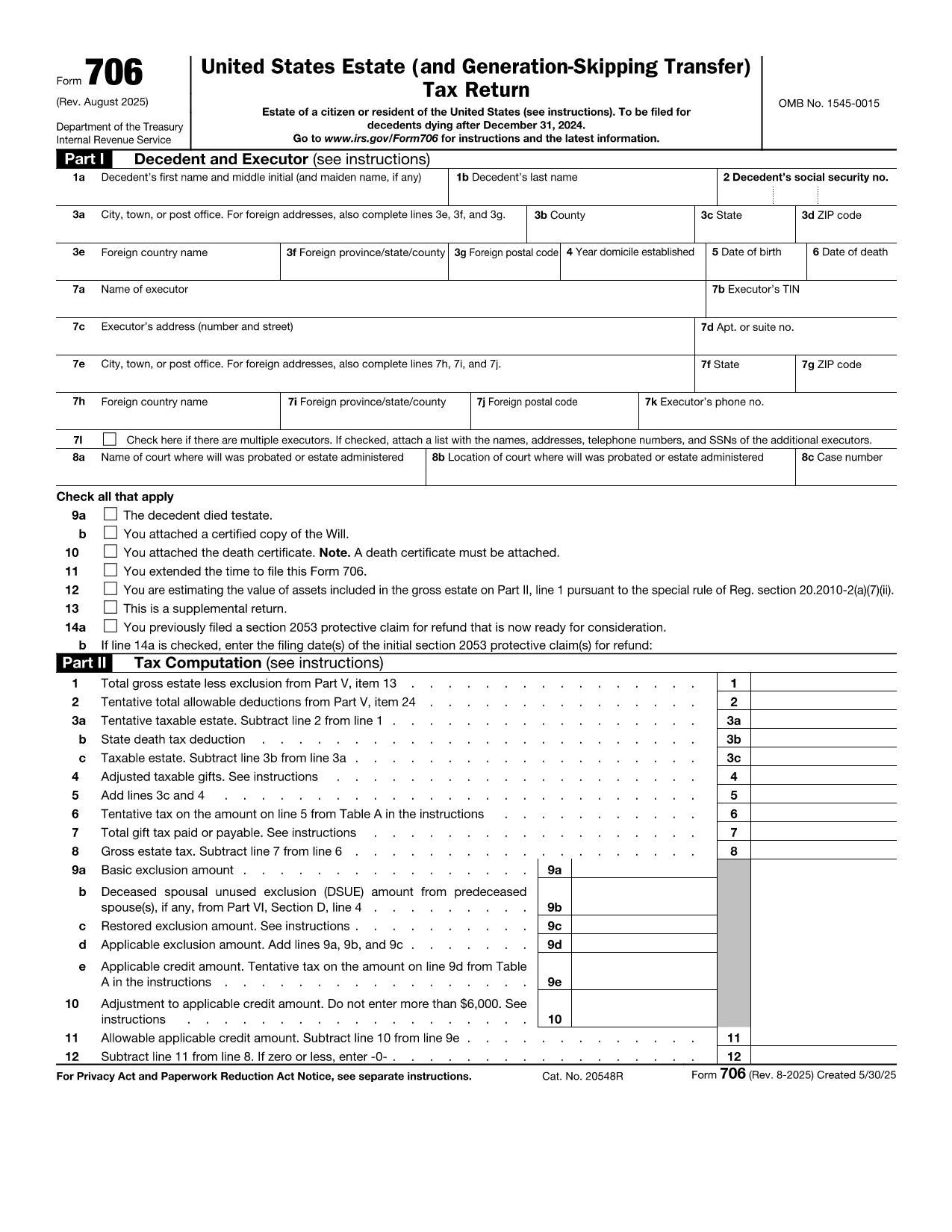
Form 706 is the United States federal estate (and generation‑skipping transfer) tax return. Executors use it to report the value of a decedent’s estate, claim deductions, and calculate any estate tax owed. The official fillable PDF is now hosted on Formize, allowing you to complete the form directly in your browser without installing additional software.

What Is IRS Form 706?

Form 706 must be filed when the gross estate exceeds the annual exemption limit (e.g., $12.92 million for 2023). It includes sections for:

  • Decedent’s personal information
  • Gross estate valuation
  • Allowable deductions (funeral expenses, state death taxes, charitable gifts, etc.)
  • Tax computation and credits
  • Schedules for assets, liabilities, and generation‑skipping transfers

Key Features of the Fillable PDF

  • Interactive fields that auto‑advance as you type
  • Built‑in calculations for taxable estate and tax due
  • Easy navigation with a table of contents
  • Direct export to PDF for printing or electronic filing

How to Complete Form 706 with Formize

Instead of downloading the PDF and opening a separate editor, simply click the "Fill out this form" button on this page. The Formize PDF Filler app will load in seconds, and you can start entering data immediately.

Common Mistakes to Avoid

  • Missing signatures: Both the executor and any paid preparer must sign.
  • Incorrect exemption amount: Verify the exemption limit for the year of death.
  • Omitting Schedule R‑1: Required when state death taxes are paid.
  • Late filing: File within nine months of death or request a six‑month extension.

Where to Submit the Completed Form

Mail the signed Form 706 to the address listed in the official instructions (based on the estate’s location). If you are filing electronically, use the IRS e‑file system for estate tax returns.

upute

PITANJA
  • Who must file IRS Form 706?

    The executor (or personal representative) of a decedent’s estate must file Form 706 when the gross estate exceeds the federal exemption amount for the year of death.

  • What is the filing deadline for Form 706?

    Form 706 is due nine months after the date of death. An automatic six‑month extension can be requested, but any tax owed must be paid by the original deadline.

  • Can I file Form 706 electronically?

    Yes. After completing the fillable PDF, you can submit the form through the IRS’s e‑file system for estate tax returns.

  • Do I need a professional to complete Form 706?

    While the form is complex, the fillable PDF with built‑in calculations simplifies the process. However, many executors still consult a tax professional for large or complicated estates.

  • What if the estate is below the exemption limit?

    If the gross estate is less than the exemption amount, you are not required to file Form 706, but you should keep records in case the IRS requests them later.

  • How are generation‑skipping transfers reported?

    Schedule G of Form 706 captures generation‑skipping transfer (GST) tax information. The fillable PDF includes prompts to enter GST taxable amounts and credits.

  • What deductions can I claim on Form 706?

    Common deductions include funeral expenses, administrative costs, state death taxes paid, charitable contributions, and certain mortgage interest.

  • Is there a penalty for filing Form 706 late?

    Yes. Late filing may result in a penalty of 5% of the tax due for each month the return is late, up to a maximum of 25%.

KAKO DA

Kako ispuniti Form 706 besplatno, online u 5 jednostavnih koraka:

  1. 1
    Open the Fillable Form
    Click the "Fill out this form" button on the page. The Formize PDF Filler will launch in a new tab.
  2. 2
    Enter Estate Information
    Start with the decedent’s name, SSN, and date of death. Then fill in the gross estate values and any deductions.
  3. 3
    Review Calculations
    The filler automatically updates the taxable estate and tax due. Verify the numbers against your supporting documents.
  4. 4
    Add Signatures
    Use the built‑in signature tool to sign as the executor and, if applicable, the paid preparer.
  5. 5
    Save and Export
    When finished, click "Export PDF". Save the file to your computer, print a copy, or submit electronically as instructed.
Aplikacija Formize PDF Filler
OKO

Porezni obrasci

Form 706 je jedan od poreznih obrazaca koji su dokumenti koji se koriste za prijavu informacija o prihodima pojedinca ili tvrtke, odbicima i poreznim obvezama relevantnim poreznim vlastima. Ovi su obrasci nužni za usklađivanje s poreznim zakonima i ispunjavanje poreznih obveza. Porezni obrasci razlikuju se ovisno o zemlji i posebnim poreznim zahtjevima. Evo nekih uobičajenih vrsta poreznih obrazaca:

Individualni porezni obrasci: Ove obrasce koriste pojedinačni porezni obveznici za prijavu osobnog dohotka i traženje odbitaka, kredita i izuzeća. Primjeri uključuju obrazac 1040 u Sjedinjenim Američkim Državama ili obrazac povrata poreza za samoprocjenu u Ujedinjenom Kraljevstvu.

Poslovni porezni obrasci: Poslovni porezni obrasci koriste se od strane tvrtki, partnerstava ili samozaposlenih pojedinaca za prijavu poslovnih prihoda, troškova i drugih podataka povezanih s porezom. Primjeri uključuju obrazac iz Priloga C (Dobit ili gubitak od poslovanja) u Sjedinjenim Državama ili obrazac CT600 (Povrat poreza tvrtke) u Ujedinjenom Kraljevstvu.

Obrasci za porez na plaće: Ove obrasce koriste poslodavci za prijavu plaća, nadnica i poreza zadržanih na plaćama svojih zaposlenika. Primjeri uključuju obrazac W-2 u Sjedinjenim Državama ili obrazac P60 u Ujedinjenom Kraljevstvu.

Obrasci za porez na promet: tvrtke koriste obrasce za porez na promet za prijavu i uplatu poreza na promet prikupljenog na oporezivu robu ili usluge. Posebni obrasci poreza na promet razlikuju se ovisno o jurisdikciji.

Obrasci za porez na dodanu vrijednost (PDV): PDV obrasci koriste se u zemljama koje nameću porez na dodanu vrijednost za prijavu i uplatu PDV-a prikupljenog od prodaje i traženje PDV kredita za kupnje. Primjeri uključuju obrasce za povrat PDV-a koji se koriste u mnogim zemljama.

Procijenjeni porezni obrasci: Procijenjeni porezni obrasci koriste se za prijavu i plaćanje procijenjenih poreza na prihod koji ne podliježe zadržavanju, kao što je prihod od samozapošljavanja ili prihod od ulaganja.

Ovo je samo nekoliko primjera od brojnih poreznih oblika koji mogu postojati. Konkretni potrebni obrasci ovise o poreznim zakonima i propisima u vašoj zemlji ili jurisdikciji. Važno je konzultirati se sa smjernicama porezne uprave ili potražiti stručni savjet kako biste utvrdili koji su obrasci primjenjivi u vašoj situaciji.

ZNAČAJKE

PDF punilo

Najlakši način da ispunite Form 706 online

  • Brzo ispunite Form 706
    Tražite način da brzo ispunite Form 706 online? Uz naš online besplatni PDF obrazac za popunjavanje, znat ćete kako urediti i ispuniti ovaj pdf dokument za manje od minute.
  • Jednostavan za korištenje mrežni PDF uređivač
    Dosta vam je ispisivanja PDF datoteka kako biste ih mogli uređivati ​​prije ponovnog skeniranja i slanja natrag? Uređujte PDF dokumente besplatno na mreži. Upotrijebite naš online uređivač pdf-ova kako biste uštedjeli vrijeme i papir.
  • Sjajni alati, sve platforme
    Pitate se kako ispuniti Form 706 na Macu ili možda kako koristiti PDF filer besplatno? Naši online PDF alati rade na svim platformama.
  • Sigurno skladištenje datoteka
    Dovršene datoteke "Form 706" pohranjuju se u zaštićenu bazu podataka kojom upravlja Amazon Cloud hosting. Svoje datoteke možete izbrisati iz našeg sustava bilo kada. U svakom slučaju, te se datoteke automatski brišu nakon 24 sata.
  • Chat s Form 706
    Razgovarajte s "Form 706" na Chatize koji je besplatni pomoćnik za čitanje PDF-ova. Postavljajte pitanja i dobivajte odgovore od "Form 706". Samo kliknite gornji gumb Chat with Document.

Izbriši sesiju punjenja

Izbrisati odabranu sesiju punjenja? U tom će slučaju vaš napredak u ispunjavanju obrasca biti izgubljen.

Izbriši sesiju uređivanja

Izbrisati odabranu sesiju uređivanja? U tom će slučaju vaš napredak u stvaranju i uređivanju obrasca biti izgubljen.