
Izaberi jezik

IRS Form 8948 – Preparer Explanation for Not Filing Electronically (Fillable PDF)

  1. Zemlja SAD
  2. Jezik Engleski
  3. Aktivnost Porezi
  4. Odjel Porezna uprava
IRS Form 8948 – Preparer Explanation for Not Filing Electronically (Fillable PDF)

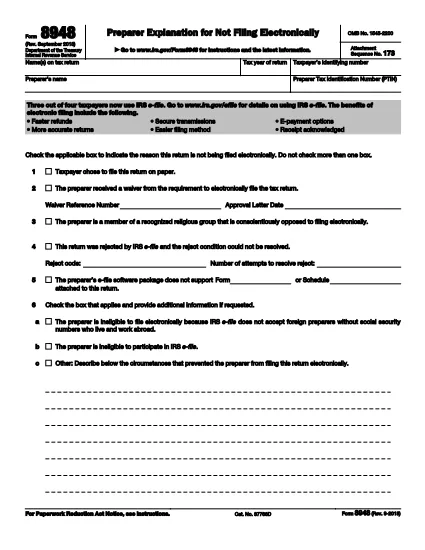
Form 8948, officially titled Preparer Explanation for Not Filing Electronically, is a one‑page IRS form that tax preparers must attach to a paper‑filed return when the electronic filing requirement cannot be met. The form provides a brief, standardized explanation for the paper‑filing exception.

What Is Form 8948?

The form captures basic taxpayer information, the preparer’s PTIN, and the specific reason why the return is being filed on paper instead of through the IRS e‑file system. It is required for most paid preparers who are otherwise obligated to e‑file.

When and Why Is Form 8948 Required?

  • The preparer received an approved e‑file hardship waiver.
  • The taxpayer elected to file a paper return.
  • The preparer’s software does not support a required schedule or form.
  • The preparer faced repeated, unresolvable e‑file rejections.
  • Religious or other qualifying exemptions prevent electronic filing.

If none of these exceptions apply, the preparer must file the return electronically.

How to Complete Form 8948 Online

With Formize you can fill out Form 8948 directly in your browser—no PDF editor needed. Follow these simple steps:

  1. Click the "Fill out this form" button on this page.
  2. The Formize PDF Filler app loads instantly.
  3. Select each highlighted field and type the required data (taxpayer name, SSN/TIN, tax year, preparer PTIN, and the applicable reason).
  4. Use the drop‑down menus to choose the correct exemption code.
  5. Review the completed form, add an electronic signature if required, and click Submit or Download for your records.

Common Mistakes to Avoid

  • Leaving the reason box unchecked: The IRS will reject the return.
  • Using the taxpayer’s choice box incorrectly: Form 8948 is not a "taxpayer choice" statement.
  • Missing the preparer’s PTIN: Every paid preparer must include a valid PTIN.
  • Incorrect tax year: Verify the year matches the return you are filing.

Download & Print Options

If you prefer a hard‑copy version, you can download the official PDF below. The file is the same document used by the IRS and is fully fillable when opened in a PDF editor.

Download IRS Form 8948 (PDF)

PITANJA
  • Who must file Form 8948?

    Any paid tax preparer who is required to e‑file but cannot do so for an approved reason must attach Form 8948 to the paper return.

  • Can I use Form 8948 for a personal return I file myself?

    No. Form 8948 is only for paid preparers. Individual taxpayers who choose to file on paper do not need this form.

  • What is the difference between the "taxpayer chose paper" box and the "hardship waiver" box?

    The taxpayer‑chosen box indicates the client elected a paper return, which is not a valid reason under IRS rules. The hardship waiver box is used when the preparer has an approved waiver from the IRS.

  • Do I need to mail Form 8948 separately?

    No. Form 8948 must be attached to the front of the paper return before mailing it to the IRS.

  • Is an electronic signature accepted on Form 8948?

    Yes. The IRS allows an electronic signature when the form is completed using a certified e‑signature solution like Formize.

  • Where can I find the official PDF for Form 8948?

    The official, up‑to‑date PDF is available from the IRS at https://www.irs.gov/pub/irs-pdf/f8948.pdf.

  • What should I do if I select the wrong reason on Form 8948?

    Correct the mistake before attaching the form. An incorrect reason can cause the entire return to be rejected by the IRS.

KAKO DA

Kako ispuniti Form 8948 besplatno, online u 4 jednostavnih koraka:

  1. 1
    Open the Fillable Form
    Click the "Fill out this form" button on the page to launch the Formize PDF Filler.
  2. 2
    Enter Your Information
    Select each highlighted field and type the required data – taxpayer name, SSN/TIN, tax year, preparer PTIN, and the reason for paper filing.
  3. 3
    Review and Sign
    Check all entries for accuracy, add an electronic signature if needed, and confirm the selected exemption code.
  4. 4
    Save or Submit
    Click "Download" to save a copy for your records or "Submit" to attach the form to your paper return.
Aplikacija Formize PDF Filler
OKO

Savezni porezni obrasci

Form 8948 jedan je od saveznih poreznih obrazaca koji su dokumenti koji se koriste za prijavu i podnošenje saveznih poreza na dohodak Poreznoj upravi (IRS) u Sjedinjenim Državama. Ove obrasce koriste pojedinci, tvrtke i organizacije za prijavu svojih prihoda, odbitaka i drugih relevantnih informacija potrebnih za izračun saveznih poreznih obveza.

Najčešće korišten savezni porezni obrazac je obrazac 1040, koji koriste pojedinačni porezni obveznici za prijavu poreza na dohodak. Drugi često korišteni obrasci uključuju Obrazac 1065 za partnerstva, Obrazac 1120 za korporacije i Obrazac 990 za organizacije oslobođene plaćanja poreza.

Savezni porezni obrasci obično zahtijevaju od poreznih obveznika da prijave različite izvore prihoda, kao što su nadnice, plaće i napojnice, kao i prihod od ulaganja, iznajmljivanja nekretnina i drugih izvora. Obrasci također omogućuju poreznim obveznicima traženje odbitaka i kredita za razne troškove, kao što su dobrotvorni prilozi, kamate na hipotekarni kredit i troškovi zdravstvene zaštite.

Važno je podnijeti savezne porezne obrasce točno i na vrijeme, jer nepoštivanje toga može rezultirati kaznama i kamatama od Porezne uprave.

ZNAČAJKE

PDF punilo

Najlakši način da ispunite Form 8948 online

  • Brzo ispunite Form 8948
    Tražite način da brzo ispunite Form 8948 online? Uz naš online besplatni PDF obrazac za popunjavanje, znat ćete kako urediti i ispuniti ovaj pdf dokument za manje od minute.
  • Jednostavan za korištenje mrežni PDF uređivač
    Dosta vam je ispisivanja PDF datoteka kako biste ih mogli uređivati ​​prije ponovnog skeniranja i slanja natrag? Uređujte PDF dokumente besplatno na mreži. Upotrijebite naš online uređivač pdf-ova kako biste uštedjeli vrijeme i papir.
  • Sjajni alati, sve platforme
    Pitate se kako ispuniti Form 8948 na Macu ili možda kako koristiti PDF filer besplatno? Naši online PDF alati rade na svim platformama.
  • Sigurno skladištenje datoteka
    Dovršene datoteke "Form 8948" pohranjuju se u zaštićenu bazu podataka kojom upravlja Amazon Cloud hosting. Svoje datoteke možete izbrisati iz našeg sustava bilo kada. U svakom slučaju, te se datoteke automatski brišu nakon 24 sata.
  • Chat s Form 8948
    Razgovarajte s "Form 8948" na Chatize koji je besplatni pomoćnik za čitanje PDF-ova. Postavljajte pitanja i dobivajte odgovore od "Form 8948". Samo kliknite gornji gumb Chat with Document.

Izbriši sesiju punjenja

Izbrisati odabranu sesiju punjenja? U tom će slučaju vaš napredak u ispunjavanju obrasca biti izgubljen.

Izbriši sesiju uređivanja

Izbrisati odabranu sesiju uređivanja? U tom će slučaju vaš napredak u stvaranju i uređivanju obrasca biti izgubljen.