Izaberi jezik

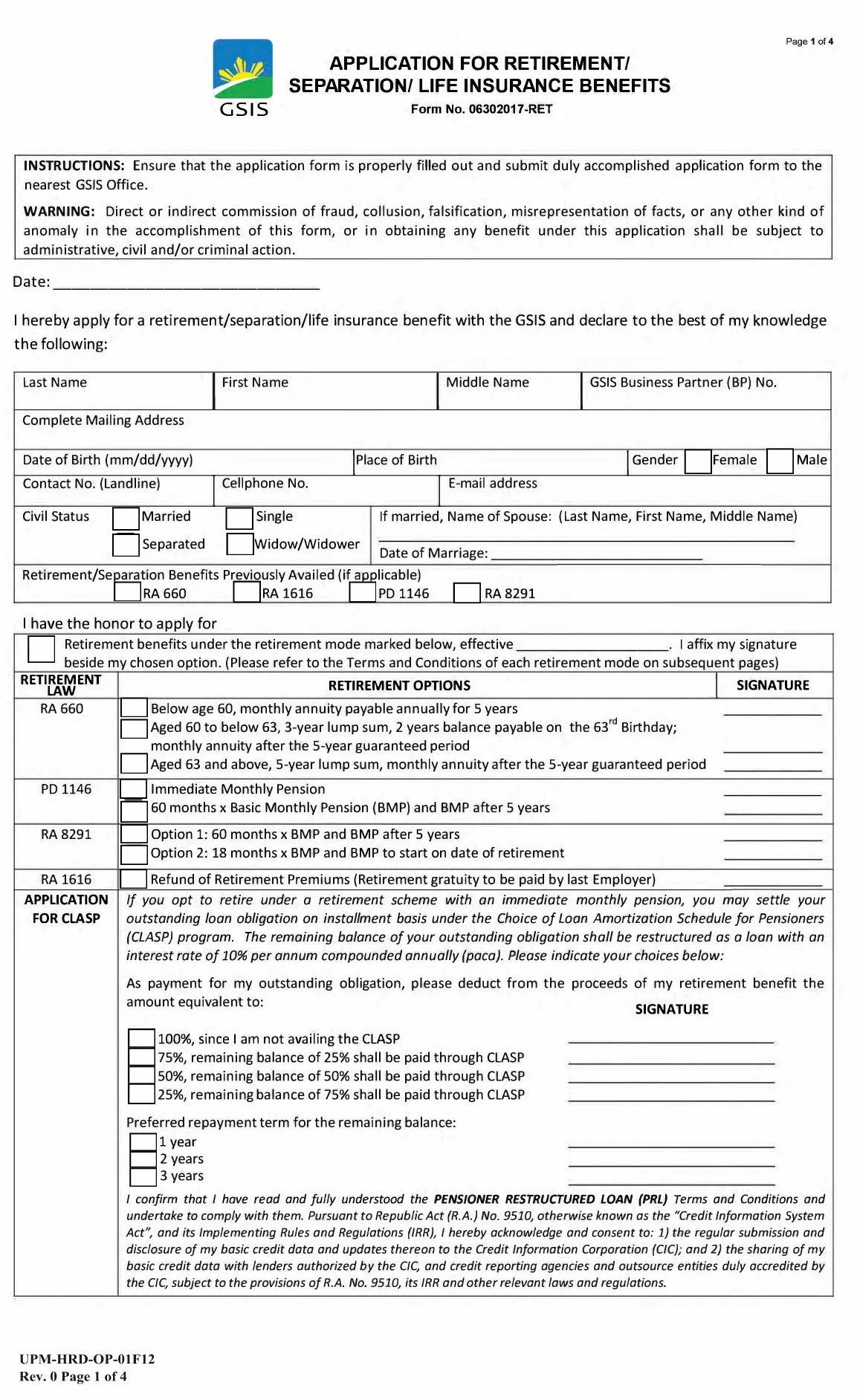
GSIS Application Form – Retirement, Separation & Life Insurance Benefits

  1. Zemlja Philippines
  2. Jezik Engleski
  3. Odjel GSIS
  4. Aktivnost Retirement Benefits
GSIS Application Form – Retirement, Separation & Life Insurance Benefits

The GSIS Application Form (Form No. 06302017‑RET) is the official document used by members of the Government Service Insurance System (GSIS) to apply for retirement, separation, or life insurance benefits. This fillable PDF lets you complete the entire application from any device without printing or scanning.

What Is the GSIS Application Form?

This form collects personal data, employment history, and details about the type of benefit you are claiming. It is required for:

  • Retirement benefits
  • Separation benefits
  • Life insurance benefits for eligible dependents

How to Complete the Form Online

Instead of downloading the PDF and using a separate editor, simply click the "Fill out this form" button on this page. The Formize PDF Filler app will load the document in your browser, allowing you to type, check boxes, and sign electronically.

Common Mistakes to Avoid

  • Leaving required fields blank – the filler will highlight missing information before you can submit.
  • Using the wrong date format – GSIS requires DD/MM/YYYY.
  • Submitting an unsigned form – add your digital signature in the designated area.
  • Uploading an outdated version – always use the latest PDF linked on this page.

Where to Submit Your Completed Form

After you finish filling out the form, download the completed PDF and bring it to the nearest GSIS office, or email it to the address listed on the last page of the form. Keep a copy for your records.

Need help? Review the FAQ section below or contact your local GSIS branch.

PITANJA
  • Who can use the GSIS Application Form?

    All active and former GSIS members who are applying for retirement, separation, or life insurance benefits for themselves or eligible dependents.

  • Do I need to print the form after filling it online?

    No. The fillable PDF can be saved digitally and submitted electronically or printed only if your local GSIS office specifically requests a hard copy.

  • What documents must I attach with the completed form?

    Typically you need a valid ID, PSA birth certificate, and proof of employment. Check the checklist on the last page of the form for the exact requirements.

  • Can I edit the form after I have downloaded it?

    Yes. Open the saved PDF again with the Formize PDF Filler or any compatible PDF editor to make changes before final submission.

  • How long does it take for GSIS to process my application?

    Processing time varies but generally takes 30‑45 days from the date of receipt, provided all required documents are complete.

  • Is there a fee for filing the application?

    No filing fee is required for the GSIS Application Form. However, certain benefit types may have associated service charges.

  • What if I make a mistake on the form?

    You can correct any errors by reopening the saved PDF in the Formize filler, updating the fields, and resubmitting the corrected version.

KAKO DA

Kako ispuniti GSIS application form besplatno, online u 5 jednostavnih koraka:

  1. 1
    Open the Fillable Form
    Click the "Fill out this form" button on the page. The Formize PDF Filler will open the GSIS application directly in your browser.
  2. 2
    Enter Your Information
    Type your personal details, employment history, and select the benefit type. Required fields are marked with an asterisk.
  3. 3
    Add Your Digital Signature
    Use the signature field to draw or upload your electronic signature. This satisfies the GSIS signing requirement.
  4. 4
    Save and Download
    When all fields are complete, click "Save & Download" to store a copy on your device.
  5. 5
    Submit to GSIS
    Take the saved PDF to the nearest GSIS office or email it as instructed on the last page of the form.
Aplikacija Formize PDF Filler
OKO

GSIS application form predložak

S tradicionalnim skupom značajki za pregled i ispunjavanje PDF dokumenta, u kombinaciji s prednostima web aplikacije i responzivnog izgleda, možete ispuniti GSIS application form u nekoliko minuta.

ZNAČAJKE

PDF punilo

Najlakši način da ispunite GSIS application form online

  • Brzo ispunite GSIS application form
    Tražite način da brzo ispunite GSIS application form online? Uz naš online besplatni PDF obrazac za popunjavanje, znat ćete kako urediti i ispuniti ovaj pdf dokument za manje od minute.
  • Jednostavan za korištenje mrežni PDF uređivač
    Dosta vam je ispisivanja PDF datoteka kako biste ih mogli uređivati ​​prije ponovnog skeniranja i slanja natrag? Uređujte PDF dokumente besplatno na mreži. Upotrijebite naš online uređivač pdf-ova kako biste uštedjeli vrijeme i papir.
  • Sjajni alati, sve platforme
    Pitate se kako ispuniti GSIS application form na Macu ili možda kako koristiti PDF filer besplatno? Naši online PDF alati rade na svim platformama.
  • Sigurno skladištenje datoteka
    Dovršene datoteke "GSIS application form" pohranjuju se u zaštićenu bazu podataka kojom upravlja Amazon Cloud hosting. Svoje datoteke možete izbrisati iz našeg sustava bilo kada. U svakom slučaju, te se datoteke automatski brišu nakon 24 sata.
  • Chat s GSIS application form
    Razgovarajte s "GSIS application form" na Chatize koji je besplatni pomoćnik za čitanje PDF-ova. Postavljajte pitanja i dobivajte odgovore od "GSIS application form". Samo kliknite gornji gumb Chat with Document.

Izbriši sesiju punjenja

Izbrisati odabranu sesiju punjenja? U tom će slučaju vaš napredak u ispunjavanju obrasca biti izgubljen.

Izbriši sesiju uređivanja

Izbrisati odabranu sesiju uređivanja? U tom će slučaju vaš napredak u stvaranju i uređivanju obrasca biti izgubljen.