Izaberi jezik

Pag‑IBIG Loyalty Card Application Form (Fillable PDF)

  1. Jezik Engleski
  2. Zemlja Philippines
  3. Aktivnost Housing and Savings
  4. Odjel Pag‑IBIG Fund
Pag‑IBIG Loyalty Card Application Form (Fillable PDF)

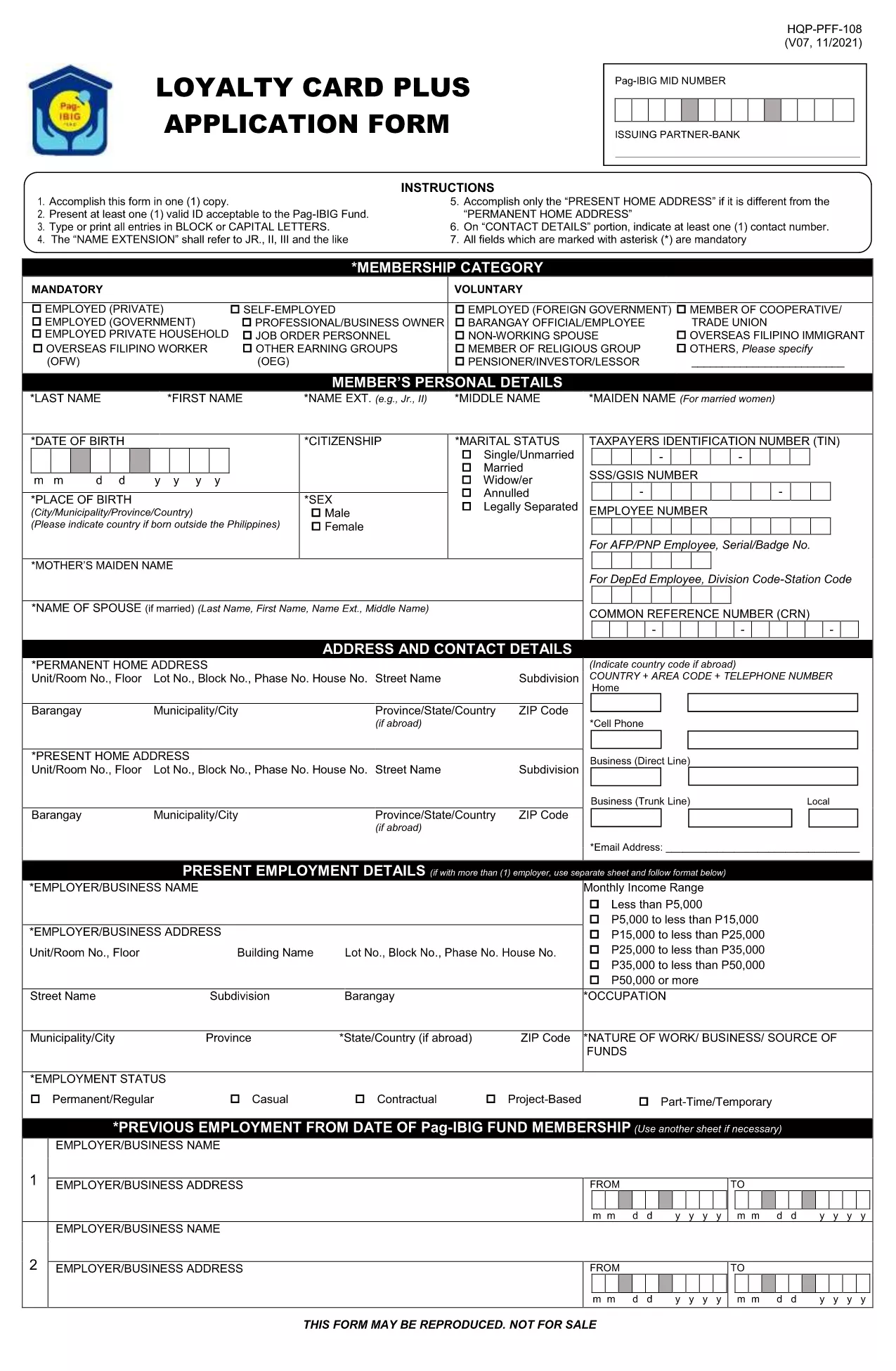
The Pag‑IBIG Loyalty Card rewards members for their consistent contributions and participation in the fund’s programs. To obtain your card, you need to complete the official Pag‑IBIG Loyalty Card Application Form, which is now available as a fillable PDF.

What is the Pag‑IBIG Loyalty Card?

The Loyalty Card is a voluntary benefit that offers exclusive discounts, priority service, and additional loan privileges to eligible Pag‑IBIG members. Once approved, the card can be used at partner merchants and for special Pag‑IBIG events.

How to Fill the Loyalty Card Application Online

Instead of downloading the PDF and opening it in a separate editor, simply click the "Fill out this form" button on this page. The Formize PDF Filler app will load the form directly in your browser, allowing you to type, select, and sign without any extra software.

Key Sections of the Form

  • Personal Information – Name, birthdate, and Pag‑IBIG Membership ID.
  • Contact Details – Current address, phone number, and email.
  • Employment & Income – Employer name, position, and monthly salary.
  • Authorization – Consent for Pag‑IBIG to verify your credit standing and eligibility.

Common Mistakes to Avoid

  • Leaving mandatory fields blank – they are marked with an asterisk (*).
  • Using an outdated Membership ID – verify your ID on the Pag‑IBIG portal first.
  • Submitting illegible signatures – the online filler lets you type a digital signature or draw one with your mouse.
  • Incorrect email format – a valid email is required for confirmation.

Download & Submit the Form

After completing all sections, click Submit. The filled PDF will be generated automatically. Save a copy for your records and follow the instructions on the confirmation page to submit the hard‑copy to your nearest Pag‑IBIG office if required.

Need the original PDF? Download it here for offline use.

PITANJA
  • Do I need a PDF editor to fill the Loyalty Card form?

    No. The Formize PDF Filler works directly in your browser, so no additional software is required.

  • Is the Loyalty Card Application free of charge?

    Yes. There is no fee to apply for the Pag‑IBIG Loyalty Card. Any charges would only apply if you request a hard‑copy card at a Pag‑IBIG office.

  • What documents are required with the application?

    Generally, a valid government ID and your Pag‑IBIG Membership ID are needed. Check the confirmation page for any additional requirements.

  • Can I edit the form after I have submitted it?

    Once you click "Submit," the form is locked. If you notice an error, you must fill out a new application.

  • How long does it take to get the Loyalty Card after approval?

    Processing typically takes 7‑10 business days after you submit the completed form and required documents.

  • Is the online filler secure?

    Yes. Formize uses SSL encryption, and your data is stored only temporarily for the duration of the session.

  • Can I print the filled form before submitting?

    Absolutely. After completing the form, click "Download" to save a printable copy.

  • What if I don’t have internet access to use the online filler?

    You can download the PDF from the link provided, fill it out manually, and submit it at any Pag‑IBIG office.

KAKO DA

Kako ispuniti Pag‑IBIG loyalty card besplatno, online u 5 jednostavnih koraka:

  1. 1
    Click the Fill‑out Button
    On this page, press the "Fill out this form" button. The Formize PDF Filler will open the Loyalty Card Application directly in your browser.
  2. 2
    Wait for the Filler to Load
    A few seconds may pass while the filler loads. This is normal; the app prepares the fillable fields for you.
  3. 3
    Complete Each Section
    Enter your personal, contact, and employment details. Use the dropdowns and checkboxes where provided.
  4. 4
    Review and Sign
    Double‑check all entries, add your digital signature using the signature field, and click "Save".
  5. 5
    Download or Submit
    After saving, download the completed PDF for your records or follow on‑screen instructions to submit it to your Pag‑IBIG office.
Aplikacija Formize PDF Filler
OKO

Pag‑IBIG loyalty card predložak

S tradicionalnim skupom značajki za pregled i ispunjavanje PDF dokumenta, u kombinaciji s prednostima web aplikacije i responzivnog izgleda, možete ispuniti Pag‑IBIG loyalty card u nekoliko minuta.

ZNAČAJKE

PDF punilo

Najlakši način da ispunite Pag‑IBIG loyalty card online

  • Brzo ispunite Pag‑IBIG loyalty card
    Tražite način da brzo ispunite Pag‑IBIG loyalty card online? Uz naš online besplatni PDF obrazac za popunjavanje, znat ćete kako urediti i ispuniti ovaj pdf dokument za manje od minute.
  • Jednostavan za korištenje mrežni PDF uređivač
    Dosta vam je ispisivanja PDF datoteka kako biste ih mogli uređivati ​​prije ponovnog skeniranja i slanja natrag? Uređujte PDF dokumente besplatno na mreži. Upotrijebite naš online uređivač pdf-ova kako biste uštedjeli vrijeme i papir.
  • Sjajni alati, sve platforme
    Pitate se kako ispuniti Pag‑IBIG loyalty card na Macu ili možda kako koristiti PDF filer besplatno? Naši online PDF alati rade na svim platformama.
  • Sigurno skladištenje datoteka
    Dovršene datoteke "Pag‑IBIG loyalty card" pohranjuju se u zaštićenu bazu podataka kojom upravlja Amazon Cloud hosting. Svoje datoteke možete izbrisati iz našeg sustava bilo kada. U svakom slučaju, te se datoteke automatski brišu nakon 24 sata.
  • Chat s Pag‑IBIG loyalty card
    Razgovarajte s "Pag‑IBIG loyalty card" na Chatize koji je besplatni pomoćnik za čitanje PDF-ova. Postavljajte pitanja i dobivajte odgovore od "Pag‑IBIG loyalty card". Samo kliknite gornji gumb Chat with Document.

Izbriši sesiju punjenja

Izbrisati odabranu sesiju punjenja? U tom će slučaju vaš napredak u ispunjavanju obrasca biti izgubljen.

Izbriši sesiju uređivanja

Izbrisati odabranu sesiju uređivanja? U tom će slučaju vaš napredak u stvaranju i uređivanju obrasca biti izgubljen.