
Izaberi jezik

South Africa DHA‑529 Application Form – Fillable PDF Online

  1. Zemlja South Africa
  2. Jezik Engleski
  3. Odjel Home Affairs
  4. Aktivnost Državljanstvo
South Africa DHA‑529 Application Form – Fillable PDF Online

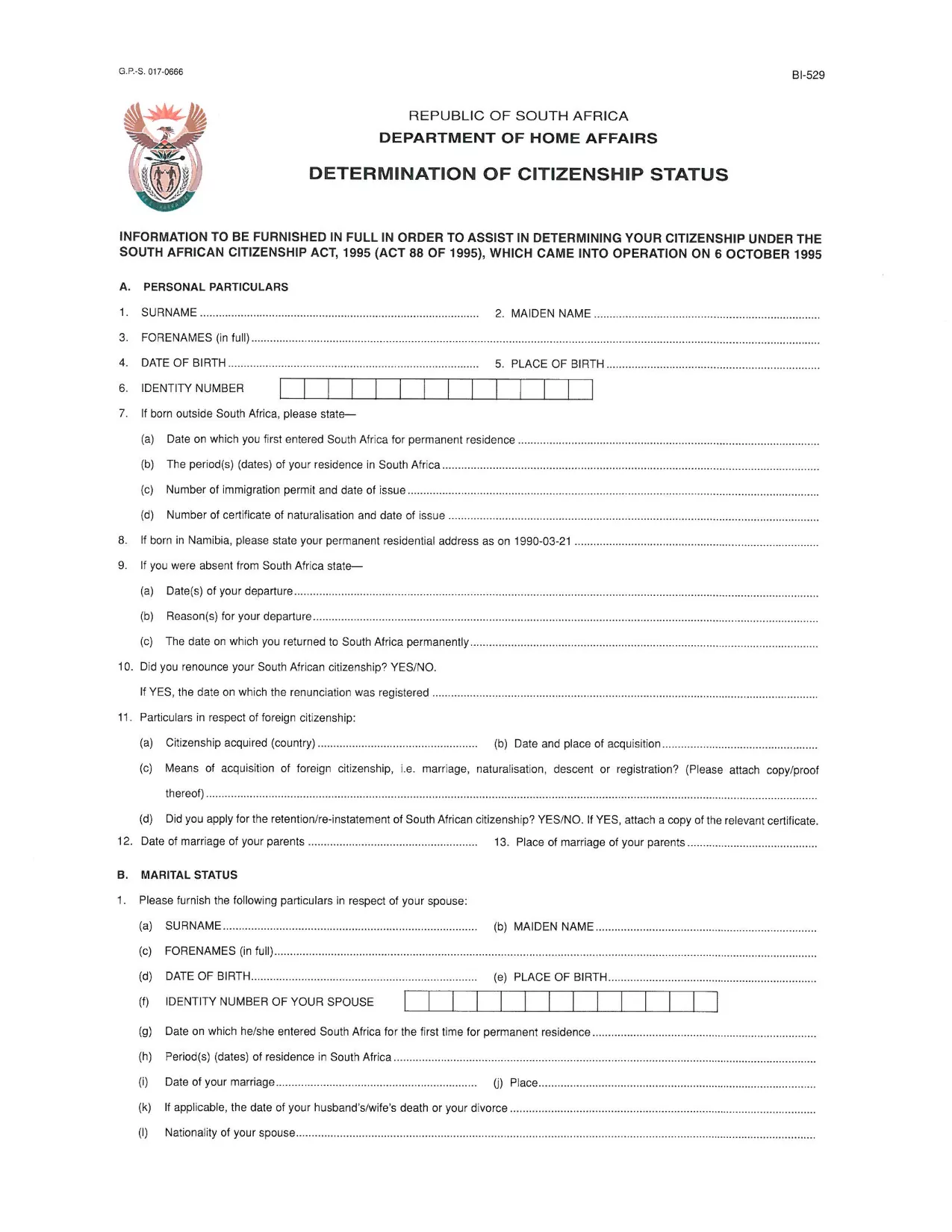
The DHA‑529 is the official South African Home Affairs form used to determine citizenship status, request a birth certificate, or submit parental consent affidavits. Whether you need it for a passport, naturalisation, or other civil services, you can now fill it out directly on our site – no Adobe Acrobat required.

What Is the DHA‑529 Application Form?

This form is issued by the Department of Home Affairs (DHA) and is commonly referred to as the “Application for a Certificate of Naturalisation” or “Citizenship Determination” form. It is required for South African citizens and residents who need to prove or change their citizenship status.

How to Complete the Form Online

Follow these simple steps to fill the form instantly:

  1. Click the "Fill out this form" button below.
  2. Wait a few seconds while the Formize PDF Filler app loads securely in your browser.
  3. Enter your information in each fillable field – the interface highlights required sections.
  4. Review the completed form, then click "Save & Download" to get a PDF copy.
  5. Print or submit the PDF electronically as instructed by Home Affairs.

Common Mistakes to Avoid

  • Leaving required fields blank – the filler will flag missing data before you can save.
  • Using an outdated version – always use the latest PDF linked on this page.
  • Incorrect dates or ID numbers – double‑check against your official documents.
  • Signing with a stylus or handwritten signature on the PDF – use the digital signature field provided.

Where to Submit the Completed Form

After downloading the filled PDF, you can:

  • Visit your nearest Department of Home Affairs office.
  • Mail the form to the address indicated on the document.
  • Upload it via the e‑services portal if you have a registered account.

Need help? The Department’s website provides contact details for each regional office.

PITANJA
  • Do I need Adobe Acrobat to fill the DHA‑529 form?

    No. Our online Formize PDF Filler lets you complete the form directly in your browser without any additional software.

  • Is the PDF version on this page the latest one?

    Yes. We regularly update the link to ensure you always download the current DHA‑529 form.

  • Can I save my progress and finish later?

    The filler allows you to download a partially completed PDF, which you can reopen later in any PDF reader to finish.

  • What if I make a mistake after downloading?

    You can re‑open the saved PDF in the Formize filler, correct the error, and download a new version.

  • How do I submit the completed form electronically?

    If you have a Home Affairs e‑services account, you can upload the filled PDF through the portal. Otherwise, print and deliver it in person.

  • Is my personal data safe while using the online filler?

    Yes. The Formize PDF Filler runs locally in your browser; no data is stored on our servers.

KAKO DA

Kako ispuniti application form co za besplatno, online u 5 jednostavnih koraka:

  1. 1
    Click the Fill Button
    Press the "Fill out this form" button on the page to launch the Formize PDF Filler.
  2. 2
    Wait for the Filler to Load
    The secure filler loads in seconds. No download or installation is required.
  3. 3
    Enter Your Information
    Complete each highlighted field. Required fields are marked with an asterisk.
  4. 4
    Review and Save
    Check all entries, then click "Save & Download" to get a completed PDF.
  5. 5
    Submit to Home Affairs
    Print or upload the saved PDF according to the instructions on the form.
Aplikacija Formize PDF Filler
OKO

Obrasci za državljanstvo

application form co za je jedan od obrazaca za državljanstvo koji su dokumenti koji se koriste za podnošenje zahtjeva za državljanstvo u nekoj zemlji. Točni obrasci i zahtjevi za državljanstvo razlikuju se od zemlje do države, ali općenito, proces uključuje davanje osobnih podataka i dokaza o ispunjavanju uvjeta za državljanstvo.

U Sjedinjenim Državama najčešći obrazac za državljanstvo je N-400 zahtjev za naturalizaciju. Ovaj obrazac koriste zakoniti stalni stanovnici (imatelji zelene karte) za podnošenje zahtjeva za državljanstvo SAD-a. U obrascu se traže osobni podaci kao što su ime, datum rođenja i podaci za kontakt, kao i podaci o imigracijskom statusu podnositelja zahtjeva, kriminalnoj povijesti i drugim zahtjevima za ispunjavanje uvjeta.

Druge zemlje mogu imati različite oblike i zahtjeve za državljanstvo, ali osnovni proces obično uključuje pružanje informacija o podnošenju zahtjeva i ispunjavanju određenih kriterija prihvatljivosti. To može uključivati ​​polaganje ispita za državljanstvo, dokazivanje znanja o povijesti i vladi zemlje i dokazivanje znanja jezika zemlje.

Važno je napomenuti da proces dobivanja državljanstva može biti složen i dugotrajan. Preporuča se da se pojedinci koji traže državljanstvo posavjetuju s imigracijskim odvjetnikom ili drugim kvalificiranim stručnjakom kako bi im pomogli u upravljanju postupkom i osigurali ispunjavanje svih potrebnih obrazaca i zahtjeva.

ZNAČAJKE

PDF punilo

Najlakši način da ispunite application form co za online

  • Brzo ispunite application form co za
    Tražite način da brzo ispunite application form co za online? Uz naš online besplatni PDF obrazac za popunjavanje, znat ćete kako urediti i ispuniti ovaj pdf dokument za manje od minute.
  • Jednostavan za korištenje mrežni PDF uređivač
    Dosta vam je ispisivanja PDF datoteka kako biste ih mogli uređivati ​​prije ponovnog skeniranja i slanja natrag? Uređujte PDF dokumente besplatno na mreži. Upotrijebite naš online uređivač pdf-ova kako biste uštedjeli vrijeme i papir.
  • Sjajni alati, sve platforme
    Pitate se kako ispuniti application form co za na Macu ili možda kako koristiti PDF filer besplatno? Naši online PDF alati rade na svim platformama.
  • Sigurno skladištenje datoteka
    Dovršene datoteke "application form co za" pohranjuju se u zaštićenu bazu podataka kojom upravlja Amazon Cloud hosting. Svoje datoteke možete izbrisati iz našeg sustava bilo kada. U svakom slučaju, te se datoteke automatski brišu nakon 24 sata.
  • Chat s application form co za
    Razgovarajte s "application form co za" na Chatize koji je besplatni pomoćnik za čitanje PDF-ova. Postavljajte pitanja i dobivajte odgovore od "application form co za". Samo kliknite gornji gumb Chat with Document.

Izbriši sesiju punjenja

Izbrisati odabranu sesiju punjenja? U tom će slučaju vaš napredak u ispunjavanju obrasca biti izgubljen.

Izbriši sesiju uređivanja

Izbrisati odabranu sesiju uređivanja? U tom će slučaju vaš napredak u stvaranju i uređivanju obrasca biti izgubljen.