Izaberi jezik

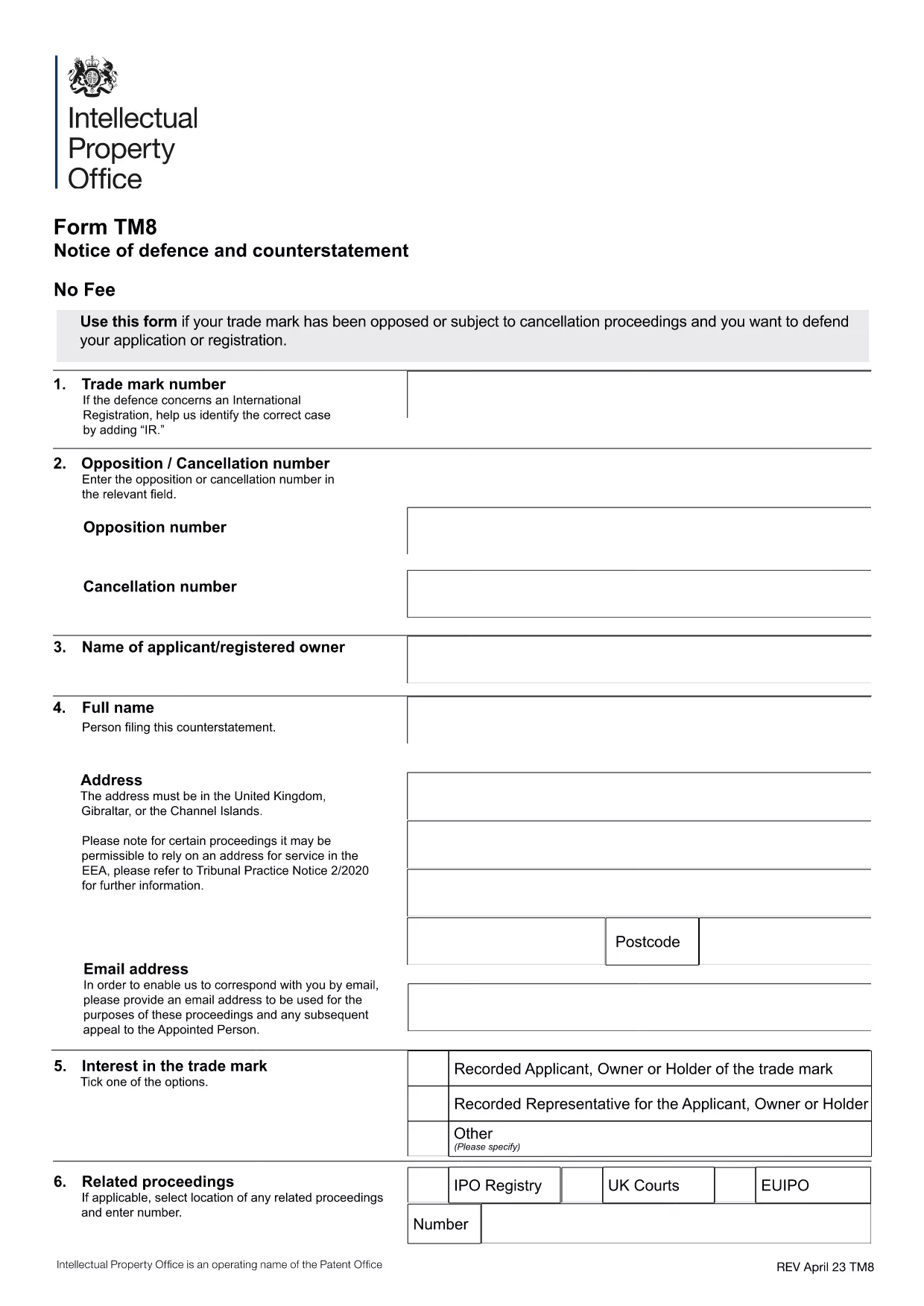
Form TM8 – Notice of Defence and Counterstatement (UK Trademark)

  1. Zemlja United Kingdom
  2. Jezik Engleski
  3. Aktivnost Trademarks
  4. Odjel Intellectual Property Office
Form TM8 – Notice of Defence and Counterstatement (UK Trademark)

The Form TM8 is the official UK Intellectual Property Office (IPO) document used to submit a defence and counter‑statement when you are challenged on a trademark registration. Whether you are responding to a notice of opposition or a cancellation request, TM8 lets you set out the legal reasons why your trademark should remain protected.

What is Form TM8 and When Is It Required?

TM8 is filed by the trademark owner (or a licensed user) after receiving a formal objection from an opponent. It must detail the factual and legal basis of your defence, and may include any counter‑claims you wish to raise.

Key Sections of the TM8 Form Explained

  • Section 1 – Applicant Details: Name, address, and registration number of the trademark.
  • Section 2 – Grounds of Defence: List each ground you rely on, such as prior use, lack of similarity, or procedural errors.
  • Section 3 – Evidence: Attach supporting documents, screenshots, or contracts.
  • Section 4 – Counter‑Statement (if any): State any claims you are making against the opponent.
  • Section 5 – Signature: Certified declaration by the owner or authorised representative.

How to Complete TM8 Online with Formize

Instead of downloading, printing, and scanning, you can fill the form directly in your browser. Simply click the “Fill out this form” button below, and the Formize PDF Filler will load the official TM8 template ready for editing.

Common Mistakes to Avoid

  • Leaving any mandatory field blank – the IPO will reject the submission.
  • Submitting outdated contact details – you may miss important communications.
  • Failing to attach all referenced evidence – unsupported arguments are dismissed.
  • Using an unsigned PDF – the declaration must be signed electronically or manually before filing.

Where to Submit Your Completed Form

Once you have saved the filled PDF, upload it through the UK IPO online portal or send it by post to the address listed on the form. Keep a copy for your records.

PITANJA
  • What is the deadline for filing Form TM8?

    The deadline is usually 28 days from the date you receive the opposition or cancellation notice, but always check the specific notice for the exact timeframe.

  • Can I submit a partially completed TM8?

    No. The IPO will reject any TM8 that has empty mandatory fields or missing signatures.

  • Do I need a lawyer to fill out TM8?

    A lawyer is not required, but legal advice can help ensure your defence is robust, especially for complex grounds.

  • Is an electronic signature accepted?

    Yes. The IPO accepts a qualified electronic signature or a scanned handwritten signature attached to the PDF.

  • Can I edit the TM8 after I have saved it?

    Yes. Open the saved PDF again in Formize or any PDF editor, make the changes, and re‑save before submission.

  • What evidence should I attach?

    Include any documents that prove prior use, ownership, or that counter the opponent’s claims – such as invoices, marketing material, or correspondence.

  • Is there a fee for filing TM8?

    Filing a defence does not incur a separate fee, but the original trademark application or opposition may have associated costs.

  • Where can I find the official TM8 PDF?

    The official version is available for download via the link below, hosted by the UK government.

KAKO DA

Kako ispuniti Form TM8 besplatno, online u 5 jednostavnih koraka:

  1. 1
    Open the Fillable Form
    Click the “Fill out this form” button on the page. The Formize PDF Filler app will load the official TM8 template instantly.
  2. 2
    Enter Your Details
    Complete each section – applicant information, grounds of defence, evidence, and counter‑statement – using the on‑screen fields.
  3. 3
    Add Attachments
    Use the “Add File” button to upload supporting documents (e.g., contracts, screenshots) directly into the PDF.
  4. 4
    Review & Sign
    Double‑check all entries for accuracy, then apply your electronic signature in the final declaration field.
  5. 5
    Save and Submit
    Save the completed PDF to your computer. Upload it to the UK IPO portal or mail it as instructed on the form.
Aplikacija Formize PDF Filler
OKO

Form TM8 predložak

S tradicionalnim skupom značajki za pregled i ispunjavanje PDF dokumenta, u kombinaciji s prednostima web aplikacije i responzivnog izgleda, možete ispuniti Form TM8 u nekoliko minuta.

ZNAČAJKE

PDF punilo

Najlakši način da ispunite Form TM8 online

  • Brzo ispunite Form TM8
    Tražite način da brzo ispunite Form TM8 online? Uz naš online besplatni PDF obrazac za popunjavanje, znat ćete kako urediti i ispuniti ovaj pdf dokument za manje od minute.
  • Jednostavan za korištenje mrežni PDF uređivač
    Dosta vam je ispisivanja PDF datoteka kako biste ih mogli uređivati ​​prije ponovnog skeniranja i slanja natrag? Uređujte PDF dokumente besplatno na mreži. Upotrijebite naš online uređivač pdf-ova kako biste uštedjeli vrijeme i papir.
  • Sjajni alati, sve platforme
    Pitate se kako ispuniti Form TM8 na Macu ili možda kako koristiti PDF filer besplatno? Naši online PDF alati rade na svim platformama.
  • Sigurno skladištenje datoteka
    Dovršene datoteke "Form TM8" pohranjuju se u zaštićenu bazu podataka kojom upravlja Amazon Cloud hosting. Svoje datoteke možete izbrisati iz našeg sustava bilo kada. U svakom slučaju, te se datoteke automatski brišu nakon 24 sata.
  • Chat s Form TM8
    Razgovarajte s "Form TM8" na Chatize koji je besplatni pomoćnik za čitanje PDF-ova. Postavljajte pitanja i dobivajte odgovore od "Form TM8". Samo kliknite gornji gumb Chat with Document.

Izbriši sesiju punjenja

Izbrisati odabranu sesiju punjenja? U tom će slučaju vaš napredak u ispunjavanju obrasca biti izgubljen.

Izbriši sesiju uređivanja

Izbrisati odabranu sesiju uređivanja? U tom će slučaju vaš napredak u stvaranju i uređivanju obrasca biti izgubljen.