Izaberi jezik

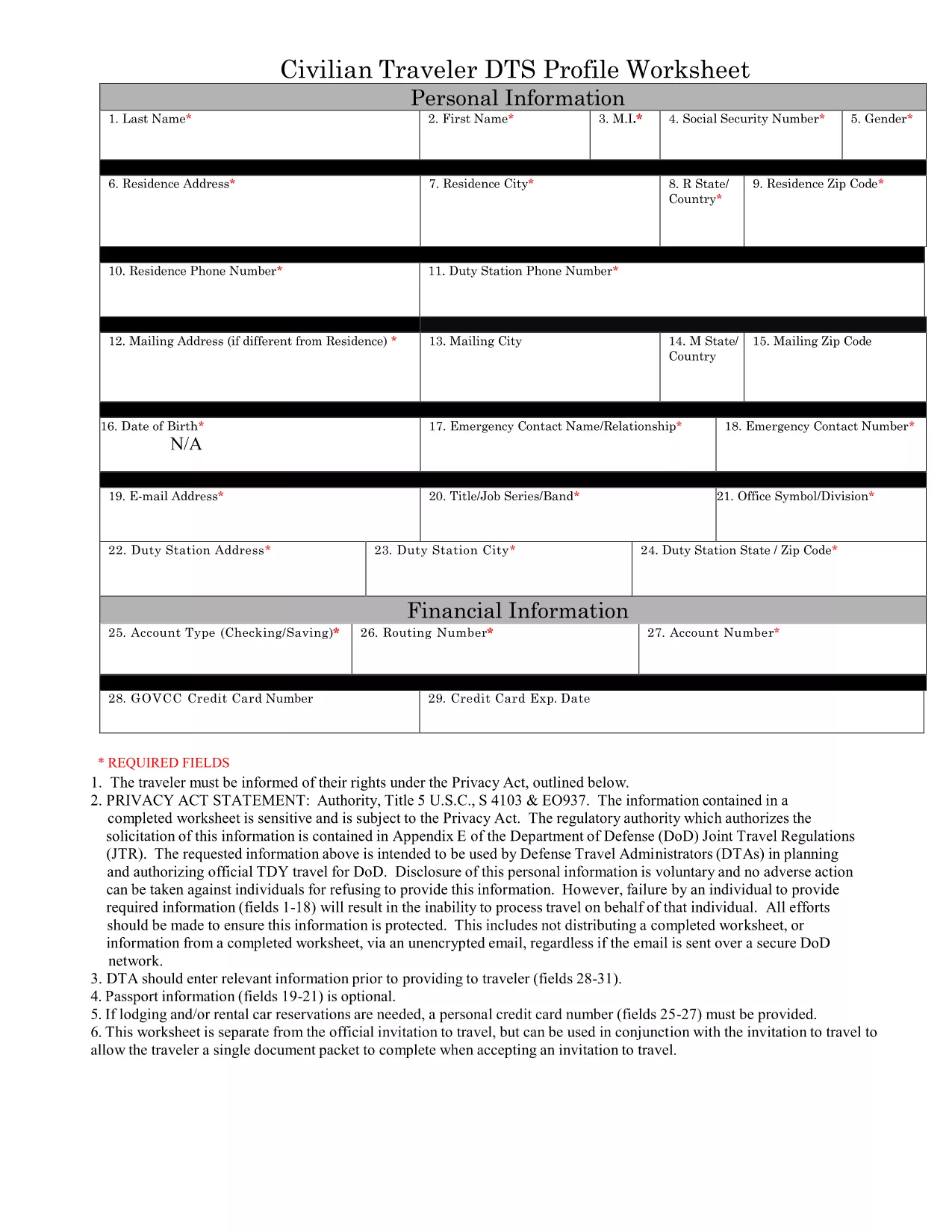
DTS Form 1 – Fillable PDF Profile Worksheet

  1. Zemlja SAD
  2. Jezik Engleski
  3. Odjel Department of Defense
  4. Aktivnost Travel
DTS Form 1 – Fillable PDF Profile Worksheet

The Defense Travel System (DTS) Form 1, also known as the DTS Profile Worksheet, is the standard document used by U.S. Army personnel to capture personal, travel, and funding information before a trip is entered into the system. Having a fillable PDF version means you can complete the form quickly, accurately, and without printing.

What Is DTS Form 1?

DTS Form 1 collects essential data such as:

  • Traveler’s name, rank, and contact details
  • Unit and sponsor information
  • Travel purpose, destination, and dates
  • Estimated expenses and funding source

Key Sections of the DTS Profile Worksheet

Understanding each section helps you avoid errors that could delay approval:

  1. Section 1 – Personal Data: Fill in your official name, SSN, and contact numbers exactly as they appear in your personnel records.
  2. Section 2 – Travel Details: Specify the mission purpose, location, and expected departure/return dates.
  3. Section 3 – Funding: Indicate the appropriate cost center and any special authorizations.
  4. Section 4 – Signatures: The traveler and approving official must sign electronically after completing the form.

How to Complete the Form Online

Instead of downloading and editing the PDF in a desktop editor, simply click the “Fill out this form” button on this page. The Formize PDF Filler will load the fillable document directly in your browser, allowing you to:

  • Enter data into each field with keyboard navigation
  • Save progress and return later
  • Submit the completed PDF to your unit’s travel office instantly

Common Mistakes to Avoid

  • Leaving the SSN or rank fields blank – the system will reject the submission.
  • Using unofficial abbreviations for locations or units.
  • Forgetting to attach required supporting documents (e.g., travel orders).
  • Entering dates that conflict with the mission timeline.

Download the Official PDF

If you prefer to keep a local copy, you can download the original, government‑issued PDF below. The file is fully fillable and compatible with Formize’s online editor.

Download DTS Form 1 (PDF)

PITANJA
  • Is the DTS Form 1 available for free?

    Yes. The official government PDF is free to download, and Formize’s online filler is also free to use.

  • Can I edit the PDF on a mobile device?

    Absolutely. The Formize PDF Filler works on all modern browsers, including smartphones and tablets.

  • Do I need Adobe Acrobat to fill out the form?

    No. The form is fully fillable in the browser via Formize, so you don’t need any additional software.

  • What should I do if a field is locked or missing?

    All fields in the official DTS Form 1 are editable. If a field appears locked, refresh the page or contact your unit’s travel administrator.

  • How long is the DTS Form 1 valid?

    The worksheet reflects the current fiscal year’s format. Check with your command for any updates before submitting.

  • Can I print the completed form after filling it online?

    Yes. After you finish, use the “Print” button in the Formize interface to produce a hard copy.

KAKO DA

Kako ispuniti DTS form besplatno, online u 3 jednostavnih koraka:

  1. 1
    Open the Fillable Form
    Click the “Fill out this form” button on this page. The Formize PDF Filler will launch in a new tab, loading the DTS Form 1 automatically.
  2. 2
    Enter Your Information
    Use your keyboard to navigate each field. All required sections are highlighted. Double‑check spelling of names, ranks, and locations.
  3. 3
    Save or Submit
    When you’re finished, click “Save” to store a copy on your device, or click “Submit” to email the completed PDF directly to your unit’s travel office.
Aplikacija Formize PDF Filler
OKO

DTS form predložak

S tradicionalnim skupom značajki za pregled i ispunjavanje PDF dokumenta, u kombinaciji s prednostima web aplikacije i responzivnog izgleda, možete ispuniti DTS form u nekoliko minuta.

ZNAČAJKE

PDF punilo

Najlakši način da ispunite DTS form online

  • Brzo ispunite DTS form
    Tražite način da brzo ispunite DTS form online? Uz naš online besplatni PDF obrazac za popunjavanje, znat ćete kako urediti i ispuniti ovaj pdf dokument za manje od minute.
  • Jednostavan za korištenje mrežni PDF uređivač
    Dosta vam je ispisivanja PDF datoteka kako biste ih mogli uređivati ​​prije ponovnog skeniranja i slanja natrag? Uređujte PDF dokumente besplatno na mreži. Upotrijebite naš online uređivač pdf-ova kako biste uštedjeli vrijeme i papir.
  • Sjajni alati, sve platforme
    Pitate se kako ispuniti DTS form na Macu ili možda kako koristiti PDF filer besplatno? Naši online PDF alati rade na svim platformama.
  • Sigurno skladištenje datoteka
    Dovršene datoteke "DTS form" pohranjuju se u zaštićenu bazu podataka kojom upravlja Amazon Cloud hosting. Svoje datoteke možete izbrisati iz našeg sustava bilo kada. U svakom slučaju, te se datoteke automatski brišu nakon 24 sata.
  • Chat s DTS form
    Razgovarajte s "DTS form" na Chatize koji je besplatni pomoćnik za čitanje PDF-ova. Postavljajte pitanja i dobivajte odgovore od "DTS form". Samo kliknite gornji gumb Chat with Document.

Izbriši sesiju punjenja

Izbrisati odabranu sesiju punjenja? U tom će slučaju vaš napredak u ispunjavanju obrasca biti izgubljen.

Izbriši sesiju uređivanja

Izbrisati odabranu sesiju uređivanja? U tom će slučaju vaš napredak u stvaranju i uređivanju obrasca biti izgubljen.