
Izaberi jezik

MV-58A Fillable PDF Form – New York DMV

  1. Jezik Engleski
  2. Zemlja SAD
  3. Aktivnost Registracija vozila
  4. Odjel Department of Motor Vehicles
MV-58A Fillable PDF Form – New York DMV

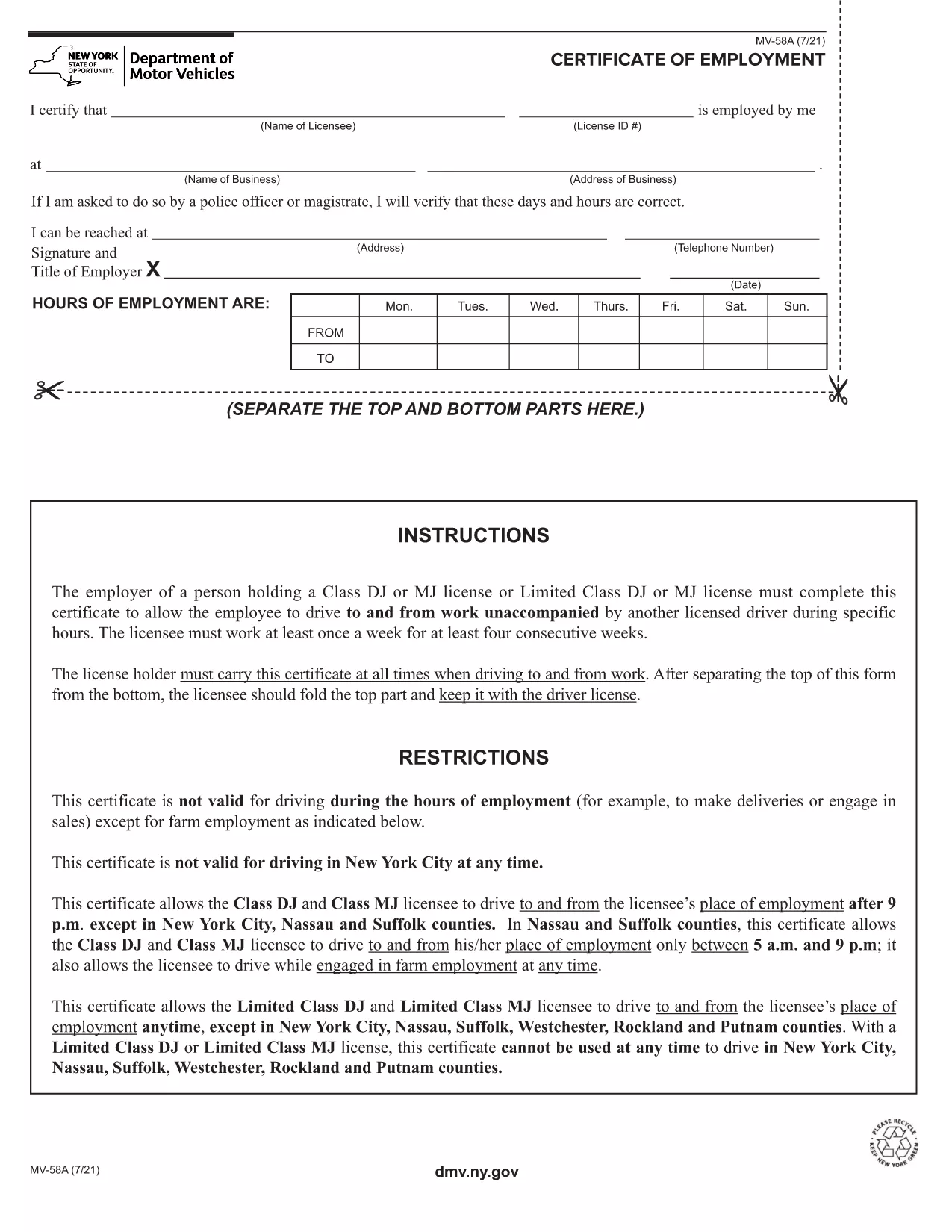
The MV-58A is the New York State Department of Motor Vehicles (DMV) form used for specific vehicle‑related transactions. Whether you need to correct registration details, request a duplicate, or handle a special circumstance, the MV-58A is the official document required by the NY DMV.

Formize.com offers a fillable PDF version of the MV-58A that lets you complete the form instantly in your browser—no extra software needed. Simply click the “Fill out this form” button, let the Formize PDF Filler load, and start entering your information.

Below you’ll find everything you need to know about the MV-58A, step‑by‑step instructions for filling it out online, common pitfalls to watch out for, and where to send the finished form.

What Is the MV-58A Form?

The MV-58A is typically used for:

  • Updating vehicle ownership information.
  • Correcting errors on a title or registration.
  • Submitting special requests that are not covered by standard DMV forms.

It is a mandatory paper‑based form for the NY DMV, but with Formize’s fillable PDF you can complete it digitally and print a clean copy for submission.

How to Complete the MV-58A Online

Follow our quick guide to finish the form without ever opening a separate PDF editor:

  1. Click the “Fill out this form” button on the page.
  2. Wait a few seconds while the Formize PDF Filler app loads the MV-58A.
  3. Enter your information in the highlighted fields. The app automatically saves your progress.
  4. Review each section for accuracy; the filler highlights any required fields you missed.
  5. When you’re done, click “Download PDF” to save a printable copy or “Print” to send it directly to your printer.

Common Mistakes to Avoid

  • Leaving required fields blank: The filler will flag empty required boxes, but double‑check before downloading.
  • Using the wrong date format: NY DMV expects MM/DD/YYYY.
  • Signing the wrong copy: The MV-58A has multiple copies; sign only the copy you will submit.
  • Incorrect vehicle identification number (VIN): Verify the VIN matches the title exactly.

Where to Submit the Completed Form

After printing, mail or deliver the signed MV-58A to your local NY DMV office. Include any supporting documents referenced on the form. For faster processing, consider using certified mail with a tracking number.

Need a reminder? Bookmark this page and return anytime you need the MV-58A fillable PDF again.

PITANJA
  • What is the purpose of the MV-58A form?

    The MV-58A is used for special vehicle registration requests, corrections, or ownership updates that are not covered by standard DMV forms.

  • Can I fill out MV-58A on a phone or tablet?

    Yes. The Formize fillable PDF works on any modern browser, including mobile devices, though a larger screen makes data entry easier.

  • Do I need to print the form after filling it online?

    The NY DMV requires a signed paper copy, so you must print the completed form, sign it, and submit it by mail or in person.

  • How long does it take for the DMV to process the MV-58A?

    Processing times vary, but most requests are handled within 10‑14 business days after the DMV receives the complete form.

  • Is there a fee for submitting MV-58A?

    A processing fee may apply depending on the specific request. Check the form instructions or the NY DMV fee schedule for details.

  • What should I do if I make a mistake after printing?

    If you notice an error, correct it on a new copy of the form. Do not use correction fluid; instead, start a fresh fillable PDF and print again.

  • Can I submit the MV-58A electronically?

    The NY DMV currently requires a handwritten signature on a printed copy, so electronic submission alone is not accepted.

  • Where can I find a local NY DMV office?

    Visit the official NY DMV website and use the office locator tool to find the nearest location.

KAKO DA

Kako ispuniti MV-58A besplatno, online u 5 jednostavnih koraka:

  1. 1
    Open the Fillable Form
    Click the “Fill out this form” button on the page. The Formize PDF Filler will open in a new tab.
  2. 2
    Enter Your Information
    Type directly into each highlighted field. The app saves your entries automatically.
  3. 3
    Validate and Review
    Check for any highlighted missing fields or format warnings, then review all entered data.
  4. 4
    Download or Print
    When satisfied, click “Download PDF” to save a copy or “Print” to produce a hard‑copy for mailing.
  5. 5
    Submit to the NY DMV
    Mail or deliver the signed form to your local New York DMV office along with any required attachments.
Aplikacija Formize PDF Filler
OKO

Obrasci za registraciju vozila

Ako posjedujete ili unajmljujete motorno vozilo, prikolicu ili čamac, morate ispuniti određene obveze kako bi vaše vozilo bilo legalno registrirano i sigurno.

MV-58A je jedan od obrazaca za registraciju vozila koji su dokumenti koji se koriste za registraciju motornog vozila kod nadležnog državnog ili pokrajinskog tijela. Ovi su obrasci obično potrebni kada osoba kupi novo ili rabljeno vozilo ili kada se s vozilom preseli u novu državu ili pokrajinu.

Točni zahtjevi i obrasci potrebni za registraciju vozila mogu se razlikovati ovisno o lokaciji, ali općenito, postupak uključuje pružanje informacija o vozilu, vlasniku i svim založnim pravima na vozilu.

Nakon podnošenja obrazaca za registraciju i pristojbi, državno ili pokrajinsko tijelo će vlasniku vozila izdati potvrdu o registraciji ili registarsku pločicu. Ova registracija omogućuje legalnu vožnju vozila na javnim cestama i autocestama.

ZNAČAJKE

PDF punilo

Najlakši način da ispunite MV-58A online

  • Brzo ispunite MV-58A
    Tražite način da brzo ispunite MV-58A online? Uz naš online besplatni PDF obrazac za popunjavanje, znat ćete kako urediti i ispuniti ovaj pdf dokument za manje od minute.
  • Jednostavan za korištenje mrežni PDF uređivač
    Dosta vam je ispisivanja PDF datoteka kako biste ih mogli uređivati ​​prije ponovnog skeniranja i slanja natrag? Uređujte PDF dokumente besplatno na mreži. Upotrijebite naš online uređivač pdf-ova kako biste uštedjeli vrijeme i papir.
  • Sjajni alati, sve platforme
    Pitate se kako ispuniti MV-58A na Macu ili možda kako koristiti PDF filer besplatno? Naši online PDF alati rade na svim platformama.
  • Sigurno skladištenje datoteka
    Dovršene datoteke "MV-58A" pohranjuju se u zaštićenu bazu podataka kojom upravlja Amazon Cloud hosting. Svoje datoteke možete izbrisati iz našeg sustava bilo kada. U svakom slučaju, te se datoteke automatski brišu nakon 24 sata.
  • Chat s MV-58A
    Razgovarajte s "MV-58A" na Chatize koji je besplatni pomoćnik za čitanje PDF-ova. Postavljajte pitanja i dobivajte odgovore od "MV-58A". Samo kliknite gornji gumb Chat with Document.

Izbriši sesiju punjenja

Izbrisati odabranu sesiju punjenja? U tom će slučaju vaš napredak u ispunjavanju obrasca biti izgubljen.

Izbriši sesiju uređivanja

Izbrisati odabranu sesiju uređivanja? U tom će slučaju vaš napredak u stvaranju i uređivanju obrasca biti izgubljen.