
Izaberi jezik

DS-4139 Signature Card – Fillable PDF Form

  1. Jezik Engleski
  2. Zemlja SAD
  3. Odjel Department of State
DS-4139 Signature Card – Fillable PDF Form

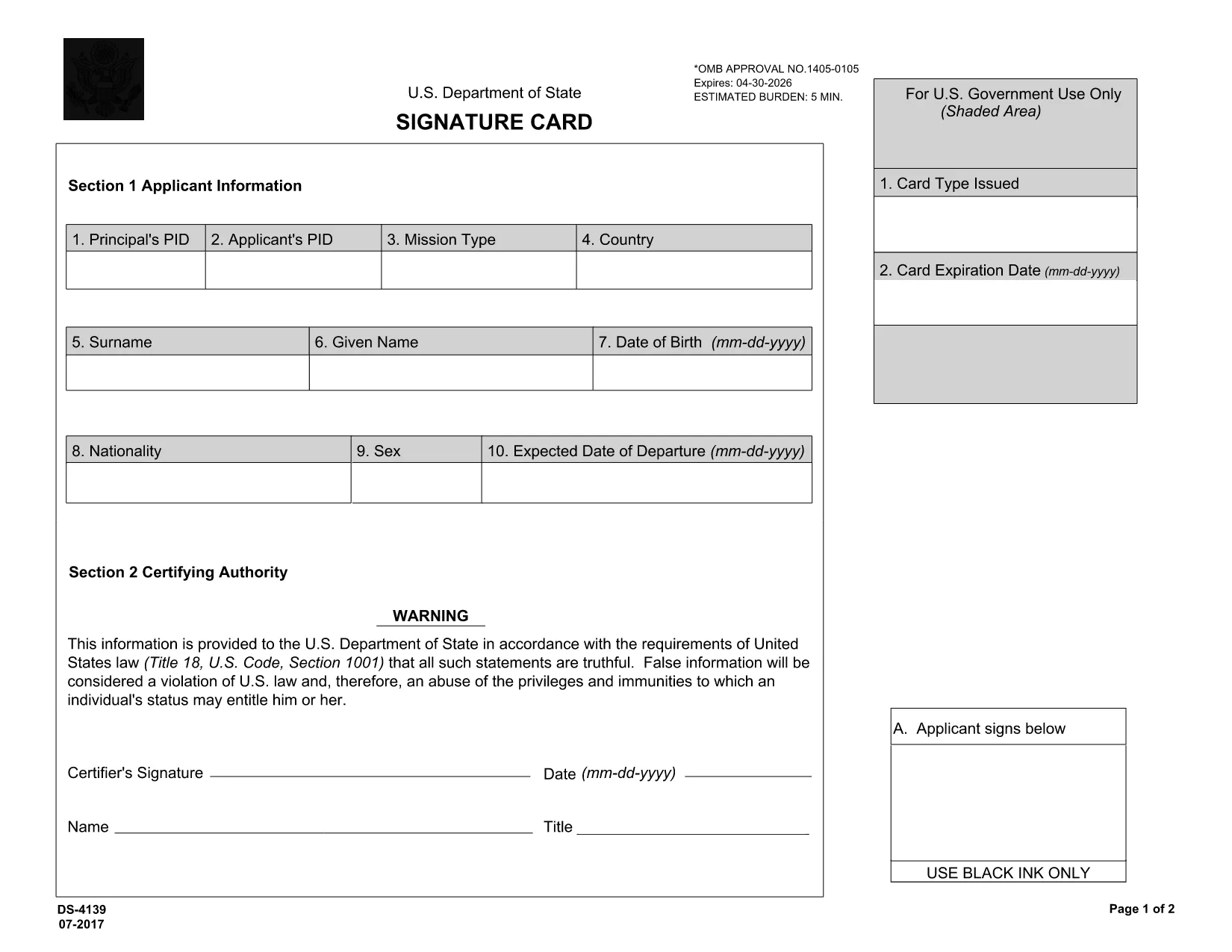
The DS-4139 Signature Card is the official form used by the U.S. Department of State’s Office of Foreign Missions to record individuals working at foreign missions or international organizations in the United States. This form captures personal details, diplomatic status, and card information that determine eligibility for diplomatic or consular privileges.

What Is the DS-4139 Signature Card?

Issued under OMB Control No. 1405‑0105, the DS-4139 collects:

  • Applicant’s personal data (name, PID, nationality, DOB)
  • Mission type and location
  • Card type, expiration date, and signature
  • Certifying authority details

The form is required for every employee, contractor, or family member who needs diplomatic benefits, such as tax exemptions or visa privileges.

Why Use Formize’s Online PDF Filler?

Formize lets you fill the DS-4139 directly in your browser—no Adobe Acrobat needed. Benefits include:

  • Instant loading of the official PDF from the State Department
  • Keyboard‑friendly fields and auto‑date pickers
  • Secure, cloud‑based saving and downloading
  • Ability to sign with a mouse or touch screen

Step‑by‑Step Guide to Completing DS‑4139

Follow these simple steps to finish the form quickly and accurately.

  1. Click “Fill out this form.” The Formize PDF Filler app loads the DS‑4139 PDF automatically.
  2. Enter your information. Fill each field—PID, name, mission type, card details, etc.—using the on‑screen keyboard.
  3. Sign the form. Use the signature tool to draw your signature or upload a scanned image.
  4. Review. Double‑check every entry for accuracy; the filler highlights empty required fields.
  5. Download or email. Save the completed PDF to your device or send it directly to the Office of Foreign Missions.

Common Mistakes to Avoid

  • Using colored ink or non‑standard fonts – the filler forces black text automatically.
  • Leaving the "Date of Expiration" blank – the form will not submit until all required dates are entered.
  • Misspelling the mission name – verify the official mission title on the State Department website.
  • Forgetting the certifier’s signature – both applicant and certifying authority must sign.

Where to Submit the Completed Form

After downloading the filled DS‑4139, email it to ofm@state.gov or upload it through the eGov portal. Keep a copy for your records.

Ready to start? Click the button below, fill out the DS‑4139 online, and submit with confidence.

PITANJA
  • What is the purpose of the DS‑4139 form?

    It records personal and diplomatic information for individuals working at foreign missions in the U.S., establishing eligibility for diplomatic privileges and immunities.

  • Do I need Adobe Acrobat to complete DS‑4139?

    No. Formize’s online PDF filler lets you complete, sign, and download the form directly in your web browser.

  • Can I save my progress and finish later?

    Yes. The filler allows you to save a draft locally and reopen it later before the final submission.

  • What happens if I submit the form with missing fields?

    The Office of Foreign Missions will reject the submission, causing delays. The online filler highlights required fields to prevent this.

  • Where should I send the completed DS‑4139?

    Email the PDF to ofm@state.gov or upload it through the eGov portal at https://egov.ofm.state.gov.

  • Is the DS‑4139 form still valid for 2024‑2025?

    Yes. The current version (2022‑2025) is available via the official State Department link and is accepted until a new revision is published.

  • Do I need a digital signature to submit?

    A hand‑drawn electronic signature created in the Formize filler satisfies the State Department’s requirements.

KAKO DA

Kako ispuniti DS-4139 besplatno, online u 5 jednostavnih koraka:

  1. 1
    Open the Form
    Click the “Fill out this form” button on the page. The Formize PDF Filler will load the official DS‑4139 PDF automatically.
  2. 2
    Enter Your Details
    Complete each field – PID, name, mission type, card information, and dates – using the on‑screen keyboard.
  3. 3
    Add Your Signature
    Use the signature tool to draw your signature with your mouse, trackpad, or touchscreen.
  4. 4
    Review and Validate
    Check that all required fields are filled. The filler will highlight any missing information.
  5. 5
    Save or Send
    Download the finished PDF to your device or email it directly to the Office of Foreign Missions via the provided link.
Aplikacija Formize PDF Filler
OKO

Obrasci Ministarstva vanjskih poslova (DOS).

DS-4139 je jedan od obrazaca za prijavu koje koristi Ministarstvo vanjskih poslova Sjedinjenih Američkih Država (DOS) za prikupljanje informacija i obradu raznih usluga vezanih uz međunarodna putovanja, vize, putovnice i konzularne usluge. DOS je odgovoran za upravljanje vanjskom politikom SAD-a, međunarodnim odnosima i pružanje usluga građanima SAD-a i stranim državljanima.

Evo nekoliko primjera obrazaca Ministarstva vanjskih poslova:

Obrasci zahtjeva za putovnicu: Ovi se obrasci koriste za podnošenje zahtjeva za putovnicu SAD-a, što je službeni dokument koji izdaje vlada i koji pojedincima omogućuje međunarodna putovanja. Obrasci zahtjeva za putovnicu prikupljaju osobne podatke, detalje o državljanstvu, identitetu i druge potrebne informacije.

Obrasci zahtjeva za neuseljeničku vizu: DOS nadzire izdavanje neuseljeničkih viza, koje stranim državljanima omogućuju privremeni posjet Sjedinjenim Državama u razne svrhe kao što su turizam, posao, studiranje ili rad. Obrasci zahtjeva za neuseljeničku vizu, kao što su DS-160, DS-156 ili DS-260, koriste se za prikupljanje informacija o osobnim podacima podnositelja zahtjeva, povijesti putovanja, svrsi putovanja i drugim relevantnim informacijama.

Obrasci zahtjeva za useljeničku vizu: Za pojedince koji žele imigrirati u Sjedinjene Države koriste se obrasci zahtjeva za useljeničku vizu. Ovi obrasci prikupljaju detaljne podatke o osobnoj povijesti podnositelja zahtjeva, članovima obitelji, povijesti zaposlenja i druge relevantne informacije. Primjeri uključuju obrazac DS-260 za obiteljsku imigraciju ili obrazac DS-230 za dobitnike lutrije za vizu za raznolikost.

Obrazac konzularnog izvješća o rođenju u inozemstvu (CRBA): koristi se ovaj obrazac dokumentirati rođenje djeteta američkog državljanina u inozemstvu roditeljima američkim državljanima. Prikuplja podatke o djetetu, roditeljima i popratnu dokumentaciju.

Obrasci izjave o potpori: Kada sponzorirate useljenika u Sjedinjene Države, američki državljanin ili zakoniti stalni stanovnik možda će morati predati obrazac izjave o potpori. Ovaj obrazac, kao što je I-864 ili I-134, koristi se za dokazivanje financijske sposobnosti za potporu budućeg imigranta i sprječavanje da to postane javno zaduženje.

Obrasci za konzularne usluge: DOS pruža razne konzularne usluge građanima SAD-a i stranim državljanima, kao što su javnobilježničke usluge, zahtjevi za hitnu pomoć ili odricanje od državljanstva SAD-a. Za ove usluge koriste se posebni obrasci, uključujući obrasce DS-11, DS-3053 ili DS-4079, ovisno o prirodi tražene usluge.

Važno je napomenuti da se određeni obrasci koje koristi Ministarstvo vanjskih poslova SAD-a mogu mijenjati tijekom vremena, a različite službe mogu zahtijevati različite obrasce. Preporučljivo je posjetiti službenu web stranicu Ministarstva vanjskih poslova SAD-a ili se posavjetovati s najbližim veleposlanstvom ili konzulatom SAD-a za najažurnije i točne informacije u vezi s određenim obrascima potrebnim za različite usluge.

ZNAČAJKE

PDF punilo

Najlakši način da ispunite DS-4139 online

  • Brzo ispunite DS-4139
    Tražite način da brzo ispunite DS-4139 online? Uz naš online besplatni PDF obrazac za popunjavanje, znat ćete kako urediti i ispuniti ovaj pdf dokument za manje od minute.
  • Jednostavan za korištenje mrežni PDF uređivač
    Dosta vam je ispisivanja PDF datoteka kako biste ih mogli uređivati ​​prije ponovnog skeniranja i slanja natrag? Uređujte PDF dokumente besplatno na mreži. Upotrijebite naš online uređivač pdf-ova kako biste uštedjeli vrijeme i papir.
  • Sjajni alati, sve platforme
    Pitate se kako ispuniti DS-4139 na Macu ili možda kako koristiti PDF filer besplatno? Naši online PDF alati rade na svim platformama.
  • Sigurno skladištenje datoteka
    Dovršene datoteke "DS-4139" pohranjuju se u zaštićenu bazu podataka kojom upravlja Amazon Cloud hosting. Svoje datoteke možete izbrisati iz našeg sustava bilo kada. U svakom slučaju, te se datoteke automatski brišu nakon 24 sata.
  • Chat s DS-4139
    Razgovarajte s "DS-4139" na Chatize koji je besplatni pomoćnik za čitanje PDF-ova. Postavljajte pitanja i dobivajte odgovore od "DS-4139". Samo kliknite gornji gumb Chat with Document.

Izbriši sesiju punjenja

Izbrisati odabranu sesiju punjenja? U tom će slučaju vaš napredak u ispunjavanju obrasca biti izgubljen.

Izbriši sesiju uređivanja

Izbrisati odabranu sesiju uređivanja? U tom će slučaju vaš napredak u stvaranju i uređivanju obrasca biti izgubljen.