
Izaberi jezik

California DMV DL 546 Health Questionnaire – Fillable PDF

  1. Jezik Engleski
  2. Zemlja SAD
  3. Aktivnost Vozačka dozvola
  4. država Kalifornija
California DMV DL 546 Health Questionnaire – Fillable PDF

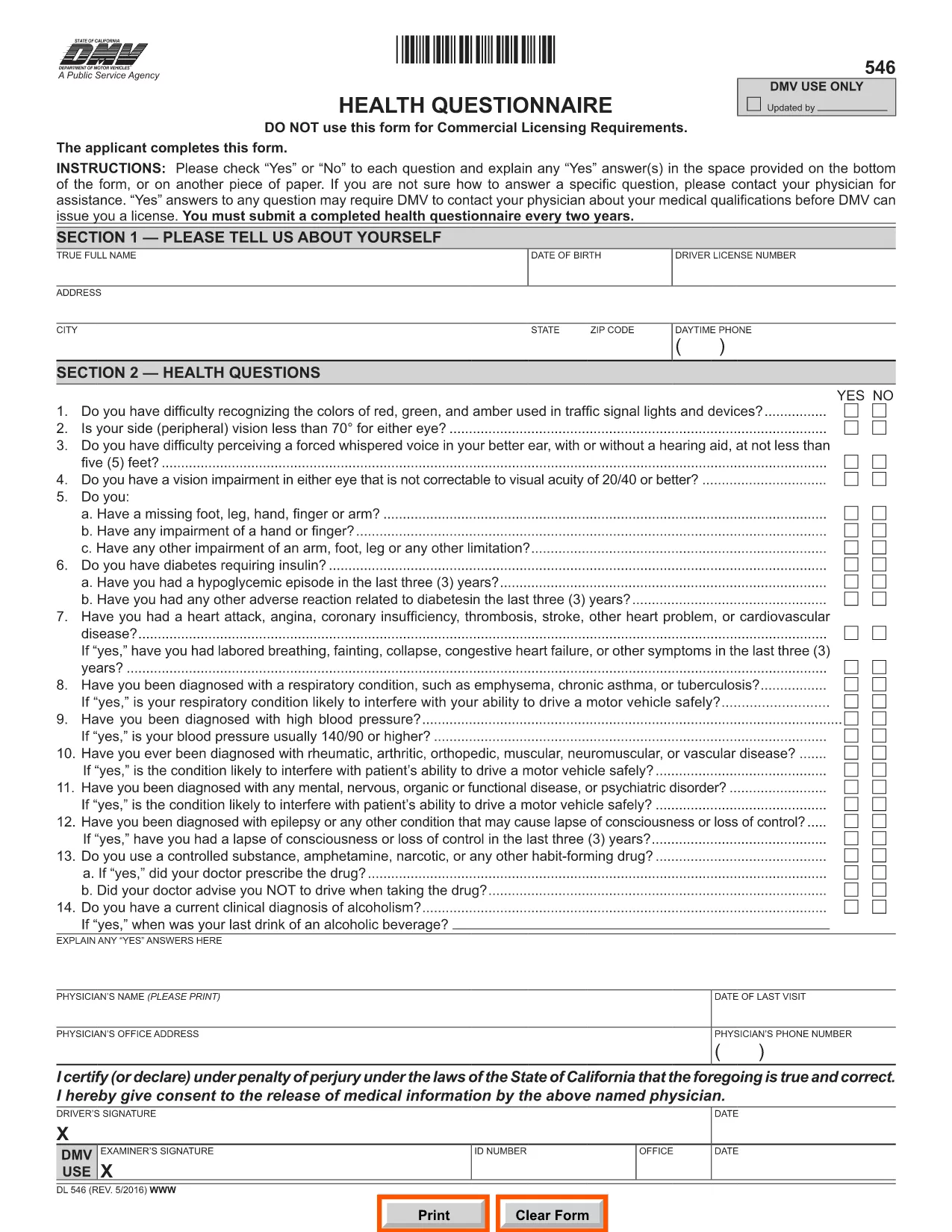
The DL 546 health questionnaire is the California Department of Motor Vehicles (DMV) form that collects medical information from anyone applying for or renewing a driver’s license. The DMV uses this form to ensure that drivers meet safety standards and can operate a vehicle without risking public health.

What Is the DL 546 Form and Who Needs It?

DL 546 is required for:

  • New driver’s license applicants
  • License renewals when the DMV requests a health update
  • Commercial driver’s license (CDL) holders needing a medical review

The questionnaire asks simple “Yes/No” questions about vision, seizures, heart conditions, and other health issues that could affect driving.

How to Complete the DL 546 Online with Formize

Formize makes the fillable PDF DL 546 experience fast and paper‑free. Follow these steps:

  1. Click the "Fill out this form" button on this page.
  2. The Formize PDF Filler app loads in your browser – no download required.
  3. Complete each question by selecting Yes or No and add any explanations in the provided text boxes.
  4. When you’re done, click Save & Sign to add an electronic signature.
  5. Download the completed form or email it directly to the DMV.

Common Mistakes to Avoid When Filling DL 546

  • Leaving a field blank: Every question must be answered, even if the answer is "No."
  • Illegible handwriting: Using the fillable PDF eliminates this risk.
  • Missing signatures or dates: The Formize app prompts you to sign before you can submit.
  • Submitting the wrong version: Ensure you are using the official California DMV PDF (linked below).

Where to Submit the Completed Form

After saving your completed DL 546, you have three submission options:

  • Online: Upload the PDF through the DMV’s MyDMV portal if available.
  • Mail: Print the PDF and send it to the address printed on the form.
  • In‑person: Bring the printed form to any California DMV office.

Choosing the online or fillable PDF route speeds up processing and reduces the chance of lost paperwork.

PITANJA
  • What is the purpose of the DL 546 form?

    The DL 546 health questionnaire collects medical information to confirm that a driver meets California safety standards before a license is issued or renewed.

  • Do I need to submit the DL 546 every time I renew my license?

    Only when the DMV specifically requests an updated health questionnaire. Some renewals may not require a new DL 546.

  • Can I fill out DL 546 on a mobile device?

    Yes. Formize’s PDF Filler is fully responsive, so you can complete the form on a smartphone, tablet, or computer.

  • Is an electronic signature accepted by the California DMV?

    The DMV accepts electronic signatures for the DL 546 when the form is submitted online or emailed. Always verify the latest DMV guidelines.

  • What should I do if I answer "Yes" to a health question?

    Provide a clear explanation in the space provided and, if necessary, attach a physician’s statement or medical records as instructed on the form.

  • How long does the DMV keep my DL 546 on file?

    The DMV retains health questionnaires for the period required by California law, typically several years, to verify driver fitness.

  • Can I print the completed DL 546 after filling it online?

    Yes. After saving, you can download and print the PDF for mailing or in‑person submission if you prefer a hard copy.

KAKO DA

Kako ispuniti DL 546 besplatno, online u 4 jednostavnih koraka:

  1. 1
    Open the Fillable Form
    Click the "Fill out this form" button on this page. The Formize PDF Filler will open directly in your browser.
  2. 2
    Enter Your Information
    Answer each Yes/No question, add any required explanations, and fill in your personal details in the provided fields.
  3. 3
    Add Your Electronic Signature
    When all fields are complete, click the "Sign" button to apply an e‑signature that meets DMV requirements.
  4. 4
    Save or Email the Completed PDF
    Download the finished DL 546 or use the built‑in email option to send it directly to the DMV or your physician.
Aplikacija Formize PDF Filler
OKO

Obrasci zahtjeva za vozačku dozvolu

U većini zemalja obavezno je imati vozačku dozvolu prije nego što krenete na cestu. Stjecanje vozačke dozvole važna je prekretnica za svakoga tko želi voziti automobil.

DL 546 je jedan od obrazaca zahtjeva za vozačku dozvolu koji su dokumenti koji se koriste za prikupljanje informacija od ljudi koji žele podnijeti zahtjev za vozačku dozvolu. Obično sadrži polja za ime podnositelja zahtjeva, datum rođenja, broj osobne iskaznice, podatke za kontakt, kao i povijest vozačke dozvole i iskustvo.

ZNAČAJKE

PDF punilo

Najlakši način da ispunite DL 546 online

  • Brzo ispunite DL 546
    Tražite način da brzo ispunite DL 546 online? Uz naš online besplatni PDF obrazac za popunjavanje, znat ćete kako urediti i ispuniti ovaj pdf dokument za manje od minute.
  • Jednostavan za korištenje mrežni PDF uređivač
    Dosta vam je ispisivanja PDF datoteka kako biste ih mogli uređivati ​​prije ponovnog skeniranja i slanja natrag? Uređujte PDF dokumente besplatno na mreži. Upotrijebite naš online uređivač pdf-ova kako biste uštedjeli vrijeme i papir.
  • Sjajni alati, sve platforme
    Pitate se kako ispuniti DL 546 na Macu ili možda kako koristiti PDF filer besplatno? Naši online PDF alati rade na svim platformama.
  • Sigurno skladištenje datoteka
    Dovršene datoteke "DL 546" pohranjuju se u zaštićenu bazu podataka kojom upravlja Amazon Cloud hosting. Svoje datoteke možete izbrisati iz našeg sustava bilo kada. U svakom slučaju, te se datoteke automatski brišu nakon 24 sata.
  • Chat s DL 546
    Razgovarajte s "DL 546" na Chatize koji je besplatni pomoćnik za čitanje PDF-ova. Postavljajte pitanja i dobivajte odgovore od "DL 546". Samo kliknite gornji gumb Chat with Document.

Izbriši sesiju punjenja

Izbrisati odabranu sesiju punjenja? U tom će slučaju vaš napredak u ispunjavanju obrasca biti izgubljen.

Izbriši sesiju uređivanja

Izbrisati odabranu sesiju uređivanja? U tom će slučaju vaš napredak u stvaranju i uređivanju obrasca biti izgubljen.