
Izaberi jezik

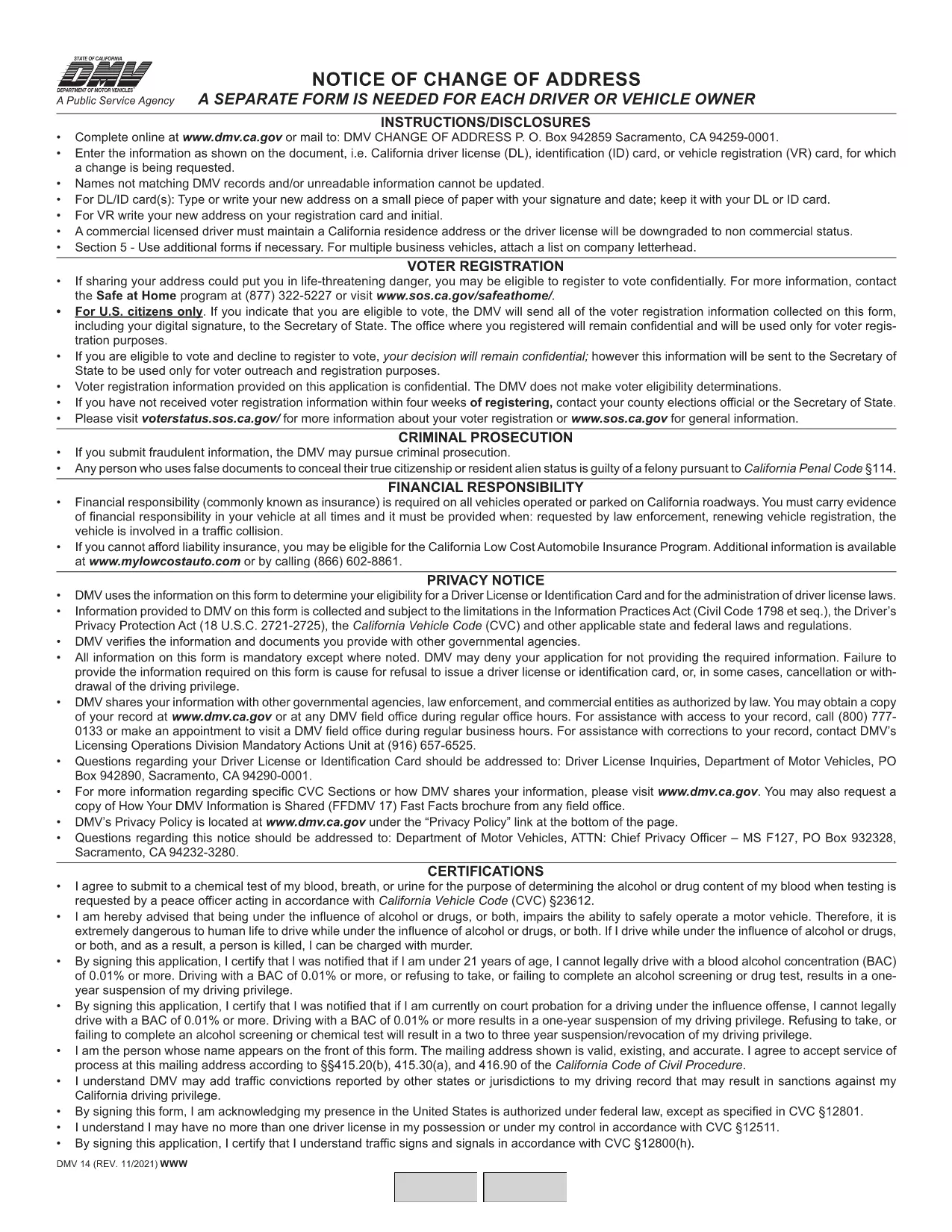
California DMV Form 14 – Notice of Change of Address

  1. Jezik Engleski
  2. Zemlja SAD
  3. Aktivnost Vozačka dozvola
  4. država Kalifornija
California DMV Form 14 – Notice of Change of Address

When you move in California, the Department of Motor Vehicles (DMV) requires you to update your address on your driver license or identification card. Form DMV‑14, also called the “Notice of Change of Address,” is the official document used for this purpose.

What Is DMV Form 14?

Form DMV‑14 is a short, printable notice that captures your new residential address, mailing address (if different), and vehicle information. The form is required for:

  • Driver licenses
  • Identification cards
  • Vehicle registrations

Submitting the form promptly helps the DMV keep your records current and ensures you receive important notices, renewal reminders, and traffic citations.

How to Fill Out the Form Online with Formize

Instead of downloading the PDF, printing it, and manually filling it in, you can complete the form instantly on our site:

  1. Click the "Fill out this form" button below the description.
  2. Our Formize PDF Filler app will load the fillable version of DMV‑14.
  3. Enter your information in the highlighted fields (address, phone, vehicle details, etc.).
  4. Review the completed form and click Submit to download a completed PDF or share it directly with the DMV.

All data stays in your browser; we never store personal details.

Common Mistakes to Avoid

  • Using the wrong ink color: If you print the form, use black or dark blue ink only.
  • Leaving fields blank: Every field marked with an asterisk (*) is mandatory.
  • Incorrect ZIP code: Double‑check the ZIP code for both old and new addresses.
  • Signing the wrong section: The signature must appear on the "Driver/Owner Signature" line.

Where to Submit Your Completed Form

After you’ve filled out and saved the PDF, you have three submission options:

  1. Mail: Send the form to DMV, P.O. Box 942859, Sacramento, CA 94259‑0001.
  2. In‑person: Bring the printed form to any California DMV office.
  3. Online (recommended): Upload the completed PDF through the California DMV website under "Change of Address".

Updating your address online is the fastest way to have the change processed, usually within 5‑7 business days.

PITANJA
  • Do I need to submit Form DMV‑14 for every vehicle I own?

    No. You only need to submit the form once for the primary address change. The DMV will automatically update the address on all vehicles linked to your driver license.

  • Can I file Form DMV‑14 online without printing?

    Yes. Use the Formize PDF Filler on this page to complete the form digitally, then download the finished PDF or upload it directly to the DMV website.

  • How long does it take for the address change to be processed?

    When submitted online, the DMV typically updates your records within 5‑7 business days. Mail submissions may take longer.

  • Is there a fee to change my address with Form DMV‑14?

    Changing your address on a driver license or ID card is free. However, if you need a new card with the updated address, a replacement fee applies.

  • What should I do if I make a mistake on the form?

    If you catch an error before submitting, simply correct it in the fillable PDF and re‑save. If you have already mailed the form, fill out a new Form DMV‑14 with the correct information.

KAKO DA

Kako ispuniti DMV Form 14 besplatno, online u 4 jednostavnih koraka:

  1. 1
    Open the Fillable Form
    Click the "Fill out this form" button on the page. The Formize PDF Filler will open the DMV‑14 document in your browser.
  2. 2
    Enter Your New Address
    Type your new residential address, mailing address (if different), and any vehicle information into the highlighted fields.
  3. 3
    Review and Sign
    Double‑check all entries for accuracy, then add your electronic signature using the signature field.
  4. 4
    Download or Submit
    Click "Download PDF" to save a copy, or use the "Submit to DMV" option to upload the completed form directly to the California DMV portal.
Aplikacija Formize PDF Filler
OKO

Obrasci zahtjeva za vozačku dozvolu

U većini zemalja obavezno je imati vozačku dozvolu prije nego što krenete na cestu. Stjecanje vozačke dozvole važna je prekretnica za svakoga tko želi voziti automobil.

DMV Form 14 je jedan od obrazaca zahtjeva za vozačku dozvolu koji su dokumenti koji se koriste za prikupljanje informacija od ljudi koji žele podnijeti zahtjev za vozačku dozvolu. Obično sadrži polja za ime podnositelja zahtjeva, datum rođenja, broj osobne iskaznice, podatke za kontakt, kao i povijest vozačke dozvole i iskustvo.

ZNAČAJKE

PDF punilo

Najlakši način da ispunite DMV Form 14 online

  • Brzo ispunite DMV Form 14
    Tražite način da brzo ispunite DMV Form 14 online? Uz naš online besplatni PDF obrazac za popunjavanje, znat ćete kako urediti i ispuniti ovaj pdf dokument za manje od minute.
  • Jednostavan za korištenje mrežni PDF uređivač
    Dosta vam je ispisivanja PDF datoteka kako biste ih mogli uređivati ​​prije ponovnog skeniranja i slanja natrag? Uređujte PDF dokumente besplatno na mreži. Upotrijebite naš online uređivač pdf-ova kako biste uštedjeli vrijeme i papir.
  • Sjajni alati, sve platforme
    Pitate se kako ispuniti DMV Form 14 na Macu ili možda kako koristiti PDF filer besplatno? Naši online PDF alati rade na svim platformama.
  • Sigurno skladištenje datoteka
    Dovršene datoteke "DMV Form 14" pohranjuju se u zaštićenu bazu podataka kojom upravlja Amazon Cloud hosting. Svoje datoteke možete izbrisati iz našeg sustava bilo kada. U svakom slučaju, te se datoteke automatski brišu nakon 24 sata.
  • Chat s DMV Form 14
    Razgovarajte s "DMV Form 14" na Chatize koji je besplatni pomoćnik za čitanje PDF-ova. Postavljajte pitanja i dobivajte odgovore od "DMV Form 14". Samo kliknite gornji gumb Chat with Document.

Izbriši sesiju punjenja

Izbrisati odabranu sesiju punjenja? U tom će slučaju vaš napredak u ispunjavanju obrasca biti izgubljen.

Izbriši sesiju uređivanja

Izbrisati odabranu sesiju uređivanja? U tom će slučaju vaš napredak u stvaranju i uređivanju obrasca biti izgubljen.