
Izaberi jezik

INF 70 – Request for Record Information (California DMV)

  1. Jezik Engleski
  2. Zemlja SAD
  3. Aktivnost Vozačka dozvola
  4. država Kalifornija
INF 70 – Request for Record Information (California DMV)

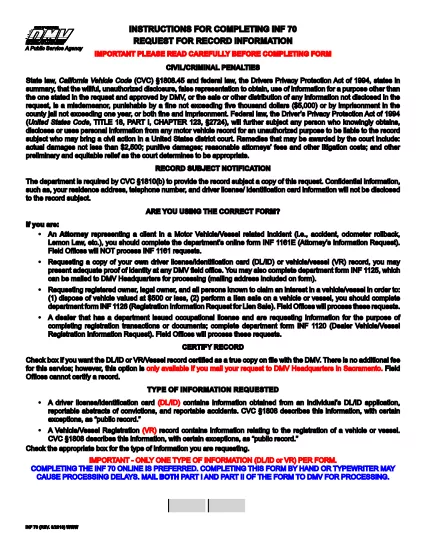
The INF 70 is the California Department of Motor Vehicles (DMV) form used to request record information about a vehicle or vessel. It is commonly required for lien sales, disposal of low‑value vehicles, or any situation where a legal owner needs official documentation of ownership or interest.

Formize makes this form easy to complete without downloading, printing, or scanning. Our secure, browser‑based PDF filler loads the official INF 70 PDF directly on the page, so you can type, sign, and save instantly.

Below you’ll find step‑by‑step instructions, tips to avoid common errors, and answers to the most frequently asked questions.

What Is the INF 70 Form?

INF 70 – “Request for Record Information” – allows a requester (owner, lienholder, or authorized agent) to obtain the DMV’s registration records for a specific vehicle or vessel. Typical uses include:

  • Preparing a lien sale or auction.
  • Disposing of a vehicle valued at $500 or less.
  • Verifying ownership before a purchase or transfer.

How to Complete the INF 70 Online

Follow the simple steps in the howto section below. The Formize PDF filler automatically loads the official DMV form, preserving the exact layout and required fields.

Common Mistakes to Avoid

  • Incorrect VIN or Plate Number: Double‑check the vehicle identification number (VIN) and license plate before submitting.
  • Missing Signature: The form requires a handwritten or electronic signature; the filler lets you draw or type it.
  • Wrong Request Reason: Choose the correct purpose (e.g., lien sale, disposal) from the dropdown to avoid processing delays.

Where to Submit the Completed Form

After filling out and saving the PDF, you can either:

  1. Mail the printed form to the address listed on the last page of the INF 70.
  2. Upload a scanned copy through the California DMV online portal (if applicable).

Always keep a copy for your records.

PITANJA
  • Who can request an INF 70?

    The legal owner, a lienholder, or an authorized agent with a valid reason (e.g., lien sale, vehicle disposal) may submit the INF 70.

  • Is a handwritten signature required?

    Yes. The Formize filler provides a digital signature tool that lets you draw or type your signature, which the DMV accepts.

  • Can I submit the INF 70 electronically?

    The DMV still requires a paper copy for most requests, but you can upload a scanned version after completing the form online.

  • How long does the DMV take to process the request?

    Processing typically takes 5‑10 business days after the DMV receives the completed form.

  • What fee is associated with the INF 70?

    A nominal processing fee is required; check the latest fee schedule on the California DMV website.

  • What if I make a mistake on the form?

    Correct the error in the Formize filler before saving, or cross out the mistake, initial it, and write the correct information on the printed copy.

KAKO DA

Kako ispuniti INF 70 besplatno, online u 4 jednostavnih koraka:

  1. 1
    Open the Fillable Form
    Click the “Fill out this form” button on the page. The Formize PDF Filler app will load the official INF 70 PDF directly in your browser.
  2. 2
    Enter Your Information
    Type into each field, select options from dropdown menus, and use the signature tool to add your signature.
  3. 3
    Review and Save
    Check all entries for accuracy, then click “Save” to download a completed PDF copy to your computer.
  4. 4
    Submit the Form
    Print the saved PDF and mail it to the DMV address, or upload a scanned version through the DMV’s online portal if allowed.
Aplikacija Formize PDF Filler
OKO

Obrasci zahtjeva za vozačku dozvolu

INF 70 je jedan od obrazaca za vozačku dozvolu koji su dokumenti koji se koriste za podnošenje zahtjeva za vozačku dozvolu ili za različite usluge vezane uz vozačke dozvole. Ove obrasce obično daje odjel ili agencija odgovorna za izdavanje vozačkih dozvola u određenoj jurisdikciji, kao što je Department of Motor Vehicles (DMV) u Sjedinjenim Državama.

Uobičajeni obrasci vozačke dozvole uključuju:

Zahtjev za vozačku dozvolu: Ovaj se obrazac koristi za podnošenje zahtjeva za novu vozačku dozvolu ili za produljenje postojeće. Obično zahtijeva osobne podatke kao što su ime, adresa, datum rođenja i broj socijalnog osiguranja.

Identifikacijski dokumenti: Neke jurisdikcije zahtijevaju posebne identifikacijske dokumente za provjeru identiteta i prebivališta podnositelja zahtjeva. Oni mogu uključivati ​​obrasce kao što su rodni list, putovnica ili iskaznica socijalnog osiguranja.

Pregled vida: Mnogi zahtjevi za vozačku dozvolu zahtijevaju obrazac za pregled vida, gdje ovlašteni medicinski stručnjak ili specijalist za njegu vida potvrđuje da podnositelj zahtjeva ispunjava minimalne uvjete vida za vožnju.

Obrasci za vozačko obrazovanje: U nekim slučajevima pojedinci će možda trebati dostaviti dokaz o završenom tečaju za vozačko obrazovanje, kao što je potvrda o završenom vozačkom obrazovanju ili obrazac potpisan od strane instruktora.

Medicinska procjena: određena medicinska stanja mogu zahtijevati dodatne obrasce koje mora ispuniti zdravstveni radnik. Ovi obrasci potvrđuju fizičku i mentalnu sposobnost kandidata za vožnju.

Obrazac za promjenu adrese: Ako se vlasnik vozačke dozvole preseli na novu adresu, možda će morati ispuniti obrazac za promjenu adrese kako bi ažurirao podatke o svojoj vozačkoj dozvoli.

Obrasci vozačke dozvole mogu se dobiti u lokalnom uredu DMV-a ili preuzeti s njihove web stranice. Važno je pažljivo ispuniti i predati tražene obrasce zajedno sa svim pratećim dokumentima kako biste osigurali nesmetan postupak prijave ili usluge.

ZNAČAJKE

PDF punilo

Najlakši način da ispunite INF 70 online

  • Brzo ispunite INF 70
    Tražite način da brzo ispunite INF 70 online? Uz naš online besplatni PDF obrazac za popunjavanje, znat ćete kako urediti i ispuniti ovaj pdf dokument za manje od minute.
  • Jednostavan za korištenje mrežni PDF uređivač
    Dosta vam je ispisivanja PDF datoteka kako biste ih mogli uređivati ​​prije ponovnog skeniranja i slanja natrag? Uređujte PDF dokumente besplatno na mreži. Upotrijebite naš online uređivač pdf-ova kako biste uštedjeli vrijeme i papir.
  • Sjajni alati, sve platforme
    Pitate se kako ispuniti INF 70 na Macu ili možda kako koristiti PDF filer besplatno? Naši online PDF alati rade na svim platformama.
  • Sigurno skladištenje datoteka
    Dovršene datoteke "INF 70" pohranjuju se u zaštićenu bazu podataka kojom upravlja Amazon Cloud hosting. Svoje datoteke možete izbrisati iz našeg sustava bilo kada. U svakom slučaju, te se datoteke automatski brišu nakon 24 sata.
  • Chat s INF 70
    Razgovarajte s "INF 70" na Chatize koji je besplatni pomoćnik za čitanje PDF-ova. Postavljajte pitanja i dobivajte odgovore od "INF 70". Samo kliknite gornji gumb Chat with Document.

Izbriši sesiju punjenja

Izbrisati odabranu sesiju punjenja? U tom će slučaju vaš napredak u ispunjavanju obrasca biti izgubljen.

Izbriši sesiju uređivanja

Izbrisati odabranu sesiju uređivanja? U tom će slučaju vaš napredak u stvaranju i uređivanju obrasca biti izgubljen.