
Izaberi jezik

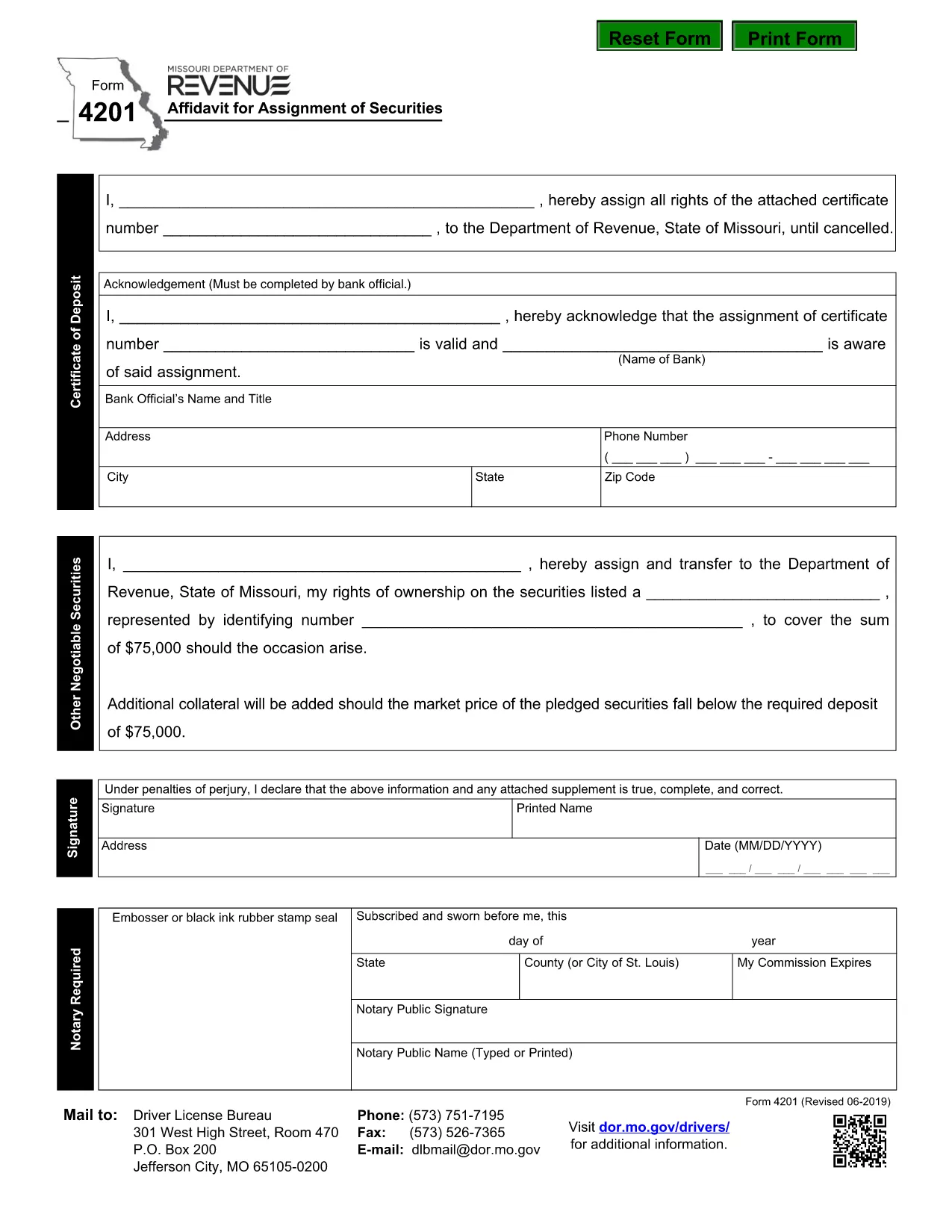
Missouri Form 4201 – Assignment of Securities (Fillable PDF)

  1. Jezik Engleski
  2. Zemlja SAD
  3. Aktivnost Vozačka dozvola
  4. država Missouri
Missouri Form 4201 – Assignment of Securities (Fillable PDF)

Form 4201 is the Missouri Department of Revenue’s official Affidavit for Assignment of Securities. This fillable PDF lets you complete the form online, save a copy, and submit it without printing.

What Is Form 4201?

Form 4201 records the transfer of securities (such as stocks, bonds, or other financial instruments) from one party to another for tax purposes. The Missouri Department of Revenue uses it to verify the assignment and ensure proper reporting.

Who Needs to File Form 4201?

  • Individuals or entities assigning securities that are subject to Missouri tax.
  • Trustees, executors, or legal representatives handling a transfer.
  • Businesses that need to document a securities assignment on their state tax return.

How to Complete the Fillable PDF

Instead of downloading the PDF and opening a separate editor, simply click the "Fill out this form" button on this page. The Formize PDF Filler app will load directly in your browser.

  1. Click Fill out this form.
  2. Wait a few seconds for the Formize PDF Filler to appear.
  3. Enter the required information in each highlighted field.
  4. Use the built‑in validation to check for missing or incorrect entries.
  5. When finished, click Download Completed PDF or Submit as instructed.

Common Mistakes & Tips

  • Missing signatures: The form requires a signature from the assignor; the filler lets you type a digital signature.
  • Incorrect dates: Use the format MM/DD/YYYY.
  • Wrong security description: Provide the full legal name and identification number.
  • Double‑check the “Assignment Amount” field for accuracy before saving.

Where to Submit the Completed Form

After saving the completed PDF, mail or fax it to the Missouri Department of Revenue address shown on the form, or upload it through the department’s online portal if you have an account.

Need help? Review the instructions on the form itself or contact the Missouri Department of Revenue directly.

PITANJA
  • What is the purpose of Missouri Form 4201?

    Form 4201 documents the assignment of securities for tax reporting. It ensures the Missouri Department of Revenue records the transfer correctly.

  • Who is required to file Form 4201?

    Anyone assigning securities that are subject to Missouri tax—individuals, trusts, executors, or businesses—must file this form.

  • Can I file Form 4201 electronically?

    Yes. Use the Formize fillable PDF to complete the form online, then download and upload it through the Missouri Department of Revenue’s electronic portal.

  • Is a handwritten signature still needed?

    A digital signature entered in the fillable PDF is accepted. If you print the form, you must sign it manually.

  • What happens if I make a mistake on the form?

    Correct the error in the Formize filler before downloading. If you submit a printed copy with errors, you may need to file an amended form.

  • Where do I send the completed Form 4201?

    Mail or fax the completed PDF to the address listed on the form, or upload it via the Missouri Department of Revenue’s online portal.

KAKO DA

Kako ispuniti Form 4201 besplatno, online u 5 jednostavnih koraka:

  1. 1
    Open the Fillable Form
    Click the "Fill out this form" button on the page. The Formize PDF Filler will open in a new browser window.
  2. 2
    Load the Form
    Wait a few seconds while the fillable PDF loads. All fields will be highlighted for easy entry.
  3. 3
    Enter Your Information
    Type the required data into each field. Use the built‑in validation to correct any errors.
  4. 4
    Review & Save
    Check the completed form for accuracy, then click "Download Completed PDF" to save a copy or "Submit" to send it directly.
  5. 5
    Submit or Print
    Print and mail the form, fax it, or upload it through the Missouri Department of Revenue portal as instructed.
Aplikacija Formize PDF Filler
OKO

Obrasci zahtjeva za vozačku dozvolu

Form 4201 je jedan od obrazaca vozačke dozvole koji su dokumenti koji se koriste u postupku dobivanja ili produljenja vozačke dozvole, službenog državnog dokumenta koji dopušta pojedincima upravljanje motornim vozilom na javnim cestama. Ti se obrasci mogu razlikovati ovisno o jurisdikciji, ali općenito uključuju sljedeće:

Obrazac za prijavu: Ovaj obrazac se koristi za podnošenje zahtjeva za vozačku dozvolu i obično traži osobne podatke kao što su ime, adresa, datum rođenja i broj socijalnog osiguranja.

Identifikacijska dokumentacija: Zajedno s obrascem za prijavu, pojedinci su obično dužni dostaviti posebne identifikacijske dokumente kako bi dokazali svoj identitet, prebivalište i zakonitu prisutnost u zemlji. To može uključivati ​​važeću putovnicu, rodni list, iskaznicu socijalnog osiguranja ili drugu identifikaciju koju je izdala vlada.

Dokaz o prebivalištu: Mnoge jurisdikcije zahtijevaju od podnositelja zahtjeva da dostave dokaz o prebivalištu, kao što je račun za režije, ugovor o najmu ili bankovni izvod, kako bi potvrdili svoju adresu.

Obrazac za liječnički pregled: Neke jurisdikcije mogu zahtijevati liječnički pregled kako bi se osiguralo da podnositelj zahtjeva ispunjava potrebne fizičke i mentalne zahtjeve za sigurnu vožnju. Medicinski stručnjak obično ispunjava ovaj obrazac.

Obrazac za završetak školovanja za vozača: Za vozače koji prvi put dolaze u promet može se zahtijevati završetak programa obrazovanja za vozača. Za podnošenje zahtjeva za vozačku dozvolu često je potreban obrazac ili potvrda koja pokazuje uspješno polaganje.

Obrazac za provjeru vida: Provjera vida obično se provodi tijekom postupka podnošenja zahtjeva za vozačku dozvolu. Očni stručnjak ili ovlašteno osoblje procijenit će oštrinu vida podnositelja zahtjeva i ispuniti traženi obrazac.

Ti su obrasci obično dostupni u lokalnom Odjelu za motorna vozila (DMV) ili ekvivalentnoj državnoj agenciji odgovornoj za izdavanje vozačkih dozvola. Važno je provjeriti posebne zahtjeve i obrasce primjenjive na vašu jurisdikciju jer mogu varirati.

ZNAČAJKE

PDF punilo

Najlakši način da ispunite Form 4201 online

  • Brzo ispunite Form 4201
    Tražite način da brzo ispunite Form 4201 online? Uz naš online besplatni PDF obrazac za popunjavanje, znat ćete kako urediti i ispuniti ovaj pdf dokument za manje od minute.
  • Jednostavan za korištenje mrežni PDF uređivač
    Dosta vam je ispisivanja PDF datoteka kako biste ih mogli uređivati ​​prije ponovnog skeniranja i slanja natrag? Uređujte PDF dokumente besplatno na mreži. Upotrijebite naš online uređivač pdf-ova kako biste uštedjeli vrijeme i papir.
  • Sjajni alati, sve platforme
    Pitate se kako ispuniti Form 4201 na Macu ili možda kako koristiti PDF filer besplatno? Naši online PDF alati rade na svim platformama.
  • Sigurno skladištenje datoteka
    Dovršene datoteke "Form 4201" pohranjuju se u zaštićenu bazu podataka kojom upravlja Amazon Cloud hosting. Svoje datoteke možete izbrisati iz našeg sustava bilo kada. U svakom slučaju, te se datoteke automatski brišu nakon 24 sata.
  • Chat s Form 4201
    Razgovarajte s "Form 4201" na Chatize koji je besplatni pomoćnik za čitanje PDF-ova. Postavljajte pitanja i dobivajte odgovore od "Form 4201". Samo kliknite gornji gumb Chat with Document.

Izbriši sesiju punjenja

Izbrisati odabranu sesiju punjenja? U tom će slučaju vaš napredak u ispunjavanju obrasca biti izgubljen.

Izbriši sesiju uređivanja

Izbrisati odabranu sesiju uređivanja? U tom će slučaju vaš napredak u stvaranju i uređivanju obrasca biti izgubljen.