
Izaberi jezik

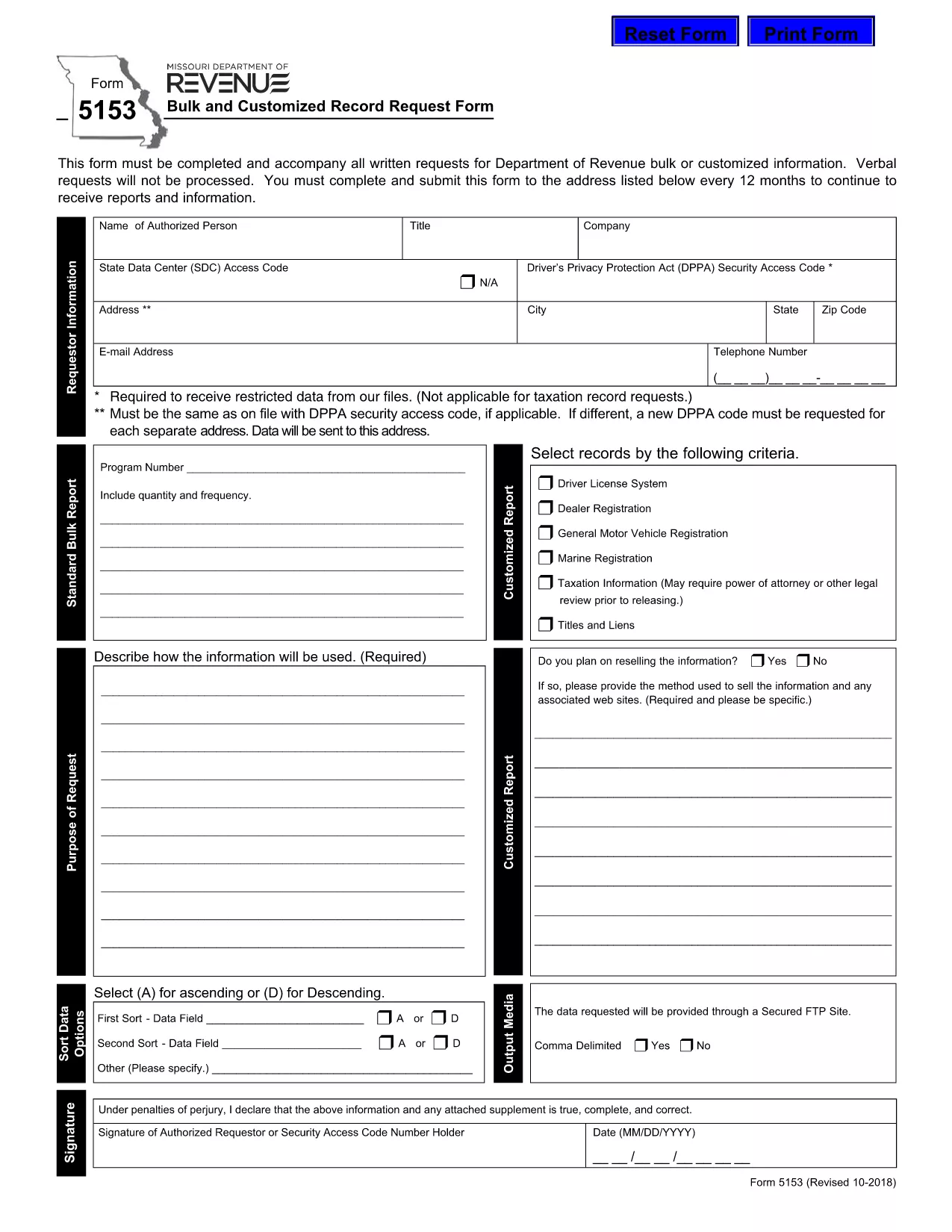
Form 5153 – Bulk and Customized Record Request

  1. Jezik Engleski
  2. Zemlja SAD
  3. Aktivnost Vozačka dozvola
  4. država Missouri
Form 5153 – Bulk and Customized Record Request

The Missouri Department of Revenue requires Form 5153 for any bulk or customized request for tax records. This form must accompany every written request; verbal requests are not processed.

What is Form 5153?

Form 5153, titled Bulk and Customized Record Request Form, authorizes the Department of Revenue to release large sets of tax data or specific customized information to the requester. It is used by businesses, researchers, and legal representatives who need extensive revenue data.

How to Fill Form 5153 Online

Instead of downloading and editing the PDF manually, simply click the “Fill out this form” button on this page. The Formize PDF Filler app will load the fillable version of Form 5153 directly in your browser.

  • Step 1: Click the blue “Fill out this form” button.
  • Step 2: Wait a few seconds while the Formize PDF Filler loads.
  • Step 3: Complete each field. The filler validates dates, numbers, and required entries in real time.
  • Step 4: When finished, click Save & Download to store a copy on your computer.
  • Step 5: Print the saved PDF, sign where required, and mail it to the address listed on the form.

Common Mistakes to Avoid

Even with an online filler, errors can cause delays. Keep these tips in mind:

  • Do not leave required fields blank – the filler will highlight them.
  • Use the exact legal name of the requesting entity.
  • Provide a complete, current mailing address.
  • Double‑check the date format (MM/DD/YYYY).
  • Ensure the signature line is signed after printing – electronic signatures are not accepted for this form.

Submission Guidelines

After printing and signing, mail the completed Form 5153 to the address shown on the last page of the PDF. Include any supporting documentation required for your specific request. Keep a copy of the signed form for your records.

Download the Fillable PDF

If you prefer the traditional method, you can download the original fillable PDF directly from the Missouri Department of Revenue:

Download Form 5153 (PDF)

PITANJA
  • What is the purpose of Form 5153?

    Form 5153 is used to request bulk or customized tax records from the Missouri Department of Revenue.

  • Can I submit Form 5153 electronically?

    No. After completing the form online, you must print, sign, and mail it to the Department of Revenue.

  • How often can I submit Form 5153?

    You may submit the form once every 12 months for the same type of request.

  • Is there a fee for filing Form 5153?

    The form itself is free, but the Department may charge fees for processing large data requests.

  • What should I do if I make a mistake on the form?

    Print a new copy, correct the error, and submit the revised form. Do not send a corrected version of a previously mailed form.

  • Where do I mail the completed Form 5153?

    The mailing address is printed on the last page of the PDF. Verify the address on the form before sending.

  • Can I request records for multiple entities on one Form 5153?

    Each entity requires its own separate Form 5153 to ensure proper processing.

KAKO DA

Kako ispuniti Form 5153 besplatno, online u 4 jednostavnih koraka:

  1. 1
    Open the Fillable Form
    Click the blue “Fill out this form” button on the page. The Formize PDF Filler loads the fillable version of Form 5153 directly in your browser.
  2. 2
    Complete the Fields
    Enter all required information. The filler validates entries in real time, highlighting any missing or incorrect data.
  3. 3
    Save and Download
    When all fields are completed, click “Save & Download” to store a copy on your computer.
  4. 4
    Print, Sign, and Mail
    Print the saved PDF, sign the required signature line, and mail the form to the address listed on the last page.
Aplikacija Formize PDF Filler
OKO

Obrasci zahtjeva za vozačku dozvolu

U većini zemalja obavezno je imati vozačku dozvolu prije nego što krenete na cestu. Stjecanje vozačke dozvole važna je prekretnica za svakoga tko želi voziti automobil.

Form 5153 je jedan od obrazaca zahtjeva za vozačku dozvolu koji su dokumenti koji se koriste za prikupljanje informacija od ljudi koji žele podnijeti zahtjev za vozačku dozvolu. Obično sadrži polja za ime podnositelja zahtjeva, datum rođenja, broj osobne iskaznice, podatke za kontakt, kao i povijest vozačke dozvole i iskustvo.

ZNAČAJKE

PDF punilo

Najlakši način da ispunite Form 5153 online

  • Brzo ispunite Form 5153
    Tražite način da brzo ispunite Form 5153 online? Uz naš online besplatni PDF obrazac za popunjavanje, znat ćete kako urediti i ispuniti ovaj pdf dokument za manje od minute.
  • Jednostavan za korištenje mrežni PDF uređivač
    Dosta vam je ispisivanja PDF datoteka kako biste ih mogli uređivati ​​prije ponovnog skeniranja i slanja natrag? Uređujte PDF dokumente besplatno na mreži. Upotrijebite naš online uređivač pdf-ova kako biste uštedjeli vrijeme i papir.
  • Sjajni alati, sve platforme
    Pitate se kako ispuniti Form 5153 na Macu ili možda kako koristiti PDF filer besplatno? Naši online PDF alati rade na svim platformama.
  • Sigurno skladištenje datoteka
    Dovršene datoteke "Form 5153" pohranjuju se u zaštićenu bazu podataka kojom upravlja Amazon Cloud hosting. Svoje datoteke možete izbrisati iz našeg sustava bilo kada. U svakom slučaju, te se datoteke automatski brišu nakon 24 sata.
  • Chat s Form 5153
    Razgovarajte s "Form 5153" na Chatize koji je besplatni pomoćnik za čitanje PDF-ova. Postavljajte pitanja i dobivajte odgovore od "Form 5153". Samo kliknite gornji gumb Chat with Document.

Izbriši sesiju punjenja

Izbrisati odabranu sesiju punjenja? U tom će slučaju vaš napredak u ispunjavanju obrasca biti izgubljen.

Izbriši sesiju uređivanja

Izbrisati odabranu sesiju uređivanja? U tom će slučaju vaš napredak u stvaranju i uređivanju obrasca biti izgubljen.