
Izaberi jezik

Nevada DMV Form 301 – Certification of Attendance (Fillable PDF)

  1. Jezik Engleski
  2. Zemlja SAD
  3. Aktivnost Vozačka dozvola
  4. država Nevada
Nevada DMV Form 301 – Certification of Attendance (Fillable PDF)

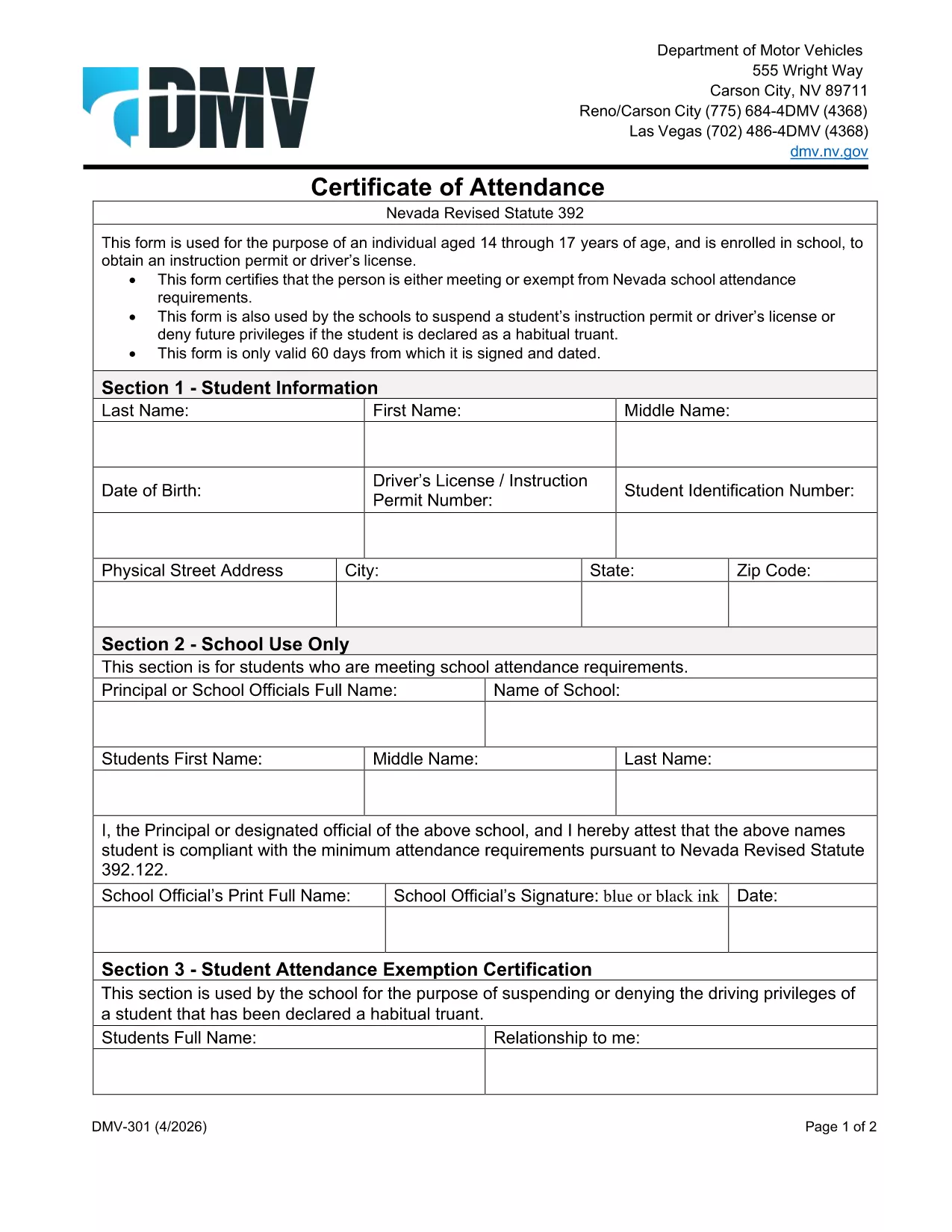
The Nevada Department of Motor Vehicles (DMV) requires Form 301 – Certification of Attendance for teens ages 14‑18 who are enrolled in school and are applying for an instruction permit or driver’s license. This form verifies that the student meets the state’s school attendance requirements or is exempt.

What Is DMV Form 301?

Form 301 is a short, one‑page certificate completed by the student, a parent/guardian, and the school. It is used to:

  • Confirm regular school attendance
  • Document any legal exemption
  • Allow the DMV to issue an instruction permit or driver’s license

How to Complete the Certification of Attendance

Follow the simple steps below. The form is fully fillable online, so you don’t need any PDF editor.

  1. Click the "Fill out this form" button on this page.
  2. Wait a few seconds while the Formize PDF Filler app loads the fillable DMV 301 PDF.
  3. Enter the student’s printed name, date of birth, and school information in the designated fields.
  4. Have the parent/guardian sign the required section electronically.
  5. If you are a school administrator, complete the "School Use Only" part and add the school seal.
  6. When all fields are completed, click Save to download a completed copy, or click Print to bring a hard copy to the DMV.

Common Mistakes to Avoid

To ensure your form is accepted, avoid these frequent errors:

  • Leaving any required field blank – the filler will highlight missing data.
  • Using an illegible signature – the electronic signature must be clear.
  • Submitting an outdated school name or address – verify the information with your school office.
  • Forgetting to date the form – the DMV requires a current date.

Where to Submit the Form

After you’ve filled and signed Form 301, bring the printed copy (or a secured digital version on a tablet) to any Nevada DMV office together with the required identification documents. The form is accepted at all DMV locations across Nevada.

Download the Fillable PDF Instantly

Ready to start? Click the button above, let Formize load the fillable PDF, and complete the Certification of Attendance in minutes.

PITANJA
  • Who needs to complete DMV Form 301?

    Any Nevada resident between 14 and 18 years old who is enrolled in school and is applying for an instruction permit or driver’s license must submit a completed Form 301.

  • Can I fill out Form 301 on a mobile device?

    Yes. The Formize PDF Filler works on smartphones, tablets, and computers, allowing you to complete the form on any device.

  • Do I need a physical signature?

    The DMV accepts an electronic signature entered through the fillable PDF. Print the form with the signature if you prefer a hard copy.

  • What if my school does not have a seal?

    If the school lacks an official seal, have the school administrator write the school name and date in the "School Use Only" section and sign it.

  • How long is the Certification of Attendance valid?

    The form is valid for the specific permit or license application it accompanies. If the application is delayed, a new form may be required.

  • Where can I submit the completed Form 301?

    Bring the completed form to any Nevada DMV office, or submit it as part of your online permit application if the DMV offers that option.

  • Is there a fee to download the PDF?

    No. The PDF is provided free of charge; you only pay the standard DMV fees for the permit or license.

KAKO DA

Kako ispuniti DMV 301 besplatno, online u 4 jednostavnih koraka:

  1. 1
    Open the Fillable Form
    Click the "Fill out this form" button on the page. The Formize PDF Filler app will load the DMV 301 PDF automatically.
  2. 2
    Enter Required Information
    Type the student's name, date of birth, school details, and any exemption notes directly into the highlighted fields.
  3. 3
    Add Signatures
    Use your mouse or touchscreen to sign the parent/guardian section. School officials can add their signature and seal if needed.
  4. 4
    Save or Print
    When all fields are completed, click "Save" to download the completed PDF or "Print" to obtain a hard‑copy for the DMV.
Aplikacija Formize PDF Filler
OKO

Obrasci zahtjeva za vozačku dozvolu

DMV 301 je jedan od obrazaca za vozačku dozvolu koji su dokumenti koji se koriste za podnošenje zahtjeva za vozačku dozvolu ili za različite usluge vezane uz vozačke dozvole. Ove obrasce obično daje odjel ili agencija odgovorna za izdavanje vozačkih dozvola u određenoj jurisdikciji, kao što je Department of Motor Vehicles (DMV) u Sjedinjenim Državama.

Uobičajeni obrasci vozačke dozvole uključuju:

Zahtjev za vozačku dozvolu: Ovaj se obrazac koristi za podnošenje zahtjeva za novu vozačku dozvolu ili za produljenje postojeće. Obično zahtijeva osobne podatke kao što su ime, adresa, datum rođenja i broj socijalnog osiguranja.

Identifikacijski dokumenti: Neke jurisdikcije zahtijevaju posebne identifikacijske dokumente za provjeru identiteta i prebivališta podnositelja zahtjeva. Oni mogu uključivati ​​obrasce kao što su rodni list, putovnica ili iskaznica socijalnog osiguranja.

Pregled vida: Mnogi zahtjevi za vozačku dozvolu zahtijevaju obrazac za pregled vida, gdje ovlašteni medicinski stručnjak ili specijalist za njegu vida potvrđuje da podnositelj zahtjeva ispunjava minimalne uvjete vida za vožnju.

Obrasci za vozačko obrazovanje: U nekim slučajevima pojedinci će možda trebati dostaviti dokaz o završenom tečaju za vozačko obrazovanje, kao što je potvrda o završenom vozačkom obrazovanju ili obrazac potpisan od strane instruktora.

Medicinska procjena: određena medicinska stanja mogu zahtijevati dodatne obrasce koje mora ispuniti zdravstveni radnik. Ovi obrasci potvrđuju fizičku i mentalnu sposobnost kandidata za vožnju.

Obrazac za promjenu adrese: Ako se vlasnik vozačke dozvole preseli na novu adresu, možda će morati ispuniti obrazac za promjenu adrese kako bi ažurirao podatke o svojoj vozačkoj dozvoli.

Obrasci vozačke dozvole mogu se dobiti u lokalnom uredu DMV-a ili preuzeti s njihove web stranice. Važno je pažljivo ispuniti i predati tražene obrasce zajedno sa svim pratećim dokumentima kako biste osigurali nesmetan postupak prijave ili usluge.

ZNAČAJKE

PDF punilo

Najlakši način da ispunite DMV 301 online

  • Brzo ispunite DMV 301
    Tražite način da brzo ispunite DMV 301 online? Uz naš online besplatni PDF obrazac za popunjavanje, znat ćete kako urediti i ispuniti ovaj pdf dokument za manje od minute.
  • Jednostavan za korištenje mrežni PDF uređivač
    Dosta vam je ispisivanja PDF datoteka kako biste ih mogli uređivati ​​prije ponovnog skeniranja i slanja natrag? Uređujte PDF dokumente besplatno na mreži. Upotrijebite naš online uređivač pdf-ova kako biste uštedjeli vrijeme i papir.
  • Sjajni alati, sve platforme
    Pitate se kako ispuniti DMV 301 na Macu ili možda kako koristiti PDF filer besplatno? Naši online PDF alati rade na svim platformama.
  • Sigurno skladištenje datoteka
    Dovršene datoteke "DMV 301" pohranjuju se u zaštićenu bazu podataka kojom upravlja Amazon Cloud hosting. Svoje datoteke možete izbrisati iz našeg sustava bilo kada. U svakom slučaju, te se datoteke automatski brišu nakon 24 sata.
  • Chat s DMV 301
    Razgovarajte s "DMV 301" na Chatize koji je besplatni pomoćnik za čitanje PDF-ova. Postavljajte pitanja i dobivajte odgovore od "DMV 301". Samo kliknite gornji gumb Chat with Document.

Izbriši sesiju punjenja

Izbrisati odabranu sesiju punjenja? U tom će slučaju vaš napredak u ispunjavanju obrasca biti izgubljen.

Izbriši sesiju uređivanja

Izbrisati odabranu sesiju uređivanja? U tom će slučaju vaš napredak u stvaranju i uređivanju obrasca biti izgubljen.