
Izaberi jezik

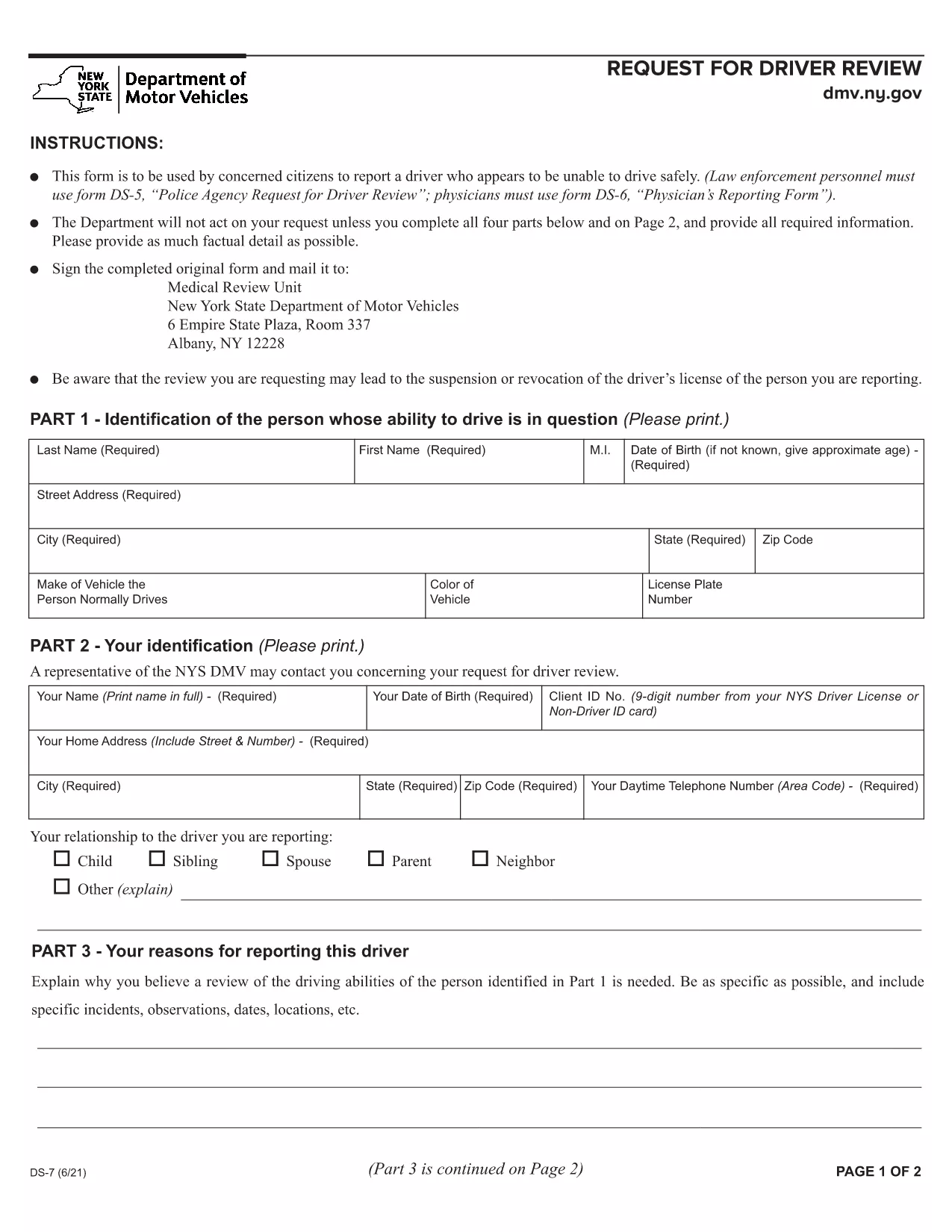
New York DMV Form DS‑7 – Driver Review Request (Fillable PDF)

  1. Jezik Engleski
  2. Zemlja SAD
  3. Aktivnost Vozačka dozvola
  4. država New York
New York DMV Form DS‑7 – Driver Review Request (Fillable PDF)

The New York Department of Motor Vehicles (DMV) requires a completed Form DS‑7 when a citizen wants to report a driver who may be unsafe on the road. This form is used by law‑enforcement, physicians, and concerned citizens to initiate a driver safety review.

Our online fillable PDF lets you complete the entire DS‑7 directly in your browser—no extra software needed. Simply click the “Fill out this form” button, wait for the Formize PDF Filler to load, and start entering your information.

Below you’ll find a quick overview of the form, detailed instructions, and tips to avoid common errors.

What Is Form DS‑7?

Form DS‑7, titled “Request for Driver Review,” collects detailed information about the driver’s behavior, vehicle details, and incident description. The DMV uses this data to determine whether a formal investigation or licensing action is required.

How to Fill Out DS‑7 Online

Follow the step‑by‑step guide in the How To section. The online filler automatically validates required fields, so you won’t miss any critical information.

Common Mistakes to Avoid

  • Leaving any required field blank – the filler will highlight missing sections.
  • Using vague descriptions – provide specific dates, times, and locations.
  • Submitting without a signature – you can sign digitally within the filler.

Submit Your Completed Form

After completing the form, click the “Submit” button to download a signed PDF. Mail or fax the PDF to the address listed on the last page of the form, or bring a printed copy to any DMV office.

Download the Fillable PDF

If you prefer to work offline, you can download the official fillable PDF directly from the New York DMV website.

PITANJA
  • Who can submit Form DS‑7?

    Any concerned citizen, law‑enforcement officer, or medical professional can submit a DS‑7 to request a driver safety review.

  • Is the online filler free to use?

    Yes, Formize provides a free, secure fillable PDF experience for the DS‑7 form.

  • Can I save my progress and return later?

    The filler allows you to save a draft locally on your computer and resume editing at any time before final submission.

  • Do I need to print the form after filling it out?

    Printing is optional. You can submit the signed PDF electronically by mail or fax, or bring a printed copy to a DMV office.

  • What happens after I submit the DS‑7?

    The DMV reviews the information, may contact the driver for additional details, and determines whether a formal investigation or license action is needed.

  • How long does the review process take?

    Processing times vary, but the DMV typically acknowledges receipt within 10 business days and may take several weeks for a full review.

  • Can I attach supporting documents?

    Yes, you can attach photos, police reports, or medical records as separate PDF files when you mail or fax the completed DS‑7.

  • Is there a fee to file Form DS‑7?

    No, filing a DS‑7 request is free of charge.

KAKO DA

Kako ispuniti DS-7 form besplatno, online u 4 jednostavnih koraka:

  1. 1
    Open the Fillable Form
    Click the “Fill out this form” button on the page. The Formize PDF Filler app will load in a new tab.
  2. 2
    Enter Your Information
    Complete each section—driver details, incident description, and witness information. Required fields are marked with an asterisk.
  3. 3
    Add a Digital Signature
    Use the built‑in signature tool to sign the form electronically. This satisfies the DMV’s signature requirement.
  4. 4
    Download and Submit
    After saving, click “Download PDF.” Print the document or send the PDF by mail/fax to the DMV address shown on the form.
Aplikacija Formize PDF Filler
OKO

Obrasci zahtjeva za vozačku dozvolu

DS-7 form je jedan od obrazaca za vozačku dozvolu koji su dokumenti koji se koriste za podnošenje zahtjeva za vozačku dozvolu ili za različite usluge vezane uz vozačke dozvole. Ove obrasce obično daje odjel ili agencija odgovorna za izdavanje vozačkih dozvola u određenoj jurisdikciji, kao što je Department of Motor Vehicles (DMV) u Sjedinjenim Državama.

Uobičajeni obrasci vozačke dozvole uključuju:

Zahtjev za vozačku dozvolu: Ovaj se obrazac koristi za podnošenje zahtjeva za novu vozačku dozvolu ili za produljenje postojeće. Obično zahtijeva osobne podatke kao što su ime, adresa, datum rođenja i broj socijalnog osiguranja.

Identifikacijski dokumenti: Neke jurisdikcije zahtijevaju posebne identifikacijske dokumente za provjeru identiteta i prebivališta podnositelja zahtjeva. Oni mogu uključivati ​​obrasce kao što su rodni list, putovnica ili iskaznica socijalnog osiguranja.

Pregled vida: Mnogi zahtjevi za vozačku dozvolu zahtijevaju obrazac za pregled vida, gdje ovlašteni medicinski stručnjak ili specijalist za njegu vida potvrđuje da podnositelj zahtjeva ispunjava minimalne uvjete vida za vožnju.

Obrasci za vozačko obrazovanje: U nekim slučajevima pojedinci će možda trebati dostaviti dokaz o završenom tečaju za vozačko obrazovanje, kao što je potvrda o završenom vozačkom obrazovanju ili obrazac potpisan od strane instruktora.

Medicinska procjena: određena medicinska stanja mogu zahtijevati dodatne obrasce koje mora ispuniti zdravstveni radnik. Ovi obrasci potvrđuju fizičku i mentalnu sposobnost kandidata za vožnju.

Obrazac za promjenu adrese: Ako se vlasnik vozačke dozvole preseli na novu adresu, možda će morati ispuniti obrazac za promjenu adrese kako bi ažurirao podatke o svojoj vozačkoj dozvoli.

Obrasci vozačke dozvole mogu se dobiti u lokalnom uredu DMV-a ili preuzeti s njihove web stranice. Važno je pažljivo ispuniti i predati tražene obrasce zajedno sa svim pratećim dokumentima kako biste osigurali nesmetan postupak prijave ili usluge.

ZNAČAJKE

PDF punilo

Najlakši način da ispunite DS-7 form online

  • Brzo ispunite DS-7 form
    Tražite način da brzo ispunite DS-7 form online? Uz naš online besplatni PDF obrazac za popunjavanje, znat ćete kako urediti i ispuniti ovaj pdf dokument za manje od minute.
  • Jednostavan za korištenje mrežni PDF uređivač
    Dosta vam je ispisivanja PDF datoteka kako biste ih mogli uređivati ​​prije ponovnog skeniranja i slanja natrag? Uređujte PDF dokumente besplatno na mreži. Upotrijebite naš online uređivač pdf-ova kako biste uštedjeli vrijeme i papir.
  • Sjajni alati, sve platforme
    Pitate se kako ispuniti DS-7 form na Macu ili možda kako koristiti PDF filer besplatno? Naši online PDF alati rade na svim platformama.
  • Sigurno skladištenje datoteka
    Dovršene datoteke "DS-7 form" pohranjuju se u zaštićenu bazu podataka kojom upravlja Amazon Cloud hosting. Svoje datoteke možete izbrisati iz našeg sustava bilo kada. U svakom slučaju, te se datoteke automatski brišu nakon 24 sata.
  • Chat s DS-7 form
    Razgovarajte s "DS-7 form" na Chatize koji je besplatni pomoćnik za čitanje PDF-ova. Postavljajte pitanja i dobivajte odgovore od "DS-7 form". Samo kliknite gornji gumb Chat with Document.

Izbriši sesiju punjenja

Izbrisati odabranu sesiju punjenja? U tom će slučaju vaš napredak u ispunjavanju obrasca biti izgubljen.

Izbriši sesiju uređivanja

Izbrisati odabranu sesiju uređivanja? U tom će slučaju vaš napredak u stvaranju i uređivanju obrasca biti izgubljen.