
Izaberi jezik

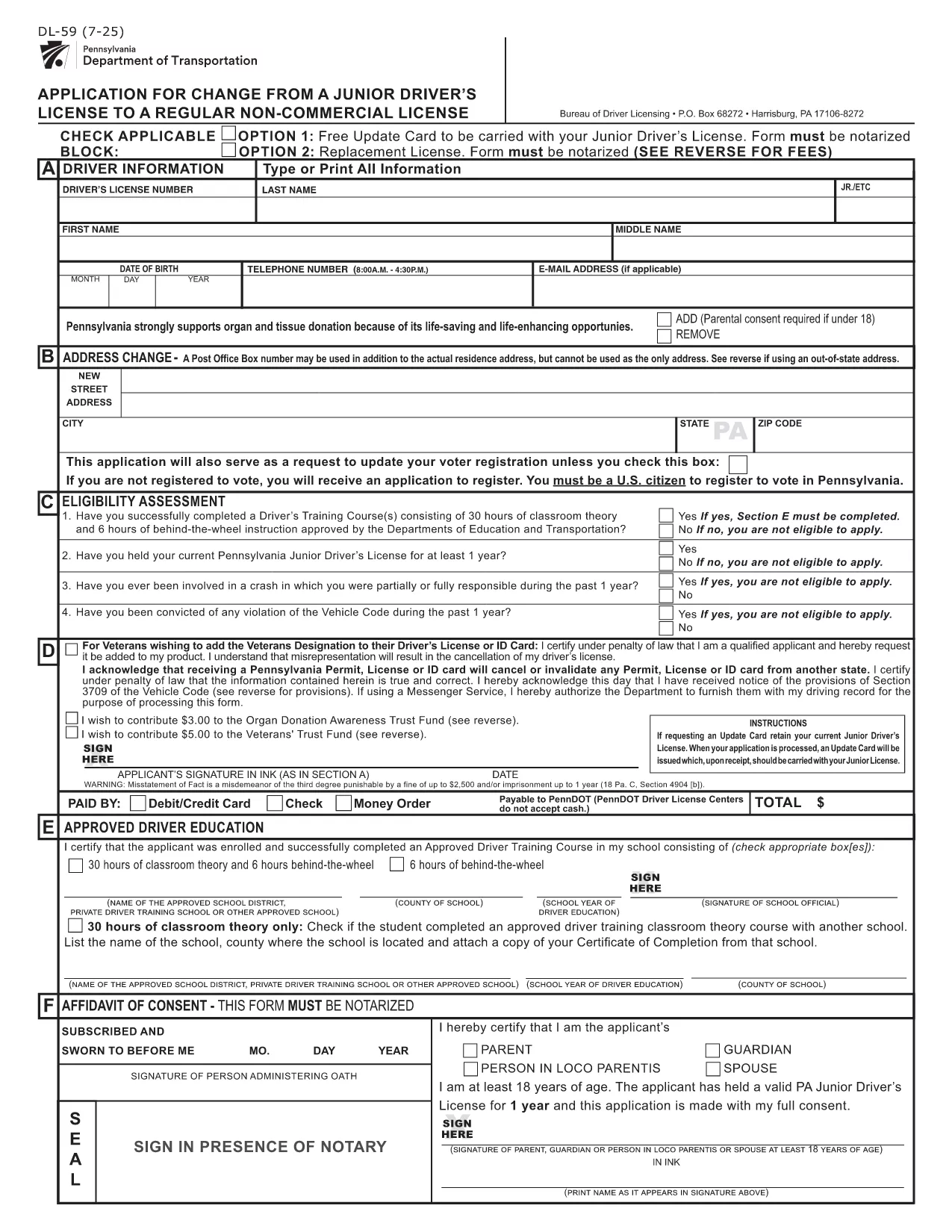
PennDOT DL-59 – Junior Driver License Upgrade Form

  1. Jezik Engleski
  2. Zemlja SAD
  3. Aktivnost Vozačka dozvola
  4. država Pennsylvania
PennDOT DL-59 – Junior Driver License Upgrade Form

The DL-59 is the Pennsylvania Department of Transportation (PennDOT) application used to change a junior driver’s license to a regular non‑commercial license. Whether you’re turning 18, adding a new class, or simply need an updated ID, the DL-59 streamlines the process.

What Is the DL-59 Form?

This official PennDOT PDF collects personal details, eye color, height, and the new license class you’re requesting. It must be signed and, in some cases, notarized before submission.

How to Complete the DL-59 Online

Instead of downloading, printing, and scanning, use Formize’s built‑in PDF filler:

  1. Click the "Fill out this form" button on this page.
  2. Wait a few seconds while the Formize PDF Filler app loads.
  3. Enter the required information directly into the fillable fields.
  4. Review the completed form for accuracy.
  5. Save or print the finished PDF and submit it to PennDOT.

Common Mistakes to Avoid

  • Leaving the eye color or height fields blank – PennDOT uses these as fraud‑prevention identifiers.
  • Forgetting to sign the form in the designated area.
  • Submitting an outdated address; always double‑check your mailing address.
  • Not notarizing when a notary seal is required (e.g., certain name changes).

Where to Submit Your Completed Form

Mail the finished DL-59 to the address listed on the form or deliver it in person to any PennDOT Driver License Center. Include the appropriate fee (usually $12‑$17) unless you qualify for a free update.

Download the Official Fillable PDF

If you prefer the traditional route, you can still download the official form below. It is fully fillable and compatible with most PDF editors.

PITANJA
  • Who needs to fill out the DL-59 form?

    Anyone who holds a Pennsylvania junior driver’s license and wants to upgrade to a regular non‑commercial license, typically after turning 18 or adding a new class.

  • Is the DL-59 form free?

    The form itself is free to download, but PennDOT charges a processing fee (usually $12‑$17) unless you qualify for a fee‑waiver update.

  • Do I need a notary for the DL-59?

    A notary is required only if the form includes a name change or other circumstances that PennDOT specifies. Check the form’s instructions.

  • Can I submit the DL-59 electronically?

    PennDOT currently accepts only printed and mailed or in‑person submissions. Use the fillable PDF to avoid errors before printing.

  • How long does it take to process the upgrade?

    Processing typically takes 7‑10 business days after PennDOT receives the completed form and payment.

  • What documents should I attach?

    Include proof of residency, a copy of your current junior license, and any required fee payment receipt.

  • What if I make a mistake after submitting?

    Contact your local PennDOT Driver License Center to request a correction; you may need to submit a new DL-59.

KAKO DA

Kako ispuniti DL-59 besplatno, online u 5 jednostavnih koraka:

  1. 1
    Open the Fillable Form
    Click the "Fill out this form" button on the page. The Formize PDF Filler will open in a new window.
  2. 2
    Enter Your Information
    Type directly into each highlighted field—personal details, eye color, height, and the new license class.
  3. 3
    Review and Sign
    Double‑check every entry, then use the built‑in signature tool to add your signature.
  4. 4
    Save or Print
    Save the completed PDF to your device or print it for submission to PennDOT.
  5. 5
    Submit to PennDOT
    Mail or deliver the form along with any required fees to the address shown on the PDF.
Aplikacija Formize PDF Filler
OKO

Obrasci zahtjeva za vozačku dozvolu

DL-59 je jedan od obrazaca za vozačku dozvolu koji su dokumenti koji se koriste za podnošenje zahtjeva za vozačku dozvolu ili za različite usluge vezane uz vozačke dozvole. Ove obrasce obično daje odjel ili agencija odgovorna za izdavanje vozačkih dozvola u određenoj jurisdikciji, kao što je Department of Motor Vehicles (DMV) u Sjedinjenim Državama.

Uobičajeni obrasci vozačke dozvole uključuju:

Zahtjev za vozačku dozvolu: Ovaj se obrazac koristi za podnošenje zahtjeva za novu vozačku dozvolu ili za produljenje postojeće. Obično zahtijeva osobne podatke kao što su ime, adresa, datum rođenja i broj socijalnog osiguranja.

Identifikacijski dokumenti: Neke jurisdikcije zahtijevaju posebne identifikacijske dokumente za provjeru identiteta i prebivališta podnositelja zahtjeva. Oni mogu uključivati ​​obrasce kao što su rodni list, putovnica ili iskaznica socijalnog osiguranja.

Pregled vida: Mnogi zahtjevi za vozačku dozvolu zahtijevaju obrazac za pregled vida, gdje ovlašteni medicinski stručnjak ili specijalist za njegu vida potvrđuje da podnositelj zahtjeva ispunjava minimalne uvjete vida za vožnju.

Obrasci za vozačko obrazovanje: U nekim slučajevima pojedinci će možda trebati dostaviti dokaz o završenom tečaju za vozačko obrazovanje, kao što je potvrda o završenom vozačkom obrazovanju ili obrazac potpisan od strane instruktora.

Medicinska procjena: određena medicinska stanja mogu zahtijevati dodatne obrasce koje mora ispuniti zdravstveni radnik. Ovi obrasci potvrđuju fizičku i mentalnu sposobnost kandidata za vožnju.

Obrazac za promjenu adrese: Ako se vlasnik vozačke dozvole preseli na novu adresu, možda će morati ispuniti obrazac za promjenu adrese kako bi ažurirao podatke o svojoj vozačkoj dozvoli.

Obrasci vozačke dozvole mogu se dobiti u lokalnom uredu DMV-a ili preuzeti s njihove web stranice. Važno je pažljivo ispuniti i predati tražene obrasce zajedno sa svim pratećim dokumentima kako biste osigurali nesmetan postupak prijave ili usluge.

ZNAČAJKE

PDF punilo

Najlakši način da ispunite DL-59 online

  • Brzo ispunite DL-59
    Tražite način da brzo ispunite DL-59 online? Uz naš online besplatni PDF obrazac za popunjavanje, znat ćete kako urediti i ispuniti ovaj pdf dokument za manje od minute.
  • Jednostavan za korištenje mrežni PDF uređivač
    Dosta vam je ispisivanja PDF datoteka kako biste ih mogli uređivati ​​prije ponovnog skeniranja i slanja natrag? Uređujte PDF dokumente besplatno na mreži. Upotrijebite naš online uređivač pdf-ova kako biste uštedjeli vrijeme i papir.
  • Sjajni alati, sve platforme
    Pitate se kako ispuniti DL-59 na Macu ili možda kako koristiti PDF filer besplatno? Naši online PDF alati rade na svim platformama.
  • Sigurno skladištenje datoteka
    Dovršene datoteke "DL-59" pohranjuju se u zaštićenu bazu podataka kojom upravlja Amazon Cloud hosting. Svoje datoteke možete izbrisati iz našeg sustava bilo kada. U svakom slučaju, te se datoteke automatski brišu nakon 24 sata.
  • Chat s DL-59
    Razgovarajte s "DL-59" na Chatize koji je besplatni pomoćnik za čitanje PDF-ova. Postavljajte pitanja i dobivajte odgovore od "DL-59". Samo kliknite gornji gumb Chat with Document.

Izbriši sesiju punjenja

Izbrisati odabranu sesiju punjenja? U tom će slučaju vaš napredak u ispunjavanju obrasca biti izgubljen.

Izbriši sesiju uređivanja

Izbrisati odabranu sesiju uređivanja? U tom će slučaju vaš napredak u stvaranju i uređivanju obrasca biti izgubljen.