
Izaberi jezik

Pennsylvania DL-82 Out‑of‑State Address & Photo Exemption Form (Fillable PDF)

  1. Jezik Engleski
  2. Zemlja SAD
  3. Aktivnost Vozačka dozvola
  4. država Pennsylvania
Pennsylvania DL-82 Out‑of‑State Address & Photo Exemption Form (Fillable PDF)

What Is the DL-82 Form?

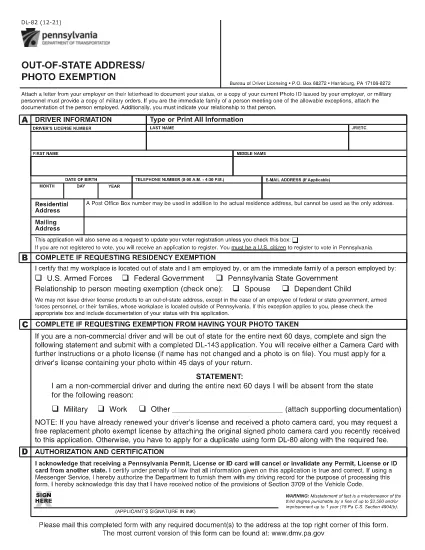
The DL-82 is the Pennsylvania Department of Transportation (PennDOT) form used to request an out‑of‑state address and photo exemption for a driver’s license. It allows military members, federal or state employees, and their immediate families to keep a valid PA license while stationed outside the Commonwealth.

Who Is Eligible for the Exemption?

  • U.S. Armed Forces personnel stationed outside Pennsylvania
  • Federal, state, or local government employees working out of state
  • Immediate family members of the above qualifying applicants
  • Non‑commercial drivers who need a photo exemption while away from Pennsylvania

How to Complete the DL-82 Online with Formize

Instead of downloading the PDF and editing it manually, simply click the “Fill out this form” button on this page. The Formize PDF Filler app will load in your browser, letting you:

  1. Enter your driver’s license number, name, and date of birth.
  2. Select the appropriate exemption check‑boxes.
  3. Upload supporting documents (military orders, employment verification, etc.).
  4. Apply an electronic signature.
  5. Save, print, or submit the completed form directly from the app.

Common Mistakes to Avoid

  • Leaving required fields blank – the form will be rejected.
  • Using an outdated version of the DL-82 – always use the latest PDF linked below.
  • Failing to attach proof of military or employment status.
  • Signing with a handwritten image instead of the built‑in e‑signature tool.

Where to Submit Your Completed Form

After completing the form, you can:

  • Mail it to the PennDOT Bureau of Driver Licensing, Harrisburg, PA.
  • Deliver it in person at any Pennsylvania DMV office.
  • If your employer’s human‑resources department accepts electronic submissions, you may forward the PDF directly.

Processing typically takes 7‑10 business days. Keep a copy of the submitted PDF for your records.

PITANJA
  • What is the purpose of the DL-82 form?

    It allows qualified individuals to request an exemption from providing a new address and photo on their Pennsylvania driver’s license while they are stationed or employed out of state.

  • Can I submit the DL-82 electronically?

    Yes. With Formize you can fill, sign, and download the completed PDF. You still need to mail or deliver the printed form to PennDOT unless your agency accepts electronic copies.

  • How long is the exemption valid?

    The exemption is typically valid for one year, after which you must submit a new DL-82 if you remain out of state.

  • Do I need to provide a new photo if I move back to Pennsylvania?

    When you return to Pennsylvania and renew your license, you must provide a current photo. The DL-82 exemption only applies while you are out of state.

  • What supporting documents are required?

    Proof of military orders, federal or state employment letters, or a spouse’s employment verification if you are a family member. Attach clear copies when you upload them in Formize.

  • Is there a fee to file the DL-82?

    There is no separate fee for the exemption itself, but standard driver’s license renewal or replacement fees still apply.

KAKO DA

Kako ispuniti DL-82 besplatno, online u 4 jednostavnih koraka:

  1. 1
    Open the Fillable Form
    Click the “Fill out this form” button on the page. The Formize PDF Filler will launch in a new tab.
  2. 2
    Enter Your Information
    Fill in your driver’s license number, name, date of birth, and select the exemption boxes that apply to you.
  3. 3
    Upload Supporting Documents
    Use the upload field to attach military orders, employment verification letters, or any other required proof.
  4. 4
    Sign and Submit
    Add your electronic signature, review all entries, then click “Save” or “Print” to finalize. You can mail the PDF or keep a digital copy.
Aplikacija Formize PDF Filler
OKO

Obrasci zahtjeva za vozačku dozvolu

U većini zemalja obavezno je imati vozačku dozvolu prije nego što krenete na cestu. Stjecanje vozačke dozvole važna je prekretnica za svakoga tko želi voziti automobil.

DL-82 je jedan od obrazaca zahtjeva za vozačku dozvolu koji su dokumenti koji se koriste za prikupljanje informacija od ljudi koji žele podnijeti zahtjev za vozačku dozvolu. Obično sadrži polja za ime podnositelja zahtjeva, datum rođenja, broj osobne iskaznice, podatke za kontakt, kao i povijest vozačke dozvole i iskustvo.

ZNAČAJKE

PDF punilo

Najlakši način da ispunite DL-82 online

  • Brzo ispunite DL-82
    Tražite način da brzo ispunite DL-82 online? Uz naš online besplatni PDF obrazac za popunjavanje, znat ćete kako urediti i ispuniti ovaj pdf dokument za manje od minute.
  • Jednostavan za korištenje mrežni PDF uređivač
    Dosta vam je ispisivanja PDF datoteka kako biste ih mogli uređivati ​​prije ponovnog skeniranja i slanja natrag? Uređujte PDF dokumente besplatno na mreži. Upotrijebite naš online uređivač pdf-ova kako biste uštedjeli vrijeme i papir.
  • Sjajni alati, sve platforme
    Pitate se kako ispuniti DL-82 na Macu ili možda kako koristiti PDF filer besplatno? Naši online PDF alati rade na svim platformama.
  • Sigurno skladištenje datoteka
    Dovršene datoteke "DL-82" pohranjuju se u zaštićenu bazu podataka kojom upravlja Amazon Cloud hosting. Svoje datoteke možete izbrisati iz našeg sustava bilo kada. U svakom slučaju, te se datoteke automatski brišu nakon 24 sata.
  • Chat s DL-82
    Razgovarajte s "DL-82" na Chatize koji je besplatni pomoćnik za čitanje PDF-ova. Postavljajte pitanja i dobivajte odgovore od "DL-82". Samo kliknite gornji gumb Chat with Document.

Izbriši sesiju punjenja

Izbrisati odabranu sesiju punjenja? U tom će slučaju vaš napredak u ispunjavanju obrasca biti izgubljen.

Izbriši sesiju uređivanja

Izbrisati odabranu sesiju uređivanja? U tom će slučaju vaš napredak u stvaranju i uređivanju obrasca biti izgubljen.