
Izaberi jezik

DI-17 Classroom Instruction Attendance Roster (Fillable PDF)

  1. Zemlja SAD
  2. Jezik Engleski
  3. Aktivnost Vozačka dozvola
  4. država Virginia
DI-17 Classroom Instruction Attendance Roster (Fillable PDF)

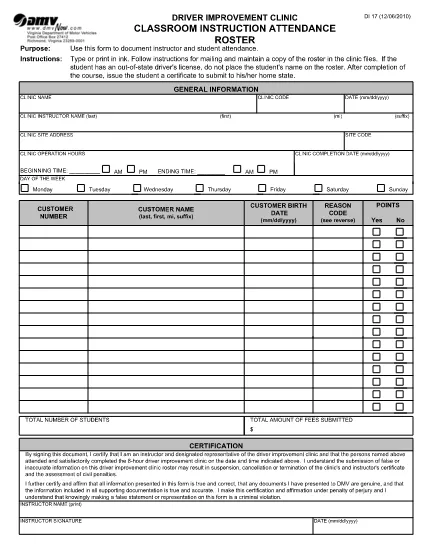
The DI-17 is the Virginia Department of Motor Vehicles (DMV) form used to record attendance for classroom driver‑education instruction. Schools, driving instructors, and training programs must submit this roster within 24 hours of completing a class.

What Is the DI-17 Form?

DI-17 captures essential details such as the instructor’s name, student information, dates of instruction, and the specific curriculum covered. It ensures compliance with Virginia DMV regulations and helps verify that learners have met the required training hours before taking the road‑skills test.

How to Complete the DI-17 Online

With Formize’s fillable PDF technology you can complete the DI‑17 directly in your browser—no extra software needed. Follow the simple steps below:

  • Click the Fill out this form button on this page.
  • Wait for the Formize PDF Filler app to load (usually a few seconds).
  • Enter all required fields exactly as they appear on the original paper form.
  • Use the Save button to store a copy on your device or in the cloud.
  • When finished, click Download to get the completed PDF ready for submission.

Common Errors to Avoid

Even a small mistake can delay processing. Keep these tips in mind:

  • Incorrect dates: Verify the class date matches the DMV’s calendar.
  • Missing signatures: Both the instructor and each student must sign.
  • Illegible handwriting: The fillable fields ensure clear, legible text.
  • Wrong form version: Use the latest DI‑17 PDF provided by the Virginia DMV (the link below is always up‑to‑date).

Submit Your Completed DI-17

After saving the filled PDF, upload it to the Virginia DMV Extranet portal or email it according to your organization’s instructions. The DMV requires receipt within 24 hours of the class.

Why Use Formize Fillable PDF

Formize turns static PDFs into interactive, web‑based forms. Benefits include:

  • Instant access: No downloads or installations.
  • Data accuracy: Built‑in validation reduces entry errors.
  • Secure storage: Your completed form is saved locally or to cloud storage of your choice.
  • Compliance‑ready: The PDF matches the official DMV layout exactly.

Ready to start? Click the button below and fill out the DI‑17 in seconds.

PITANJA
  • What is the purpose of the DI‑17 form?

    The DI‑17 records attendance for classroom driver‑education instruction and verifies that students have completed the required training before taking the road‑skills test.

  • Can I fill out the DI‑17 on a mobile device?

    Yes. Formize’s fillable PDF works on smartphones and tablets with any modern browser.

  • Do I need Adobe Acrobat to complete the DI‑17?

    No. The Formize PDF Filler runs entirely in the browser, eliminating the need for separate PDF editors.

  • How soon must the DI‑17 be submitted after a class?

    Virginia DMV requires the completed DI‑17 to be submitted within 24 hours of the class date.

  • What if I make a mistake after saving the form?

    Open the saved PDF again in the Formize filler, correct the error, and re‑save before submitting.

  • Is the DI‑17 form free to download?

    Yes. The official DI‑17 PDF is provided by the Virginia DMV at no cost.

  • Do I need a DMV account to use the fillable version?

    No. You can fill out and download the PDF without a DMV login; however, submission through the Extranet may require an authorized account.

  • Can I print the completed DI‑17 after filling it online?

    Absolutely. After saving, you can print the PDF for your records or to submit a hard copy if required.

KAKO DA

Kako ispuniti DI-17 besplatno, online u 5 jednostavnih koraka:

  1. 1
    Click the Fill‑out Button
    On this page, press the “Fill out this form” button to launch the Formize PDF Filler.
  2. 2
    Wait for the Filler to Load
    The web app loads the DI‑17 PDF in a few seconds. No download or installation is required.
  3. 3
    Enter Required Information
    Complete each fillable field with accurate data—dates, instructor name, student details, and signatures.
  4. 4
    Review and Save
    Double‑check all entries, then click Save to store a copy on your device or cloud storage.
  5. 5
    Download or Submit
    Download the finished PDF and upload it to the Virginia DMV Extranet portal, or follow your organization’s submission guidelines.
Aplikacija Formize PDF Filler
OKO

Obrasci zahtjeva za vozačku dozvolu

DI-17 je jedan od obrazaca za vozačku dozvolu koji su dokumenti koji se koriste za podnošenje zahtjeva za vozačku dozvolu ili za različite usluge vezane uz vozačke dozvole. Ove obrasce obično daje odjel ili agencija odgovorna za izdavanje vozačkih dozvola u određenoj jurisdikciji, kao što je Department of Motor Vehicles (DMV) u Sjedinjenim Državama.

Uobičajeni obrasci vozačke dozvole uključuju:

Zahtjev za vozačku dozvolu: Ovaj se obrazac koristi za podnošenje zahtjeva za novu vozačku dozvolu ili za produljenje postojeće. Obično zahtijeva osobne podatke kao što su ime, adresa, datum rođenja i broj socijalnog osiguranja.

Identifikacijski dokumenti: Neke jurisdikcije zahtijevaju posebne identifikacijske dokumente za provjeru identiteta i prebivališta podnositelja zahtjeva. Oni mogu uključivati ​​obrasce kao što su rodni list, putovnica ili iskaznica socijalnog osiguranja.

Pregled vida: Mnogi zahtjevi za vozačku dozvolu zahtijevaju obrazac za pregled vida, gdje ovlašteni medicinski stručnjak ili specijalist za njegu vida potvrđuje da podnositelj zahtjeva ispunjava minimalne uvjete vida za vožnju.

Obrasci za vozačko obrazovanje: U nekim slučajevima pojedinci će možda trebati dostaviti dokaz o završenom tečaju za vozačko obrazovanje, kao što je potvrda o završenom vozačkom obrazovanju ili obrazac potpisan od strane instruktora.

Medicinska procjena: određena medicinska stanja mogu zahtijevati dodatne obrasce koje mora ispuniti zdravstveni radnik. Ovi obrasci potvrđuju fizičku i mentalnu sposobnost kandidata za vožnju.

Obrazac za promjenu adrese: Ako se vlasnik vozačke dozvole preseli na novu adresu, možda će morati ispuniti obrazac za promjenu adrese kako bi ažurirao podatke o svojoj vozačkoj dozvoli.

Obrasci vozačke dozvole mogu se dobiti u lokalnom uredu DMV-a ili preuzeti s njihove web stranice. Važno je pažljivo ispuniti i predati tražene obrasce zajedno sa svim pratećim dokumentima kako biste osigurali nesmetan postupak prijave ili usluge.

ZNAČAJKE

PDF punilo

Najlakši način da ispunite DI-17 online

  • Brzo ispunite DI-17
    Tražite način da brzo ispunite DI-17 online? Uz naš online besplatni PDF obrazac za popunjavanje, znat ćete kako urediti i ispuniti ovaj pdf dokument za manje od minute.
  • Jednostavan za korištenje mrežni PDF uređivač
    Dosta vam je ispisivanja PDF datoteka kako biste ih mogli uređivati ​​prije ponovnog skeniranja i slanja natrag? Uređujte PDF dokumente besplatno na mreži. Upotrijebite naš online uređivač pdf-ova kako biste uštedjeli vrijeme i papir.
  • Sjajni alati, sve platforme
    Pitate se kako ispuniti DI-17 na Macu ili možda kako koristiti PDF filer besplatno? Naši online PDF alati rade na svim platformama.
  • Sigurno skladištenje datoteka
    Dovršene datoteke "DI-17" pohranjuju se u zaštićenu bazu podataka kojom upravlja Amazon Cloud hosting. Svoje datoteke možete izbrisati iz našeg sustava bilo kada. U svakom slučaju, te se datoteke automatski brišu nakon 24 sata.
  • Chat s DI-17
    Razgovarajte s "DI-17" na Chatize koji je besplatni pomoćnik za čitanje PDF-ova. Postavljajte pitanja i dobivajte odgovore od "DI-17". Samo kliknite gornji gumb Chat with Document.

Izbriši sesiju punjenja

Izbrisati odabranu sesiju punjenja? U tom će slučaju vaš napredak u ispunjavanju obrasca biti izgubljen.

Izbriši sesiju uređivanja

Izbrisati odabranu sesiju uređivanja? U tom će slučaju vaš napredak u stvaranju i uređivanju obrasca biti izgubljen.