
Izaberi jezik

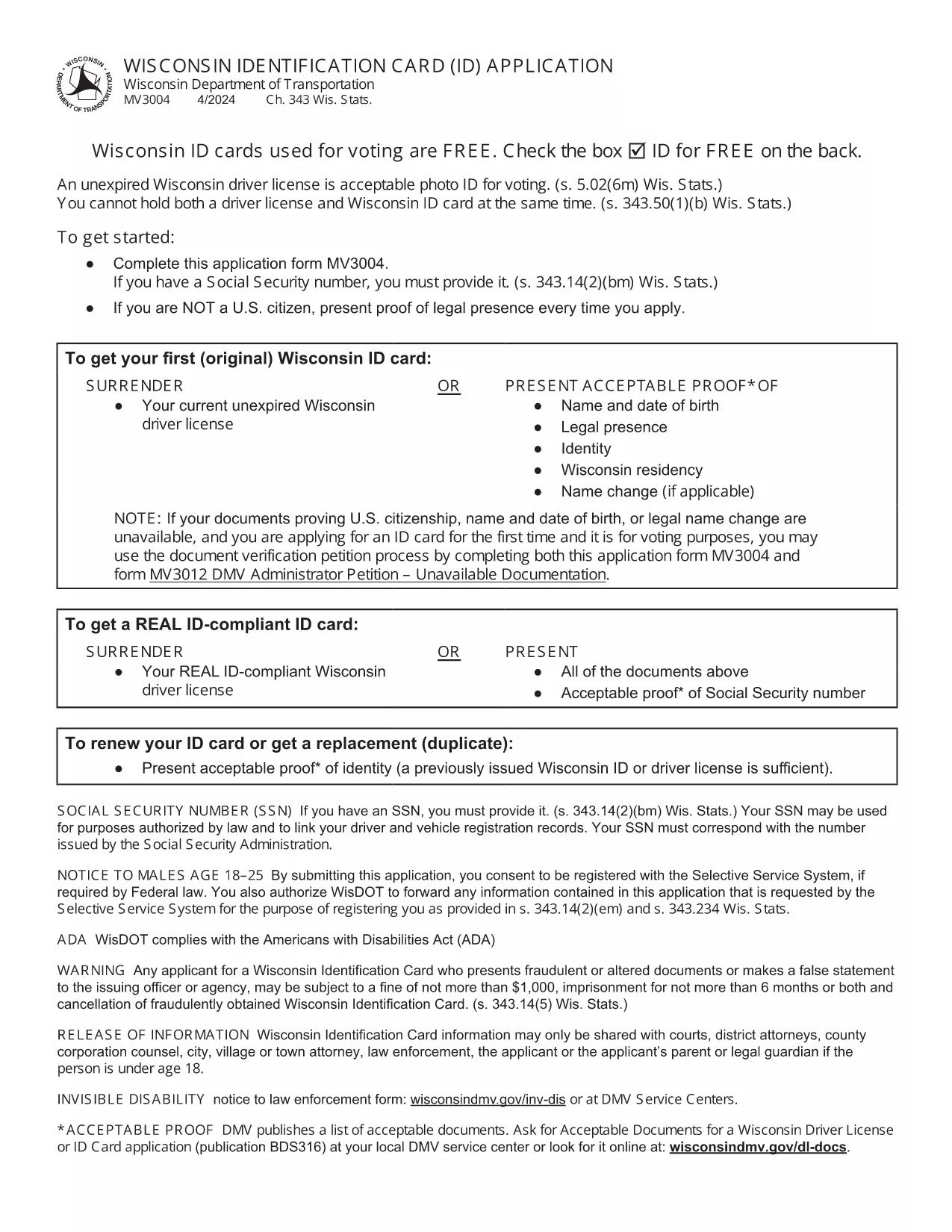
Wisconsin Identification Card Application (Form MV3004) – Fillable PDF

  1. Jezik Engleski
  2. Zemlja SAD
  3. Aktivnost Vozačka dozvola
  4. država Wisconsin
Wisconsin Identification Card Application (Form MV3004) – Fillable PDF

Form MV3004 is the official Wisconsin Identification Card (ID) application issued by the Wisconsin Department of Transportation (DOT). Whether you need an ID for voting, travel, or everyday identification, this fillable PDF lets you complete the entire request from the comfort of your home.

What Is Form MV3004?

The MV3004 form collects personal details, proof‑of‑citizenship documents, and a photo consent statement. It is required for first‑time applicants, name changes, or renewals when a new photo is needed.

How to Complete the MV3004 Online

Instead of downloading and editing the PDF manually, simply click the "Fill out this form" button on this page. The Formize PDF Filler app will load directly in your browser, allowing you to type, select, and sign without any extra software.

  • Step 1: Click the button and wait for the Formize PDF Filler to appear.
  • Step 2: Enter your name, address, date of birth, and other required information.
  • Step 3: Upload scanned copies of your citizenship and name‑change documents.
  • Step 4: Review the completed form for accuracy.
  • Step 5: Submit the form electronically or print it for mailing.

Common Mistakes to Avoid

  • Leaving any required field blank – the online filler will highlight missing data.
  • Uploading blurry or non‑PDF supporting documents – use clear, high‑resolution scans.
  • Signing with a stylus that does not create a vector signature – use the built‑in signature tool.
  • Mismatching the name on your ID with the name on supporting documents – ensure exact spelling.

Where to Submit Your Completed Form

After you finish, you have two options:

  • Electronic submission: Save the completed PDF and email it to your local DMV office (check the Wisconsin DOT contact page for the correct address).
  • Mail submission: Print the form, attach your original documents or certified copies, and mail everything to the address listed on the form.

Processing typically takes 7‑10 business days. Keep a copy of the submitted PDF for your records.

PITANJA
  • Who needs to fill out Form MV3004?

    Anyone applying for a Wisconsin state identification card for the first time, changing their legal name, or needing a new photo on an existing ID.

  • Can I submit the form online?

    Yes. After completing the fillable PDF, you can email the file to your local DMV office. Check the Wisconsin DOT website for the correct email address.

  • What documents must I attach?

    Proof of U.S. citizenship (e.g., birth certificate or passport), a legal name‑change document if applicable, and a recent head‑shot photo if a new picture is required.

  • How long does processing take?

    Standard processing is 7‑10 business days after the DMV receives a complete application and supporting documents.

  • Is there a fee for the Wisconsin ID card?

    Yes. As of 2026, the fee is $30 for a standard ID card. Check the latest fee schedule on the Wisconsin DOT website.

  • What if I make a mistake on the form?

    If you notice an error after submission, contact your local DMV office immediately. In most cases, you can submit a corrected form without paying an additional fee.

  • Do I need a notarized signature?

    No. The electronic signature created in the Formize PDF Filler is accepted for the MV3004 application.

  • Can I use a mobile device to fill out MV3004?

    Yes. The Formize PDF Filler works on modern smartphones and tablets, but a larger screen makes it easier to review scanned documents.

KAKO DA

Kako ispuniti MV3004 besplatno, online u 5 jednostavnih koraka:

  1. 1
    Open the Fillable Form
    Click the "Fill out this form" button on the page. The Formize PDF Filler loads instantly in your browser.
  2. 2
    Enter Your Information
    Type your personal details into each field. Use the dropdown menus for state, gender, and document types.
  3. 3
    Upload Supporting Documents
    Attach clear PDF or JPEG scans of your citizenship proof, name‑change documents, and a recent photo if required.
  4. 4
    Review and Sign
    Double‑check every entry, then use the built‑in signature tool to add your electronic signature.
  5. 5
    Submit or Print
    Save the completed PDF. You can either email it directly to your local DMV office or print it for postal submission.
Aplikacija Formize PDF Filler
OKO

Obrasci zahtjeva za vozačku dozvolu

U većini zemalja obavezno je imati vozačku dozvolu prije nego što krenete na cestu. Stjecanje vozačke dozvole važna je prekretnica za svakoga tko želi voziti automobil.

MV3004 je jedan od obrazaca zahtjeva za vozačku dozvolu koji su dokumenti koji se koriste za prikupljanje informacija od ljudi koji žele podnijeti zahtjev za vozačku dozvolu. Obično sadrži polja za ime podnositelja zahtjeva, datum rođenja, broj osobne iskaznice, podatke za kontakt, kao i povijest vozačke dozvole i iskustvo.

ZNAČAJKE

PDF punilo

Najlakši način da ispunite MV3004 online

  • Brzo ispunite MV3004
    Tražite način da brzo ispunite MV3004 online? Uz naš online besplatni PDF obrazac za popunjavanje, znat ćete kako urediti i ispuniti ovaj pdf dokument za manje od minute.
  • Jednostavan za korištenje mrežni PDF uređivač
    Dosta vam je ispisivanja PDF datoteka kako biste ih mogli uređivati ​​prije ponovnog skeniranja i slanja natrag? Uređujte PDF dokumente besplatno na mreži. Upotrijebite naš online uređivač pdf-ova kako biste uštedjeli vrijeme i papir.
  • Sjajni alati, sve platforme
    Pitate se kako ispuniti MV3004 na Macu ili možda kako koristiti PDF filer besplatno? Naši online PDF alati rade na svim platformama.
  • Sigurno skladištenje datoteka
    Dovršene datoteke "MV3004" pohranjuju se u zaštićenu bazu podataka kojom upravlja Amazon Cloud hosting. Svoje datoteke možete izbrisati iz našeg sustava bilo kada. U svakom slučaju, te se datoteke automatski brišu nakon 24 sata.
  • Chat s MV3004
    Razgovarajte s "MV3004" na Chatize koji je besplatni pomoćnik za čitanje PDF-ova. Postavljajte pitanja i dobivajte odgovore od "MV3004". Samo kliknite gornji gumb Chat with Document.

Izbriši sesiju punjenja

Izbrisati odabranu sesiju punjenja? U tom će slučaju vaš napredak u ispunjavanju obrasca biti izgubljen.

Izbriši sesiju uređivanja

Izbrisati odabranu sesiju uređivanja? U tom će slučaju vaš napredak u stvaranju i uređivanju obrasca biti izgubljen.