Izaberi jezik

FAFSA Application Form Not Available? Use Our Fillable PDF

  1. Jezik Engleski
  2. Zemlja SAD
  3. Odjel Education
  4. Aktivnost Financial Aid
FAFSA Application Form Not Available? Use Our Fillable PDF

Why the FAFSA Form May Appear Unavailable

During peak filing periods, the online FAFSA portal can experience downtime, maintenance windows, or regional restrictions that make the form seem unavailable. In these cases, the paper version of the FAFSA—available as a fillable PDF—remains a reliable backup.

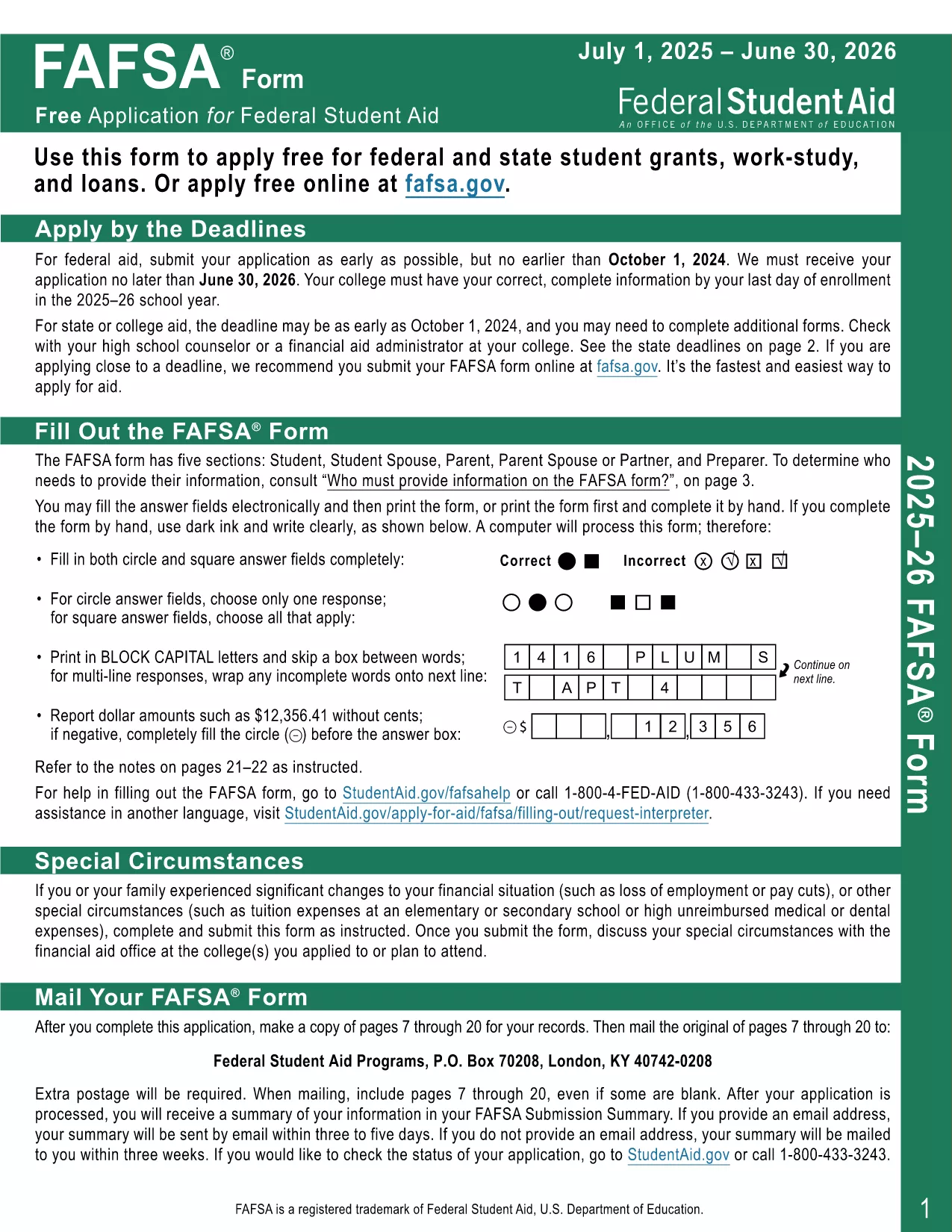
Download the Official 2025‑26 FAFSA Fillable PDF

We host the exact 2025‑26 FAFSA form released by the U.S. Department of Education. Click the button below to start the download, or simply press Fill out this form to launch the Formize PDF Filler directly in your browser.

How to Complete the FAFSA with Formize PDF Filler

Our online filler lets you work on the PDF without installing any software. Follow the simple steps in the “How‑to” section below.

Common Mistakes to Avoid

  • Entering outdated tax information—use the most recent tax year.
  • Leaving required fields blank; the filler will highlight missing data.
  • Saving the form in a non‑PDF format; always keep the original PDF for submission.

Where to Get Help

If you run into issues, the U.S. Department of Education’s StudentAid.gov site offers detailed guides. For technical help with the Formize filler, refer to the on‑screen tips or the FAFSA Help Center.

PITANJA
  • Why can't I access the FAFSA online right now?

    The FAFSA portal may be down for maintenance, experiencing high traffic, or blocked by your network. The fillable PDF works offline and can be submitted later.

  • Is the PDF version still accepted by the Department of Education?

    Yes. The paper FAFSA PDF is an official form. After completing it, you can mail it or upload it through the FAFSA website when it’s back online.

  • Do I need Adobe Acrobat to use the form?

    No. Formize’s online filler works with any modern browser. You only need Adobe Reader if you prefer to edit the PDF locally.

  • Can I edit the PDF after I save it?

    Absolutely. Open the saved PDF in Formize again or any PDF reader that supports form fields to make changes.

  • What if I make a mistake while filling out the FAFSA?

    The filler highlights errors in real time. You can correct them before saving. If you submit a paper copy, you can file a correction form later.

  • Is there a fee to download or use the fillable FAFSA PDF?

    No. The PDF and Formize filler are completely free.

  • How do I know the PDF is the latest version?

    We host the official 2025‑26 FAFSA PDF released by the U.S. Department of Education, updated on the release date.

  • Can I submit the completed PDF directly from Formize?

    Formize allows you to download the completed PDF. You can then upload it to StudentAid.gov when the portal is available.

KAKO DA

Kako ispuniti FAFSA fillable PDF besplatno, online u 4 jednostavnih koraka:

  1. 1
    Click "Fill out this form"
    Press the button on the page to open the Formize PDF Filler. No download is required.
  2. 2
    Wait for the filler to load
    The app loads the FAFSA PDF in your browser. This usually takes a few seconds.
  3. 3
    Complete each field
    Enter your personal, financial, and school information. Required fields are highlighted in red if left empty.
  4. 4
    Save or submit
    When finished, click "Save" to download a completed PDF or use the built‑in submit button to send it directly to StudentAid.gov.
Aplikacija Formize PDF Filler
OKO

FAFSA fillable PDF predložak

S tradicionalnim skupom značajki za pregled i ispunjavanje PDF dokumenta, u kombinaciji s prednostima web aplikacije i responzivnog izgleda, možete ispuniti FAFSA fillable PDF u nekoliko minuta.

ZNAČAJKE

PDF punilo

Najlakši način da ispunite FAFSA fillable PDF online

  • Brzo ispunite FAFSA fillable PDF
    Tražite način da brzo ispunite FAFSA fillable PDF online? Uz naš online besplatni PDF obrazac za popunjavanje, znat ćete kako urediti i ispuniti ovaj pdf dokument za manje od minute.
  • Jednostavan za korištenje mrežni PDF uređivač
    Dosta vam je ispisivanja PDF datoteka kako biste ih mogli uređivati ​​prije ponovnog skeniranja i slanja natrag? Uređujte PDF dokumente besplatno na mreži. Upotrijebite naš online uređivač pdf-ova kako biste uštedjeli vrijeme i papir.
  • Sjajni alati, sve platforme
    Pitate se kako ispuniti FAFSA fillable PDF na Macu ili možda kako koristiti PDF filer besplatno? Naši online PDF alati rade na svim platformama.
  • Sigurno skladištenje datoteka
    Dovršene datoteke "FAFSA fillable PDF" pohranjuju se u zaštićenu bazu podataka kojom upravlja Amazon Cloud hosting. Svoje datoteke možete izbrisati iz našeg sustava bilo kada. U svakom slučaju, te se datoteke automatski brišu nakon 24 sata.
  • Chat s FAFSA fillable PDF
    Razgovarajte s "FAFSA fillable PDF" na Chatize koji je besplatni pomoćnik za čitanje PDF-ova. Postavljajte pitanja i dobivajte odgovore od "FAFSA fillable PDF". Samo kliknite gornji gumb Chat with Document.

Izbriši sesiju punjenja

Izbrisati odabranu sesiju punjenja? U tom će slučaju vaš napredak u ispunjavanju obrasca biti izgubljen.

Izbriši sesiju uređivanja

Izbrisati odabranu sesiju uređivanja? U tom će slučaju vaš napredak u stvaranju i uređivanju obrasca biti izgubljen.