
Izaberi jezik

IRS Form 14039 – Fillable Identity Theft Affidavit PDF

  1. Zemlja SAD
  2. Jezik Engleski
  3. Aktivnost Porezi
  4. Odjel IRS
IRS Form 14039 – Fillable Identity Theft Affidavit PDF

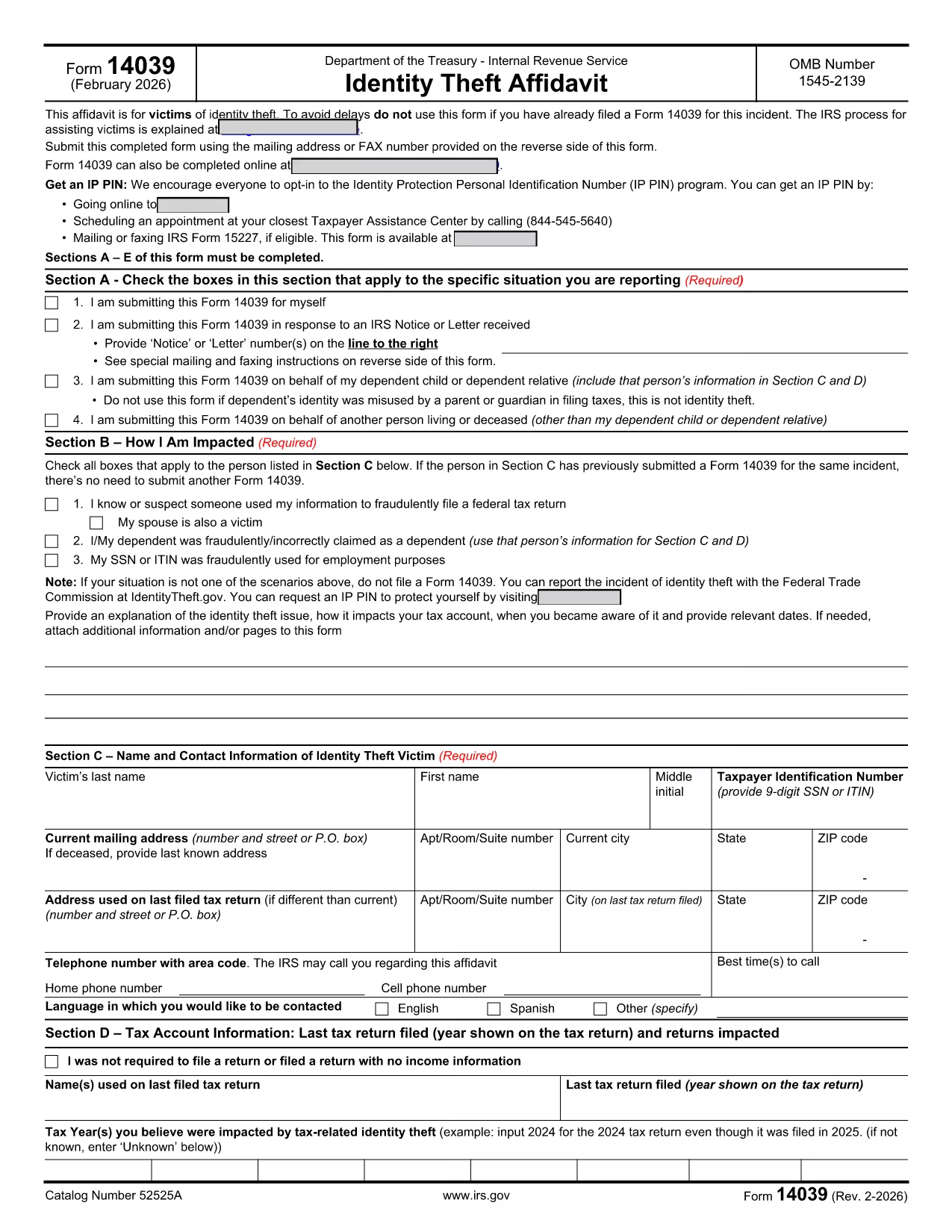
IRS Form 14039, also known as the Identity Theft Affidavit, is the official document you use to report tax‑related identity theft to the Internal Revenue Service. Whether your Social Security number or ITIN has been misused for a fraudulent return, employment, or any other purpose, this form lets you alert the IRS quickly and securely.

Formize.com hosts a fully fillable PDF version of Form 14039, so you can complete the affidavit directly in your browser—no extra software required. Just click the “Fill out this form” button, wait for the Formize PDF Filler app to load, and start entering your information.

What Is IRS Form 14039?

The form is a two‑page affidavit that collects personal details, a description of the identity‑theft incident, and the tax years affected. It is required whenever the IRS notifies you of a suspected fraud or when you discover unauthorized use of your taxpayer information.

Key Sections of the Form

  • Section A – Type of Situation: Choose why you are filing (self‑initiated, response to IRS notice, etc.).
  • Section B – How You Are Impacted: Check the boxes that match your experience (e.g., fraudulent return filed, SSN used for employment).
  • Section C – Victim Contact Information: Provide your name, SSN/ITIN, mailing address, and phone number.
  • Section D – Tax Account Information: List the tax year(s) you believe were compromised.
  • Section E – Penalty of Perjury & Signature: Sign under penalty of perjury to certify the information is true.
  • Section F – Representative Information: Fill out only if you are filing on behalf of someone else.

How to Complete the Form Online

Follow the simple steps below to submit a completed Form 14039 using Formize’s fillable PDF:

Common Mistakes to Avoid

  • Leaving any required field blank – the PDF validator will block submission.
  • Using an outdated version of the form. Always download the latest PDF (Rev. 2‑2026) from the IRS.
  • Forgetting to sign the affidavit. An unsigned form will be returned.
  • Submitting the form to the wrong address. Follow the mailing/fax instructions on the reverse side.

Where to Submit the Completed Form

After you finish, you can either:

  • Print the PDF and mail it to the address listed in the form’s instructions.
  • Fax it to the number provided on the reverse side.
  • Attach the PDF to a secure message in your IRS online account (if available).

Using Formize’s fillable version ensures the PDF is correctly formatted, reducing the chance of processing delays.

PITANJA
  • Who should file IRS Form 14039?

    Anyone who believes their SSN or ITIN has been used fraudulently for tax filing, employment, or other purposes should file Form 14039.

  • Can I file Form 14039 electronically?

    The IRS does not currently accept an electronic submission of Form 14039. You must print and mail or fax the completed form.

  • Do I need a lawyer to complete the Identity Theft Affidavit?

    No. The form is designed for individuals to complete on their own. If you have a representative, you can fill out Section F.

  • What if I file the wrong tax year?

    Specify the tax year(s) you suspect were compromised in Section D. If you’re unsure, write “Unknown” and provide any supporting details.

  • How long does the IRS take to respond?

    Processing times vary, but the IRS typically acknowledges receipt within 30 days. They may contact you for additional information.

  • Is the Formize fillable PDF free?

    Yes. Formize provides the fillable version of Form 14039 at no cost.

  • Can I use the same Form 14039 for multiple incidents?

    Each incident should be reported on a separate, newly completed Form 14039.

KAKO DA

Kako ispuniti IRS Form 14039 besplatno, online u 5 jednostavnih koraka:

  1. 1
    Open the Fillable Form
    Click the “Fill out this form” button on the page. The Formize PDF Filler app will load in a new window.
  2. 2
    Enter Your Information
    Complete each section (A‑F) directly in the browser. The form validates required fields in real time.
  3. 3
    Review and Sign
    Double‑check all entries, then use the built‑in e‑signature tool to add your signature under penalty of perjury.
  4. 4
    Save or Print
    Save the completed PDF to your computer, or print it if you need to mail or fax the affidavit to the IRS.
  5. 5
    Submit to the IRS
    Follow the mailing or fax instructions on the reverse side of the form, or upload the PDF through your IRS online account.
Aplikacija Formize PDF Filler
OKO

Porezni obrasci

IRS Form 14039 je jedan od poreznih obrazaca koji su dokumenti koji se koriste za prijavu informacija o prihodima pojedinca ili tvrtke, odbicima i poreznim obvezama relevantnim poreznim vlastima. Ovi su obrasci nužni za usklađivanje s poreznim zakonima i ispunjavanje poreznih obveza. Porezni obrasci razlikuju se ovisno o zemlji i posebnim poreznim zahtjevima. Evo nekih uobičajenih vrsta poreznih obrazaca:

Individualni porezni obrasci: Ove obrasce koriste pojedinačni porezni obveznici za prijavu osobnog dohotka i traženje odbitaka, kredita i izuzeća. Primjeri uključuju obrazac 1040 u Sjedinjenim Američkim Državama ili obrazac povrata poreza za samoprocjenu u Ujedinjenom Kraljevstvu.

Poslovni porezni obrasci: Poslovni porezni obrasci koriste se od strane tvrtki, partnerstava ili samozaposlenih pojedinaca za prijavu poslovnih prihoda, troškova i drugih podataka povezanih s porezom. Primjeri uključuju obrazac iz Priloga C (Dobit ili gubitak od poslovanja) u Sjedinjenim Državama ili obrazac CT600 (Povrat poreza tvrtke) u Ujedinjenom Kraljevstvu.

Obrasci za porez na plaće: Ove obrasce koriste poslodavci za prijavu plaća, nadnica i poreza zadržanih na plaćama svojih zaposlenika. Primjeri uključuju obrazac W-2 u Sjedinjenim Državama ili obrazac P60 u Ujedinjenom Kraljevstvu.

Obrasci za porez na promet: tvrtke koriste obrasce za porez na promet za prijavu i uplatu poreza na promet prikupljenog na oporezivu robu ili usluge. Posebni obrasci poreza na promet razlikuju se ovisno o jurisdikciji.

Obrasci za porez na dodanu vrijednost (PDV): PDV obrasci koriste se u zemljama koje nameću porez na dodanu vrijednost za prijavu i uplatu PDV-a prikupljenog od prodaje i traženje PDV kredita za kupnje. Primjeri uključuju obrasce za povrat PDV-a koji se koriste u mnogim zemljama.

Procijenjeni porezni obrasci: Procijenjeni porezni obrasci koriste se za prijavu i plaćanje procijenjenih poreza na prihod koji ne podliježe zadržavanju, kao što je prihod od samozapošljavanja ili prihod od ulaganja.

Ovo je samo nekoliko primjera od brojnih poreznih oblika koji mogu postojati. Konkretni potrebni obrasci ovise o poreznim zakonima i propisima u vašoj zemlji ili jurisdikciji. Važno je konzultirati se sa smjernicama porezne uprave ili potražiti stručni savjet kako biste utvrdili koji su obrasci primjenjivi u vašoj situaciji.

ZNAČAJKE

PDF punilo

Najlakši način da ispunite IRS Form 14039 online

  • Brzo ispunite IRS Form 14039
    Tražite način da brzo ispunite IRS Form 14039 online? Uz naš online besplatni PDF obrazac za popunjavanje, znat ćete kako urediti i ispuniti ovaj pdf dokument za manje od minute.
  • Jednostavan za korištenje mrežni PDF uređivač
    Dosta vam je ispisivanja PDF datoteka kako biste ih mogli uređivati ​​prije ponovnog skeniranja i slanja natrag? Uređujte PDF dokumente besplatno na mreži. Upotrijebite naš online uređivač pdf-ova kako biste uštedjeli vrijeme i papir.
  • Sjajni alati, sve platforme
    Pitate se kako ispuniti IRS Form 14039 na Macu ili možda kako koristiti PDF filer besplatno? Naši online PDF alati rade na svim platformama.
  • Sigurno skladištenje datoteka
    Dovršene datoteke "IRS Form 14039" pohranjuju se u zaštićenu bazu podataka kojom upravlja Amazon Cloud hosting. Svoje datoteke možete izbrisati iz našeg sustava bilo kada. U svakom slučaju, te se datoteke automatski brišu nakon 24 sata.
  • Chat s IRS Form 14039
    Razgovarajte s "IRS Form 14039" na Chatize koji je besplatni pomoćnik za čitanje PDF-ova. Postavljajte pitanja i dobivajte odgovore od "IRS Form 14039". Samo kliknite gornji gumb Chat with Document.

Izbriši sesiju punjenja

Izbrisati odabranu sesiju punjenja? U tom će slučaju vaš napredak u ispunjavanju obrasca biti izgubljen.

Izbriši sesiju uređivanja

Izbrisati odabranu sesiju uređivanja? U tom će slučaju vaš napredak u stvaranju i uređivanju obrasca biti izgubljen.