Izaberi jezik

Motion to Dismiss Form – Fillable PDF Ready to Use

  1. Jezik Engleski
  2. Zemlja SAD
  3. Aktivnost Legal Forms
  4. Odjel Judiciary
Motion to Dismiss Form – Fillable PDF Ready to Use

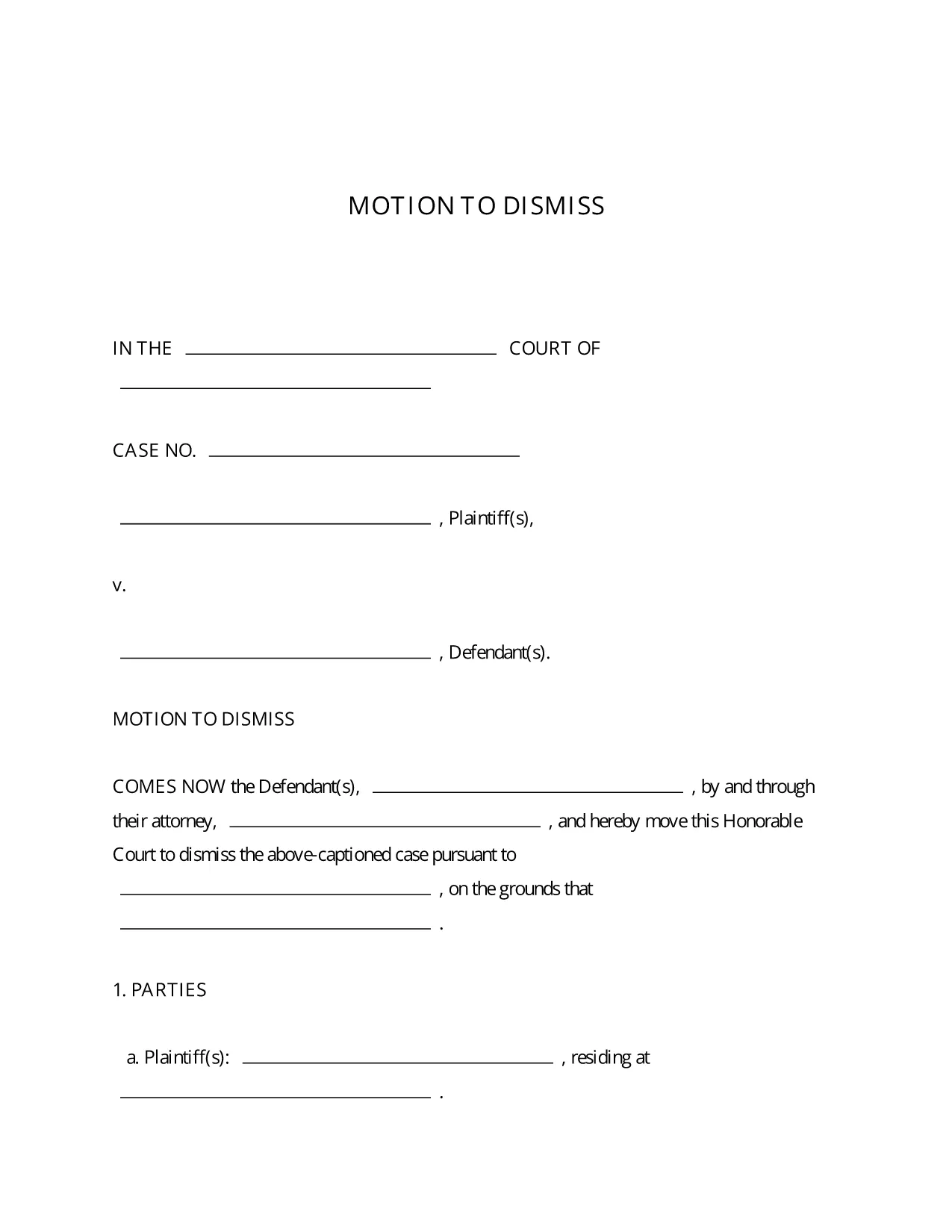
A Motion to Dismiss is a formal request to the court to throw out a case before trial. Whether you’re citing lack of jurisdiction, failure to state a claim, or an expired statute of limitations, the right template saves you time and ensures every required element is included.

What Is a Motion to Dismiss?

The motion asks the judge to dismiss the plaintiff’s complaint for legal reasons. It is typically filed early in the litigation process and must follow the procedural rules of the jurisdiction where the case is pending.

Key Sections of the Motion to Dismiss Form

  • Caption: Court name, case number, and parties.
  • Introduction: Brief statement of the request.
  • Grounds for Dismissal: Detailed legal reasons with citations.
  • Conclusion & Relief Sought: What you want the court to order.
  • Signature Block: Attorney’s signature, bar number, and contact info.

How to Fill Out the Fillable PDF in Seconds

Instead of downloading the PDF and opening a separate editor, simply click the “Fill out this form” button on this page. The Formize PDF Filler app loads instantly, letting you type directly into each field, add your signature, and save the completed document with one click.

Common Mistakes to Avoid

  • Leaving required fields blank – the court will reject an incomplete motion.
  • Using the wrong jurisdictional language – double‑check the local rules.
  • Failing to attach supporting case law or statutes.
  • Missing the signature block or bar number.

Download, Complete, and Submit Your Motion

Once you’ve filled out the form, download the finished PDF, print it (if required), and file it with the clerk of the court. Many courts now accept electronic filing, so you can upload the PDF directly from your computer.

This fillable Motion to Dismiss PDF is free, fully editable, and compliant with standard court formatting requirements.

PITANJA
  • Is the Motion to Dismiss form free to use?

    Yes, the fillable PDF provided here is completely free and can be used for any civil case in U.S. courts.

  • Do I need Adobe Acrobat to edit the form?

    No. The Formize PDF Filler works in any modern browser, so you can edit the form without installing additional software.

  • Can I file the completed motion electronically?

    Most U.S. courts accept electronic filing (e‑filing). After downloading the completed PDF, follow your court’s e‑filing portal instructions.

  • What if my jurisdiction has different formatting rules?

    The template follows the most common federal and state formatting guidelines. Review your local court rules and adjust font size or margin settings if needed.

  • How long does it take to complete the form?

    With the fillable PDF and Formize Filler, most users finish in 5‑10 minutes, depending on the complexity of the legal arguments.

  • Can I save my progress and return later?

    Yes. Use the “Save” button in Formize PDF Filler to store a draft in your account, then reopen it whenever you’re ready.

  • Do I need a lawyer to use this form?

    While the form is designed for self‑representation, it’s advisable to have an attorney review your motion to ensure legal accuracy.

KAKO DA

Kako ispuniti motion to dismiss form besplatno, online u 5 jednostavnih koraka:

  1. 1
    Click the Fill‑out Button
    Press the “Fill out this form” button on the page to launch Formize PDF Filler.
  2. 2
    Wait for the Filler to Load
    The app loads in seconds; you’ll see editable fields appear directly in your browser.
  3. 3
    Enter Your Information
    Type the case details, grounds for dismissal, and any supporting citations into the highlighted fields.
  4. 4
    Add Your Signature
    Use the built‑in e‑signature tool to sign the document securely.
  5. 5
    Save or Download
    Click “Save” to store the completed PDF in your Formize account, or “Download” to get a copy for filing.
Aplikacija Formize PDF Filler
OKO

motion to dismiss form predložak

S tradicionalnim skupom značajki za pregled i ispunjavanje PDF dokumenta, u kombinaciji s prednostima web aplikacije i responzivnog izgleda, možete ispuniti motion to dismiss form u nekoliko minuta.

ZNAČAJKE

PDF punilo

Najlakši način da ispunite motion to dismiss form online

  • Brzo ispunite motion to dismiss form
    Tražite način da brzo ispunite motion to dismiss form online? Uz naš online besplatni PDF obrazac za popunjavanje, znat ćete kako urediti i ispuniti ovaj pdf dokument za manje od minute.
  • Jednostavan za korištenje mrežni PDF uređivač
    Dosta vam je ispisivanja PDF datoteka kako biste ih mogli uređivati ​​prije ponovnog skeniranja i slanja natrag? Uređujte PDF dokumente besplatno na mreži. Upotrijebite naš online uređivač pdf-ova kako biste uštedjeli vrijeme i papir.
  • Sjajni alati, sve platforme
    Pitate se kako ispuniti motion to dismiss form na Macu ili možda kako koristiti PDF filer besplatno? Naši online PDF alati rade na svim platformama.
  • Sigurno skladištenje datoteka
    Dovršene datoteke "motion to dismiss form" pohranjuju se u zaštićenu bazu podataka kojom upravlja Amazon Cloud hosting. Svoje datoteke možete izbrisati iz našeg sustava bilo kada. U svakom slučaju, te se datoteke automatski brišu nakon 24 sata.
  • Chat s motion to dismiss form
    Razgovarajte s "motion to dismiss form" na Chatize koji je besplatni pomoćnik za čitanje PDF-ova. Postavljajte pitanja i dobivajte odgovore od "motion to dismiss form". Samo kliknite gornji gumb Chat with Document.

Izbriši sesiju punjenja

Izbrisati odabranu sesiju punjenja? U tom će slučaju vaš napredak u ispunjavanju obrasca biti izgubljen.

Izbriši sesiju uređivanja

Izbrisati odabranu sesiju uređivanja? U tom će slučaju vaš napredak u stvaranju i uređivanju obrasca biti izgubljen.