
Izaberi jezik

RI 20-97 – Military Earnings Request Form (Fillable PDF)

  1. Zemlja SAD
  2. Jezik Engleski
  3. Odjel Ured za upravljanje osobljem
  4. Sektor Obrasci za mirovinu i osiguranje
RI 20-97 – Military Earnings Request Form (Fillable PDF)

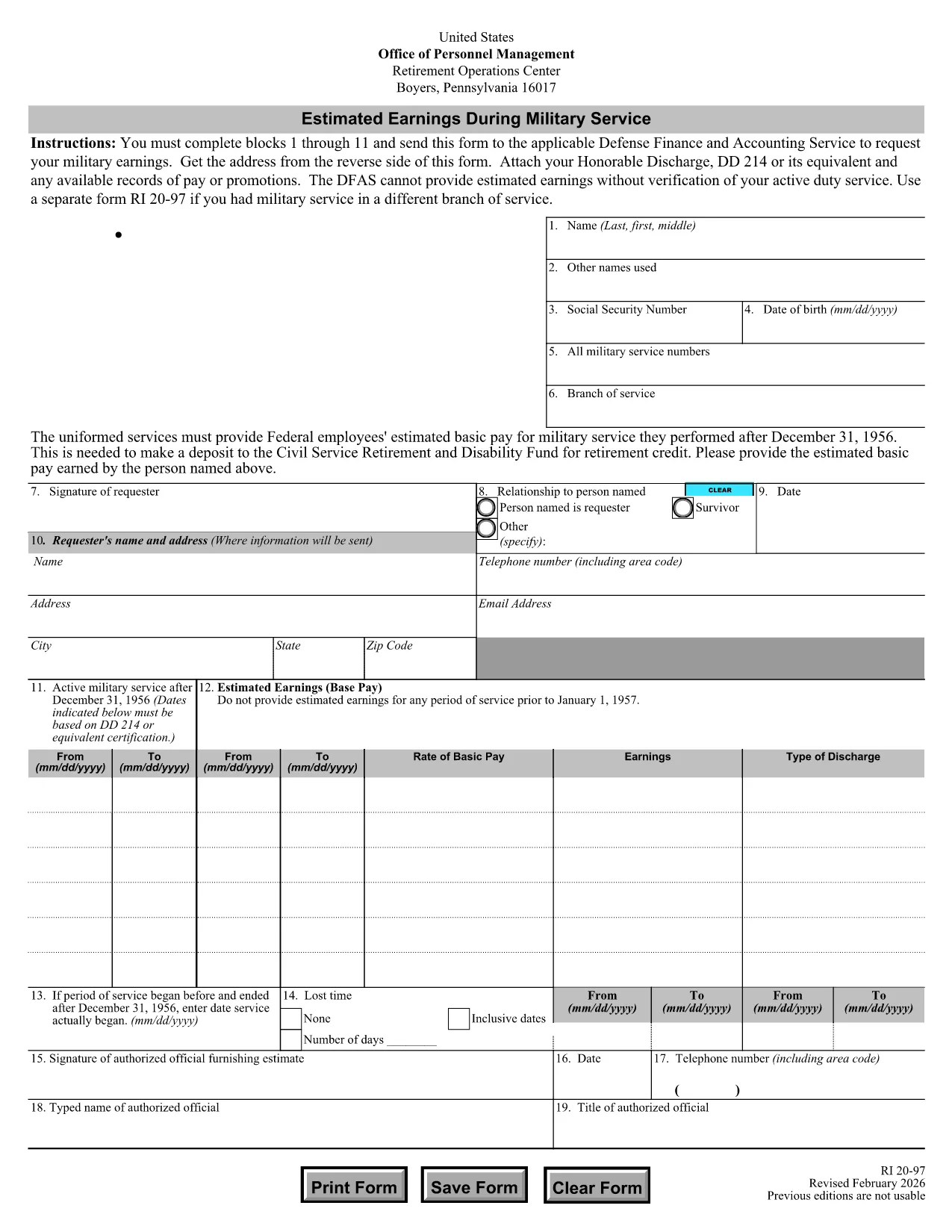
The RI 20-97 is the U.S. Office of Personnel Management (OPM) form used to request an estimate of your military earnings for retirement credit. Federal employees who have served in the armed forces use this form to ensure their service pay is counted toward their civil service pension.

What Is the RI 20-97 Form?

This official PDF, provided by OPM, captures personal details, service dates, pay grade, and any special pay received. Once completed, the form is sent to the Defense Finance and Accounting Service (DFAS) for calculation.

How to Complete the RI 20-97 Online with Formize

Instead of downloading, printing, and scanning, you can fill out the form directly on our site:

  1. Click the "Fill out this form" button below.
  2. The Formize PDF Filler app loads the fillable RI 20-97 template.
  3. Enter your information in each field (blocks 1‑11).
  4. Upload supporting documents such as your DD‑214.
  5. Review, e‑sign, and submit the form securely.

Common Mistakes & Tips for a Successful Submission

  • Missing DD‑214: The form will be rejected if you don’t attach a copy of your discharge papers.
  • Incorrect Service Dates: Double‑check start and end dates; even a one‑day error can delay processing.
  • Skipping Optional Fields: Fill in all optional fields when applicable; they help DFAS calculate a more accurate estimate.
  • Signature Errors: Both electronic and wet signatures are accepted – make sure the signature field is not left blank.

Supporting Documents You’ll Need

Prepare these items before you start:

  • DD‑214 or official military service record
  • Pay statements or promotion orders (if available)
  • Any previous RI 20‑97 submissions for reference

Where to Send Your Completed Form

After you finish the online fill, the Formize app will give you two options:

  • Download a PDF copy to mail to DFAS
  • Securely upload the completed form directly to DFAS through the provided portal link

Following these steps ensures your military earnings are counted toward your federal retirement benefits.

PITANJA
  • Who needs to fill out the RI 20-97 form?

    Any current or former federal employee who served in the U.S. military and wants their service earnings counted toward their civil service retirement credit.

  • Can I use a wet signature on the RI 20-97?

    Yes. Both electronic and wet signatures are accepted. If you print the form, sign it, and mail it, DFAS will process it without issue.

  • What if I don’t have my DD‑214?

    The DD‑214 is required for verification. If it’s lost, request a replacement from the National Archives before submitting the RI 20‑97.

  • How long does DFAS take to calculate my earnings?

    Processing typically takes 2‑4 weeks after receipt of a complete, correctly signed RI 20‑97 with all supporting documents.

  • Is the Formize filler secure?

    Yes. Formize uses SSL encryption and complies with federal data‑privacy standards, ensuring your personal and military information is protected.

  • Do I need to fill out every field?

    All mandatory fields (blocks 1‑11) must be completed. Optional fields should be filled when applicable to improve accuracy.

  • Can I submit the form directly to DFAS from Formize?

    After completing the form, you can either download a PDF to mail or use the secure upload link provided by Formize to send it directly to DFAS.

  • What is the difference between the RI 20‑97 and the RI‑20‑97‑2023 version?

    The content is the same; the year in the file name reflects the most recent revision. All versions are accepted by DFAS as long as they are the official OPM form.

KAKO DA

Kako ispuniti RI 20-97 besplatno, online u 5 jednostavnih koraka:

  1. 1
    Open the Fillable Form
    Click the "Fill out this form" button on the page. The Formize PDF Filler will load the RI 20-97 template instantly.
  2. 2
    Enter Your Information
    Complete fields 1 through 11 with accurate personal and service details. Use dropdowns and date pickers for consistency.
  3. 3
    Attach Supporting Documents
    Upload your DD‑214 and any pay records using the attachment area. The system validates file types before you proceed.
  4. 4
    Review and Sign
    Double‑check every entry, then add an electronic signature or upload a scanned wet signature as required.
  5. 5
    Submit or Download
    Choose to submit directly to DFAS through the secure portal, or download the completed PDF to mail it yourself.
Aplikacija Formize PDF Filler
OKO

Obrasci Ureda za upravljanje osobljem (OPM).

RI 20-97 jedan je od službenih obrazaca koje koristi Ured za upravljanje osobljem Sjedinjenih Država, neovisna agencija savezne vlade odgovorna za upravljanje radnom snagom u državnoj službi i beneficijama saveznih zaposlenika. OPM utvrđuje politike i propise koji se odnose na savezno zapošljavanje, upravlja različitim kadrovskim programima i pruža usluge saveznim zaposlenicima, umirovljenicima i kandidatima za posao.

Evo nekoliko primjera obrazaca Ureda za upravljanje osobljem:

Standardni obrazac 86 (SF-86) : Ovaj se obrazac koristi za proces istrage pojedinaca koji se prijavljuju za sigurnosnu provjeru. Prikuplja sveobuhvatne osobne podatke, podatke o zapošljavanju, obrazovanju i financijske podatke, kao i detalje o inozemnim kontaktima i aktivnostima.

Standardni obrazac 2809 (SF-2809) : Ovaj se obrazac koristi za upis u program Federal Employees Health Benefits (FEHB), koji osigurava zdravstveno osiguranje federalnim zaposlenicima, umirovljenicima i članovima njihovih obitelji koji ispunjavaju uvjete.

Standardni obrazac 2817 (SF-2817): Ovaj se obrazac koristi za podnošenje zahtjeva za nastavak osiguranja prema Federalnom programu osiguranja zuba i vida (FEDVIP) nakon umirovljenja ili odvajanja od savezne službe.

Standardni obrazac 3107 (SF-3107) : Ovaj se obrazac koristi za podnošenje zahtjeva za mirovinu prema Sustavu mirovina za državnu službu (CSRS).

Standardni obrazac 2801 (SF-2801) : Ovaj obrazac se koristi za podnošenje zahtjeva za mirovinu prema Federal Employees Retirement System (FERS).

Standardni obrazac 15 (SF-15) : Ovaj se obrazac koristi za podnošenje zahtjeva za veteransku prednost pri saveznom zapošljavanju. Podnose ga veterani ili njihovi kvalificirani članovi obitelji koji traže priliku za zapošljavanje u saveznoj vladi.

Ovi primjeri predstavljaju neke uobičajene OPM obrasce koji se koriste u kontekstu saveznog zapošljavanja i beneficija zaposlenika. Međutim, OPM ima niz drugih oblika povezanih s raznim kadrovskim programima, mirovinom, osiguranjem i drugim aspektima saveznog zapošljavanja. Specifični potrebni obrasci mogu varirati ovisno o prirodi transakcije, programa ili pogodnosti koje se traže. Preporučljivo je konzultirati službenu web stranicu Ureda za upravljanje osobljem SAD-a (www.opm.gov) ili potražiti smjernice od OPM-a ili relevantnog osoblja za ljudske resurse kako biste dobili točne i up- najnovije informacije u vezi s određenim OPM obrascima koji su relevantni za vaše potrebe vezane uz savezno zapošljavanje ili naknade.

ZNAČAJKE

PDF punilo

Najlakši način da ispunite RI 20-97 online

  • Brzo ispunite RI 20-97
    Tražite način da brzo ispunite RI 20-97 online? Uz naš online besplatni PDF obrazac za popunjavanje, znat ćete kako urediti i ispuniti ovaj pdf dokument za manje od minute.
  • Jednostavan za korištenje mrežni PDF uređivač
    Dosta vam je ispisivanja PDF datoteka kako biste ih mogli uređivati ​​prije ponovnog skeniranja i slanja natrag? Uređujte PDF dokumente besplatno na mreži. Upotrijebite naš online uređivač pdf-ova kako biste uštedjeli vrijeme i papir.
  • Sjajni alati, sve platforme
    Pitate se kako ispuniti RI 20-97 na Macu ili možda kako koristiti PDF filer besplatno? Naši online PDF alati rade na svim platformama.
  • Sigurno skladištenje datoteka
    Dovršene datoteke "RI 20-97" pohranjuju se u zaštićenu bazu podataka kojom upravlja Amazon Cloud hosting. Svoje datoteke možete izbrisati iz našeg sustava bilo kada. U svakom slučaju, te se datoteke automatski brišu nakon 24 sata.
  • Chat s RI 20-97
    Razgovarajte s "RI 20-97" na Chatize koji je besplatni pomoćnik za čitanje PDF-ova. Postavljajte pitanja i dobivajte odgovore od "RI 20-97". Samo kliknite gornji gumb Chat with Document.

Izbriši sesiju punjenja

Izbrisati odabranu sesiju punjenja? U tom će slučaju vaš napredak u ispunjavanju obrasca biti izgubljen.

Izbriši sesiju uređivanja

Izbrisati odabranu sesiju uređivanja? U tom će slučaju vaš napredak u stvaranju i uređivanju obrasca biti izgubljen.