Izaberi jezik

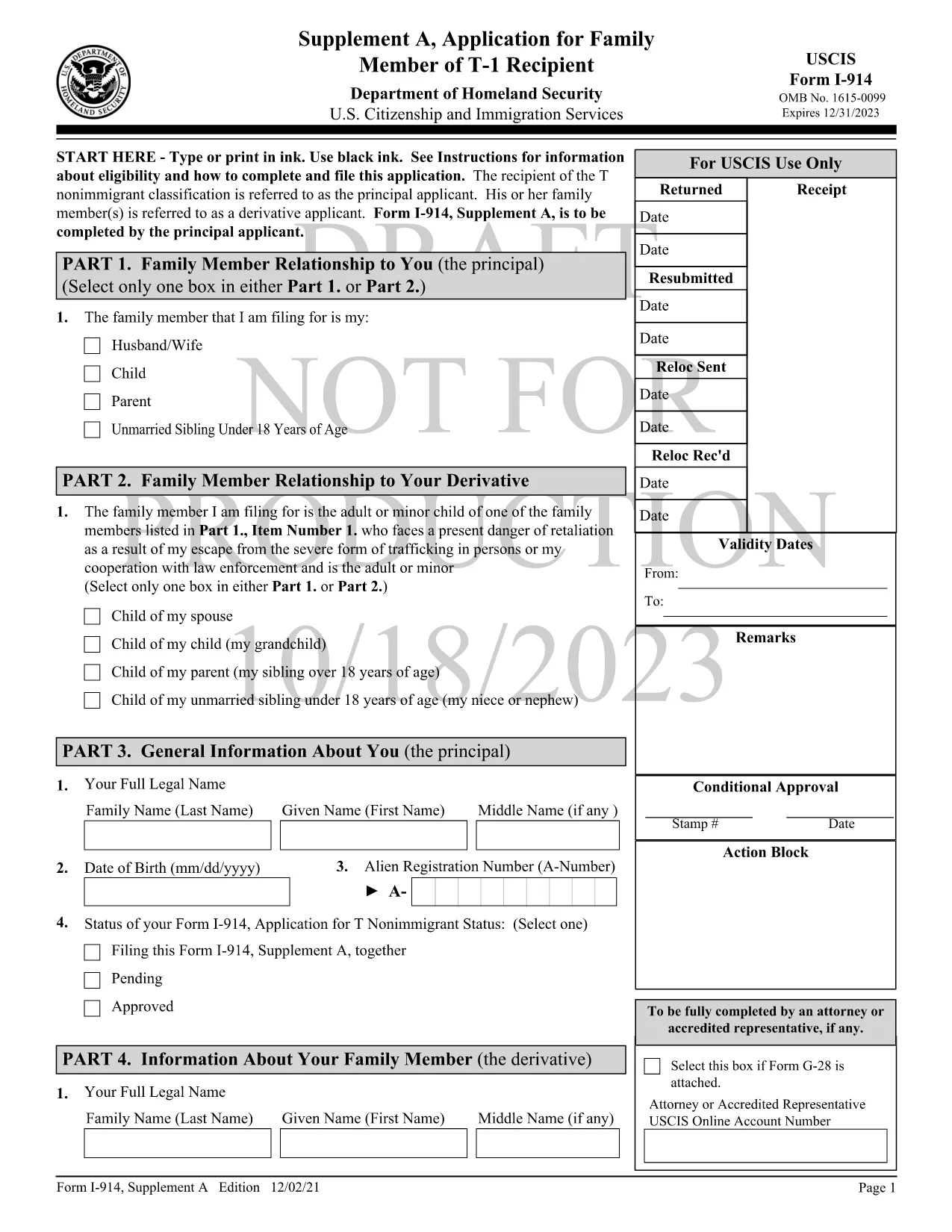
Form I-914 Supplement A – Fillable PDF for T‑Visa Family Members

  1. Zemlja SAD
  2. Jezik Engleski
  3. Odjel Službe za državljanstvo i useljeništvo SAD-a
Form I-914 Supplement A – Fillable PDF for T‑Visa Family Members

Form I-914 Supplement A is the official USCIS application used by qualifying family members of a principal T‑1 nonimmigrant to request derivative T‑visa status. This supplement accompanies the main I-914, Application for T Nonimmigrant Status and must be completed accurately to avoid delays.

What Is Form I-914 Supplement A?

The supplement collects detailed information about the relationship between the principal T‑visa holder and the derivative applicant, as well as proof of eligibility. It is a fillable PDF that can be completed online, printed, and mailed to the appropriate USCIS lockbox.

Key Eligibility Requirements

  • The principal applicant must already have an approved I-914 (T‑1) petition.
  • Derivatives include spouses, children, parents, and unmarried siblings under 18, provided they meet the definition of a “family member” under 8 CFR 274a.12(c).
  • The family member must be physically present in the United States, American Samoa, the Northern Mariana Islands, or at a port of entry.
  • Evidence of the qualifying relationship (marriage certificate, birth certificate, etc.) must be submitted with the form.

How to Complete the Fillable PDF with Formize

Instead of downloading the PDF and using a separate editor, follow these simple steps to fill it out directly on Formize:

  1. Click the "Fill out this form" button on this page.
  2. Wait a few seconds while the Formize PDF Filler app loads the I-914 Supplement A template.
  3. Enter your information in each field using black ink‑style typing. The app automatically saves your progress.
  4. Review the completed form for any missing or incorrect entries.
  5. When you’re satisfied, download the finished PDF or print it directly for mailing.

Common Mistakes to Avoid

  • Leaving fields blank: Every field marked with an asterisk (*) is required.
  • Using the wrong edition: Ensure the PDF you are filling matches the edition date shown on the bottom of each page (currently 01/20/25).
  • Mismatched signatures: The signature on Supplement A must be the derivative applicant’s, not the principal’s.
  • Incorrect document attachments: Attach only the documents listed in the instructions and label them clearly.

Where to Submit the Completed Form

After printing and signing, mail the form to the USCIS lockbox that corresponds to your residence. Refer to the USCIS I-914 filing locations page for the correct address.

Using Formize’s fillable version reduces the risk of errors, speeds up processing, and keeps your data secure.

PITANJA
  • Who can file Form I-914 Supplement A?

    Spouses, children, parents, and unmarried siblings under 18 of a principal T‑1 applicant who meet USCIS eligibility criteria can file Supplement A.

  • Do I need to submit the main I-914 with Supplement A?

    Yes. Supplement A is filed together with the principal applicant’s approved I-914 petition and any required supporting evidence.

  • Can I submit the form electronically?

    USCIS currently requires a printed, signed copy for mailing. The fillable PDF helps you complete the form accurately before printing.

  • What happens if I make a mistake on the form?

    USCIS may issue a Request for Evidence (RFE) or reject the filing, causing delays. Use the Formize filler to reduce errors.

  • How long does USCIS take to process Supplement A?

    Processing times vary by service center but typically range from 2 to 6 months after receipt of a complete application.

  • Do I need to include a filing fee with Supplement A?

    Supplement A itself does not have a separate fee, but the principal I-914 filing fee applies. Check the USCIS fee schedule for the latest amounts.

  • Can I use a PDF editor instead of Formize?

    You can, but Formize’s fillable version ensures proper field alignment and reduces the chance of formatting errors that cause rejections.

KAKO DA

Kako ispuniti I-914 Supplement A besplatno, online u 5 jednostavnih koraka:

  1. 1
    Open the Fillable Form
    Click the "Fill out this form" button on the page to launch the Formize PDF Filler.
  2. 2
    Load the Template
    Wait a few seconds while the I-914 Supplement A template loads in the browser.
  3. 3
    Enter Your Information
    Type your answers into each field. The app saves your progress automatically.
  4. 4
    Review and Sign
    Check every required field for completeness, then add your electronic signature if allowed, or print to sign.
  5. 5
    Download or Print
    Download the completed PDF for your records or print it to mail to the USCIS lockbox.
Aplikacija Formize PDF Filler
OKO

I-914 Supplement A predložak

S tradicionalnim skupom značajki za pregled i ispunjavanje PDF dokumenta, u kombinaciji s prednostima web aplikacije i responzivnog izgleda, možete ispuniti I-914 Supplement A u nekoliko minuta.

ZNAČAJKE

PDF punilo

Najlakši način da ispunite I-914 Supplement A online

  • Brzo ispunite I-914 Supplement A
    Tražite način da brzo ispunite I-914 Supplement A online? Uz naš online besplatni PDF obrazac za popunjavanje, znat ćete kako urediti i ispuniti ovaj pdf dokument za manje od minute.
  • Jednostavan za korištenje mrežni PDF uređivač
    Dosta vam je ispisivanja PDF datoteka kako biste ih mogli uređivati ​​prije ponovnog skeniranja i slanja natrag? Uređujte PDF dokumente besplatno na mreži. Upotrijebite naš online uređivač pdf-ova kako biste uštedjeli vrijeme i papir.
  • Sjajni alati, sve platforme
    Pitate se kako ispuniti I-914 Supplement A na Macu ili možda kako koristiti PDF filer besplatno? Naši online PDF alati rade na svim platformama.
  • Sigurno skladištenje datoteka
    Dovršene datoteke "I-914 Supplement A" pohranjuju se u zaštićenu bazu podataka kojom upravlja Amazon Cloud hosting. Svoje datoteke možete izbrisati iz našeg sustava bilo kada. U svakom slučaju, te se datoteke automatski brišu nakon 24 sata.
  • Chat s I-914 Supplement A
    Razgovarajte s "I-914 Supplement A" na Chatize koji je besplatni pomoćnik za čitanje PDF-ova. Postavljajte pitanja i dobivajte odgovore od "I-914 Supplement A". Samo kliknite gornji gumb Chat with Document.

Izbriši sesiju punjenja

Izbrisati odabranu sesiju punjenja? U tom će slučaju vaš napredak u ispunjavanju obrasca biti izgubljen.

Izbriši sesiju uređivanja

Izbrisati odabranu sesiju uređivanja? U tom će slučaju vaš napredak u stvaranju i uređivanju obrasca biti izgubljen.