Izaberi jezik

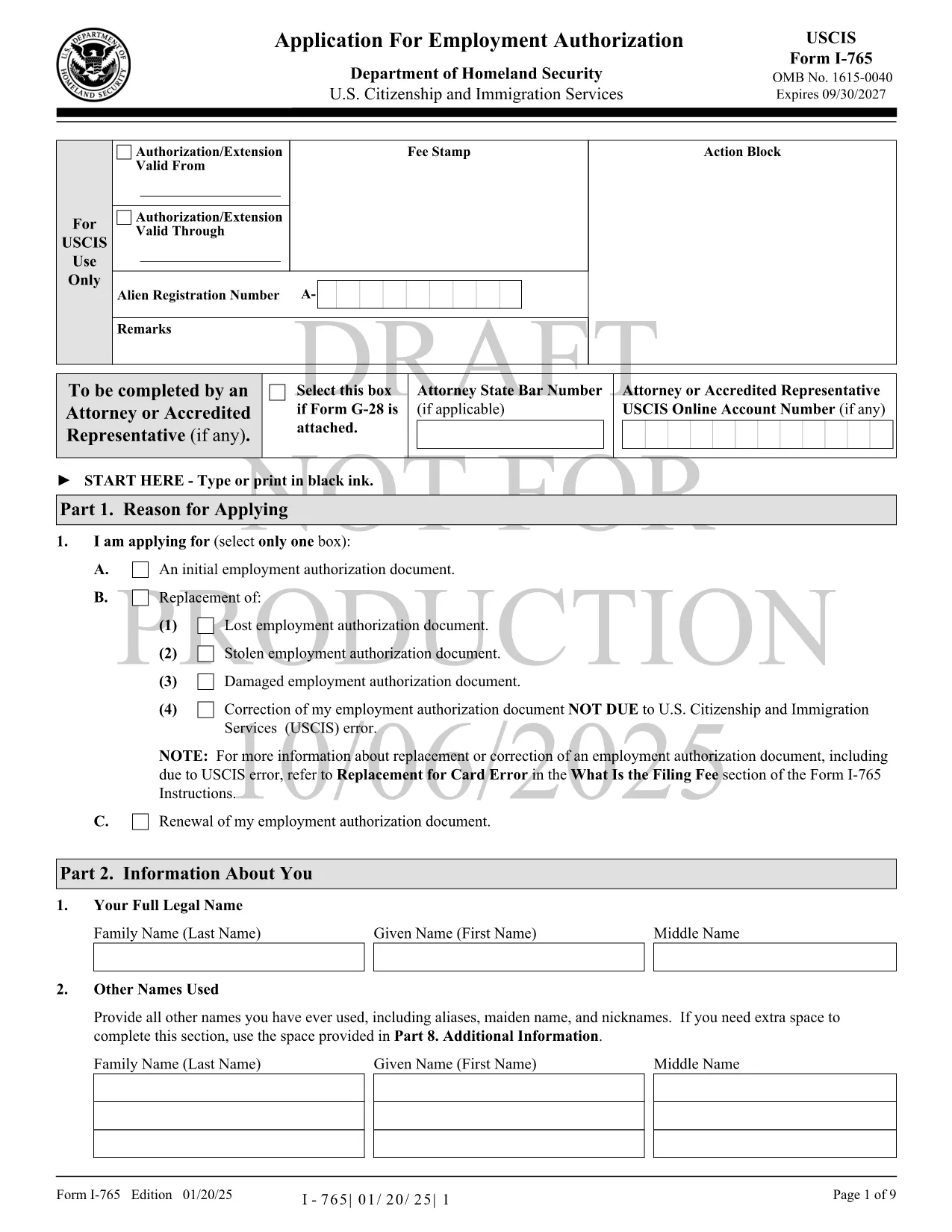
USCIS Form I-765 – Fillable PDF for Employment Authorization

  1. Jezik Engleski
  2. Zemlja SAD
  3. Aktivnost Imigracija
  4. Odjel USCIS
USCIS Form I-765 – Fillable PDF for Employment Authorization

The USCIS Form I-765, also known as the Application for Employment Authorization, is the key document you need to request an Employment Authorization Document (EAD). Whether you’re an asylum seeker, a DACA recipient, or a student on Optional Practical Training, a correctly completed I-765 can unlock your right to work in the United States.

What Is Form I-765 and Who Needs It?

Form I-765 is used by eligible non‑citizens to apply for a temporary work permit. Common categories include:

  • Asylees and refugees
  • F‑1 students seeking Optional Practical Training (OPT)
  • Adjustment‑of‑status applicants
  • Individuals with Deferred Action for Childhood Arrivals (DACA)

How to Complete the Fillable I-765 Online

Instead of downloading the PDF and editing it with a separate editor, simply click the "Fill out this form" button on this page. The Formize PDF Filler app will load the official fillable PDF directly in your browser. Follow these steps:

  1. Click Fill out this form to launch the online filler.
  2. Wait a few seconds while the fillable PDF loads.
  3. Enter your information in each field – the app auto‑saves as you type.
  4. Review the completed form for accuracy.
  5. Download the finished PDF or print it for mailing to USCIS.

Common Mistakes to Avoid on Form I-765

  • Incorrect filing fee amount – always check the latest USCIS fee schedule.
  • Missing signatures – an unsigned form will be rejected.
  • Using outdated form edition – our fillable PDF is the current version.
  • Providing unmounted or retouched photos – follow USCIS photo guidelines.

Where to Submit Your Completed I-765

After you’ve downloaded the completed PDF, mail it to the filing address that matches your eligibility category. USCIS provides a detailed Direct Filing Addresses page. If you prefer electronic filing, you can also submit through your USCIS online account where the same PDF can be uploaded.

Download the Official PDF

For reference or offline use, you can download the official USCIS Form I-765 PDF directly from the link below. The same file is used by the Formize filler, ensuring you always have the most up‑to‑date version.

Download USCIS Form I-765 (PDF)

PITANJA
  • Do I need to print the fillable PDF after completing it online?

    Yes. USCIS requires a printed, signed copy for most filing categories. You can also upload the PDF if you are filing electronically.

  • Can I save my progress and return later?

    The Formize filler auto‑saves locally in your browser. Use the "Save as Draft" button to download a copy and continue later.

  • What filing fee should I include with Form I-765?

    Check the latest fee on the USCIS website. Fees vary by eligibility category and are updated yearly.

  • How long does USCIS take to process an I-765?

    Processing times range from 3 to 7 months depending on the service center and your category. You can track status online with your receipt number.

  • Is the PDF provided here the official USCIS form?

    Yes. The download link points to the official USCIS‑published PDF, ensuring you have the current edition.

  • Can I submit the form without a photo?

    A passport‑style photo is required for most categories. Follow USCIS photo specifications to avoid delays.

  • What should I do if I make a mistake after submitting?

    File Form I-765 Supplement (if applicable) or submit a new application with the correct information, along with an explanation of the error.

KAKO DA

Kako ispuniti USCIS Form I-765 besplatno, online u 5 jednostavnih koraka:

  1. 1
    Launch the Formize filler
    Click the "Fill out this form" button on the page. The fillable PDF loads instantly in your browser.
  2. 2
    Enter your information
    Fill each field with accurate data. The app auto‑saves so you won’t lose any entries.
  3. 3
    Review and verify
    Double‑check every section, especially your signature and fee amount, before finalizing.
  4. 4
    Download or print
    When you’re satisfied, click "Download PDF" to save a copy or print it for mailing to USCIS.
  5. 5
    Submit to USCIS
    Mail the completed form to the correct USCIS address for your category, or upload it via your USCIS online account.
Aplikacija Formize PDF Filler
OKO

USCIS Form I-765 predložak

S tradicionalnim skupom značajki za pregled i ispunjavanje PDF dokumenta, u kombinaciji s prednostima web aplikacije i responzivnog izgleda, možete ispuniti USCIS Form I-765 u nekoliko minuta.

ZNAČAJKE

PDF punilo

Najlakši način da ispunite USCIS Form I-765 online

  • Brzo ispunite USCIS Form I-765
    Tražite način da brzo ispunite USCIS Form I-765 online? Uz naš online besplatni PDF obrazac za popunjavanje, znat ćete kako urediti i ispuniti ovaj pdf dokument za manje od minute.
  • Jednostavan za korištenje mrežni PDF uređivač
    Dosta vam je ispisivanja PDF datoteka kako biste ih mogli uređivati ​​prije ponovnog skeniranja i slanja natrag? Uređujte PDF dokumente besplatno na mreži. Upotrijebite naš online uređivač pdf-ova kako biste uštedjeli vrijeme i papir.
  • Sjajni alati, sve platforme
    Pitate se kako ispuniti USCIS Form I-765 na Macu ili možda kako koristiti PDF filer besplatno? Naši online PDF alati rade na svim platformama.
  • Sigurno skladištenje datoteka
    Dovršene datoteke "USCIS Form I-765" pohranjuju se u zaštićenu bazu podataka kojom upravlja Amazon Cloud hosting. Svoje datoteke možete izbrisati iz našeg sustava bilo kada. U svakom slučaju, te se datoteke automatski brišu nakon 24 sata.
  • Chat s USCIS Form I-765
    Razgovarajte s "USCIS Form I-765" na Chatize koji je besplatni pomoćnik za čitanje PDF-ova. Postavljajte pitanja i dobivajte odgovore od "USCIS Form I-765". Samo kliknite gornji gumb Chat with Document.

Izbriši sesiju punjenja

Izbrisati odabranu sesiju punjenja? U tom će slučaju vaš napredak u ispunjavanju obrasca biti izgubljen.

Izbriši sesiju uređivanja

Izbrisati odabranu sesiju uređivanja? U tom će slučaju vaš napredak u stvaranju i uređivanju obrasca biti izgubljen.