Izaberi jezik

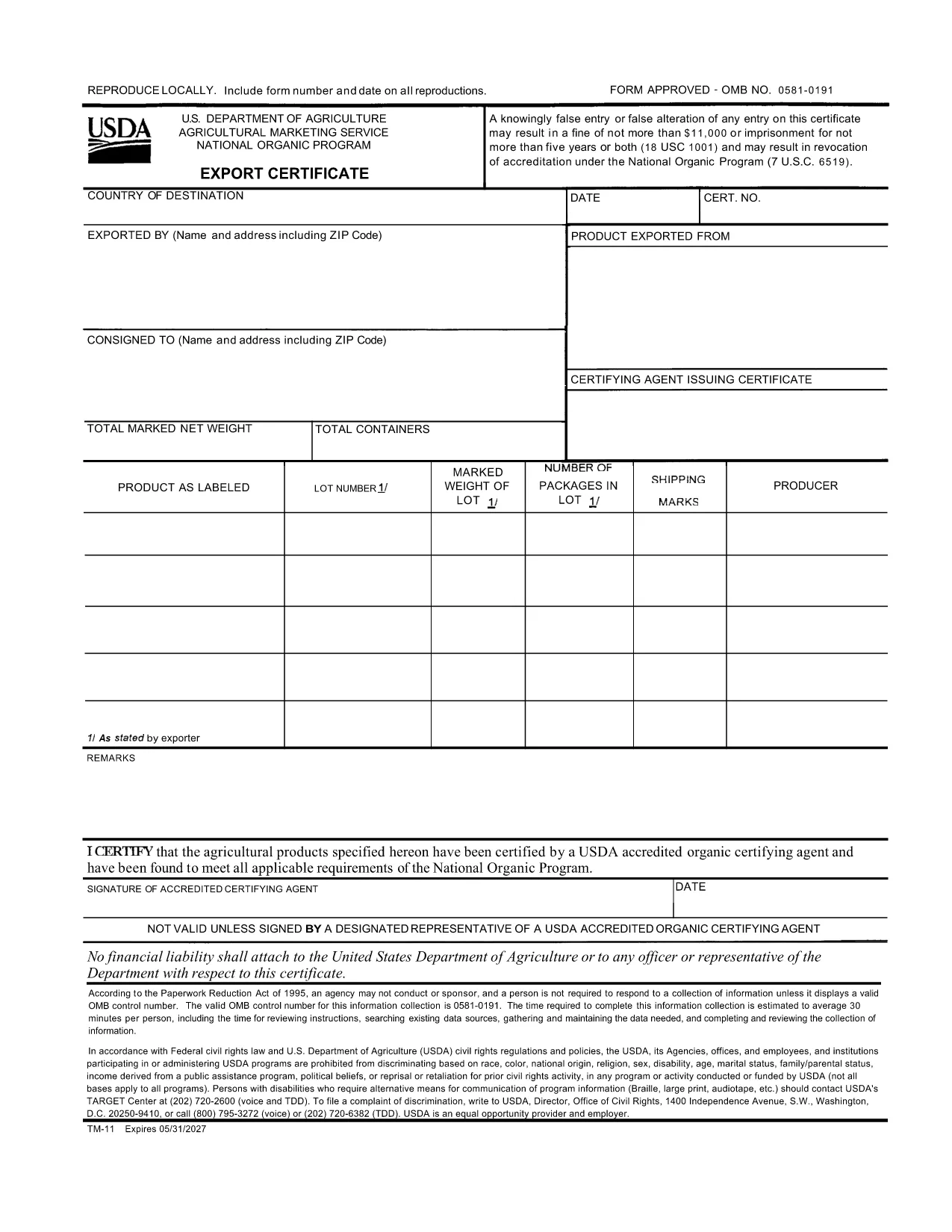
USDA TM-11 Export Certificate – Fillable PDF Form

  1. Jezik Engleski
  2. Zemlja SAD
  3. Aktivnost Agriculture
  4. Odjel USDA
USDA TM-11 Export Certificate – Fillable PDF Form

The TM-11 Export Certificate is the USDA‑approved document required for exporting organic products to certain foreign markets. Whether you are shipping to Taiwan, Japan, or other USDA‑recognized trade partners, a correctly completed TM-11 ensures your shipment meets all organic compliance standards.

What Is the TM-11 Export Certificate?

Form TM‑11 is issued by the U.S. Department of Agriculture (USDA) Agricultural Marketing Service (AMS). It verifies that the goods being exported comply with the organic regulations of both the United States and the destination country. The form must be signed by an accredited certifying agent (ACA) and accompany the shipment.

How to Complete the TM-11 Form Online

With Formize’s built‑in PDF filler, you can complete the TM‑11 without downloading any software. Just click the “Fill out this form” button, wait for the Formize PDF Filler to load, and start entering your information directly in the browser.

Common Mistakes to Avoid

  • Leaving required fields blank – every section marked with an asterisk must be completed.
  • Incorrect certification numbers – double‑check the ACA’s certification number before submitting.
  • Signature errors – the ACA must sign the form electronically or print, sign, and scan the final PDF.
  • Mismatched product descriptions – ensure the product name matches the USDA organic certification.

Download the Fillable PDF Instantly

Click the button below to open the official USDA TM‑11 PDF in the Formize filler. When you finish, download the completed form and attach it to your export documentation package.

PITANJA
  • What is the purpose of Form TM‑11?

    Form TM‑11 serves as the official USDA Export Certificate for organic products, confirming compliance with U.S. and foreign organic standards.

  • Can I sign the TM‑11 electronically?

    Yes. The Formize filler allows electronic signatures for the exporter. The certifying agent must still provide a handwritten signature or an approved electronic signature.

  • Do I need a separate PDF for each shipment?

    A new TM‑11 must be completed for each export batch. Re‑using an old certificate can lead to compliance violations.

  • Is the TM‑11 form free to download?

    Yes. The USDA provides the TM‑11 PDF at no cost. Formize hosts the fillable version for free use.

  • What countries accept the USDA TM‑11?

    Countries with USDA organic trade agreements—such as Taiwan, Japan, and others listed in the USDA Export Arrangement—accept the TM‑11.

  • What if I make a mistake after submitting?

    Correct the error on a new TM‑11 form and attach it to the shipment. Keep both the original and corrected copies for records.

KAKO DA

Kako ispuniti TM-11 besplatno, online u 3 jednostavnih koraka:

  1. 1
    Open the TM-11 Form
    Click the “Fill out this form” button on this page. The Formize PDF Filler will load directly in your browser.
  2. 2
    Enter Your Information
    Fill in each required field—exporter details, product description, destination country, and certification numbers.
  3. 3
    Save and Download
    When all fields are completed, click “Save” to download the filled PDF. Attach the file to your export paperwork.
Aplikacija Formize PDF Filler
OKO

TM-11 predložak

S tradicionalnim skupom značajki za pregled i ispunjavanje PDF dokumenta, u kombinaciji s prednostima web aplikacije i responzivnog izgleda, možete ispuniti TM-11 u nekoliko minuta.

ZNAČAJKE

PDF punilo

Najlakši način da ispunite TM-11 online

  • Brzo ispunite TM-11
    Tražite način da brzo ispunite TM-11 online? Uz naš online besplatni PDF obrazac za popunjavanje, znat ćete kako urediti i ispuniti ovaj pdf dokument za manje od minute.
  • Jednostavan za korištenje mrežni PDF uređivač
    Dosta vam je ispisivanja PDF datoteka kako biste ih mogli uređivati ​​prije ponovnog skeniranja i slanja natrag? Uređujte PDF dokumente besplatno na mreži. Upotrijebite naš online uređivač pdf-ova kako biste uštedjeli vrijeme i papir.
  • Sjajni alati, sve platforme
    Pitate se kako ispuniti TM-11 na Macu ili možda kako koristiti PDF filer besplatno? Naši online PDF alati rade na svim platformama.
  • Sigurno skladištenje datoteka
    Dovršene datoteke "TM-11" pohranjuju se u zaštićenu bazu podataka kojom upravlja Amazon Cloud hosting. Svoje datoteke možete izbrisati iz našeg sustava bilo kada. U svakom slučaju, te se datoteke automatski brišu nakon 24 sata.
  • Chat s TM-11
    Razgovarajte s "TM-11" na Chatize koji je besplatni pomoćnik za čitanje PDF-ova. Postavljajte pitanja i dobivajte odgovore od "TM-11". Samo kliknite gornji gumb Chat with Document.

Izbriši sesiju punjenja

Izbrisati odabranu sesiju punjenja? U tom će slučaju vaš napredak u ispunjavanju obrasca biti izgubljen.

Izbriši sesiju uređivanja

Izbrisati odabranu sesiju uređivanja? U tom će slučaju vaš napredak u stvaranju i uređivanju obrasca biti izgubljen.