
Izaberi jezik

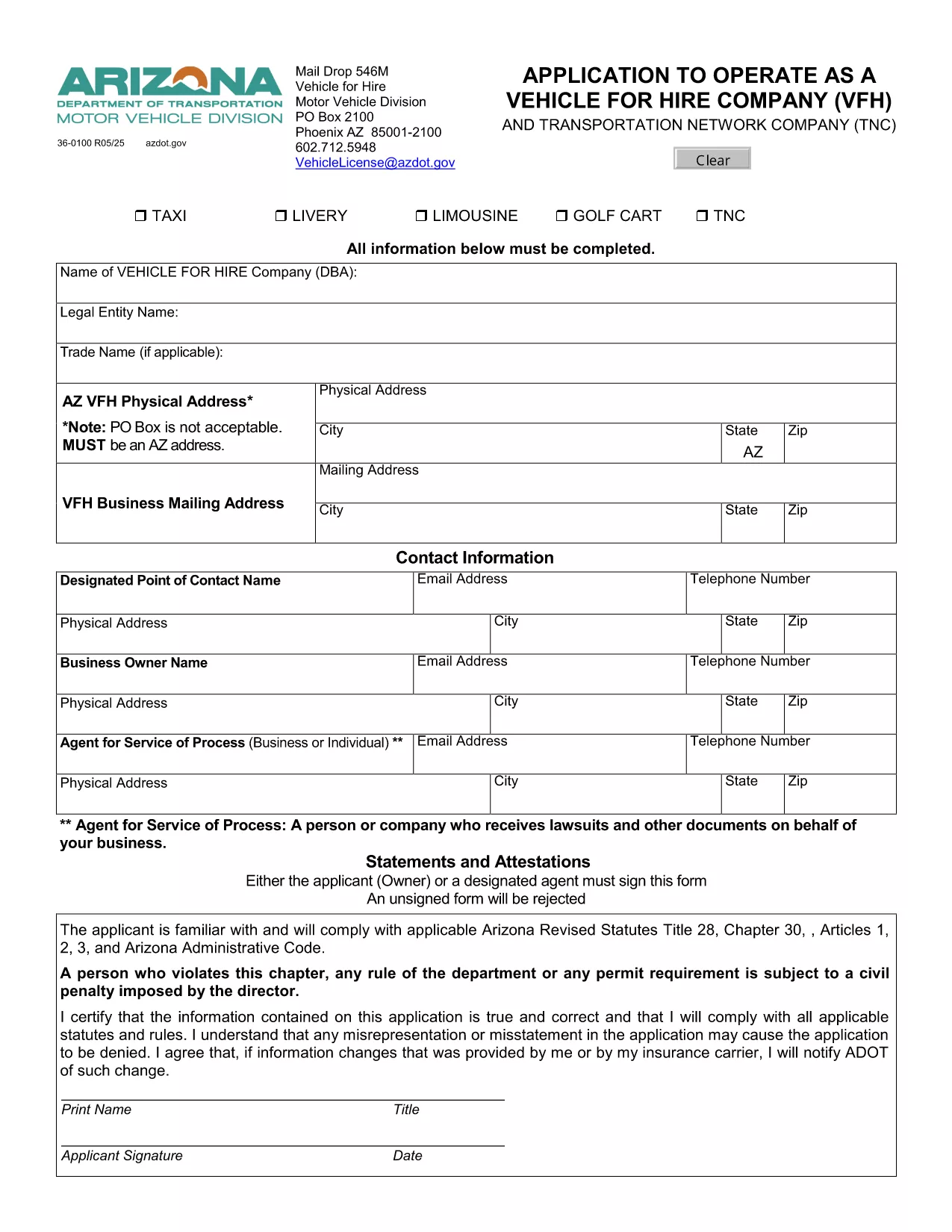
Arizona Form 36-0100 – Vehicle for Hire Application (Fillable PDF)

  1. Jezik Engleski
  2. Zemlja SAD
  3. Aktivnost Registracija vozila
  4. država Arizona
Arizona Form 36-0100 – Vehicle for Hire Application (Fillable PDF)

Form 36-0100 is the official Arizona Department of Transportation (ADOT) application used by individuals and companies that want to operate a vehicle for hire, such as taxis, rideshare services, or limousine companies. This fillable PDF lets you enter all required information directly in your browser, save a copy, and print a signed version for submission.

What Is Form 36-0100?

The form collects essential details about the applicant, the vehicle(s), insurance coverage, and compliance with state safety regulations. It is required before any vehicle can be legally used for commercial passenger transport in Arizona.

How to Complete the Fillable Form Online

Instead of downloading the PDF and opening it in a separate editor, simply click the “Fill out this form” button on this page. The Formize PDF Filler app will load instantly, allowing you to:

  • Enter text into every field using your keyboard.
  • Select dates, checkboxes, and dropdown options.
  • Save your progress and return later if needed.
  • Export a completed, printable PDF with one click.

Common Mistakes to Avoid

  • Leaving required fields blank: The form will highlight missing information before you can submit.
  • Using non‑black ink for signatures: Print the final PDF and sign with a black pen as required by ADOT.
  • Submitting outdated insurance documents: Verify that your policy dates cover the entire period you intend to operate.

Where to Submit Your Completed Form

After printing and signing, mail the form to:

Vehicle for Hire Division
Arizona Department of Transportation
PO Box 2100
Phoenix, AZ 85001‑2100

Or deliver it in person to any ADOT Motor Vehicle Division office.

Need More Help?

If you have questions about eligibility, insurance requirements, or the submission process, contact the ADOT Vehicle Licensing Unit at VehicleLicense@azdot.gov or call 602‑712‑5948.

PITANJA
  • Is Form 36-0100 available in a fillable format?

    Yes. On this page you can fill it out online with the Formize PDF Filler, then download the completed PDF.

  • Do I need a separate insurance certificate?

    ADOT requires a current commercial liability insurance policy that covers passenger transport. Attach a copy with your application.

  • Can I submit the form electronically?

    Arizona law still requires a printed, signed copy. After filling it online, print, sign, and mail the form.

  • How long does the approval process take?

    Typically 10–15 business days after ADOT receives the completed, signed application and supporting documents.

  • What if I make a mistake after submitting?

    Contact the Vehicle for Hire Division to request a correction form. Do not alter the already‑submitted PDF.

  • Is there a fee for filing Form 36-0100?

    Yes. The current application fee is listed on the form’s first page and must be paid by check or money order.

  • Do I need to renew this form annually?

    The vehicle for hire license must be renewed each year, but the same Form 36-0100 is used for renewal with updated information.

  • Can I use this form for a rideshare company?

    Absolutely. Any business that transports passengers for compensation in Arizona uses Form 36-0100.

KAKO DA

Kako ispuniti Form 36-0100 besplatno, online u 5 jednostavnih koraka:

  1. 1
    Open the Fillable Form
    Click the “Fill out this form” button on the page. The Formize PDF Filler loads directly in your browser.
  2. 2
    Enter Your Information
    Complete each field – personal details, vehicle information, insurance data, and declarations – using your keyboard.
  3. 3
    Save & Review
    Use the “Save” button to store a draft. Review all entries; required fields will be highlighted if missed.
  4. 4
    Export and Print
    When finished, click “Export PDF”. Print the document, sign with a black pen, and attach any supporting documents.
  5. 5
    Submit to ADOT
    Mail or deliver the signed PDF to the Vehicle for Hire Division address listed on the form.
Aplikacija Formize PDF Filler
OKO

Obrasci za registraciju vozila

Form 36-0100 jedan je od obrazaca za registraciju vozila koji su dokumenti koji se koriste za registraciju motornog vozila kod relevantnog državnog tijela, obično Odjela za motorna vozila (DMV) ili ekvivalentne agencije. Ovi obrasci su potrebni kada osoba kupi novo ili rabljeno vozilo, prenese vlasništvo nad vozilom ili se preseli u novu jurisdikciju s vozilom.

Specifični obrasci za registraciju vozila mogu se razlikovati ovisno o jurisdikciji, ali općenito zahtijevaju sljedeće podatke:

Informacije o vozilu: Ovo uključuje detalje o vozilu, kao što su marka, model, godina, identifikacijski broj vozila (VIN) i očitanje brojača kilometara.

Podaci o vlasniku: obrazac će zahtijevati podatke o vlasniku vozila, uključujući njegovo ime, adresu, podatke za kontakt i broj vozačke dozvole.

Dokaz o vlasništvu: Ovisno o okolnostima, može biti potreban dokaz o vlasništvu, kao što je vlasnički list, račun o prodaji ili potvrda proizvođača o podrijetlu (za nova vozila).

Informacije o osiguranju: Obično je potreban dokaz o važećem osiguranju vozila. To može uključivati ​​davanje broja police osiguranja, datuma pokrića i podataka o osiguravajućem društvu.

Plaćanje naknada: Registracija vozila uključuje plaćanje raznih naknada, kao što su naknade za registraciju, porezi i eventualno drugi troškovi specifični za jurisdikciju.

Uz ove osnovne zahtjeve, neke jurisdikcije mogu imati dodatne zahtjeve za obrasce ili dokumentaciju. Na primjer, rezultati ispitivanja emisija, sigurnosne inspekcije ili dokaz o prebivalištu mogu biti potrebni u određenim područjima.

Nakon što se ispune i predaju obrasci za registraciju vozila, državno tijelo će izdati potvrdu o registraciji, registarske pločice i registracijske naljepnice. Ovi dokumenti pokazuju da je vozilo legalno registrirano i ovlašteno za promet na javnim cestama.

Važno je napomenuti da se zahtjevi za registraciju vozila mogu značajno razlikovati ovisno o jurisdikciji. Stoga se preporučuje konzultirati lokalni DMV ili ekvivalentnu agenciju za specifične obrasce i postupke koji se primjenjuju na vašu lokaciju.

ZNAČAJKE

PDF punilo

Najlakši način da ispunite Form 36-0100 online

  • Brzo ispunite Form 36-0100
    Tražite način da brzo ispunite Form 36-0100 online? Uz naš online besplatni PDF obrazac za popunjavanje, znat ćete kako urediti i ispuniti ovaj pdf dokument za manje od minute.
  • Jednostavan za korištenje mrežni PDF uređivač
    Dosta vam je ispisivanja PDF datoteka kako biste ih mogli uređivati ​​prije ponovnog skeniranja i slanja natrag? Uređujte PDF dokumente besplatno na mreži. Upotrijebite naš online uređivač pdf-ova kako biste uštedjeli vrijeme i papir.
  • Sjajni alati, sve platforme
    Pitate se kako ispuniti Form 36-0100 na Macu ili možda kako koristiti PDF filer besplatno? Naši online PDF alati rade na svim platformama.
  • Sigurno skladištenje datoteka
    Dovršene datoteke "Form 36-0100" pohranjuju se u zaštićenu bazu podataka kojom upravlja Amazon Cloud hosting. Svoje datoteke možete izbrisati iz našeg sustava bilo kada. U svakom slučaju, te se datoteke automatski brišu nakon 24 sata.
  • Chat s Form 36-0100
    Razgovarajte s "Form 36-0100" na Chatize koji je besplatni pomoćnik za čitanje PDF-ova. Postavljajte pitanja i dobivajte odgovore od "Form 36-0100". Samo kliknite gornji gumb Chat with Document.

Izbriši sesiju punjenja

Izbrisati odabranu sesiju punjenja? U tom će slučaju vaš napredak u ispunjavanju obrasca biti izgubljen.

Izbriši sesiju uređivanja

Izbrisati odabranu sesiju uređivanja? U tom će slučaju vaš napredak u stvaranju i uređivanju obrasca biti izgubljen.