
Izaberi jezik

Connecticut Cert-106 Vehicle Use Tax Refund Form (Fillable PDF)

  1. Jezik Engleski
  2. Zemlja SAD
  3. Aktivnost Registracija vozila
  4. država Connecticut
Connecticut Cert-106 Vehicle Use Tax Refund Form (Fillable PDF)

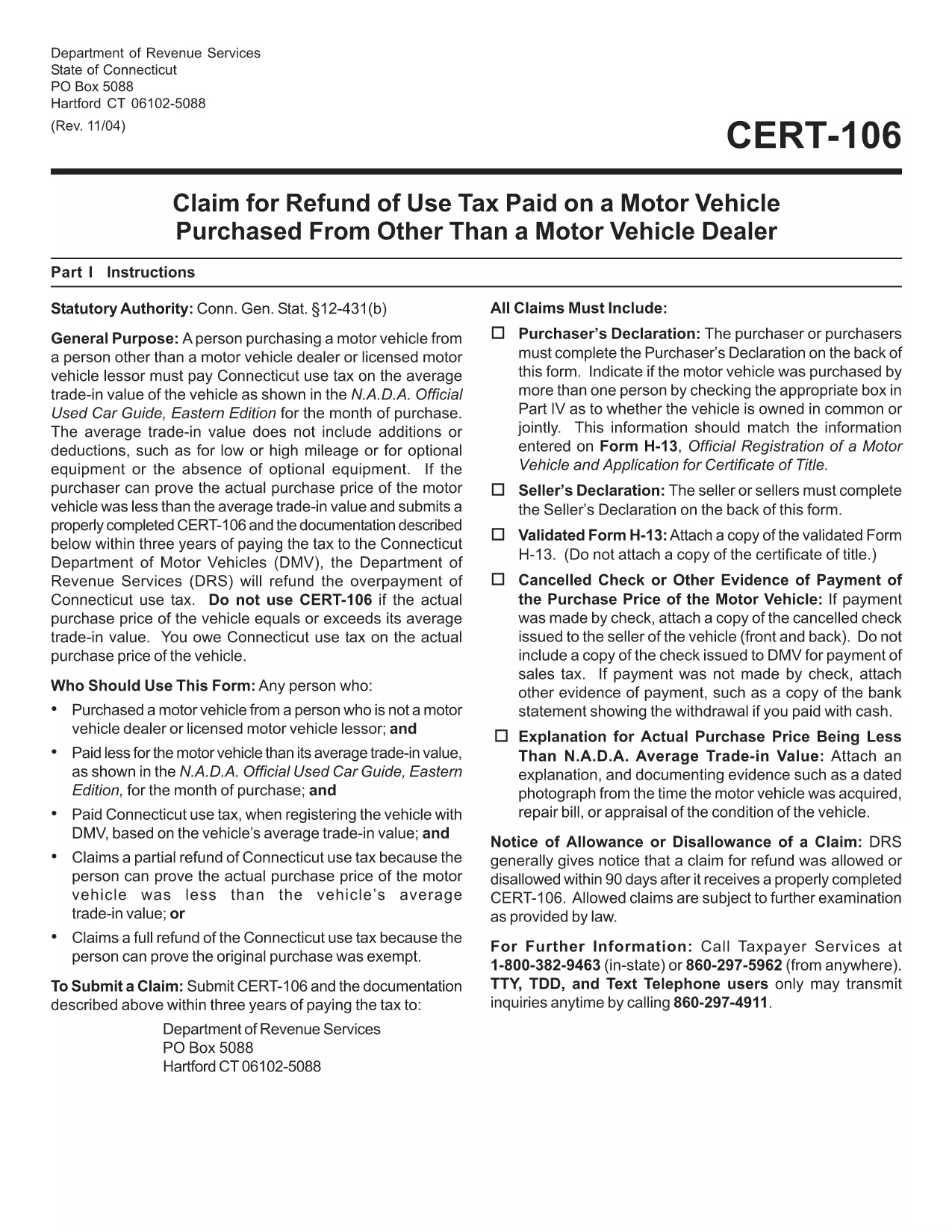
The Connecticut Cert-106 is the official claim form used to request a refund of use tax paid on a motor vehicle purchase. Whether you bought a car, truck, or motorcycle and believe you over‑paid tax, this fillable PDF lets you submit a proper request to the Connecticut Department of Revenue Services (DRS) quickly and accurately.

What is the Cert-106 Form?

Cert-106, officially titled “Claim for Refund of Use Tax Paid on Motor Vehicle Purchased,” collects essential details about the buyer, the vehicle, and the tax paid. The DRS reviews the information and, if eligible, issues a refund.

Who Needs to File Cert-106?

  • Individuals who purchased a vehicle and paid Connecticut use tax but qualify for a refund (e.g., out‑of‑state purchase, trade‑in adjustments).
  • Dealers or businesses that acted as the purchaser on behalf of a client.
  • Anyone who can provide proof of tax payment and supporting documentation within three years of the payment date.

How to Fill Out Cert-106 Online

Instead of printing, scanning, or manually typing, use Formize’s built‑in PDF filler:

  1. Click the "Fill out this form" button on this page.
  2. Wait a few seconds while the Formize PDF Filler app loads the Cert‑106 template.
  3. Enter your information directly into the fields (name, address, vehicle details, tax amount, etc.).
  4. Upload any required documents (receipt, proof of payment, vehicle title) using the attachment icons.
  5. Review the completed form, then click Save & Download or Submit according to your preferred filing method.

Common Mistakes to Avoid

  • Missing signatures: The purchaser’s declaration on the back of the form must be signed.
  • Incorrect dates: Use the exact date the tax was paid, not the purchase date.
  • Incomplete documentation: Attach the original receipt and any trade‑in paperwork; otherwise the claim will be rejected.
  • Submitting after three years: The DRS only accepts claims within three years of the tax payment.

Where to Submit Your Completed Form

After you’ve filled and saved the PDF, you can:

  • Mail it to Department of Revenue Services, PO Box 5088, Hartford, CT 06102‑5088.
  • Upload it through the Connecticut DRS online portal (if you have an account).
  • Deliver it in person to a local DRS office for immediate assistance.

Using Formize’s fillable PDF eliminates the hassle of printing, scanning, or re‑typing. Get your refund faster and keep a digital copy for your records.

PITANJA
  • What is the purpose of Cert‑106?

    Cert‑106 is used to claim a refund of Connecticut use tax paid on a motor vehicle when the taxpayer qualifies for a refund.

  • Can I file Cert‑106 electronically?

    Yes. Fill the form online with Formize’s fillable PDF, save the completed document, and then upload or mail it to the Department of Revenue Services.

  • How long do I have to submit a Cert‑106 claim?

    Claims must be submitted within three years of the date the tax was paid.

  • What supporting documents are required?

    You need the original tax receipt, vehicle purchase agreement or title, and any trade‑in documentation that affects the tax amount.

  • Do I need a signature on the form?

    Yes. The purchaser’s declaration on the back of Cert‑106 must be signed for the claim to be valid.

  • Is there a filing fee for Cert‑106?

    No. There is no fee to submit a Cert‑106 claim, but you must provide accurate information to avoid processing delays.

  • Can a business use Cert‑106?

    Businesses that purchased a vehicle and paid use tax can also file Cert‑106 to request a refund.

  • What if my claim is denied?

    The DRS will send a written explanation. You can correct any errors and resubmit, or appeal the decision according to the DRS guidelines.

KAKO DA

Kako ispuniti cert-106 besplatno, online u 5 jednostavnih koraka:

  1. 1
    Open the Fillable Form
    Click the "Fill out this form" button on the page. The Formize PDF Filler app will open automatically.
  2. 2
    Enter Your Information
    Type directly into each field – name, address, vehicle details, tax amount, and any other required data.
  3. 3
    Attach Supporting Documents
    Use the attachment icons to upload receipts, proof of tax payment, and the vehicle title.
  4. 4
    Review & Save
    Double‑check every entry, then click "Save & Download" to keep a copy or "Submit" to send it to the DRS.
  5. 5
    Send Your Claim
    Mail the saved PDF to the DRS address, upload it via the online portal, or deliver it in person.
Aplikacija Formize PDF Filler
OKO

Obrasci za registraciju vozila

cert-106 jedan je od obrazaca za registraciju vozila koji su dokumenti koji se koriste za registraciju motornog vozila kod relevantnog državnog tijela, obično Odjela za motorna vozila (DMV) ili ekvivalentne agencije. Ovi obrasci su potrebni kada osoba kupi novo ili rabljeno vozilo, prenese vlasništvo nad vozilom ili se preseli u novu jurisdikciju s vozilom.

Specifični obrasci za registraciju vozila mogu se razlikovati ovisno o jurisdikciji, ali općenito zahtijevaju sljedeće podatke:

Informacije o vozilu: Ovo uključuje detalje o vozilu, kao što su marka, model, godina, identifikacijski broj vozila (VIN) i očitanje brojača kilometara.

Podaci o vlasniku: obrazac će zahtijevati podatke o vlasniku vozila, uključujući njegovo ime, adresu, podatke za kontakt i broj vozačke dozvole.

Dokaz o vlasništvu: Ovisno o okolnostima, može biti potreban dokaz o vlasništvu, kao što je vlasnički list, račun o prodaji ili potvrda proizvođača o podrijetlu (za nova vozila).

Informacije o osiguranju: Obično je potreban dokaz o važećem osiguranju vozila. To može uključivati ​​davanje broja police osiguranja, datuma pokrića i podataka o osiguravajućem društvu.

Plaćanje naknada: Registracija vozila uključuje plaćanje raznih naknada, kao što su naknade za registraciju, porezi i eventualno drugi troškovi specifični za jurisdikciju.

Uz ove osnovne zahtjeve, neke jurisdikcije mogu imati dodatne zahtjeve za obrasce ili dokumentaciju. Na primjer, rezultati ispitivanja emisija, sigurnosne inspekcije ili dokaz o prebivalištu mogu biti potrebni u određenim područjima.

Nakon što se ispune i predaju obrasci za registraciju vozila, državno tijelo će izdati potvrdu o registraciji, registarske pločice i registracijske naljepnice. Ovi dokumenti pokazuju da je vozilo legalno registrirano i ovlašteno za promet na javnim cestama.

Važno je napomenuti da se zahtjevi za registraciju vozila mogu značajno razlikovati ovisno o jurisdikciji. Stoga se preporučuje konzultirati lokalni DMV ili ekvivalentnu agenciju za specifične obrasce i postupke koji se primjenjuju na vašu lokaciju.

ZNAČAJKE

PDF punilo

Najlakši način da ispunite cert-106 online

  • Brzo ispunite cert-106
    Tražite način da brzo ispunite cert-106 online? Uz naš online besplatni PDF obrazac za popunjavanje, znat ćete kako urediti i ispuniti ovaj pdf dokument za manje od minute.
  • Jednostavan za korištenje mrežni PDF uređivač
    Dosta vam je ispisivanja PDF datoteka kako biste ih mogli uređivati ​​prije ponovnog skeniranja i slanja natrag? Uređujte PDF dokumente besplatno na mreži. Upotrijebite naš online uređivač pdf-ova kako biste uštedjeli vrijeme i papir.
  • Sjajni alati, sve platforme
    Pitate se kako ispuniti cert-106 na Macu ili možda kako koristiti PDF filer besplatno? Naši online PDF alati rade na svim platformama.
  • Sigurno skladištenje datoteka
    Dovršene datoteke "cert-106" pohranjuju se u zaštićenu bazu podataka kojom upravlja Amazon Cloud hosting. Svoje datoteke možete izbrisati iz našeg sustava bilo kada. U svakom slučaju, te se datoteke automatski brišu nakon 24 sata.
  • Chat s cert-106
    Razgovarajte s "cert-106" na Chatize koji je besplatni pomoćnik za čitanje PDF-ova. Postavljajte pitanja i dobivajte odgovore od "cert-106". Samo kliknite gornji gumb Chat with Document.

Izbriši sesiju punjenja

Izbrisati odabranu sesiju punjenja? U tom će slučaju vaš napredak u ispunjavanju obrasca biti izgubljen.

Izbriši sesiju uređivanja

Izbrisati odabranu sesiju uređivanja? U tom će slučaju vaš napredak u stvaranju i uređivanju obrasca biti izgubljen.