
Izaberi jezik

MV216 – Application for Title Correction (Delaware)

  1. Jezik Engleski
  2. Zemlja SAD
  3. Aktivnost Registracija vozila
  4. država Delaware
MV216 – Application for Title Correction (Delaware)

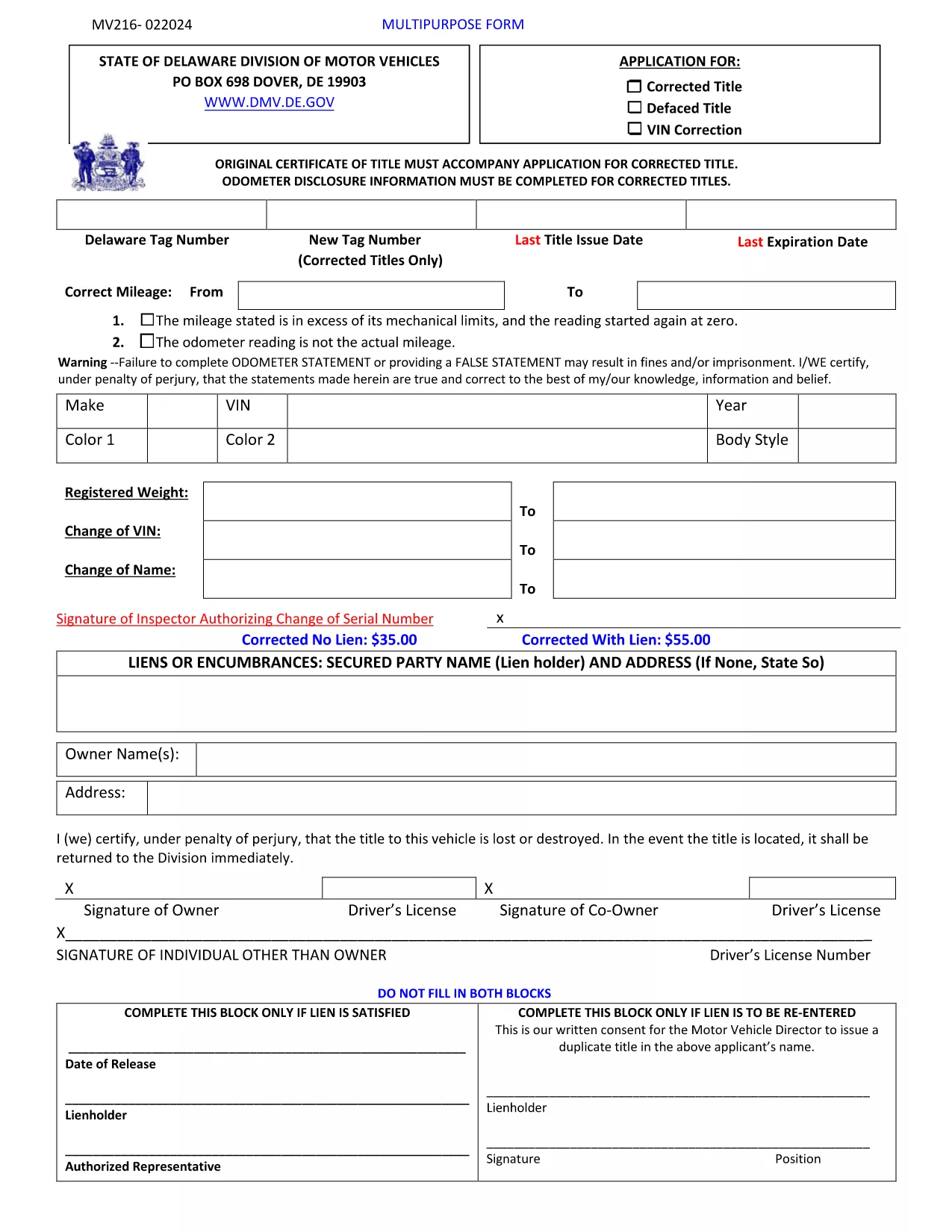
The MV216 is the Delaware Division of Motor Vehicles (DMV) application used to correct errors on a vehicle title or to request a multipurpose title change. Whether you need to fix a misspelled name, update a VIN, or change ownership details, this form is required before the DMV can issue a corrected title.

What Is the MV216 Form?

MV216 is a government‑issued, fillable PDF that captures the vehicle’s current title information, the correction needed, and the owner's signature. The form is used for:

  • Correcting misspelled names or addresses
  • Fixing VIN transcription errors
  • Updating lienholder details
  • Other multipurpose title adjustments

How to Complete the MV216 Online

Instead of downloading, printing, and scanning, you can fill the form directly in your browser using Formize’s PDF Filler app. Follow these simple steps:

  1. Click the "Fill out this form" button on this page.
  2. The Formize PDF Filler loads the MV216 PDF instantly.
  3. Enter your information in the highlighted fields.
  4. Review the data, add your electronic signature, and click Submit.
  5. Download the completed PDF for your records or print it for in‑person submission.

Common Mistakes & Tips

Avoid these pitfalls to ensure a smooth processing time:

  • Incorrect VIN: Double‑check the 17‑character VIN against the vehicle’s registration.
  • Missing signatures: Both the owner and, if applicable, the lienholder must sign.
  • Unsupported file types: Use the built‑in Formize filler; do not attach separate PDFs.
  • Out‑of‑date information: Make sure your address and contact details match DMV records.

Where to Submit Your Completed Form

After filling out MV216, you have two options:

  • In‑person: Bring the printed form to any Delaware DMV office.
  • Mail: Send the completed PDF (or printed copy) to:
    Division of Motor Vehicles
    PO Box 698
    Dover, DE 19903

Include any supporting documentation (e.g., proof of identity) to avoid delays.

Download the Official PDF Instructions

If you prefer the original instructions, you can download the official PDF directly from the Delaware DMV website.

PITANJA
  • Do I need to print the MV216 after filling it out online?

    Printing is required only if you plan to submit the form in person. For mail submissions, a printed copy is also recommended.

  • Can I submit the MV216 electronically?

    Delaware DMV currently accepts mailed or in‑person submissions. However, using Formize lets you complete the form quickly and ensures all fields are correctly filled before printing.

  • What supporting documents do I need with MV216?

    Include a copy of the current title, proof of identity (driver’s license or state ID), and any lienholder documentation if applicable.

  • How long does it take for the corrected title to arrive?

    Processing typically takes 7‑10 business days after the DMV receives a complete MV216 application.

  • Is there a fee for filing MV216?

    Yes, the Delaware DMV charges a title correction fee. Check the latest fee schedule on the DMV website or the form instructions.

  • What if I make a mistake after submitting?

    Contact the Delaware DMV immediately. You may need to submit a new MV216 with the correct information and pay an additional fee.

  • Can I use a mobile device to fill out MV216?

    Yes, the Formize PDF Filler works on most modern smartphones and tablets, allowing you to complete the form on the go.

KAKO DA

Kako ispuniti MV216 form besplatno, online u 5 jednostavnih koraka:

  1. 1
    Open the Fillable Form
    Click the “Fill out this form” button on the page. The Formize PDF Filler app will load the MV216 PDF instantly in your browser.
  2. 2
    Enter Your Information
    Fill in all highlighted fields – owner details, vehicle information, and the specific correction you need.
  3. 3
    Add Your Signature
    Use the built‑in signature tool to sign electronically. If a lienholder signature is required, have them sign the same way.
  4. 4
    Review and Submit
    Double‑check every entry, then click the Submit button. The completed PDF will be saved to your device.
  5. 5
    Print or Email
    Print the completed form for in‑person DMV submission, or email the PDF to the Delaware DMV if they accept electronic filings.
Aplikacija Formize PDF Filler
OKO

Obrasci za registraciju vozila

MV216 form je jedan od DMV obrazaca, također poznatih kao obrasci Odjela za motorna vozila, koji su dokumenti koji se koriste u raznim transakcijama i procesima povezanim s motornim vozilima. DMV je državna agencija odgovorna za izdavanje vozačkih dozvola, registraciju vozila i provođenje zakona o motornim vozilima. Specifični dostupni DMV obrasci mogu se razlikovati ovisno o nadležnosti, ali evo nekoliko uobičajenih primjera:

Obrasci za vozačku dozvolu: Ovi se obrasci koriste za podnošenje zahtjeva za vozačku dozvolu ili za traženje promjena ili obnavljanja. Obično zahtijevaju osobne podatke, dokaz identiteta i mogu uključivati ​​odjeljke za medicinske podatke ili povijest vožnje.

Obrasci za registraciju vozila: Ovi se obrasci koriste za registraciju motornog vozila kod DMV-a. Zahtijevaju podatke o vozilu, podatke o vlasništvu i dokaz o osiguranju.

Obrasci za prijenos vlasništva: Prilikom kupnje ili prodaje vozila, ovi se obrasci koriste za prijenos vlasništva s jedne strane na drugu. Zahtijevaju podatke o kupcu, prodavatelju, pojedinosti o vozilu, a mogu uključivati ​​i račun o prodaji.

Obrasci za oslobađanje od odgovornosti za vozilo: Prilikom prodaje ili prijenosa vlasništva nad vozilom, ovi obrasci obavještavaju DMV da prodavatelj više nije odgovoran za vozilo. Pomaže u zaštiti prodavatelja od odgovornosti za nezgode ili incidente koji uključuju vozilo nakon prodaje.

Obrasci za obnovu registarske pločice i registracije: Ovi se obrasci koriste za obnovu registracije vozila ili traženje novih registarskih pločica. Obično zahtijevaju informacije o registriranom vlasniku, podatke o trenutnoj registraciji i plaćanje primjenjivih naknada.

Obrasci zahtjeva za evidenciju vožnje: Ovi obrasci omogućuju pojedincima da zatraže svoju evidenciju vožnje od DMV-a, koja pruža informacije o prekršajima vožnje, statusu dozvole i drugim relevantnim detaljima.

Obrasci posebnih ili personaliziranih registarskih pločica: Ovi se obrasci koriste za podnošenje zahtjeva za personalizirane ili specijalizirane registarske pločice, koje omogućuju pojedincima da prilagode svoje registarske pločice određenim znakovima ili dizajnom.

Ovo je samo nekoliko primjera od mnogih obrazaca koji mogu biti dostupni putem DMV-a. Specifični obrasci i zahtjevi mogu se razlikovati ovisno o nadležnosti, stoga je važno konzultirati lokalnu web stranicu DMV-a ili posjetiti ured DMV-a kako biste dobili ispravne obrasce za svoje posebne potrebe.

ZNAČAJKE

PDF punilo

Najlakši način da ispunite MV216 form online

  • Brzo ispunite MV216 form
    Tražite način da brzo ispunite MV216 form online? Uz naš online besplatni PDF obrazac za popunjavanje, znat ćete kako urediti i ispuniti ovaj pdf dokument za manje od minute.
  • Jednostavan za korištenje mrežni PDF uređivač
    Dosta vam je ispisivanja PDF datoteka kako biste ih mogli uređivati ​​prije ponovnog skeniranja i slanja natrag? Uređujte PDF dokumente besplatno na mreži. Upotrijebite naš online uređivač pdf-ova kako biste uštedjeli vrijeme i papir.
  • Sjajni alati, sve platforme
    Pitate se kako ispuniti MV216 form na Macu ili možda kako koristiti PDF filer besplatno? Naši online PDF alati rade na svim platformama.
  • Sigurno skladištenje datoteka
    Dovršene datoteke "MV216 form" pohranjuju se u zaštićenu bazu podataka kojom upravlja Amazon Cloud hosting. Svoje datoteke možete izbrisati iz našeg sustava bilo kada. U svakom slučaju, te se datoteke automatski brišu nakon 24 sata.
  • Chat s MV216 form
    Razgovarajte s "MV216 form" na Chatize koji je besplatni pomoćnik za čitanje PDF-ova. Postavljajte pitanja i dobivajte odgovore od "MV216 form". Samo kliknite gornji gumb Chat with Document.

Izbriši sesiju punjenja

Izbrisati odabranu sesiju punjenja? U tom će slučaju vaš napredak u ispunjavanju obrasca biti izgubljen.

Izbriši sesiju uređivanja

Izbrisati odabranu sesiju uređivanja? U tom će slučaju vaš napredak u stvaranju i uređivanju obrasca biti izgubljen.