
Izaberi jezik

Missouri Form 1576 – Application for Replacement Plates & Tabs (Fillable PDF)

  1. Jezik Engleski
  2. Zemlja SAD
  3. Aktivnost Registracija vozila
  4. država Missouri
Missouri Form 1576 – Application for Replacement Plates & Tabs (Fillable PDF)

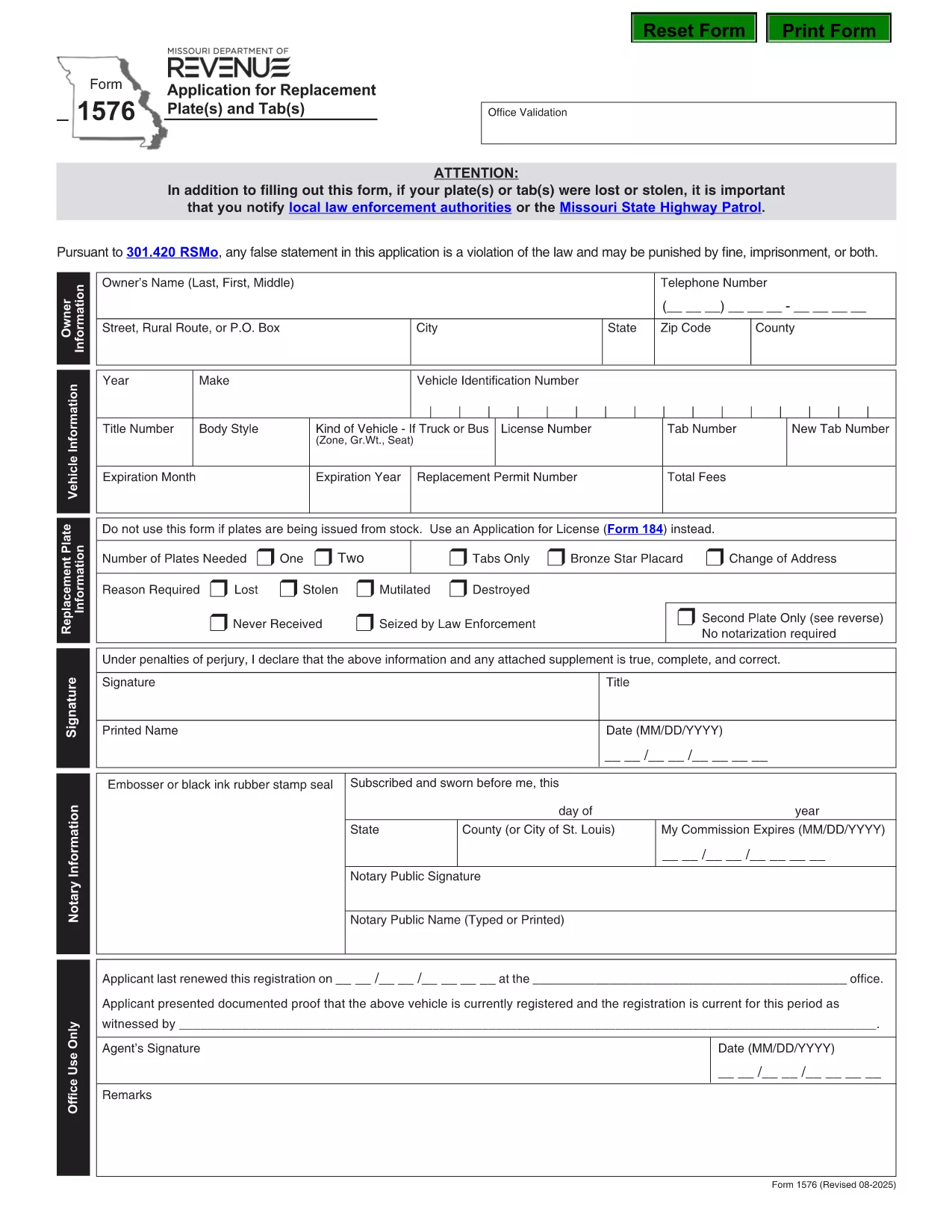
Form 1576 is the official Missouri Department of Revenue (DOR) application used when you need a replacement for lost, stolen, mutilated, destroyed, or never‑received license plates or registration tabs. The form must be notarized before submission, and it includes sections for vehicle details, owner information, and payment.

What Is Form 1576 and When Is It Required?

Missouri drivers file Form 1576 whenever any of the following occurs:

  • License plates are lost or stolen.
  • Registration tabs are missing, damaged, or never received.
  • Plates are mutilated, destroyed by fire, flood, or other accident.
  • You need a duplicate set because the original was never delivered.

The form is processed by the Missouri DOR and must be accompanied by the appropriate fee and a notarized signature.

How to Complete the Fillable PDF with Formize

Instead of printing, scanning, or editing the PDF manually, use the Formize PDF Filler – a fast, browser‑based solution that keeps the document fully fillable.

  1. Click the “Fill out this form” button on this page.
  2. The Formize PDF Filler app loads directly in your browser.
  3. Enter your information field‑by‑field: owner name, address, vehicle VIN, make, model, and year.
  4. Upload a digital notarization if you have a remote notary, or print the completed form for a traditional notary.
  5. Review the completed form, then click “Download” or “Print” to submit to your local DOR office.

Common Mistakes & Tips for a Successful Submission

  • Missing notarization: The DOR will reject the form without a notarized signature.
  • \n
  • Incorrect VIN: Double‑check the Vehicle Identification Number; a typo can delay processing.
  • Fee amount: Verify the current replacement fee on the DOR website before paying.
  • Incomplete sections: Leave no required field blank; use “N/A” only when the form explicitly allows it.

Following these tips helps ensure a quick turnaround and avoids unnecessary trips to the DOR office.

PITANJA
  • Do I need a notarized signature on Form 1576?

    Yes. Missouri law requires a notarized signature on Form 1576 before the DOR will process your replacement request.

  • Can I submit Form 1576 electronically?

    The DOR currently accepts only paper submissions. Use the fillable PDF to avoid errors, then print and have it notarized before mailing or delivering it in person.

  • How much does a replacement plate or tab cost?

    Fees vary by vehicle type and plate style. Check the latest fee schedule on the Missouri DOR website before paying.

  • What if my VIN is incorrect on the form?

    An incorrect VIN will delay processing. Verify the VIN on your registration or title and correct any typos before submitting.

  • Do I need to provide proof of ownership?

    A copy of your current registration or title is recommended, but not mandatory if the DOR can verify ownership through the VIN and your personal information.

  • How long does it take to receive replacement plates?

    Processing time is typically 7–10 business days after the DOR receives a complete, notarized Form 1576 and the required fee.

  • Can I use Form 1576 for a personalized plate replacement?

    Yes, Form 1576 covers all standard, personalized, and specialty plates as long as the reason is loss, theft, or damage.

KAKO DA

Kako ispuniti Form 1576 besplatno, online u 5 jednostavnih koraka:

  1. 1
    Open the Fillable Form
    Click the “Fill out this form” button on the page. The Formize PDF Filler loads instantly in your browser.
  2. 2
    Enter Your Information
    Complete each field – owner details, vehicle VIN, make, model, year, and reason for replacement.
  3. 3
    Add Notarization
    If you have a digital notarization, upload it now. Otherwise, print the completed form for a traditional notary signature.
  4. 4
    Review and Save
    Double‑check all entries, then click “Download” or “Print” to obtain a final copy for submission.
  5. 5
    Submit to the DOR
    Take the printed, notarized form (or submit the digital copy if accepted) to your local Missouri Department of Revenue office along with the required fee.
Aplikacija Formize PDF Filler
OKO

Obrasci za registraciju vozila

Ako posjedujete ili unajmljujete motorno vozilo, prikolicu ili čamac, morate ispuniti određene obveze kako bi vaše vozilo bilo legalno registrirano i sigurno.

Form 1576 je jedan od obrazaca za registraciju vozila koji su dokumenti koji se koriste za registraciju motornog vozila kod nadležnog državnog ili pokrajinskog tijela. Ovi su obrasci obično potrebni kada osoba kupi novo ili rabljeno vozilo ili kada se s vozilom preseli u novu državu ili pokrajinu.

Točni zahtjevi i obrasci potrebni za registraciju vozila mogu se razlikovati ovisno o lokaciji, ali općenito, postupak uključuje pružanje informacija o vozilu, vlasniku i svim založnim pravima na vozilu.

Nakon podnošenja obrazaca za registraciju i pristojbi, državno ili pokrajinsko tijelo će vlasniku vozila izdati potvrdu o registraciji ili registarsku pločicu. Ova registracija omogućuje legalnu vožnju vozila na javnim cestama i autocestama.

ZNAČAJKE

PDF punilo

Najlakši način da ispunite Form 1576 online

  • Brzo ispunite Form 1576
    Tražite način da brzo ispunite Form 1576 online? Uz naš online besplatni PDF obrazac za popunjavanje, znat ćete kako urediti i ispuniti ovaj pdf dokument za manje od minute.
  • Jednostavan za korištenje mrežni PDF uređivač
    Dosta vam je ispisivanja PDF datoteka kako biste ih mogli uređivati ​​prije ponovnog skeniranja i slanja natrag? Uređujte PDF dokumente besplatno na mreži. Upotrijebite naš online uređivač pdf-ova kako biste uštedjeli vrijeme i papir.
  • Sjajni alati, sve platforme
    Pitate se kako ispuniti Form 1576 na Macu ili možda kako koristiti PDF filer besplatno? Naši online PDF alati rade na svim platformama.
  • Sigurno skladištenje datoteka
    Dovršene datoteke "Form 1576" pohranjuju se u zaštićenu bazu podataka kojom upravlja Amazon Cloud hosting. Svoje datoteke možete izbrisati iz našeg sustava bilo kada. U svakom slučaju, te se datoteke automatski brišu nakon 24 sata.
  • Chat s Form 1576
    Razgovarajte s "Form 1576" na Chatize koji je besplatni pomoćnik za čitanje PDF-ova. Postavljajte pitanja i dobivajte odgovore od "Form 1576". Samo kliknite gornji gumb Chat with Document.

Izbriši sesiju punjenja

Izbrisati odabranu sesiju punjenja? U tom će slučaju vaš napredak u ispunjavanju obrasca biti izgubljen.

Izbriši sesiju uređivanja

Izbrisati odabranu sesiju uređivanja? U tom će slučaju vaš napredak u stvaranju i uređivanju obrasca biti izgubljen.