
Izaberi jezik

VP-015 Vehicle Inspection Certificate – Fillable PDF Form

  1. Jezik Engleski
  2. Zemlja SAD
  3. Aktivnost Registracija vozila
  4. država Nevada
VP-015 Vehicle Inspection Certificate – Fillable PDF Form

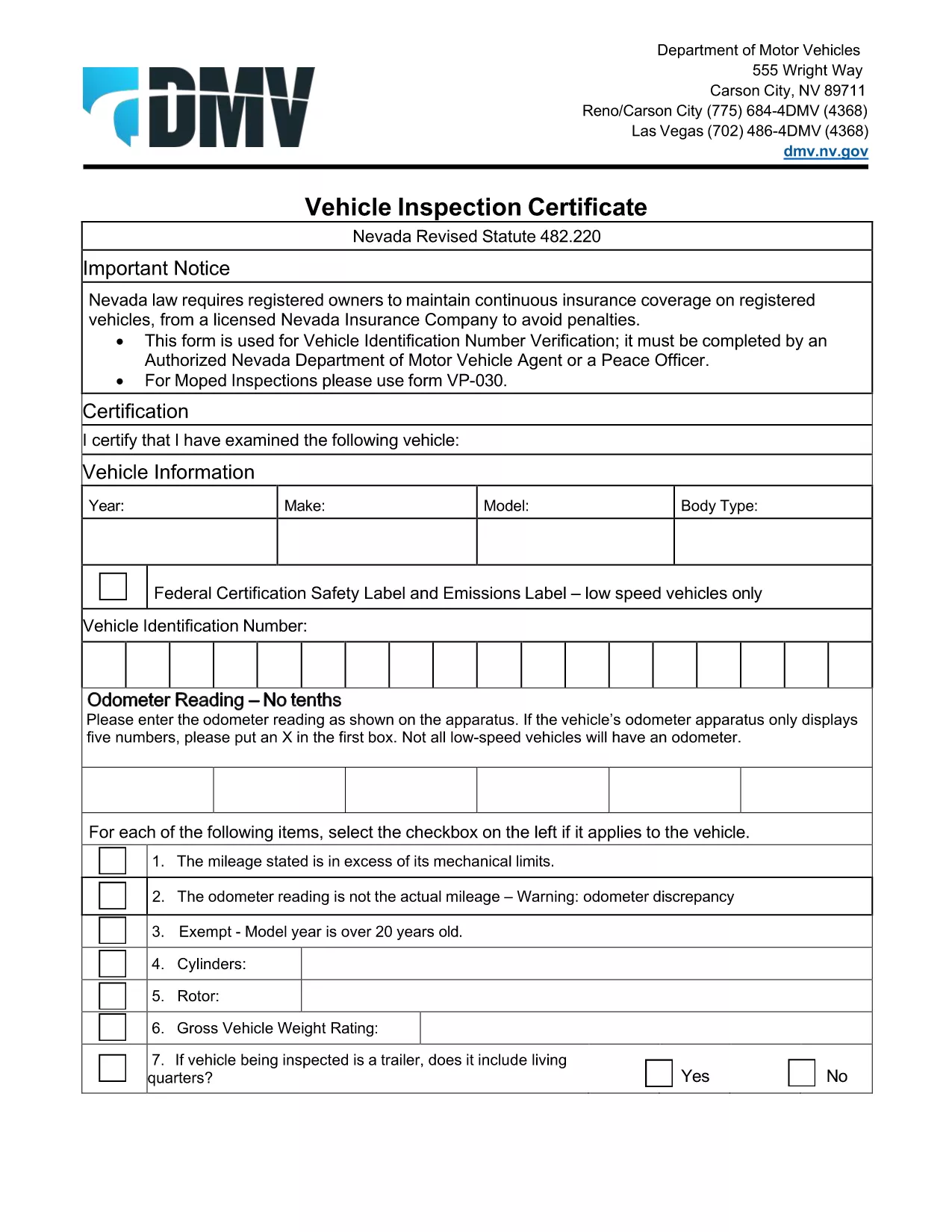
The VP-015 Vehicle Inspection Certificate is the official Nevada Department of Motor Vehicles (DMV) form used to verify a vehicle’s identification number (VIN) and confirm that it has passed a state‑approved inspection. Whether you’re registering a newly purchased vehicle, renewing registration, or need a certified inspection for a title transfer, the VP-015 is required.

Formize.com makes this process painless. Instead of printing, writing, and scanning, you can fill out the official VP‑015 PDF directly in your browser with our secure fillable PDF tool. Your data is saved instantly, and you can download a completed copy ready for submission.

What Is the VP-015 Form?

The VP‑015 captures essential information such as:

  • Vehicle make, model, year, and VIN
  • Inspection date, location, and inspector’s signature
  • Owner’s name and address
  • Any noted defects or required repairs

It must be completed by an authorized Nevada DMV agent, a peace officer, or a certified inspection station.

How to Complete the VP-015 Online

Follow these simple steps to fill the form without leaving your desk:

  1. Click the "Fill out this form" button on this page.
  2. Wait a few seconds while the Formize PDF Filler loads the VP‑015 template.
  3. Enter the required data in each field – the interface guides you with tooltips.
  4. When finished, click Save to download a completed PDF or Print to submit a hard copy to the DMV.

Common Mistakes to Avoid

  • Incorrect VIN entry: Double‑check the 17‑character VIN; a single typo can delay registration.
  • Missing inspector signature: The form is invalid without a signed and dated inspection.
  • Illegible handwriting: Using the fillable PDF eliminates this issue entirely.
  • Out‑of‑date inspection: The DMV only accepts inspections performed within the last 30 days for most registrations.

Where to Submit the Completed Form

After you download the filled‑in VP‑015, you have two options:

  • In‑person: Bring the printed form to any Nevada DMV office or authorized inspection station.
  • Mail: Include the completed VP‑015 with your registration paperwork and mail it to the address listed on the form.

Keep a copy for your records – it may be requested during future vehicle transactions.

PITANJA
  • Who can sign the VP‑015 form?

    An authorized Nevada DMV agent, a peace officer, or a certified inspection station employee may sign the VP‑015.

  • Is the fillable PDF legally accepted by the DMV?

    Yes. The PDF retains the exact layout and fields of the official DMV form, so a printed copy is fully compliant.

  • Can I submit the VP‑015 electronically?

    The Nevada DMV currently requires a paper copy for registration, but you can complete the form electronically and print it for submission.

  • What if my VIN is 17 characters but the form won’t accept it?

    Make sure you are entering only alphanumeric characters without spaces or dashes. The fillable PDF validates the length automatically.

  • How long is a vehicle inspection valid for the VP‑015?

    Generally, the inspection must be performed within 30 days of submitting the registration paperwork, unless otherwise specified.

  • Do I need to provide any additional documents with the VP‑015?

    Usually you’ll need proof of insurance, the vehicle title, and a completed registration application. Check the DMV checklist for your specific transaction.

KAKO DA

Kako ispuniti VP-015 besplatno, online u 5 jednostavnih koraka:

  1. 1
    Click the Fill Out Button
    Press the "Fill out this form" button on the page to launch the Formize fillable PDF interface.
  2. 2
    Wait for the PDF Filler to Load
    The VP‑015 template loads in seconds; a loading bar will show progress.
  3. 3
    Enter Your Information
    Type directly into each field. The form highlights required sections and validates VIN length.
  4. 4
    Save or Print the Completed Form
    When all fields are completed, click "Save" to download the finished PDF or "Print" to produce a hard copy for the DMV.
  5. 5
    Submit to the DMV
    Take the printed form to a Nevada DMV office or mail it with your registration paperwork.
Aplikacija Formize PDF Filler
OKO

Obrasci za registraciju vozila

VP-015 je jedan od DMV obrazaca, također poznatih kao obrasci Odjela za motorna vozila, koji su dokumenti koji se koriste u raznim transakcijama i procesima povezanim s motornim vozilima. DMV je državna agencija odgovorna za izdavanje vozačkih dozvola, registraciju vozila i provođenje zakona o motornim vozilima. Specifični dostupni DMV obrasci mogu se razlikovati ovisno o nadležnosti, ali evo nekoliko uobičajenih primjera:

Obrasci za vozačku dozvolu: Ovi se obrasci koriste za podnošenje zahtjeva za vozačku dozvolu ili za traženje promjena ili obnavljanja. Obično zahtijevaju osobne podatke, dokaz identiteta i mogu uključivati ​​odjeljke za medicinske podatke ili povijest vožnje.

Obrasci za registraciju vozila: Ovi se obrasci koriste za registraciju motornog vozila kod DMV-a. Zahtijevaju podatke o vozilu, podatke o vlasništvu i dokaz o osiguranju.

Obrasci za prijenos vlasništva: Prilikom kupnje ili prodaje vozila, ovi se obrasci koriste za prijenos vlasništva s jedne strane na drugu. Zahtijevaju podatke o kupcu, prodavatelju, pojedinosti o vozilu, a mogu uključivati ​​i račun o prodaji.

Obrasci za oslobađanje od odgovornosti za vozilo: Prilikom prodaje ili prijenosa vlasništva nad vozilom, ovi obrasci obavještavaju DMV da prodavatelj više nije odgovoran za vozilo. Pomaže u zaštiti prodavatelja od odgovornosti za nezgode ili incidente koji uključuju vozilo nakon prodaje.

Obrasci za obnovu registarske pločice i registracije: Ovi se obrasci koriste za obnovu registracije vozila ili traženje novih registarskih pločica. Obično zahtijevaju informacije o registriranom vlasniku, podatke o trenutnoj registraciji i plaćanje primjenjivih naknada.

Obrasci zahtjeva za evidenciju vožnje: Ovi obrasci omogućuju pojedincima da zatraže svoju evidenciju vožnje od DMV-a, koja pruža informacije o prekršajima vožnje, statusu dozvole i drugim relevantnim detaljima.

Obrasci posebnih ili personaliziranih registarskih pločica: Ovi se obrasci koriste za podnošenje zahtjeva za personalizirane ili specijalizirane registarske pločice, koje omogućuju pojedincima da prilagode svoje registarske pločice određenim znakovima ili dizajnom.

Ovo je samo nekoliko primjera od mnogih obrazaca koji mogu biti dostupni putem DMV-a. Specifični obrasci i zahtjevi mogu se razlikovati ovisno o nadležnosti, stoga je važno konzultirati lokalnu web stranicu DMV-a ili posjetiti ured DMV-a kako biste dobili ispravne obrasce za svoje posebne potrebe.

ZNAČAJKE

PDF punilo

Najlakši način da ispunite VP-015 online

  • Brzo ispunite VP-015
    Tražite način da brzo ispunite VP-015 online? Uz naš online besplatni PDF obrazac za popunjavanje, znat ćete kako urediti i ispuniti ovaj pdf dokument za manje od minute.
  • Jednostavan za korištenje mrežni PDF uređivač
    Dosta vam je ispisivanja PDF datoteka kako biste ih mogli uređivati ​​prije ponovnog skeniranja i slanja natrag? Uređujte PDF dokumente besplatno na mreži. Upotrijebite naš online uređivač pdf-ova kako biste uštedjeli vrijeme i papir.
  • Sjajni alati, sve platforme
    Pitate se kako ispuniti VP-015 na Macu ili možda kako koristiti PDF filer besplatno? Naši online PDF alati rade na svim platformama.
  • Sigurno skladištenje datoteka
    Dovršene datoteke "VP-015" pohranjuju se u zaštićenu bazu podataka kojom upravlja Amazon Cloud hosting. Svoje datoteke možete izbrisati iz našeg sustava bilo kada. U svakom slučaju, te se datoteke automatski brišu nakon 24 sata.
  • Chat s VP-015
    Razgovarajte s "VP-015" na Chatize koji je besplatni pomoćnik za čitanje PDF-ova. Postavljajte pitanja i dobivajte odgovore od "VP-015". Samo kliknite gornji gumb Chat with Document.

Izbriši sesiju punjenja

Izbrisati odabranu sesiju punjenja? U tom će slučaju vaš napredak u ispunjavanju obrasca biti izgubljen.

Izbriši sesiju uređivanja

Izbrisati odabranu sesiju uređivanja? U tom će slučaju vaš napredak u stvaranju i uređivanju obrasca biti izgubljen.