
Válasszon nyelvet

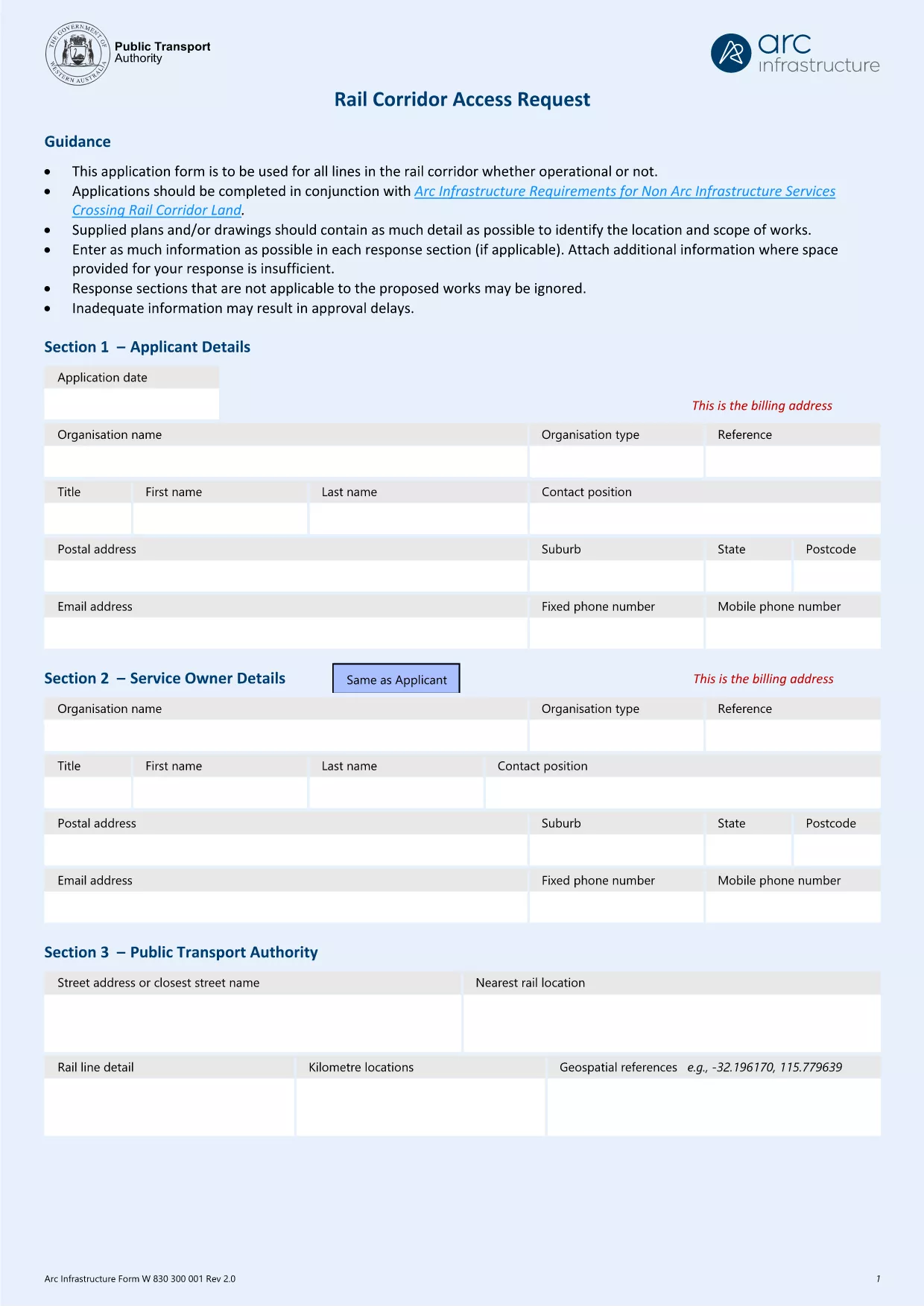
Arc Infrastructure TPS Application Form (hr@arcs.af) – Fillable PDF

  1. Ország Ausztrália
  2. Nyelv angol
  3. Tevékenység Rail Corridor Access
  4. Osztály Infrastructure
Arc Infrastructure TPS Application Form (hr@arcs.af) – Fillable PDF

The Arc Infrastructure TPS Application Form (referenced by the email address hr@arcs.af) is required for anyone seeking permission to cross or use rail corridor land managed by Arc Infrastructure. Instead of printing, printing‑and‑scanning, or dealing with cumbersome paper copies, you can now complete the form instantly online with our Formize PDF Filler. The fillable PDF is fully compatible with all modern browsers and devices.

Our landing page gives you direct access to the official PDF, a step‑by‑step guide, and answers to the most common questions, ensuring a smooth and error‑free submission.

Key benefits of using the online fillable version:

  • Instant loading – no need to download and open a separate editor.
  • Auto‑save functionality keeps your progress safe.
  • Built‑in validation reduces mistakes.
  • Download a completed copy for your records or submit directly to Arc Infrastructure.

Ready to start? Click the “Fill out this form” button below and let the Formize PDF Filler do the heavy lifting.

GYIK
  • Do I need Adobe Acrobat to fill this form?

    No. The Formize PDF Filler works in any modern browser and does not require Adobe Acrobat or any additional plugins.

  • Can I edit the form after I have saved it?

    Yes. Open the saved PDF again with the Formize filler or any standard PDF editor to make changes, then re‑save.

  • What if I encounter a validation error?

    The filler highlights the problematic field and provides a short message (e.g., missing phone number, incorrect date format). Correct the entry and re‑validate.

  • Is the information I enter secure?

    All data is processed locally in your browser; nothing is uploaded to external servers unless you choose to share the completed PDF.

  • Can I print a hard‑copy after completing the form?

    Absolutely. Use the **Print** button in the filler or your browser’s print function to produce a paper copy.

  • What is the deadline for submitting this application?

    Check the notice on the form itself or any correspondence from Arc Infrastructure; deadlines vary by project.

HOGYAN KELL

A(z) Arc Infrastructure application form ingyenes online kitöltése 5 egyszerű lépésben:

  1. 1
    Open the Fillable Form
    Click the **Fill out this form** button on this page. The Formize PDF Filler app will launch in a new tab.
  2. 2
    Wait for the Filler to Load
    The app loads the TPS Application Form automatically. A loading spinner indicates progress; this usually takes a few seconds.
  3. 3
    Complete Each Section
    Enter your details directly into the highlighted fields. Use the tab key or click to move between sections. Required fields are marked with a red asterisk.
  4. 4
    Validate and Save
    When you finish, click **Validate** to let the filler check for missing or incorrectly formatted data. Then click **Save** to download a copy to your device.
  5. 5
    Submit to Arc Infrastructure
    Attach the saved PDF to an email addressed to hr@arcs.af or follow any additional submission instructions provided by Arc Infrastructure.
PDF-kitöltő alkalmazás formázása
RÓL RŐL

Arc Infrastructure application form sablon

A PDF-dokumentumok megtekintésére és kitöltésére szolgáló hagyományos funkciókkal, valamint a webalkalmazás és az adaptív elrendezés előnyeivel percek alatt teljesítheti a Arc Infrastructure application form.

JELLEMZŐK

PDF kitöltő

A PDF űrlapok online kitöltésének legegyszerűbb módja

  • Gyorsan töltse ki a következőt: Arc Infrastructure application form
    Módot keres a(z) Arc Infrastructure application form online gyors kitöltésére? Online ingyenes PDF űrlapkitöltőnkkel tudni fogja, hogyan kell szerkeszteni és kitölteni ezt a pdf dokumentumot kevesebb mint egy perc alatt.
  • Könnyen használható online PDF szerkesztő
    Eleged van abból, hogy kinyomtatja a PDF-fájlokat, hogy szerkeszthesse őket, mielőtt újra beolvassa és visszaküldi őket? PDF dokumentumok szerkesztése ingyen online. Használja online pdf-szerkesztőnket, hogy időt és papírt takarítson meg.
  • Remek eszközök, minden platformon
    Kíváncsi arra, hogyan töltse ki a Arc Infrastructure application form mezőt Mac számítógépen, vagy hogyan használhat ingyenes PDF-kitöltőt? Online PDF eszközeink minden platformon működnek.
  • Biztonságos fájltárolás
    A befejezett „Arc Infrastructure application form” fájlokat az Amazon Cloud hosting által kezelt, biztonságos adatbázisban tároljuk. Fájljait bármikor törölheti rendszerünkből. Mindenesetre ezek a fájlok 24 óra elteltével automatikusan törlődnek.
  • Csevegés Arc Infrastructure application form felhasználóval
    Csevegés "Arc Infrastructure application form" felhasználóval a Chatize oldalon, amely egy ingyenes PDF-olvasó segéd. Tegyen fel kérdéseket, és kapjon választ a következőtől: "Arc Infrastructure application form". Csak kattintson a fenti Csevegés dokumentummal gombra.

Kitöltési munkamenet törlése

Törli a kiválasztott kitöltési munkamenetet? Ebben az esetben az űrlap kitöltésének előrehaladása elvész.

Szerkesztési munkamenet törlése

Törli a kiválasztott szerkesztési munkamenetet? Ebben az esetben az űrlap létrehozásának és szerkesztésének előrehaladása elvész.